> For the complete documentation index, see [llms.txt](https://help.smartico.ai/welcome/llms.txt). Markdown versions of documentation pages are available by appending `.md` to page URLs; this page is available as [Markdown](https://help.smartico.ai/welcome/products/ai-models/rfm-analysis.md).
# RFM Analysis
RFM (Recency, Frequency, Monetary) Segmentation is a feature designed to help operators analyse and understand player behaviour.
By categorizing players based on their activity, RFM segmentation provides insights into **how recently**, **how often**, and **how much** players have deposited or bet. This segmentation enables operators to tailor their engagement strategies to match the specific needs and behaviours of each player group.
This feature evaluates player activity over the last 30 days, providing a clear view of user segments and their current engagement levels. By analysing these segments, operators can identify patterns in player behaviour, develop targeted campaigns, and implement strategies aimed at improving retention and maximizing the value of their player base.
There are 4 possible ways the business can choose to set up the RFM Segmentation Methodology:
1. Net Deposit by Label (default methodology)
2. Net Deposit by Brand
3. Casino GGR by Label
4. Casino GGR by Brand
Each methodology is based on different KPIs and aggregations. Detailed explanations can be found in the ["How the RFM Model Evaluates Players"](#how-the-rfm-model-evaluates-players) section below.
### **Configuration & Activation**
RFM Analysis is enabled by default for all labels. Administrators can view or change the active methodology in the Back-Office under **Settings → Label Settings → AI, Stat models & Insights**:
* **RFM calculation methodology:** The default methodology is *Net Deposit by Label*. You can select between the 4 available methodologies: *Net Deposit by Label*, *Net Deposit by Brand*, *Casino GGR by Label*, or *Casino GGR by Brand*.
* Changes to the methodology take effect on subsequent model runs, immediately updating current user scores across the platform.
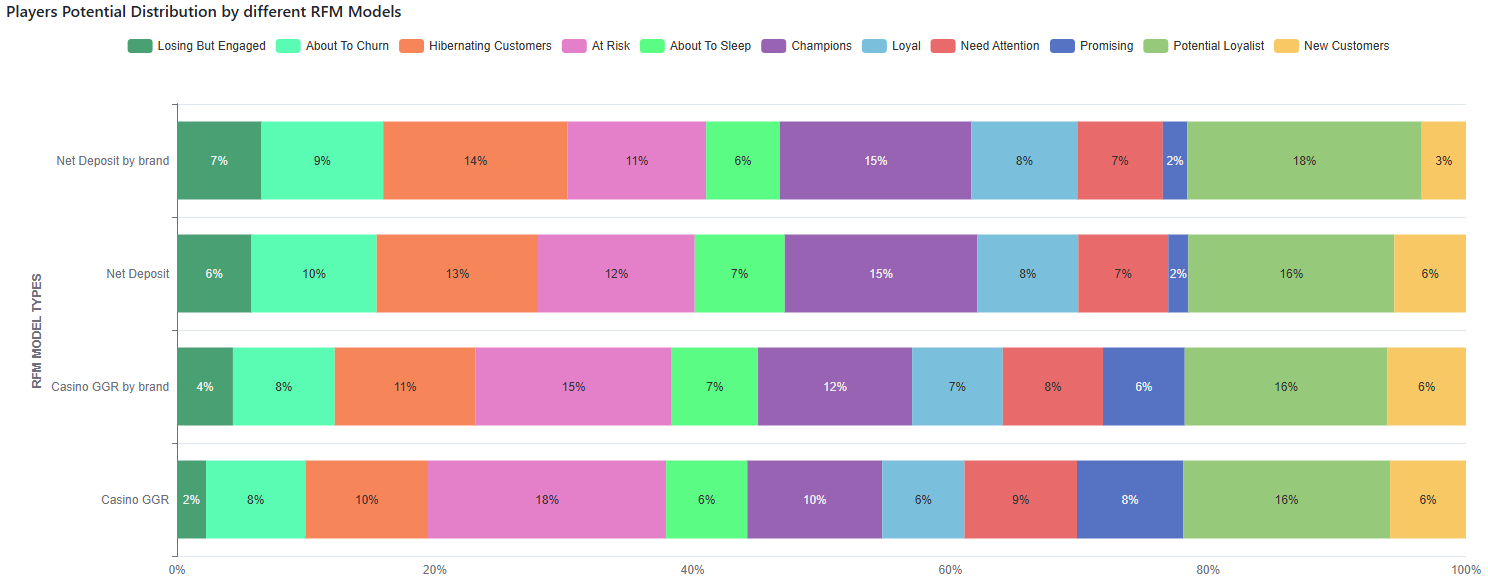
The simulation on how the distribution of the Segments looks under each of the 4 methodologies can be found in the **RFM Model Alternatives** tab:
RFM Segmentation is available under the **RFM Analysis** section in the **Marketing** view of the Smartico platform. It provides a visual representation of player groups and offers tools to create segments directly based on these insights.
### **What is RFM Analysis?**
RFM analysis is a data-driven approach to segmenting users based on three core dimensions:
* **Recency (R):** How recently a player made their last activity (either a Deposit or a Bet - subject to the chosen Segmentation Methodology).
* **Frequency (F):** How often a player engages with the platform over time (either by depositing or betting - subject to the chosen Segmentation Methodology).
* **Monetary (M):** The total value of a player's KPI (either a Deposit or a Bet - subject to the KPI of the chosen Segmentation Methodology), reflecting their financial or gaming impact on your platform.
With these metrics, you can identify distinct user segments and create targeted strategies to enhance their value and engagement.
For additional player profiling techniques, see the related documentation on [Value Score](/welcome/products/ai-models/value-score.md), [Churn & LTV Prediction](/welcome/products/ai-models/churn-and-ltv-prediction.md), and [Best Time Model](/welcome/products/ai-models/best-time-model.md).
### **How the RFM Model Evaluates Players**
**Eligibility:**
The population, considered for the calculation of the segment, is all players with the relevant activity (either a Deposit or a Bet - subject to the KPI of the chosen Segmentation Methodology) during the last 30 days.
Ineligible users are excluded from all RFM segments.
**RFM Granularity:**
* Model values can be calculated based on either Label Granularity or Brand Granularity.
* A business can have more than one Brand for a Label. A common reason is defining each country operation as a separate brand. If a Label has multiple Brands, it is recommended to use the "By Brand" methodology for more relevant segmentation.
* **"By Label" methodology:** RFM KPIs are calculated for all players across the **Label** with qualifying activity during the last 30 days. Segments are then assigned based on RFM scoring logic.
* **"By Brand" methodology:** RFM KPIs are calculated for all players across the specific **Brand** with qualifying activity during the last 30 days. Segments are then assigned based on RFM scoring logic.
{% hint style="success" %}
For example:
We have a population of 5 players with different attributions
* Player 1 - Label A; Brand X
* Player 2 - Label A; Brand X
* Player 3 - Label A; Brand Y
* Player 4 - Label A; Brand Y
* Player 5 - Label A; Brand Y
Label A RFM Model calculation will be based on all the players' KPIs.
Brand X RFM Model calculation will be based on the KPIs of the Player 1 and Player 2
Brand Y RFM Model calculation will be based on the KPIs of the Player 3, Player 4 and Player 5
{% endhint %}
**RFM Granularity:**
* The Model Values can be calculated either based on the Label Granularity of the Brand Granularity.
* A Business can have more than one Brand for the Label. The business logic for having several Brands per Label might differ. One of the common reasons is defining each country operation as a separate brand. In case the Label has more than one Brand, it's recommended to use the "By Brand" type Methodology for more relevant Segmentation.
* **"By Label" type Methodology:** The RFM related KPIs are calculated for all the player across the **Label** with the relevant activity (either a Deposit or a Bet - subject to the KPI of the chosen Segmentation Methodology) during the last 30 days. Then the segments are assigned based on the RFM Scoring logic.
* **"By Brand" type Methodology:** The RFM related KPIs are calculated for all the player across the **Brand** with the relevant activity (either a Deposit or a Bet - subject to the KPI of the chosen Segmentation Methodology) during the last 30 days. Then the segments are assigned based on the RFM Scoring logic.
**RFM Scoring:**
* **Recency:** Ranks players based on days since their last activity. For the "Net Deposit" Segmentation Methodology, the Deposit is considered as Activity, while for the "Casino GGR" Segmentation Methodology, the Casino Bet is considered as Activity
* **Frequency:** Evaluates average activity intervals. For the "Net Deposit" Segmentation Methodology, the Deposit is considered as Activity, while for the "Casino GGR" Segmentation Methodology, the Casino Bet is considered as Activity
* **Monetary:** Assesses cumulative KPIs. For the "Net Deposit" Segmentation Methodology, the Deposit Amount is the measured KPI, while for the "Casino GGR" Segmentation Methodology, the Casino GGR is the measured KPI.
Each user receives a score from 1 to 5 in each category, with 5 being the highest. Combining these scores determines their segment.
* **Monetary Rank -** divides all players into 5 equal groups (quantiles) based on either the Net Deposit or the Casino GGR amount, from lowest to highest.
* **Recency Rank** - divides all players into 5 equal groups (quantiles) based on how recently they made a Deposit or placed a Casino Bet.
* **Frequency Rank** - divides all players into 5 equal groups (quantiles) based on activity intervals (either a Deposit or a Bet - subject to the KPI of the Segmentation Methodology) — longer intervals imply lower frequency. Sorted descending (longer intervals = less frequent).
### **How It Works**
**Visualizing Your RFM Segments:**
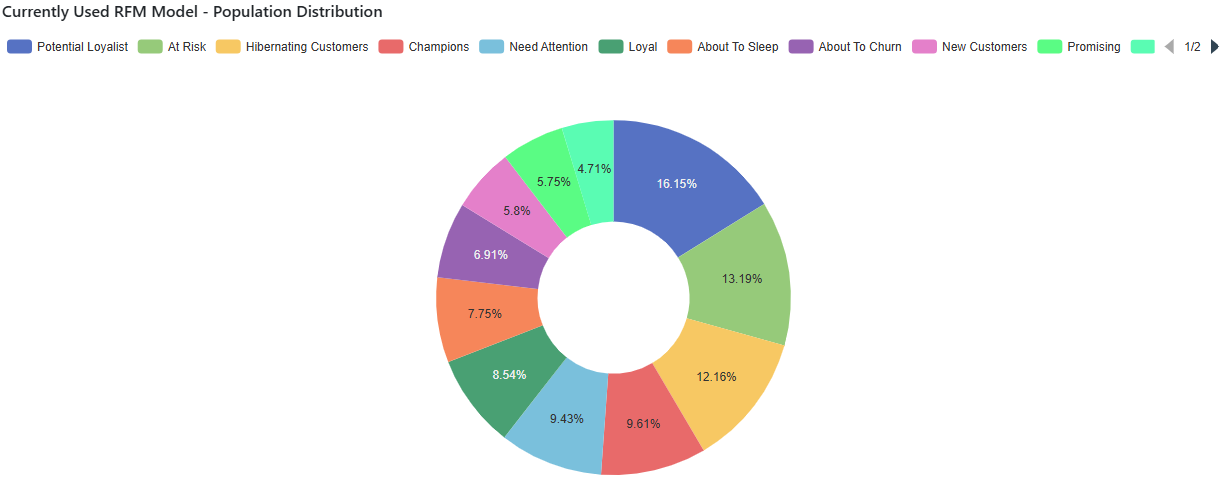
* **Graphical Representation:** The "Currently Used RFM Model - Population Distribution" chart provides an intuitive visualization of player segments
* **Segment Details:** Hovering over or selecting a segment provides a detailed breakdown, including the size and percentage of active players it represents.
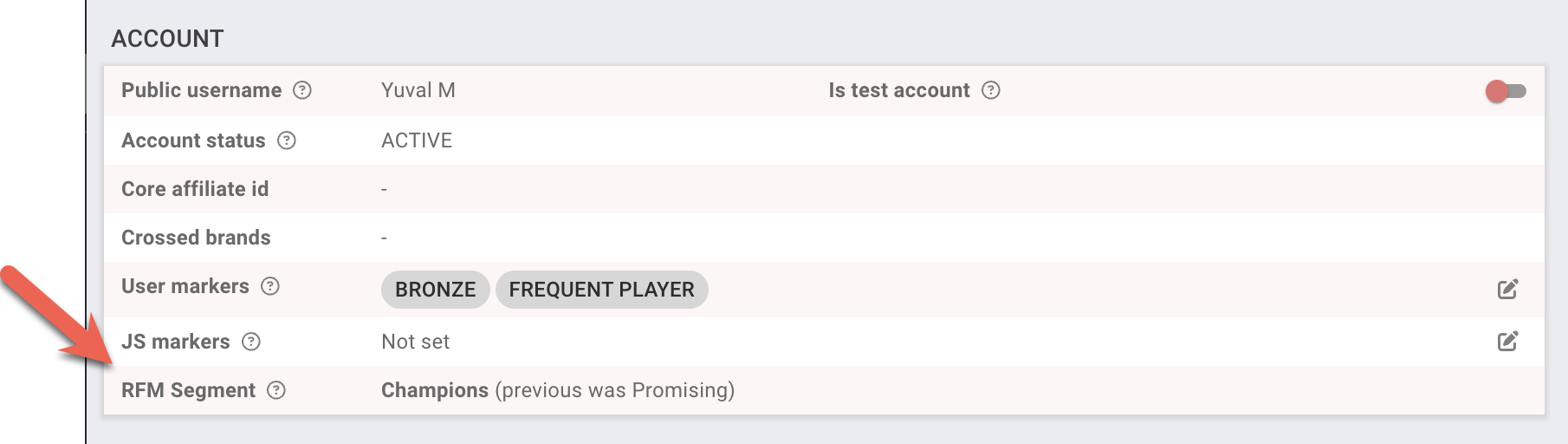
Each player will have their own property for RFM Analysis which can be used in segmentation and in campaigns.
BO: RFM Segment indication in CRM User profile page
### **User Properties & Profile History**
RFM calculations populate specific user state properties that can be used in User Search and segment rules:
* **RFM Segment:** Current segment assignment (values 1–12 corresponding to the RFM categories).
* **Previous RFM Segment:** The user's prior segment, useful for tracking migrations such as moving from Loyal to At Risk.
* **Sub-Scores:** Individual Recency, Frequency, and Monetary scores (each ranging from 0 to 5).
In the Back-Office CRM User Profile header, clicking the RFM badge opens an interactive **RFM History Dialog**. This modal displays the player's current segment and sub-scores, along with a 30-day trend chart showing score changes and segment transitions over time.
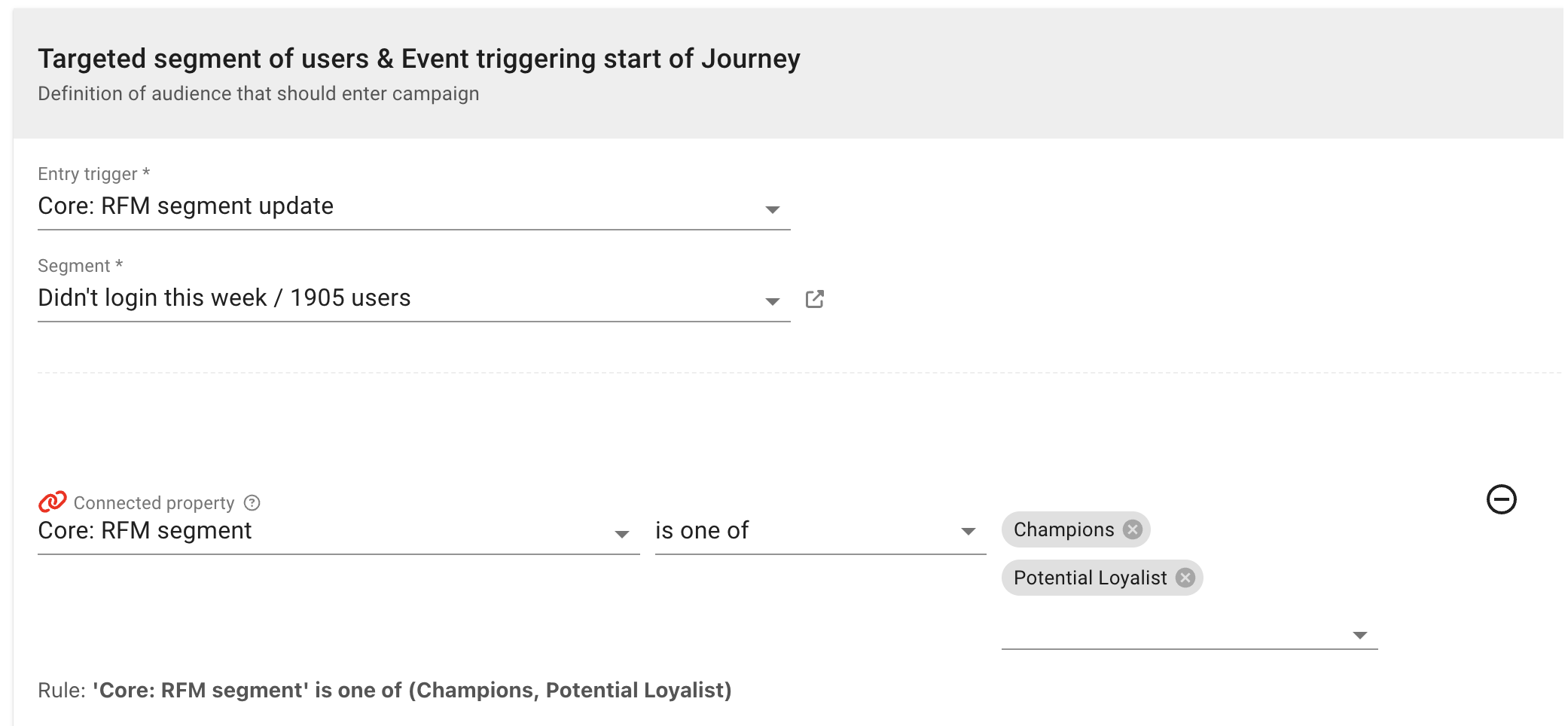
Campaigns can also be triggered by the event of "RFM segment update"
BO: Use of RFM segment in Campaign builder
When player scores are synced, the platform triggers event notifications that can initiate automated workflows:
* **RFM Segment Update:** Fired whenever a player's segment changes (e.g., transitioning from "Champions" to "Need Attention"), carrying both the new and previous segment IDs. This enables instant automated retention campaigns or VIP outreach.
* **RFM Scores Update:** Fired when individual Recency, Frequency, or Monetary sub-scores change without altering the overall segment category.
**Interactive Features:**
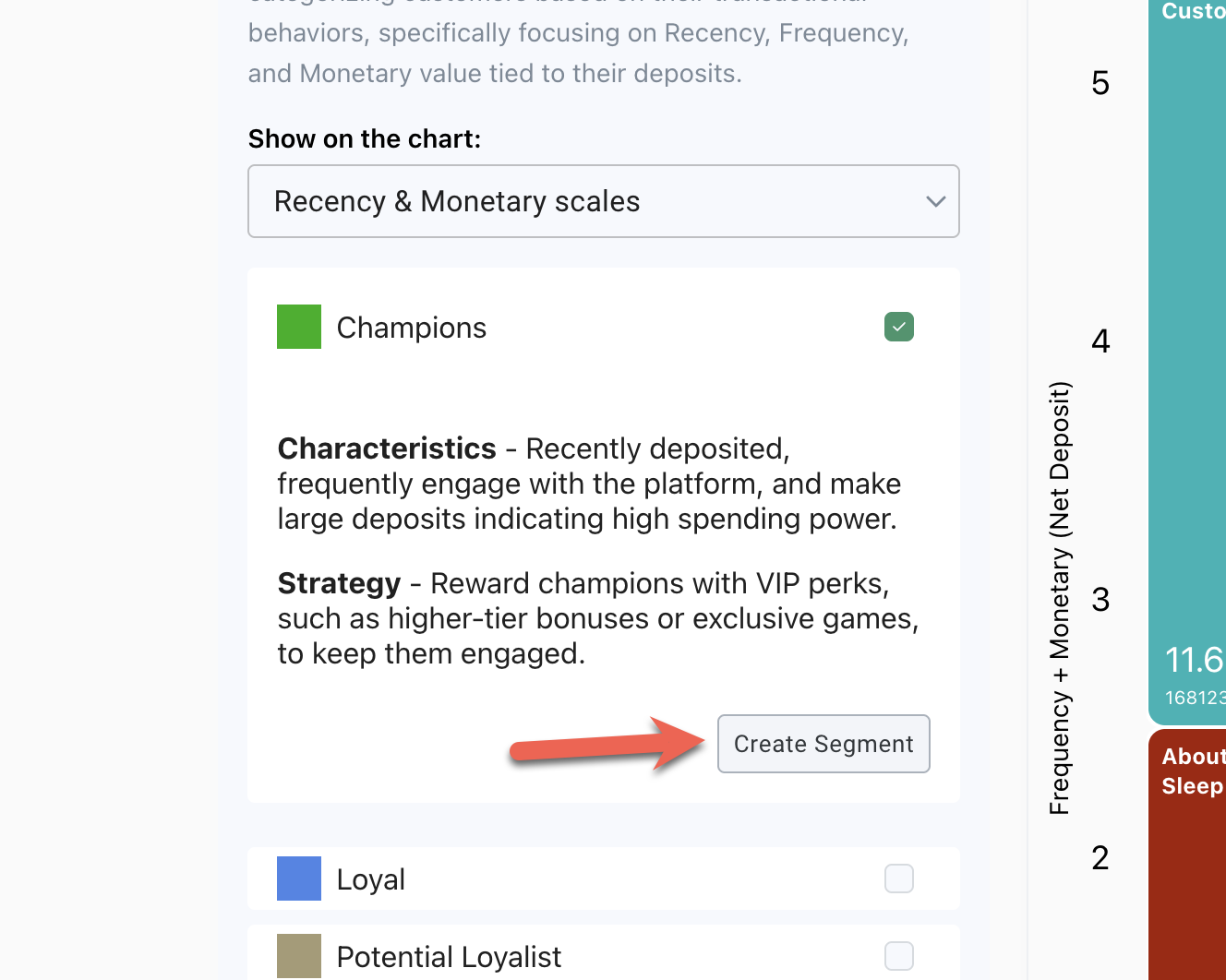
* **Segment Insights:** Click any segment to view its characteristics and suggested strategies for engagement.
* **Create Targeted Campaigns:** Use the **Create Segment** button to define custom user journeys, such as tailored tournaments or personalized offers, directly from the analysis.
BO: Auto create segment for specific category of users
**1. Champions**
* **Traits:** Recent, frequent activity with high spending.
* **Strategy:** Reward them with exclusive bonuses, VIP perks, and personalized experiences to maintain their loyalty.
**2. Loyal Customers**
* **Traits:** Consistently active users with moderate to high spending.
* **Strategy:** Strengthen their loyalty through personalized rewards programs and early access to new features.
**3. Losing But Engaged**
* **Traits:** Recently active, but showing a declining frequency of activity.
* **Strategy:** Rekindle interest with time-limited offers and challenges.
**5. Need Attention**
* **Traits:** Low-frequency players with small KPI amounts.
* **Strategy:** Target them with promotions tailored to their favourite games.
**6. Promising Customers**
* **Traits:** New users with moderate KPIs, showing growth potential.
* **Strategy:** Provide incentives for early engagement and introduce community challenges.
**7. New Customers**
* **Traits:** Recently acquired players with initial KPIs of moderate size.
* **Strategy:** Gradually increase rewards and tailor game recommendations.
**8. Hibernating Customers**
* **Traits:** Previously active players who have disengaged.
* **Strategy:** Reconnect by offering nostalgic incentives like free spins on their favourite games.
**9. About To Sleep**
* **Traits:** Players whose activity is starting to fade; they have below-average recency and frequency and are at risk of stopping entirely.
* **Strategy:** Reconnect before they become dormant using nostalgic incentives or limited-time "we miss you" offers to reignite interest.
**10. At Risk**
* **Traits:** Previously active and high-value players (high frequency or spend) who have not shown any activity recently.
* **Strategy:** This is a critical segment; use aggressive reactivation campaigns, such as personalized cashback or high-value bonuses, to encourage a return.
**11. Potential Loyalist**
* **Traits:** Recent, active players showing promising frequency, though their total monetary spend may still vary.
* **Strategy:** Engage them with loyalty programs, multi-tier challenges, or incentives designed to increase their lifetime value and frequency.
**12. Churned By Definition**
* **Traits:** Players who have had no activity for a significantly long period and are now considered completely dormant or "lost."
* **Strategy:** These players are often moved to a "Hibernating" or "Lost" status; occasional high-level brand awareness offers can be sent, but marketing spend should be minimized.
**13. About To Churn**
* **Traits:** Nearly lost players with minimal play, very low spend, and almost no recent engagement.
* **Strategy:** Attempt one final "last-call" reactivation offer; if they do not respond, they are moved to the churned category to save on marketing costs.
### **Monitoring the RFM changes**
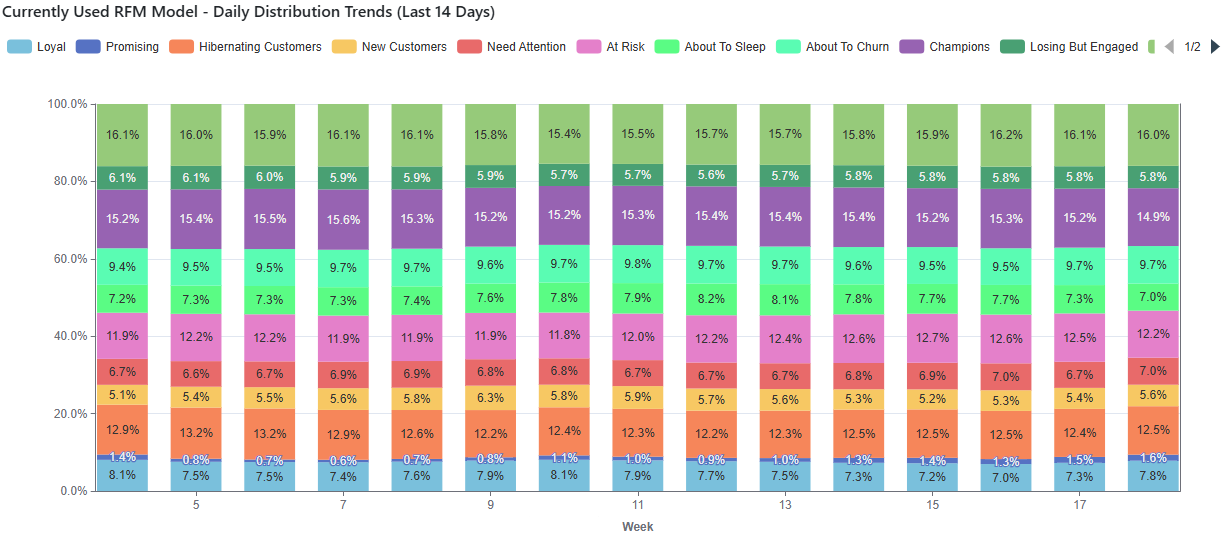
**Daily Trends:** Daily share of the players with the Segment and Model-related activity.
Best used to monitor short-term changes in the Business. For example, the day-over-day increase in the "New Customers" segment share might indicate an immediate increase in acquisition.
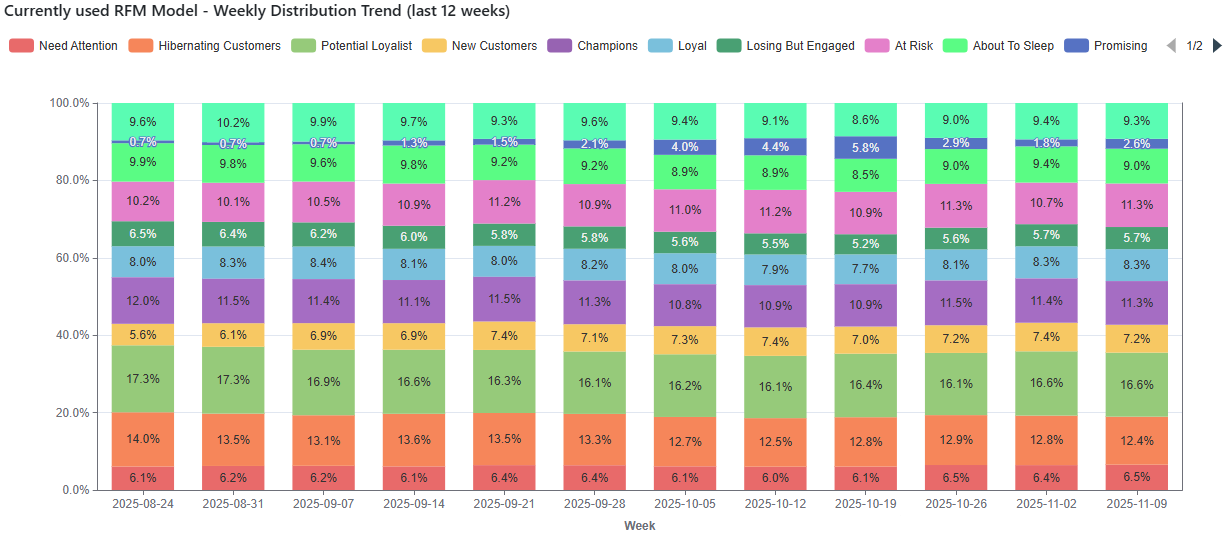
**Weekly Trends:** Weekly share of the players with the Segment and Model-related activity.
Best used to monitor mid-term changes in the Business. For example, the week-over-week increase in "Champions" segment share might indicate marketing optimization.
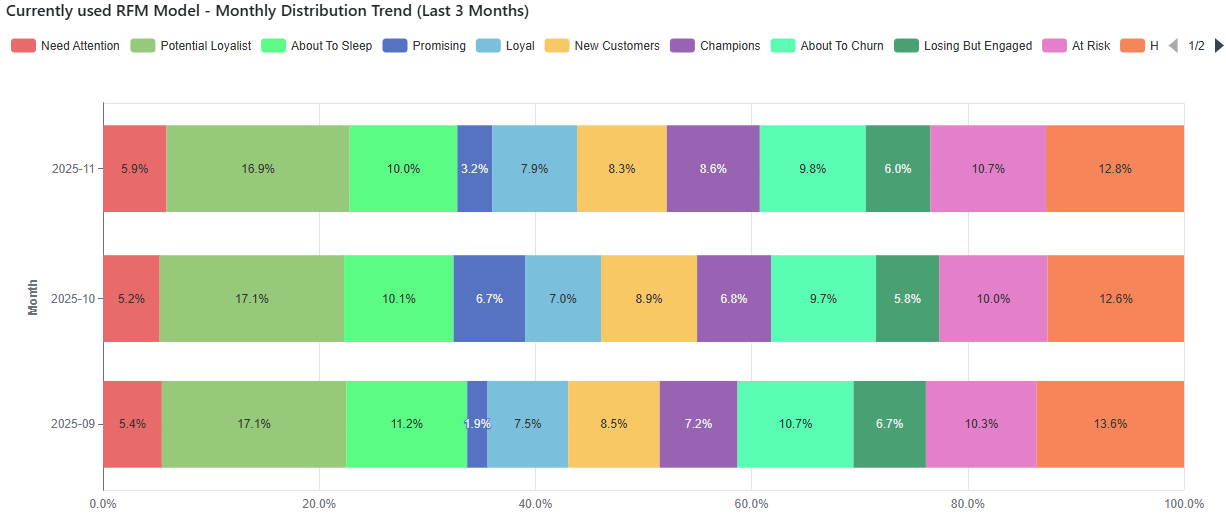
**Monthly Trends:** Monthly share of the players with the Segment and Model-related activity. Best used to monitor long-term changes in the Business.
For example, the month-over-month increase in the share of the "About to Sleep" and "Need Attention" segments might indicate either a retention issue or faulty acquisition.
## FAQ
**Q: How often are RFM categories recalculated?**
They are recalculated daily
**Q: What metrics are taken as the basis for RFM segmentation?**
We employ the classic RFM approach and adhere to the generally accepted practice.
"Days since last activity" (either a Deposit or a Casino Bet - subject to the used Methodology) - for Recency,
"Average activity interval" (either a Deposit or a Casino Bet - subject to the used Methodology) - for frequency,
"KPI" (either a Deposit or a Casino GGR - subject to the used Methodology) - for Monetary
**Q: Are the segment boundaries rigid?**
The exact thresholds are constantly changing, based on the player's activity, and the numbers are based on the specific client's data. Also, the measured population is dependent on the Segmentation Type and can be based on either the entire **Label** or a specific **Brand**.
If we assume that all players, split in equal numbers per day, made an activity each within the past 20 days, then the recency 5 will be given to those that were active within the last 4 days, recency 4 will be assigned to those that were active from 5 to and including 8 days, and so on.
**Q: Can I see the exact matrix, how players are assigned to different segments based on R, F, and M scores?**
Sure, here it is
| Segment Name | RFM Codes (order - R, F, M) | Description |
| --------------------- | ---------------------------------------------------------------------------------------------------------------------- | ----------------------------------------------------- |
| Champions | 555, 554, 544, 545, 454, 455, 445 | Most active, very recent and high-value players. |
| Loyal Customers | 543, 444, 435, 355, 354, 345, 344, 335 | Repeat players, consistent activity and decent value. |
| Potential Loyalist | 553, 551, 552, 541, 542, 533, 532, 531, 452, 451, 442, 441, 431, 453, 433, 432, 423, 353, 352, 351, 342, 341, 333, 323 | Active and promising — may turn into loyal customers. |
| Promising | 525, 524, 523, 522, 521, 515, 514, 513, 425, 424, 413, 414, 415, 315, 314, 313 | Recent players with moderate activity and spend. |
| New Customers | 512, 511, 422, 421, 412, 411, 311 | Just joined — limited activity so far. |
| Need Attention | 535, 534, 443, 434, 343, 334, 325, 324 | Decreasing activity — may require re-engagement. |
| About To Sleep | 331, 321, 312, 221, 213, 231, 241, 251 | Activity is fading — players might stop soon. |
| Hibernating Customers | 332, 322, 233, 232, 223, 222, 132, 123, 122, 212, 211 | Very low interaction — likely dormant. |
| At Risk | 255, 254, 245, 244, 253, 252, 243, 242, 235, 234, 225, 224, 153, 152, 145, 143, 142, 135, 134, 133, 125, 124 | Used to be active — now disengaging. |
| Losing But Engaged | 155, 154, 144, 214, 215, 115, 114, 113 | Still online, but less valuable than before. |
| About To Churn | 111, 112, 121, 131, 141, 151 | Nearly lost — minimal play and spend. |
**Q: How does the RFM model treat registered players who have never made a deposit?**
Registered users without a First Time Deposit (FTD) or qualifying activity are excluded from RFM segmentation entirely. Their RFM segment property remains unset rather than being classified as "Churned by Definition". The "Churned by Definition" segment (Segment 12) is reserved for players who previously had activity but recorded no deposits or bets in the rolling 30-day evaluation window.
**Q: Are the 1–5 scores based on fixed currency amounts or dynamic rankings?**
Scores are calculated using dynamic **quantiles (quintiles)** across the active player population of your label or brand over the trailing 30 days. Rather than static currency thresholds (such as $100 for score 3), the top 20% highest spenders receive Monetary score 5, the next 20% receive score 4, and so on.
**Q: Are Sportsbook bets included in the RFM calculation?**
No. The Net Deposit methodologies evaluate deposit transactions only, while the Casino GGR methodologies evaluate Casino bets and gross gaming revenue. Sportsbook bets are not currently included in the standard RFM models.
**Q: What happens to historical reports if we switch the RFM methodology?**
Switching the methodology updates current player scores and future syncs. However, historical daily reporting snapshots in analytics prior to the switch date remain based on the methodology that was active at that time and are not retroactively recalculated.
---
# Agent Instructions
This documentation is published with GitBook. GitBook is the documentation platform designed so that both humans and AI agents can read, navigate, and reason over technical content effectively. Learn more at gitbook.com.
## Querying This Documentation
If you need additional information that is not directly available in this page, you can query the documentation by asking a question.
Perform an HTTP GET request on the following URL with the `ask` and `goal` query parameters:
```
GET https://help.smartico.ai/welcome/products/ai-models/rfm-analysis.md?ask=&goal=
```
`ask` is the immediate question: it should be specific, self-contained, and written in natural language.
`goal` is what the user is ultimately trying to achieve, the reason they need the answer. Sharing it helps GitBook give you a better, more relevant answer. A goal is most helpful when it describes the outcome the user wants rather than restating the question. For example, with `ask=how do I create an API token`, a goal like `automate deployments from our CI pipeline` lets GitBook tailor the answer to that use case.
The response will contain a direct answer to the question and relevant excerpts and sources from the documentation.
Use this mechanism when the answer is not explicitly present in the current page, you need clarification or additional context, or you want to retrieve related documentation sections.