> For the complete documentation index, see [llms.txt](https://help.smartico.ai/welcome/llms.txt). Markdown versions of documentation pages are available by appending `.md` to page URLs; this page is available as [Markdown](https://help.smartico.ai/welcome/products/crm-automation/communication-channels/sms-viber-and-whatsapp.md).
# SMS, Viber, and WhatsApp
SMS, Telegram, Viber, and WhatsApp are powerful offline communication channels widely used for player retention. With Smartico, you can send messages through real-time or scheduled campaigns, ensuring timely and effective engagement.
### Creating & Managing Messaging Assets
Before sending any SMS, Viber, or WhatsApp messages in a campaign, you must first create an asset (resource).
**📌 Where to Create Assets?**
* Navigate to the Marketing tab in the BO (Back Office).
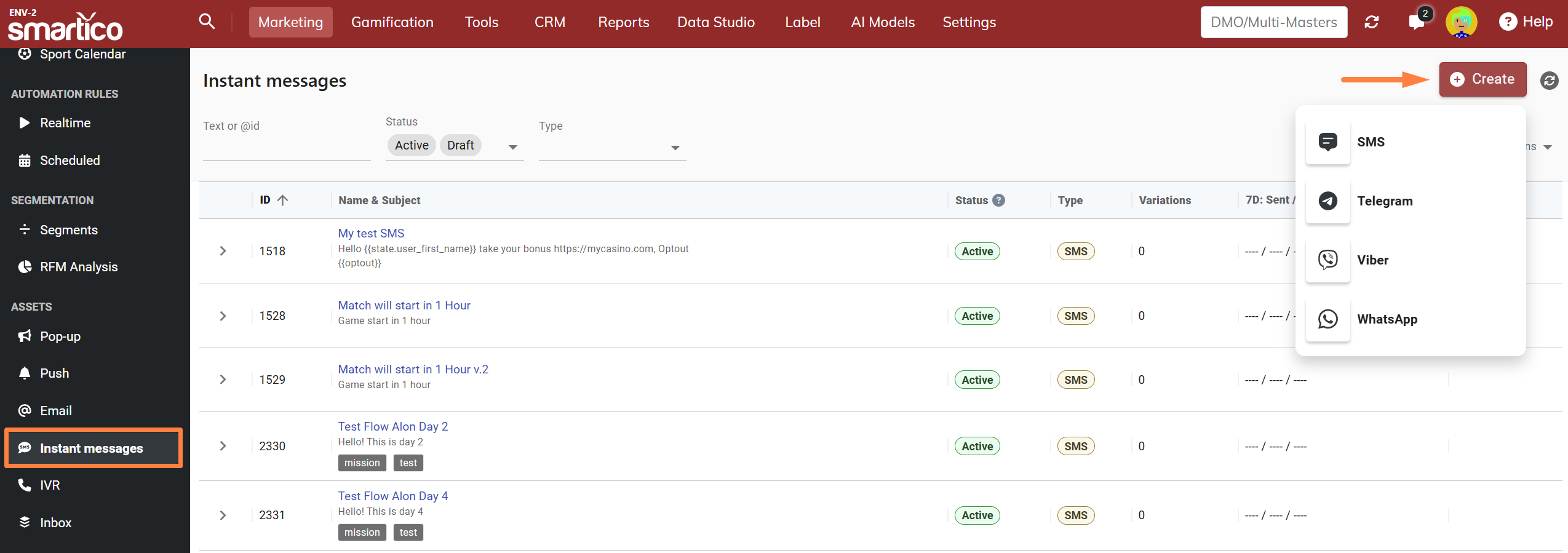
* Go to the Assets section, select Instant Messages and choose the type you want to create (SMS, Telegram, Viber, WhatsApp, etc.).
📌 **Key Asset Configurations:**
* **Asset Name** – Used to identify and select the asset in campaigns.
* **Asset Status** – Can be Active, Draft, or Archived.
{% hint style="info" %}
**Important:** If an asset is in Draft or Archived status but is already used in a campaign, the communication **will still be sent.** However, variations within the asset that are in Draft or Archived status **will not be sent** in campaigns.
{% endhint %}
* **Message Content** – The actual text of your message.
SMS messages have strict character limits based on encoding:
* A single SMS segment contains up to 160 standard GSM characters (spaces count as characters).
* Messages exceeding 160 characters are split into multiple segments (concatenated messages).
* If a single Unicode character (e.g., non-Latin alphabets, emojis) is included, the message encoding switches to Unicode (UCS-2), reducing the single-message limit to 70 characters (and 67 characters per segment for concatenated multi-part messages, compared to 153 characters per segment for GSM-7).
**Note**: Smartico provides estimated message segmentation, but actual SMS costs and segmentation may vary depending on the provider.
### SMS Liquid Capabilities
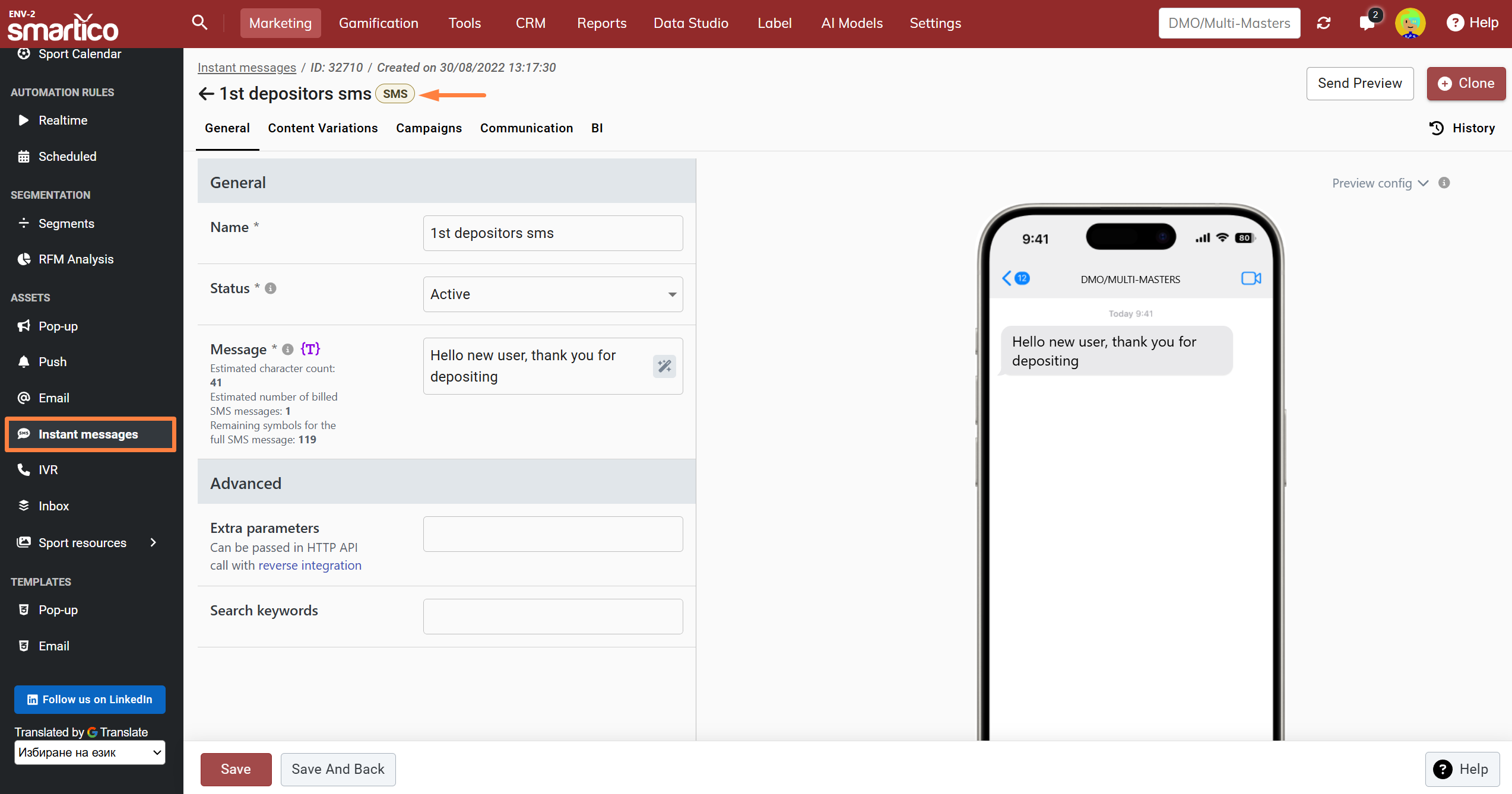
When creating an SMS asset in Smartico, operators can select Liquid message type to customize how text content and dynamic variables are processed:
* **Dynamic Logic & Content Control:** Execute conditional statements (`if`, `else`, `elsif`), assign custom variables, and apply Liquid filters directly inside the message body.
* **Real-Time Editor Estimates**: Smartly calculates character counts, billed SMS segments, and remaining symbol allowances based on the rendered Liquid preview output. The raw Liquid code and syntax tags themselves are excluded from the character count, only the resulting text is evaluated.
{% hint style="info" %}
**Note**: Calculated character counts in the editor are based on rendered preview values. The final message length will vary per individual end-user data.
{% endhint %}
BO: Example of Liquid type SMS
Use case scenario for Liquid SMS
**Fallback for Long Names (160-Character Limit Protection)**
Checks the length of a user's first name. If the name exceeds 10 characters or is blank, Liquid substitutes a shorter fallback (`"Player"`) to ensure the rendered text stays within 160 characters and avoids triggering multi-part SMS charges.
```
{%- assign name_length = state.user_first_name | size -%}
{%- if name_length > 10 or state.user_first_name == blank -%}
{%- assign name = "Player" -%}
{%- else -%}
{%- assign name = state.user_first_name -%}
{%- endif -%}
Hey {{ name }}! Enjoy 20% off your next order with code PROMO20.
```
### Viber Rich Messaging Capabilities
When creating a Viber asset, operators can send rich interactive messages with media and call-to-action buttons:
* **Rich Media & Buttons**: Supports message text (up to 1,000 characters), an Image URL (JPEG, PNG, non-animated GIF up to 1 MB), and an action button with custom button text and a destination URL.
* **Delivery Tracking & Seen Events**: In addition to Sent and Delivered delivery statuses, Viber provides "Seen" (Impression) tracking when the recipient views the message on their device.
* **SMS Fallback**: For campaigns using Viber gateways, messages can be configured to automatically fall back to SMS if the recipient does not have Viber installed or delivery fails.
### WhatsApp Messaging & Template Requirements
WhatsApp messaging in Smartico allows operators to send personalized 1-to-1 communications directly to a player's verified mobile phone number:
* **1-to-1 Direct Delivery**: Messages are sent strictly to individual player phone numbers registered on their profile. WhatsApp group messaging is not supported.
* **Pre-Approved Templates**: Outbound business-initiated WhatsApp messages require templates pre-approved through your WhatsApp Business API provider (such as Meta, Infobip, or Twilio) in accordance with regional and content policies.
* **Dynamic Placeholders**: Templates can include dynamic placeholders mapped to Smartico personalization tags (e.g., player first name, custom URLs, bonus codes).
### Personalized Content with Content Variations
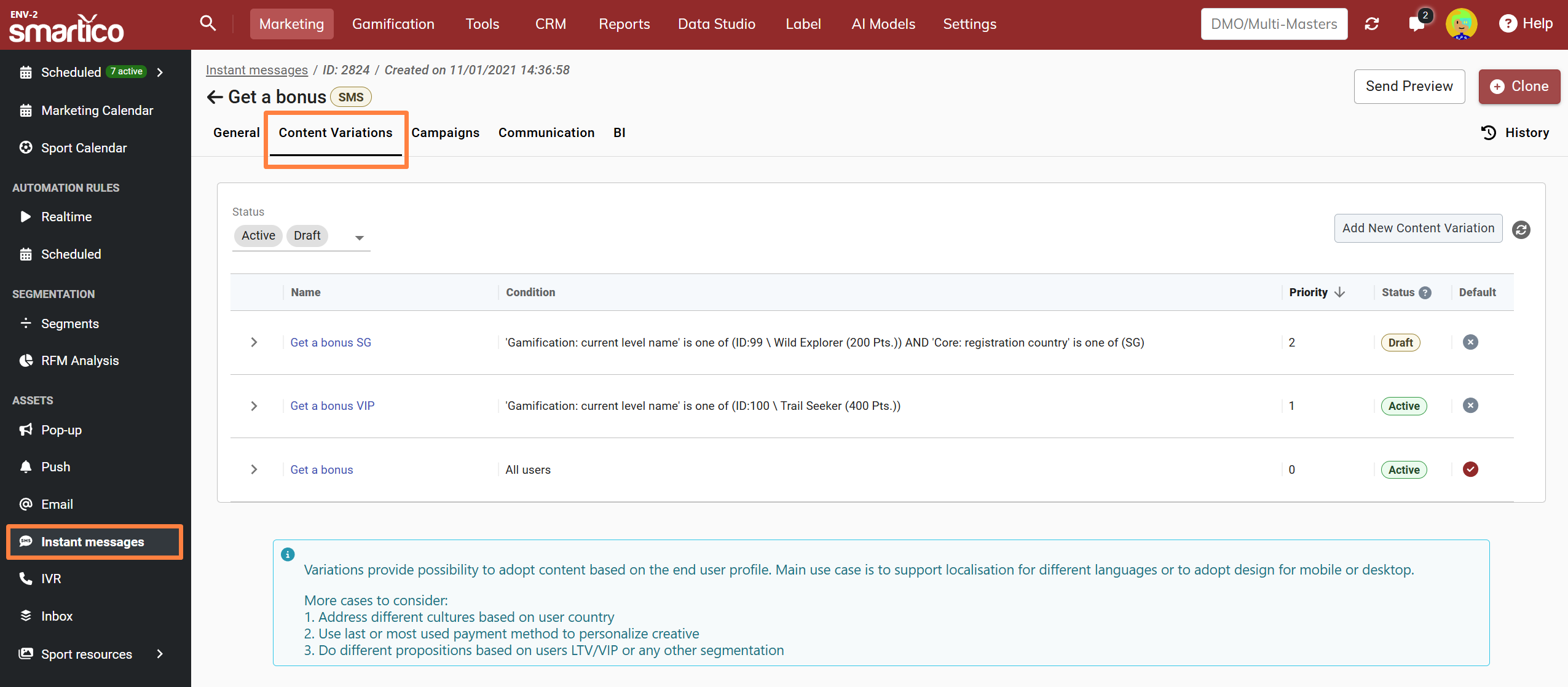
You can tailor content based on the end user's profile using Content Variations. This feature allows you to present different offers based on user segmentation, such as level, language, currency, country, or other customizable properties.
💡 How It Works:
* Configure the properties you want to use (e.g., Language, Level, Currency, Country).
* Create different content variations tailored to specific user segments.
* Once the asset is added to a campaign, end users will receive the most relevant variation based on their profile and matching conditions.
### Gateway Setup and Automatic Provider Routing
Before sending instant messages, delivery gateways must be connected in the Back Office:
* **Connecting Gateways**: Configure gateways under **Label Settings > Gateways > Instant Messages**, supporting over 150 SMS, WhatsApp, and Viber providers globally.
* **Automatic Selection for Multi-Brand Labels**: In multi-brand setups, campaigns can use **Automatic Selection** to route dispatches dynamically to the correct provider gateway based on the recipient's Brand and matching selection conditions (such as Country or Currency).
* **Sender ID Management**: Operators can set default Sender IDs ("From" names) on the gateway configuration or override the "From" name directly within the campaign activity settings.
### Frequently Asked Questions
**Q: Can Smartico send WhatsApp messages to a WhatsApp group, or only to individual player phone numbers?**
**A:** WhatsApp campaigns in Smartico deliver strictly 1-to-1 to individual player phone numbers registered on their profile. Smartico does not support broadcasting to or managing WhatsApp groups.
**Q: How are SMS character counts and billed parts calculated when dynamic tags are used?**
**A:** The Back Office editor displays an estimated character count and segment breakdown based on template text. However, final character length and segment count are calculated at dispatch time after resolving all user and campaign tags. If resolved personalized values contain non-GSM characters (such as accents or emojis), the message automatically encodes as Unicode (UCS-2) for that specific recipient.
---
# Agent Instructions
This documentation is published with GitBook. GitBook is the documentation platform designed so that both humans and AI agents can read, navigate, and reason over technical content effectively. Learn more at gitbook.com.
## Querying This Documentation
If you need additional information that is not directly available in this page, you can query the documentation dynamically by asking a question.
Perform an HTTP GET request on the current page URL with the `ask` query parameter, and the optional `goal` query parameter:
```
GET https://help.smartico.ai/welcome/products/crm-automation/communication-channels/sms-viber-and-whatsapp.md?ask=&goal=
```
`ask` is the immediate question: it should be specific, self-contained, and written in natural language.
`goal` is optional and describes the broader end goal you are ultimately trying to accomplish on behalf of the user. GitBook uses it to tailor the answer towards what is most useful for that goal.
The response will contain a direct answer to the question and relevant excerpts and sources from the documentation.
Use this mechanism when the answer is not explicitly present in the current page, you need clarification or additional context, or you want to retrieve related documentation sections.