> For the complete documentation index, see [llms.txt](https://help.smartico.ai/welcome/llms.txt). Markdown versions of documentation pages are available by appending `.md` to page URLs; this page is available as [Markdown](https://help.smartico.ai/welcome/products/release-notes/february-2026.md).
# February 2026
Smartico release notes for February 2026 - covering CRM Automation and Gamification improvements done since the previous release.
### :file-code: Smartico API support in Liquid Sections
You can now access the Smartico API directly within Liquid Custom Sections. This allows you to build a fully customized UI for gamification features such as mini-games, missions, badges, tournaments, and in-store items. By leveraging the API within your Liquid code, you have complete creative control over how these features are presented and integrated into your site.
Read more about [Liquid Section](https://help.smartico.ai/welcome/products/gamification-basics/liquid-section)
### :chart-diagram: Create a campaign from a template
We’ve introduced campaign templates, so you can now create both marketing and operational campaigns from pre-defined templates - for real-time and scheduled campaigns. You’ll find this under `Campaigns → Create → Create Campaign from template`.
BO: Create campaign from template
Pick a template, name your campaign, choose a segment, and replace the placeholder content in the flow (e.g., swap the generic email with your own). Once everything is customized, you’re ready to activate the campaign.
Read more about [Campaigns](https://help.smartico.ai/welcome/products/crm-automation/create-journey-flow)
### :envelope: Emails preview
We’re excited to introduce our new Email Preview functionality. You can now test your templates across a vast range of email clients on different operating systems, browsers, and devices before you hit send.
BO: Example of Email preview of Gmail
Now you don’t need to guess how your layout holds up in Outlook or Yahoo. This tool ensures your message remains pixel-perfect, catching compatibility issues and checking how Dark Mode affects your text and banners.
Read more about [Email previews](https://help.smartico.ai/welcome/products/crm-automation/communication-channels/email#emails-preview)
### :alarm-clock: Activity period for scoring formula in Tournaments
We’ve added an Activity Period option to tournament scoring formulas. It’s disabled by default. When enabled, you can set start and end dates, and the formula will be applied only within that time window. Any actions made outside the selected period won’t count; players will not be able to progress in the tournament and earn points.
BO: Activity period in Scoring formula in Tournaments
Read more about [Tournaments](https://help.smartico.ai/welcome/products/tournaments/tournament-setup)
### :block-question: Lock answers after submission in the Quiz
We’ve added a new Quiz setting that lets you control whether players can change their answers after submitting. The option is called ‘**Allow editing of answers**’ and is available in the Quiz round configuration. When disabled, players can’t edit their answers after submission. This is configured per round, so you can have some rounds where editing is allowed and others where answers are locked.
GF: Locked answer in Quiz, where user cannot edit anymore
Read more about [Quiz](https://help.smartico.ai/welcome/products/mini-games/quiz-game)
### :envelope: Set a default Gateway
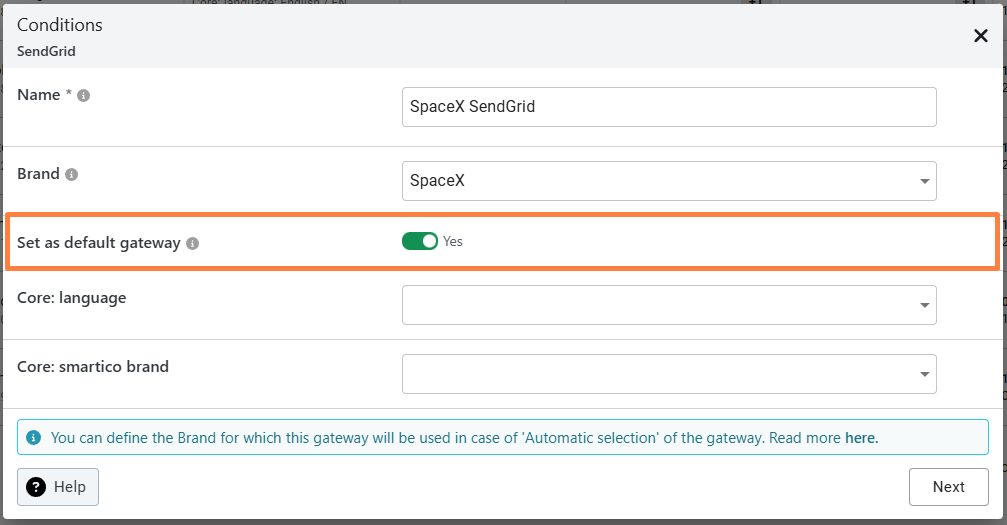
We’ve added a new option to set a default gateway for Email, Instant Messages, and IVR. This option is disabled by default. When enabled, the selected gateway will be automatically preselected whenever you add the corresponding channel (Email, SMS, Viber, etc.) to a campaign flow.
{% hint style="info" %}
**Please note:** You can have only one default gateway per channel type (e.g., only one default Email gateway at a time).
{% endhint %}
BO: Set a default gateway option in Email gateway
Read more about [Email Gateway](https://help.smartico.ai/welcome/products/general-concepts/email-gateways-guide)
### :gear: Shorten large numbers in the Gamification Widget
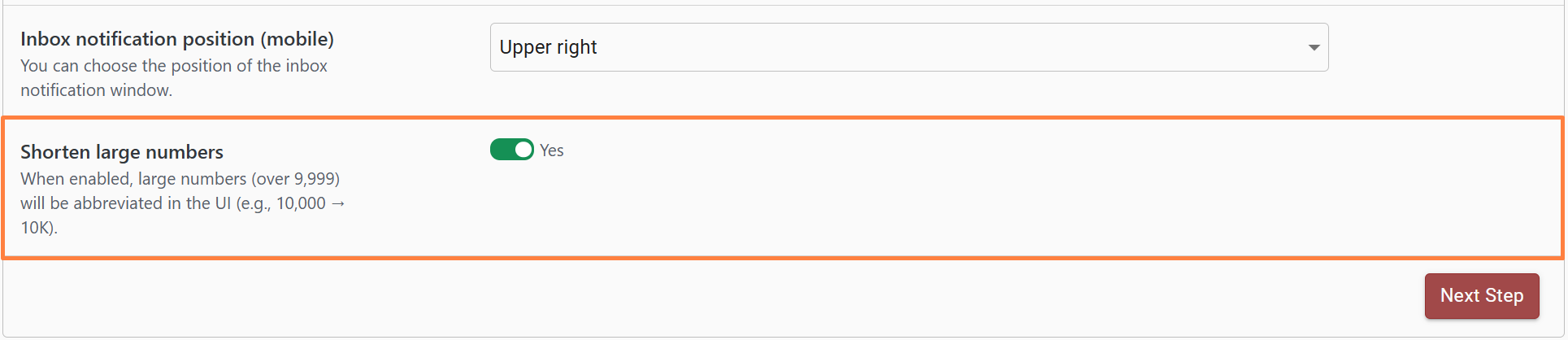
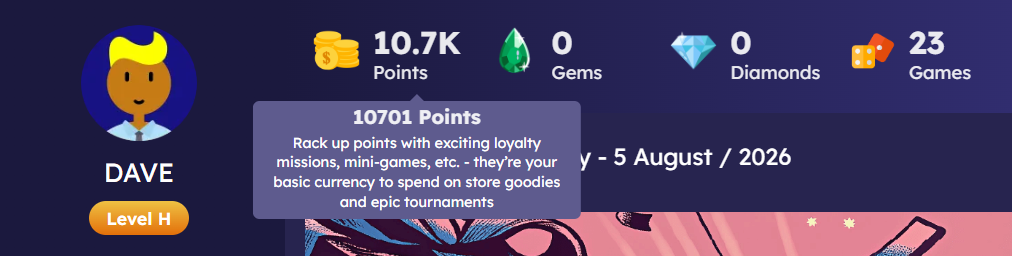
We’ve introduced a new option that lets you abbreviate large numbers in the GF Widget. It is called ‘**Shorten large numbers**’, and it is available in Label/Brand settings. By default, this option is disabled, so all values are shown in full. When enabled, numbers over 9,999 will be displayed in a shortened format (for example, 10,000 → 10K).
BO: 'Shorten large numbers option' in Label settings
GF: Points balance with shorten number
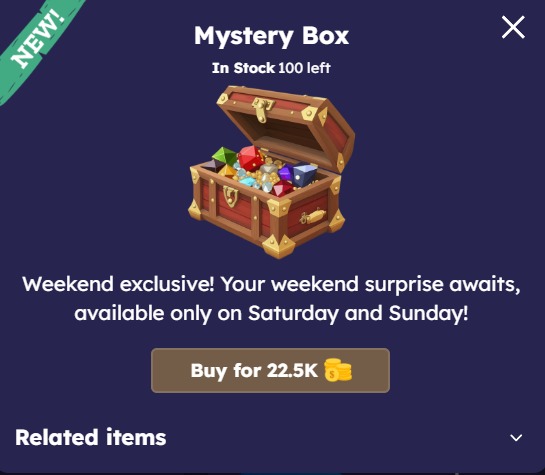
This applies for balances (points, gems, diamonds) in the header, for levels and for store prices. The abbreviations used are translatable and can be localized as needed.
| Abbreviation | Meaning | Minimum Value | Example |
| ------------ | --------- | ------------------- | ----------------------------------------- |
| K | Thousands | ≥ 10,000 |
10,000 → 10K 22,500 → 22.5K
|
| M | Millions | ≥ 1,000,000 |
1,000,000 → 1M 1,430,000 → 1.4M
|
| B | Billions | ≥ 1,000,000,000 | 1,000,000,000 → 1B |
| T | Trillions | ≥ 1,000,000,000,000 | 1,000,000,000,000 → 1T |
{% hint style="info" %}
**Important Notes:**
* Keep in mind that store prices should use clean, rounded numbers. For example, if you set an item price to 10,501 points, it will be displayed as 10.5K points, and the user won’t see the exact value. To avoid confusion, use rounded prices like 10,500 points instead, so the abbreviated display remains accurate and intuitive.
* For the balance counters in the header, we show the full value in a tooltip when numbers are shortened, so players can always see the exact amount. Keep in mind that if you enable redirection on the counter instead of the tooltip, the tooltip won’t be displayed.
{% endhint %}
GF: Store item with shorten number for the price
### :gears: New Common Case: Users who have a bonus X with status Y
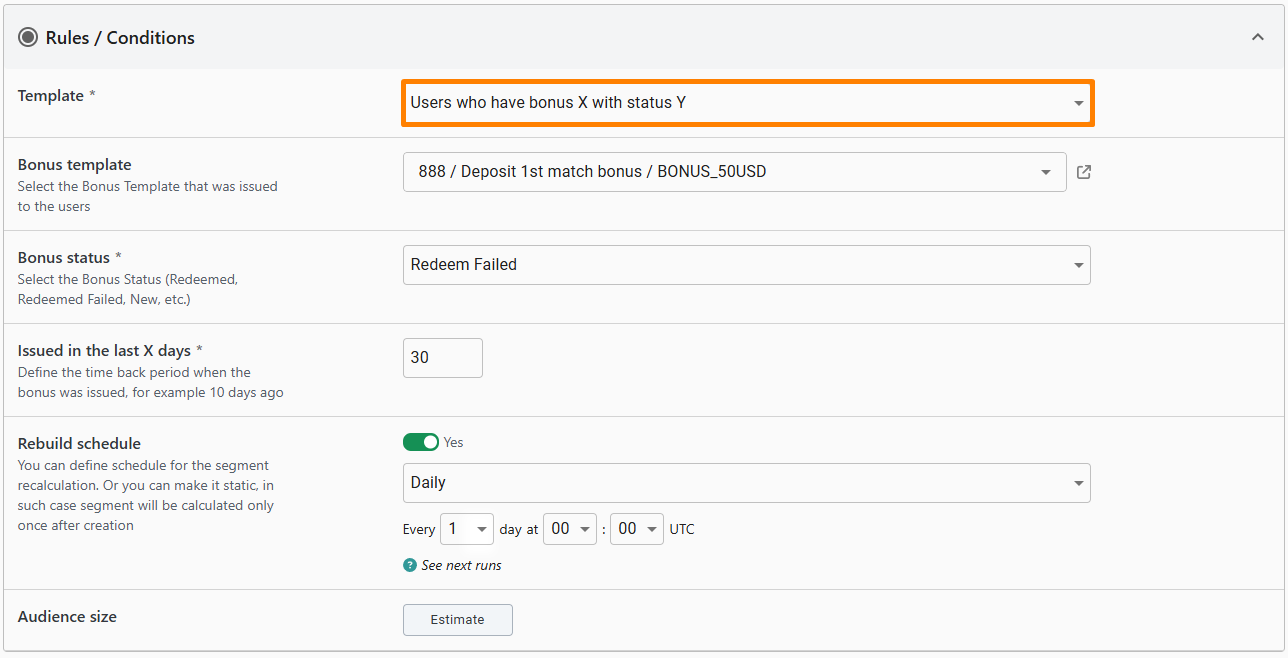
We’ve added a new Common Case template called **‘Users who have bonus X with status Y’**.This template lets you segment users who received a specific bonus, with the option to filter by both bonus status and a time period. For example, you can easily target all users who received a bonus in the last 30 days, where the bonus status is **Redeemed Failed.**
BO: 'Users who have bonus X with status Y' template in Common Cases
Read more about [Common Case](https://help.smartico.ai/welcome/products/crm-automation/segmentation/common-cases-segments)
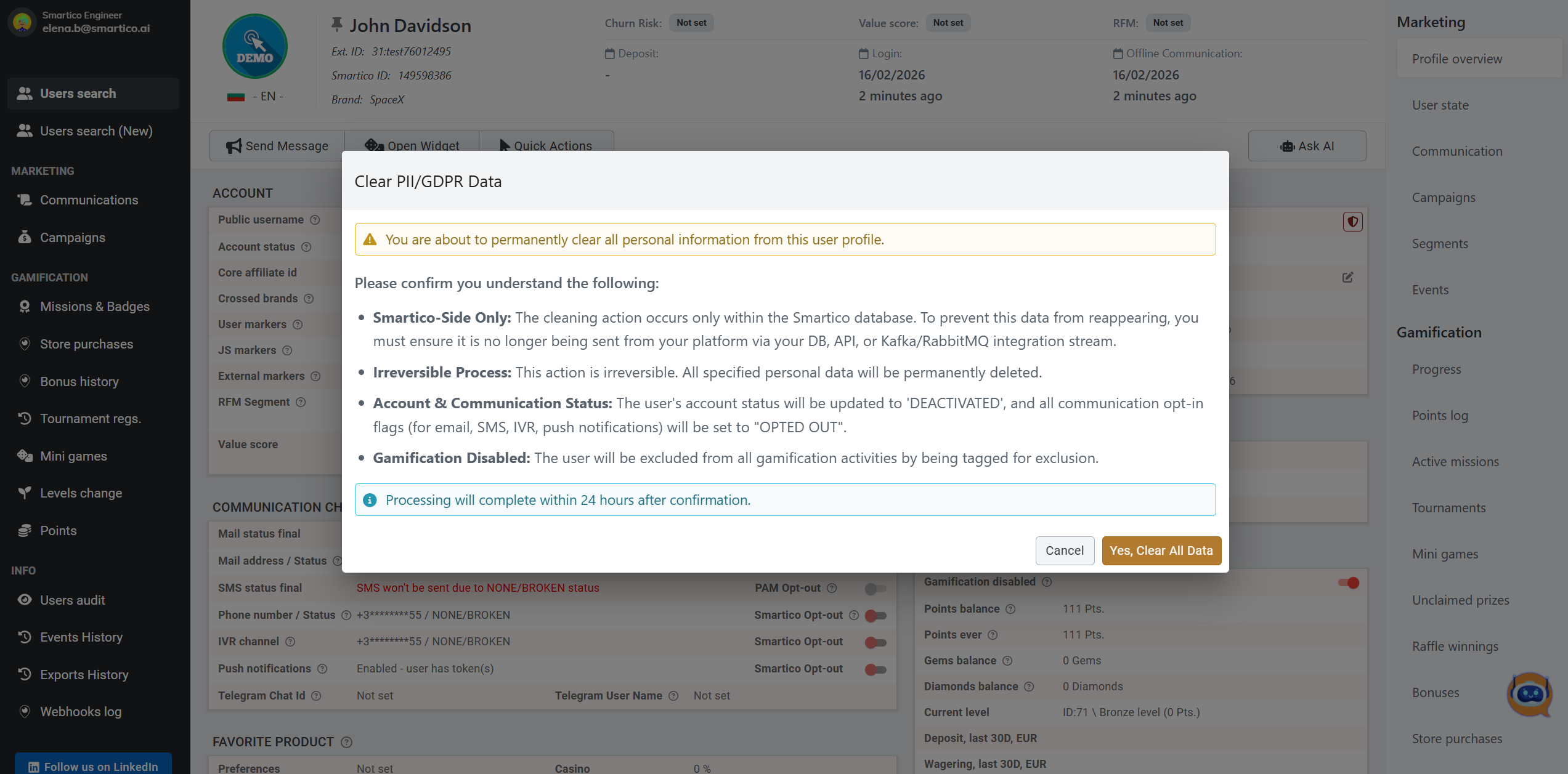
### :shield-user: Clean user PII from the CRM profile
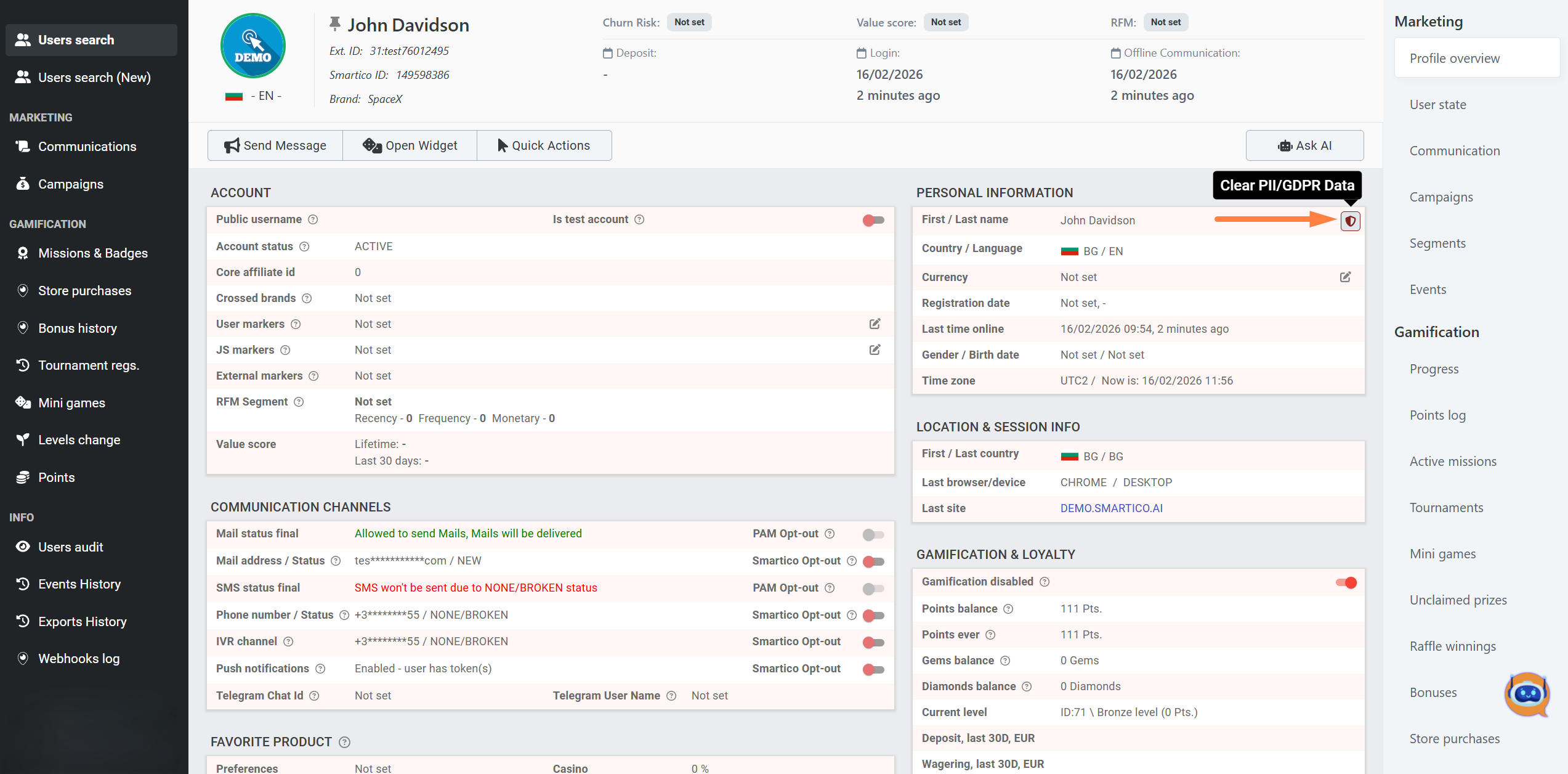
We’ve introduced a new option to permanently delete users’ Personally Identifiable Information (PII) directly from the user profile page. Please note the following important details before using it:
* **Role-based access:** Available only for users with the CRM Admin role.
* **Smartico-only cleanup:** The data is removed only from Smartico’s database. To prevent it from being restored, ensure your platform stops sending this user’s data via DB sync, APIs, or Kafka/RabbitMQ streams.
* **Irreversible action:** Once deleted, the selected personal data cannot be recovered.
* **Account deactivation:** The user’s status will be set to DEACTIVATED, and all communication preferences (email, SMS, IVR, push) will be switched to OPTED OUT.\
**Excluded from gamification:** The user will be tagged and excluded from all gamification activities.
* **Processing time:** The deletion is finalized within 24 hours after confirmation.
BO: Clear PII in User profile page
BO: Clear PII confirmation screen
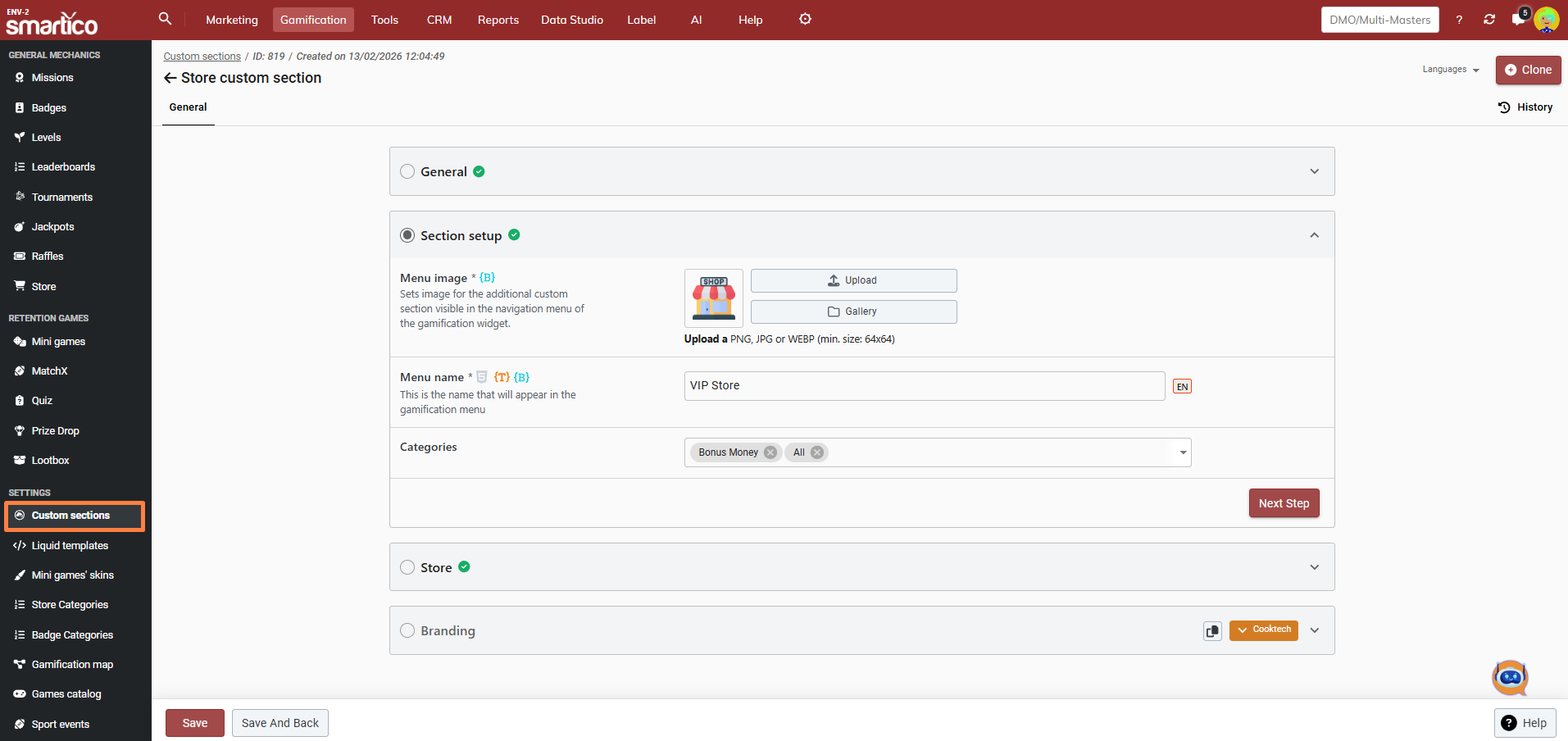
### :store: Custom Section with Store items
We’ve added Store as a new type in Custom Sections. You can now create dedicated custom sections that display selected store items independently from the main Store section. This gives you full flexibility to control visibility, segmentation, and timing of the section.\
For example, you can:
* Create a custom section that displays only Bonus store items
* Make the section visible to a specific user segment
* Schedule it to appear only during a defined time period
BO: Custom section with Store items
Read more about [Custom Sections](https://help.smartico.ai/welcome/products/general-concepts/custom-sections)
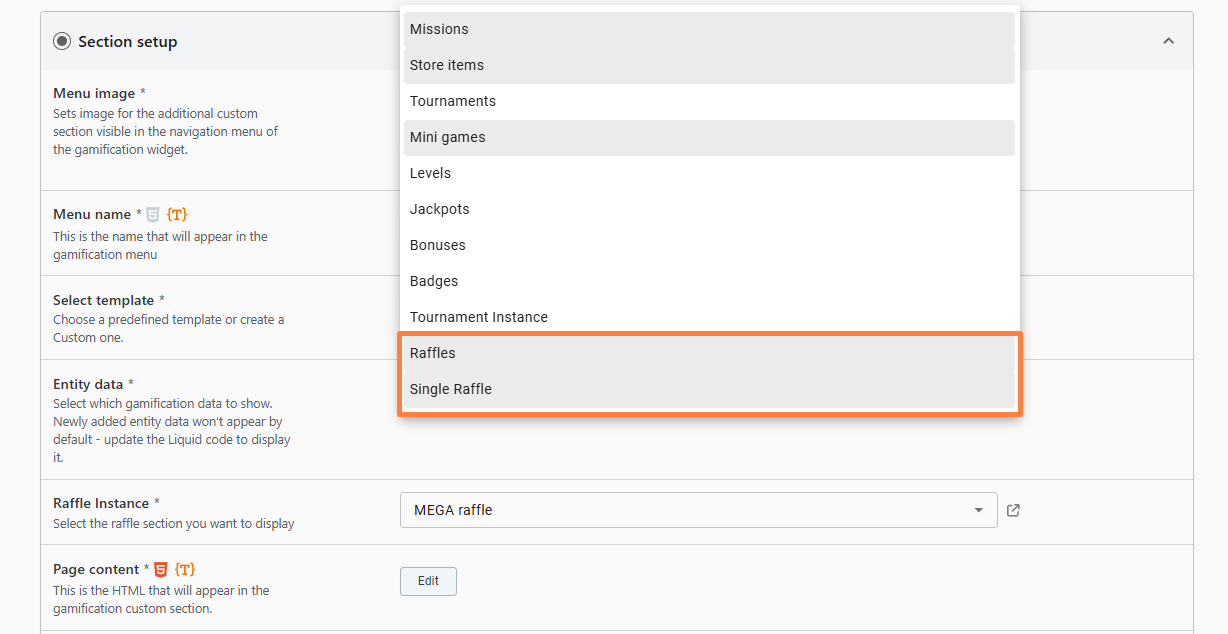
### :code: Raffles in Liquid Custom Section
We’ve added Raffles to the Entity Data available in Liquid Sections. You can now build fully custom Liquid sections and include raffles in them. Allowing you to:
* Display all raffles available to the user
* Highlight a specific raffle
BO: Raffles entity data in Liquid Section
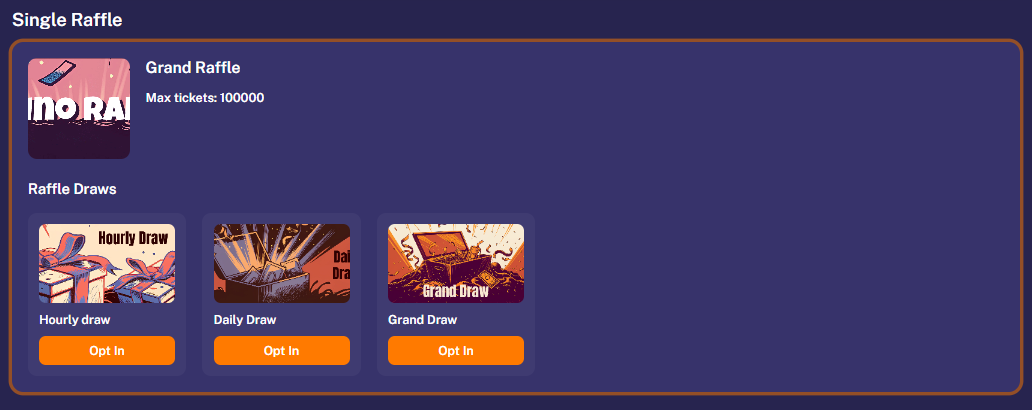
In addition, we’ve introduced Raffle Instance. This allows you to showcase a single raffle within a dedicated block, including:
* All associated draws
* The ability for users to opt in to specific draws directly from the block
GF: Single Raffle in Liquid Section
Read more about [Liquid Custom Section](https://help.smartico.ai/welcome/products/gamification-basics/liquid-section#liquid-data-keys)
### :file-waveform: Activity log
We are introducing the Activity Log, which lets users where users can easily track every movement of their points, gems, and diamonds. Each entry provides full visibility into gains and losses, including the source of the change, the exact time, and the resulting balance at that moment. This update offers total transparency into how and why users' balances evolve.
{% hint style="info" %}
Note: To simplify the user experience, any movement from manual adjustments, automation rules, or campaigns will be labeled as Marketing, since these are technical areas that don't have presentation in Gamification mechanics.
{% endhint %}
GF: Activity Log section
Read more about [Activity Log](https://help.smartico.ai/welcome/products/gamification-basics/activity-log)
### :ticket: Raffle: Individual Opt In per Draw
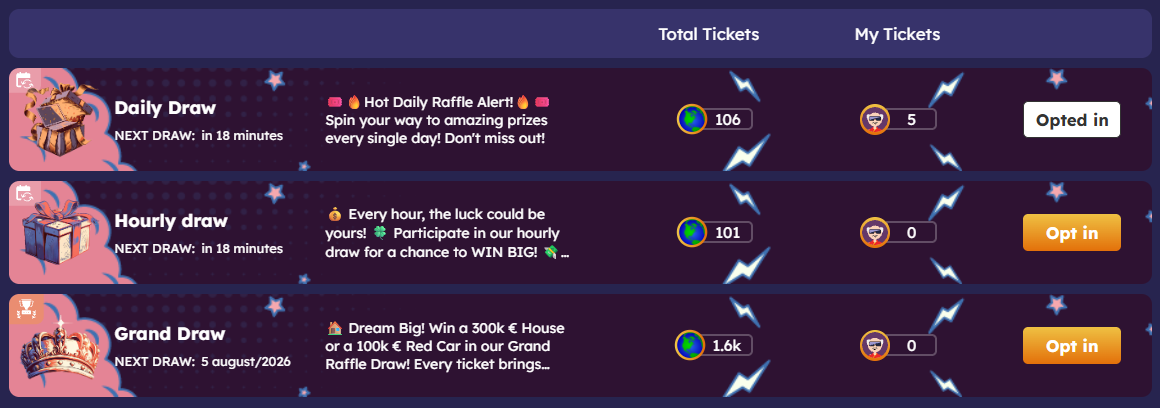
We are adding the ability for you to set up manual opt-in for your Draws. This is an individual setting, which means you can have some Draws running with manual opt-in while others continue to use automatic entry.
Gamification: Opt in for Draws in Raffle
This new functionality allows you to increase user engagement by requiring users to actively join to participate. It is especially effective for recurring draws, where the user's status resets after every Draw run.\
For example, if you have a recurring daily Draw, the user would need to log in and opt in again each day to confirm their participation and make their accumulated raffle tickets eligible. This ensures that only active users are included in the pool, giving you more control over how your draws are executed.
[Read more about the Draw opt-in for Raffles](https://help.smartico.ai/welcome/products/raffles#draw-setup)
### :user-magnifying-glass: Redesign of User Search & User Profile header
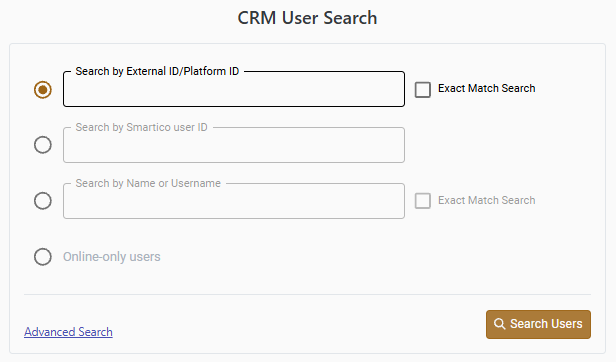
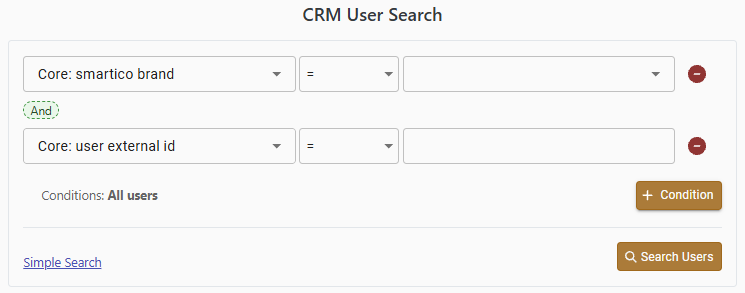
We are now gradually rolling out a completely overhauled User Search that is faster and more efficient. The interface is now split into two distinct modes to better suit your workflow. You can use Simple Search for quick lookups by ID, username, or current online status, or switch to Advanced Search to use the query builder for more complex requirements.
BO: Basic user profile Search
BO: Advanced user profile Search
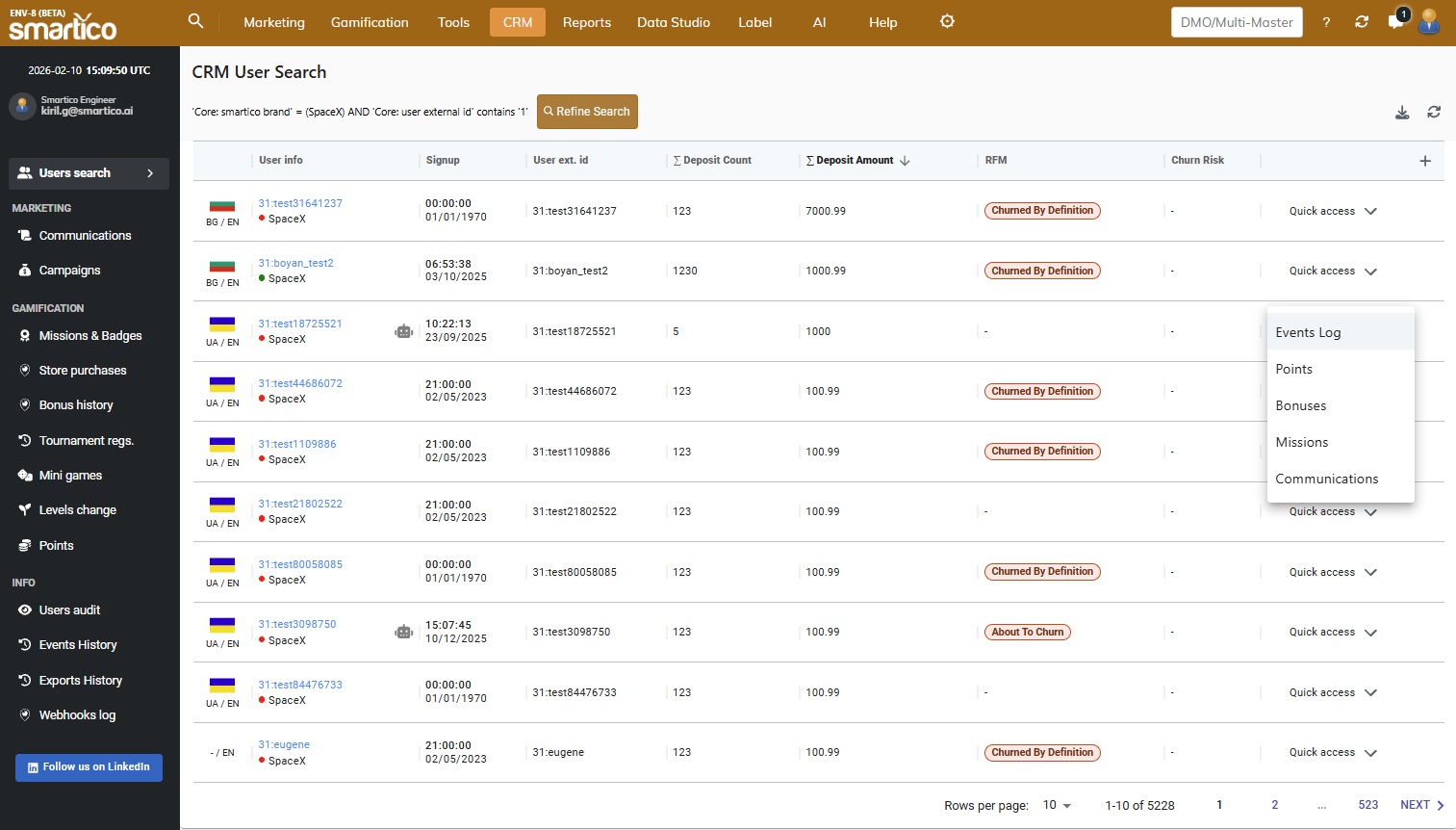
We've also redesigned the **results table** to provide a cleaner, consolidated view of your data. The addition of the Quick Access menu lets you jump directly to frequently used sections like bonuses, communication, and event logs, making it much easier to check or troubleshoot individual user stats on the fly.
BO: The user search result table with Quick access
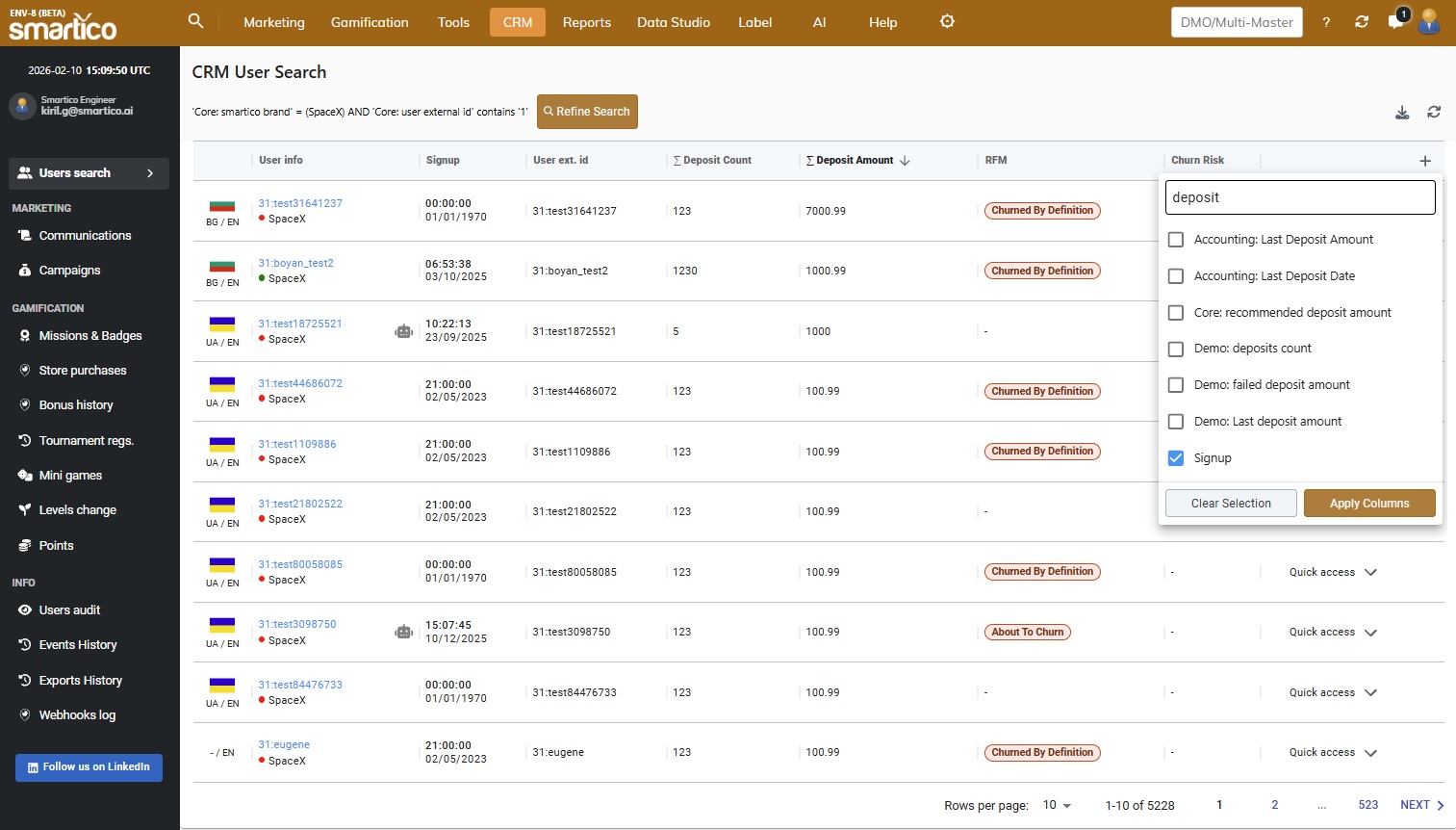
Perhaps most importantly, you now have the power to **fully customize your results data**. By navigating to the column settings, you can add a column for any existing property you wish to track. Simply enter the property name to instantly add it, and tailor the result table to your exact specifications.
BO: Add any property as a column to the User search result table
Alongside the search updates, we have also redesigned the **user profile header** to provide a cleaner, more intuitive view of the most important user statistics. To improve navigation, we have removed the previous clutter of buttons and organized them into logical groups, making it easier to find the specific action you need. We have also introduced a new AI button that utilizes our latest model to provide instant investigative insights, such as analysis of deposits, bets, and other key activities.
BO: Simplified and redesigned User profile header
### :brain: Smartico AI Agents: Wheel Design Creator
We’ve introduced the [Wheel Design Creator Agent](#smartico-ai-agents-wheel-design-creator), a specialized assistant designed to help you create custom skins for your "Spin the Wheel" minigames instantly. This agent removes the need for manual graphic design by generating all necessary visual elements based on your specific requirements or brand identity.
{% embed url="" %}
Key capabilities include:
* **Reference-Based Generation**: Simply attach a screenshot of your website or marketing materials, and the agent will match the design style for your wheel.
* **Live Preview & Iteration**: Switch between mobile and desktop views or different sector numbers to see the design in action. If a specific element isn't perfect, you can re-generate individual resources on the fly.
* **Seamless Integration**: Once you are happy with the design, click "Publish" to create a template that can be immediately applied to your Mini-game logic and prize configurations.
[Read more about the Wheel Design Creator here](https://help.smartico.ai/welcome/products/ai-agents/ai-agent-wheel-design-creator)
### :puzzle: Puzzle template in Liquid Sections
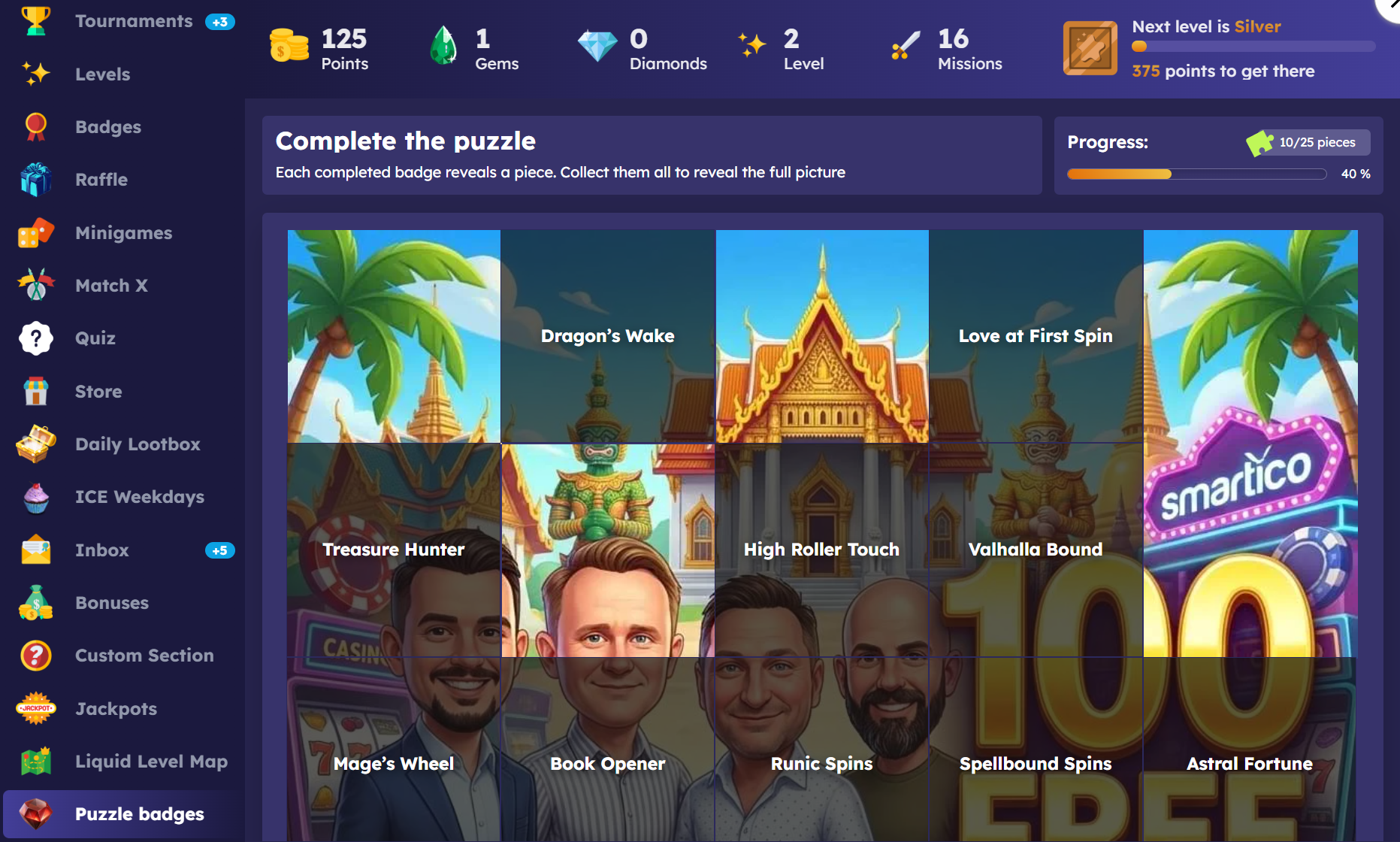
We’ve introduced a new Puzzle template in Liquid Sections. This template lets you create a puzzle in which each piece (image) is revealed as players complete specific badges. Once all the defined badges are completed, the full puzzle image is revealed. The Puzzle template can be found under **Custom Sections → Liquid section** type. To set up a puzzle, you first need to create the required badges and prepare the images to use as puzzle pieces.
Read more about [Liquid Sections](https://help.smartico.ai/welcome/products/gamification-basics/liquid-section#templates).
---
# Agent Instructions
This documentation is published with GitBook. GitBook is the documentation platform designed so that both humans and AI agents can read, navigate, and reason over technical content effectively. Learn more at gitbook.com.
## Querying This Documentation
If you need additional information that is not directly available in this page, you can query the documentation by asking a question.
Perform an HTTP GET request on the following URL with the `ask` and `goal` query parameters:
```
GET https://help.smartico.ai/welcome/products/release-notes/february-2026.md?ask=&goal=
```
`ask` is the immediate question: it should be specific, self-contained, and written in natural language.
`goal` is what the user is ultimately trying to achieve, the reason they need the answer. Sharing it helps GitBook give you a better, more relevant answer. A goal is most helpful when it describes the outcome the user wants rather than restating the question. For example, with `ask=how do I create an API token`, a goal like `automate deployments from our CI pipeline` lets GitBook tailor the answer to that use case.
The response will contain a direct answer to the question and relevant excerpts and sources from the documentation.
Use this mechanism when the answer is not explicitly present in the current page, you need clarification or additional context, or you want to retrieve related documentation sections.


.png?alt=media)