> For the complete documentation index, see [llms.txt](https://help.smartico.ai/welcome/llms.txt). Markdown versions of documentation pages are available by appending `.md` to page URLs; this page is available as [Markdown](https://help.smartico.ai/welcome/products/bi-and-reporting/tournaments-dashboard.md).
# Tournaments Dashboard
## 📘 Overview
The Tournaments Dashboard provides statistical, operational and analytical overview for your Tournament related KPIs. This report is divided into seven tabs:
* Summary
* Alerts
* General Stats
* Operational Data
* Analytical Data
* Daily Data
* Billing
It’s designed to help you in monitoring, managing and optimizing your business usage of the Tournaments Gamification feature, and make data-driven decisions.
**🔍 How to Access the Tournaments Dashboard**
1. Navigate to Reports → Gamification → "Tournaments"
2. Select:
1. Period
2. Tournament Name / ID
3. Tournament Registration Type
4. Tournament Instance ID
5. Value Score
6. Brand (CRM Brand)
{% hint style="info" %}
**Per-Tournament Analytics:**\
In addition to the global dashboard under Reports, you can view analytics for an individual tournament by navigating to Gamification → Tournaments, opening the tournament template, and selecting the **Analytics** tab. This automatically filters the metrics to that specific tournament.
{% endhint %}
For community-based and team competitions, see the [Clans](https://help.smartico.ai/welcome/products/bi-and-reporting/raffles-1) analytics documentation.
**The Report consists of 7 tabs:**
1. **Summary -** presents the management summary of the product, including its Funnel and the ROI.
2. **Alerts -** focuses on the points that might require an immediate attention.
3. **General Stats** - focuses on the overall stats and trends of the Tournaments related KPIs.
4. **Operational Data** - provides the operational insights on the optimizations of the Tournaments product in your Business.
5. **Analytical Data** - measures the effectiveness of the Tournaments usage from different perspectives.
6. **Daily Data -** provides daily turnover and GGR breakdown for tournament participants over the tournament period.
7. **Billing -** tracks monthly and daily tournament credit consumption across billing cycles.
## Summary tab:
### Section 1: top ribbon
A set of KPIs showing the total Tournaments Funnel during the chosen period.
**Key Funnel Steps Included:**
* Total Active Users (Bets or Deposits) - users that had a Bet or a Deposit (unrelated to the tournament) during the filtered period.
* Number of Tournaments - total count of tournament instances that started during the filtered period.
* Users Registered to Tournaments - users that have registered to the tournament (potential participation).
* Users Participated in Tournaments (by fulfilling the criteria) - unique count of users that triggered a Tournament related event.
{% hint style="info" %}
**Value to You:**\
This section shows the general stats of the Tournaments Funnel within the according to the applied filters. This focuses you on the usage of the product.
{% endhint %}
### Section 2: bottom ribbon
This section shows the contribution and the value of the Tournaments Product.
**Key Metrics Included:**
* Bet Amount per Tournament - the average incremental bet amount per tournament instance, calculated by deducting baseline non-tournament betting activity and dividing across filtered tournament instances.
* GGR per Tournament - the average incremental gross gaming revenue per tournament instance, calculated from the adjusted bet amount multiplied by product margins and divided across filtered tournament instances.
* Prize Value per Tournament - the average nominal value of prizes granted per tournament instance (total nominal prize value divided by finished tournament instances).
* Prize Cost per Tournament - the average monetary bonus cost of prizes per tournament instance (total bonus expenditure divided by finished tournament instances, subject to configured bonus costs in the Back-Office).
* Tournaments ROI - the return on the investment for the tournaments product during the filtered period (GGR divided by Prize Cost)
{% hint style="info" %}
**Value to You:**\
Measures the value of the Tournaments Product (or a specific filtered Tournament) for your business.
For instructions on defining monetary values for bonus rewards so that prize expenditure and ROI calculate accurately, see the [Bonus Cost](https://help.smartico.ai/welcome/products/bi-and-reporting/bonus-cost) documentation.
{% endhint %}
## Alerts tab:
### Section 1: Tournaments with significant share (at least 20%) of users that registered and weren't active
This section shows tournament instances with significant inactivity that need your attention.
**Key Metrics Included:**
* Tournament details - Instance ID, Tournament Start Date, Tournament Date, Tournament ID, Registration Type, Days since the Beginning
* Potential Active Users - number of users that registered to the tournament and are a potential for participation.
* Users with 0-1 Tournament Events - users that had an insufficient Tournament activity (up to 1 event, contributing to the Tournament progress).
* Share of "Inactives" out of Potential - Users with insufficient activity divided by the potentially active users.
{% hint style="info" %}
Value to You:\
Alerting on the need to take an immediate actions to engage more users in the currently active Tournaments or optimize for the future the finished tournaments that had an insufficient participation rates.
{% endhint %}
### Section 2: Users Joining Active Tournament Instances Throughout the Tournament Period
This section introduces the tournaments' instances progress for the Active instances.
**Key Concept:**
The Instances are split into 10 equal periods between the instance start date and the instance end date. The number of users that are joining the period instance throughout each of these periods are shown in the table.
{% hint style="info" %}
**Value to You:**\
Use this table to find the currently active Tournament Instances that are not bringing new participants throughout the steps of the Instance.
{% endhint %}
## General Stats tab:
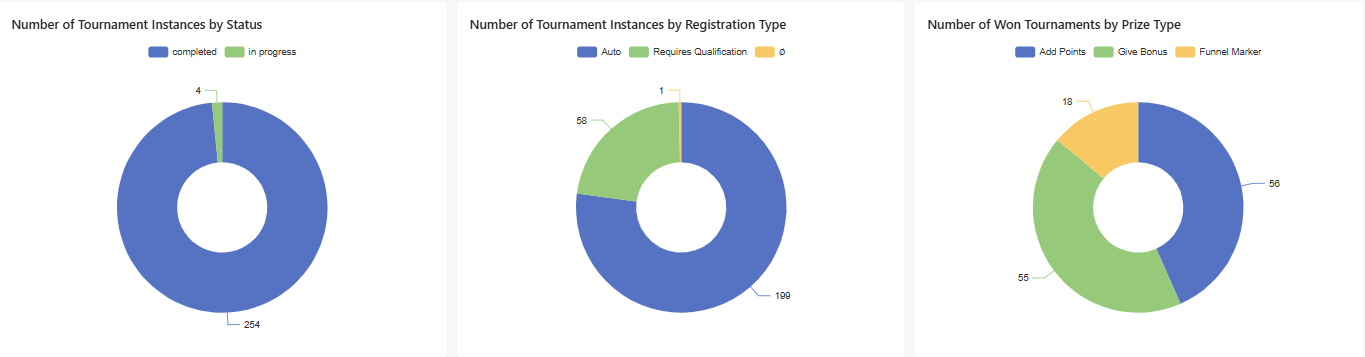
### Section 1: Number of Tournament Instances by Status/Registration Type/Prize Type
This section introduces pie charts showing the proportion of the Tournament Instances by different criteria.
**Key Visualization:**
Pie charts, showing the total count of Tournament instances that started during the filtered period, split by the Instance Status, by Registration Type and by Prize Type (for the finished ones).
{% hint style="info" %}
**Value to You:**\
This breakdown provides a quantitative overview of event activity, participant entry models, and reward distribution. It is essential for managing event planning and resource prioritization.
{% endhint %}
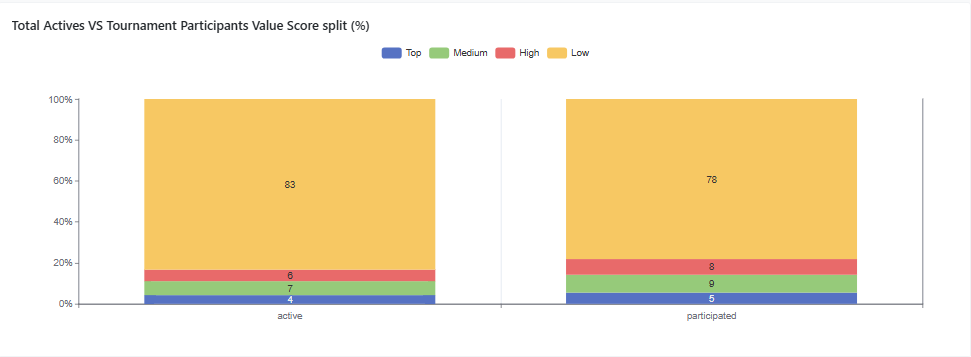
### Section 2: Total Actives VS Tournament Participants Value Score split (%)
This section introduces the Tournaments Activity Distribution by Value Score, compared to the Total Activity Distribution by Value Score.
**Key Concept:**
The idea is to compare the Tournament Participation distribution by Value Score to the baseline, which is the Total Activity distribution by Value Score. For example, if the Top Value users share from the Tournament Participants is 10%, while their share of the Total Activity is 5% - it means that this segment is over represented in the Tournaments activity.
{% hint style="info" %}
**Value to You:**\
This comparison directly identifies which user segments are over- or under-indexed in tournament participation relative to their overall platform activity. This insight is crucial for segment targeting and allows the business to tailor future tournament strategies to either drive engagement from underrepresented segments or reward and retain high-value, active participants.
{% endhint %}
### Section 3: Winners/Prizes data
This section introduces the data on the winning stats for the Tournaments.
**Key Visualization:**
Winners split per Value Score - shows the distribution of the tournaments winning users by their Value Score.
Prizes Nominal Value - split by Type - shows the count of the prizes granted to the tournament winners, split into the types of the prizes
Prizes Monetary Cost - split by Type - shows the cost of the prizes granted to the tournament winners, split into the types of the prizes (only in case the costs of the prizes are updated in the backoffice)
{% hint style="info" %}
**Value to You:**\
This section provides key data on the value profile of winning participants (Value Score distribution) and offers crucial oversight of the cost and distribution of rewards (Prizes Nominal/Monetary Cost split by Type). This information is vital for financial control, resource budgeting, and confirming the intended recipient segment of the incentive program.
{% endhint %}
### Section 4: Daily Split of Unique Active Users
This section introduces the daily trend for the Users split by Activity Type.
**Key Visualization:**
The daily number of unique Users is split into two population - user that had the tournament related events during the day and the users that had either bet or deposit during the day, not related to the tournament activity.
{% hint style="info" %}
**Value to You:**\
This data provides a daily trend for measuring tournament feature adoption and its reach within the unique active user base. It is essential for quantifying the incremental user engagement driven specifically by the tournament program, separate from the core, non-tournament related activity (betting/depositing).
{% endhint %}
### Section 5: Tournament Steps (Funnel) & Minutes between Registration and first event
This section introduces the tournament Funnel and the list of the relevant Instances with the average time between the registration and the beginning of activity.
**Key Visualizations:**
Tournament Steps (Funnel) - shows the number of unique users, participating in each step of the Tournament Funnel. Due to the different mechanics of the Tournaments, this chart best used while applying either the Registration Type filter or the Tournament Name filter. This will allow you to monitor the most relevant steps of the Tournament Funnel.
Minutes between registration and first event - shows the average period (in minutes) between tournament registration (or tournament start) and the participant's first scoring event.
{% hint style="info" %}
**Value to You:**\
Combining the table and the chart while filtering specific Tournament Instance will allow you to check whether registering before the tournament has any effect on the participation.
{% endhint %}
## Operational Data tab
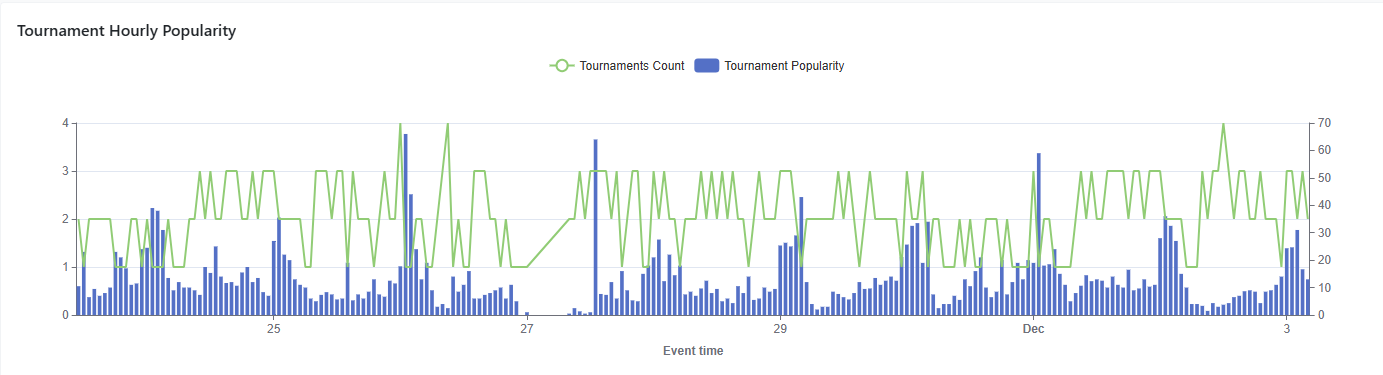
### Section 1: Tournament Hourly Popularity
The Chart shows the hourly distribution of the tournaments count and the average number of participants per tournament (popularity).
**Key Visualization:**
* The line presents the number of active tournament instances.
* The column presents the average number of participants per tournament instance.
{% hint style="info" %}
**Value to You:**\
Use this Chart for taking the business decision on the best hours for launching the tournaments.
{% endhint %}
### Section 2: Tournaments Progress
This table categorizes tournament participants based on their level of engagement, measured by the number of events they've taken part in.
**Key Visualization:**
* The columns group users into tiers ranging from least active (0-1 events) to most active (500+ events). The "0-1 events" category specifically identifies users who either never participated after registering or only completed a single tournament event without further progression.
*Event = User's activity, triggering the Tournament participation condition.*
{% hint style="info" %}
**Value to You:**\
Use this Table for outlining the tournaments with insufficient progress and optimizing the activity.
{% endhint %}
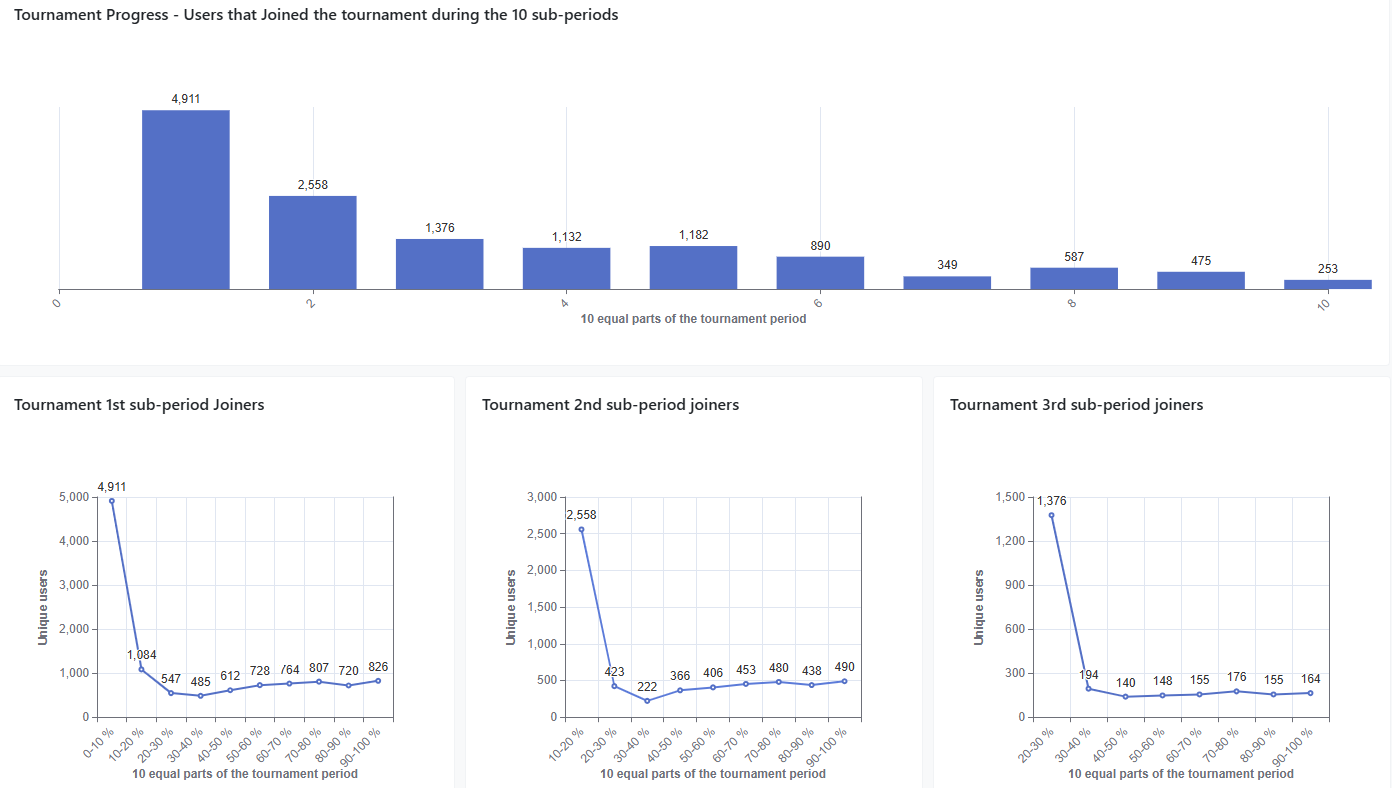
### Section 3: Tournament Progress by Joining Cohort
This section focuses on the Tournaments' participants onboarding and their progress within the Tournament.
**Key Concept and Metrics Included:**
* Each Tournament Period is split into 10 equal sub-periods in order to measure the Tournament Activity and Cohort. *For Example - if the Tournament lasts 20 days, each sub-period is equal to 2 days.*
* The top chart shows the number of unique users that joined the tournament during each of the 10 sub-periods.
* The split between the 3 bottom charts compares the progress flow of the users that joined during the 1st sub-period of the tournament to the flow of the users that joined on the 2nd sub-period of the tournament to the flow of the users that joined on the 3rd sub-period of the tournament.
{% hint style="info" %}
**Value to You:**\
It's recommended to look at the data on a tournament or a tournament instance level to draw any business conclusions.
Use these Charts to understand at which stage the users are joining the tournament and how they progress through it.
{% endhint %}
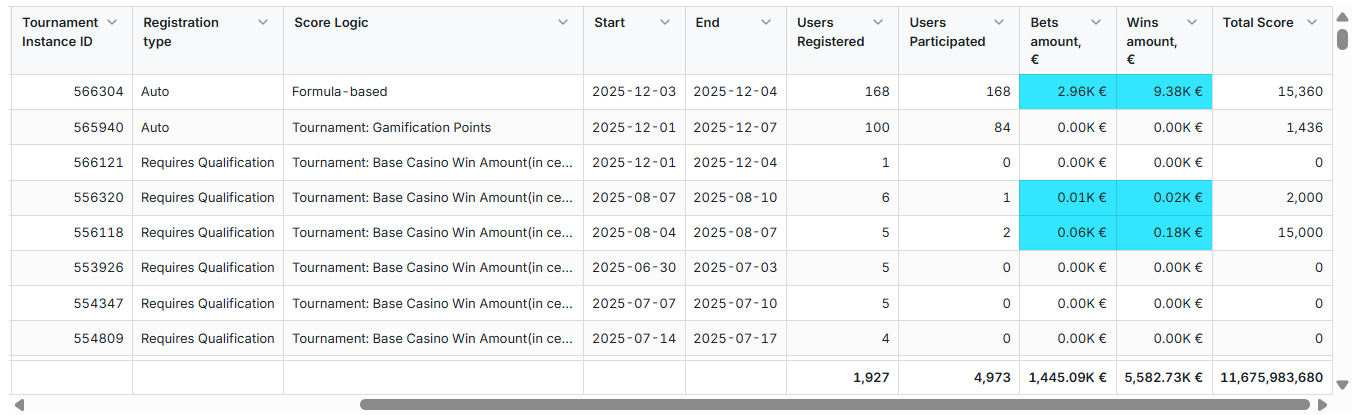
### Section 4: Tournaments Detailed Gaming Data
The Table presents the activity, generated due to the participation in the Tournament.
**Key Metrics Included:**
* Tournament instances are ordered by participant count and grouped by status—starting with instances currently in progress.
* Bets & Wins amounts are present only when they contribute to the Tournament Instance progress. Otherwise the values will be 0.
* By default, tournament analytics store only the events that changed a player's score, so events with 0 score (for example, a casino win of 0) are missing from these reports. To include them, ask your Success manager to turn on the **Tournament analytics: include events with 0 score** setting in **Label settings**.
{% hint style="info" %}
**Value to You:**\
Use this Table to focus on the Business KPIs related solely to the Tournaments events
{% endhint %}
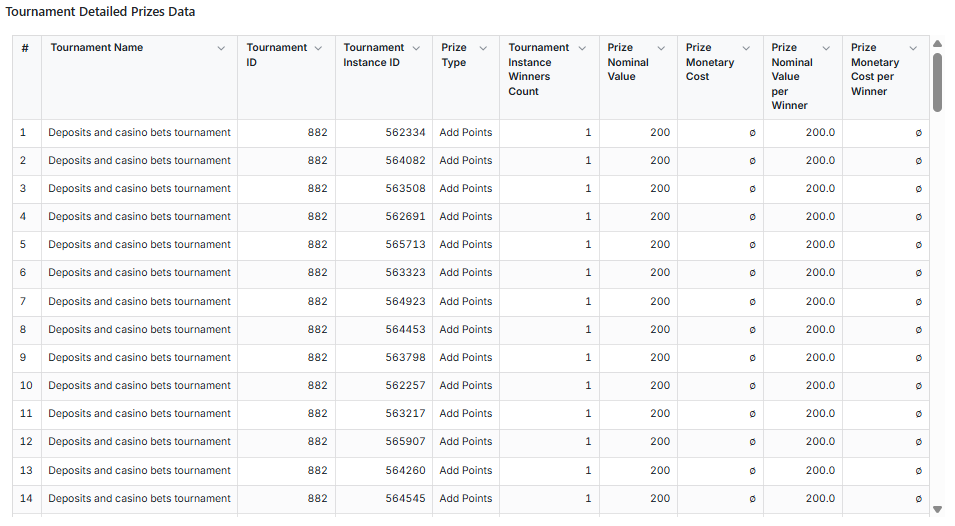
### Section 5: Tournament Detailed Prizes Data
We’ve introduced a table, presenting the detailed view of the winning related KPIs per Tournament Instance.
**Key Metrics Included:**
* Tournament details - Instance ID, Tournament Name Tournament ID
* Prize Type
* Winners Count - how many users received a prize for the instance.
* Prize Nominal Value - the nominal value of the Instance Prize per Instance (for example, 20 prizes of 1 = 20 and also 1 prize of 20 = 20)
* Prize Monetary Cost - the cost of the prize per Instance (in case it's defined and updated in the backoffice)
* Prize Nominal Value per Winner = Prize Nominal Value / Winners Count
* Prize Monetary Cost per Winner = Prize Monetary Cost / Winners Count
{% hint style="info" %}
**Value to You:**\
This table allows the business to track prize commitment (Nominal Value) versus actual expenditure (Monetary Cost) on a per-instance basis. Crucially, the per-winner metrics (Nominal Value/Monetary Cost per Winner) are essential for micro-level cost control and standardizing reward metrics across different tournament sizes.
{% endhint %}
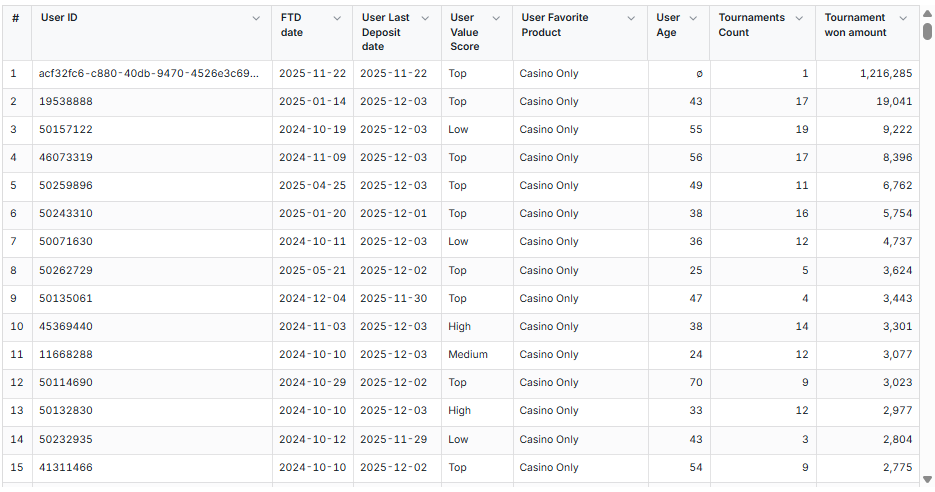
### Section 6: Top tournaments Winners
We’ve introduced a table, showing the top tournaments winners with their nominal win amount and some additional data, reflecting the user's status.
**Key Metrics Included:**
* User related Data - User ID, First Deposit Date, Last Deposit Date, Value Score, Favorite Product, Age
* Tournaments Count - how many tournament instances the user has won.
* Tournament Won Amount - the nominal value of the Prize.
{% hint style="info" %}
**Value to You:**\
This table provides a view of the demographic and behavioral profile of the most successful participants. Tracking the Tournament Count and Nominal Win Amount per user is essential for identifying and monitoring super-winners, which is vital for maintaining program integrity, managing retention strategies, and preventing potential fraud or abuse related to large nominal payouts.
{% endhint %}
### Exporting Tournament Data
Operators can export participant lists, event logs, and leaderboard results directly from the Back-Office:
* **Participant History:** Navigate to Gamification → Tournaments → History to filter and export player registrations, opt-in timestamps, and qualification statuses.
* **Dashboard CSV Export:** Click the action menu on any reporting table (such as Top Tournament Winners or Detailed Gaming Data) and choose **Export CSV** to download user-level records for offline auditing.
## Analytical Data tab
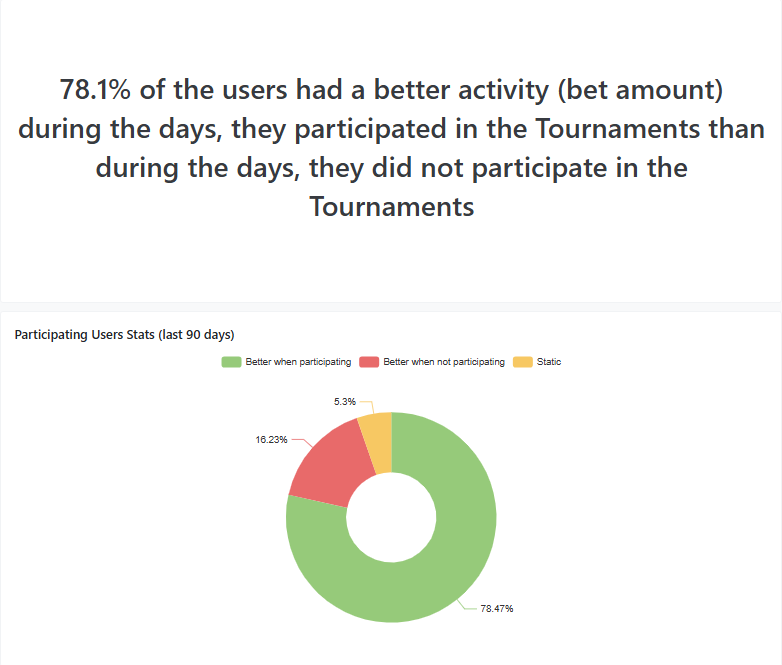
### Section 1: Bet Amount Tournament Days VS. Non Tournament Days
This section illustrates which part of the population had a better activity due to the participation in the tournament, and by how much.
**Key Concept:**
The analysis considers the population of users that had both the days with the Tournament activity and without the Tournament activity during the last 90 days. For these users it measures the Average Bet Amount during each period and presents the comparison between the periods on a user level, both on the pie chart and as a summary.
{% hint style="info" %}
**Value to You:**\
This analysis measures the incremental impact of tournament participation on user activity. By comparing average bet amounts for the same users during tournament versus non-tournament periods, it quantifies the specific monetary uplift generated by the feature. This is essential for justifying the program's existence by proving its ability to stimulate higher betting activity among engaged users.
{% endhint %}
### Section 2: Best Performing Tournaments
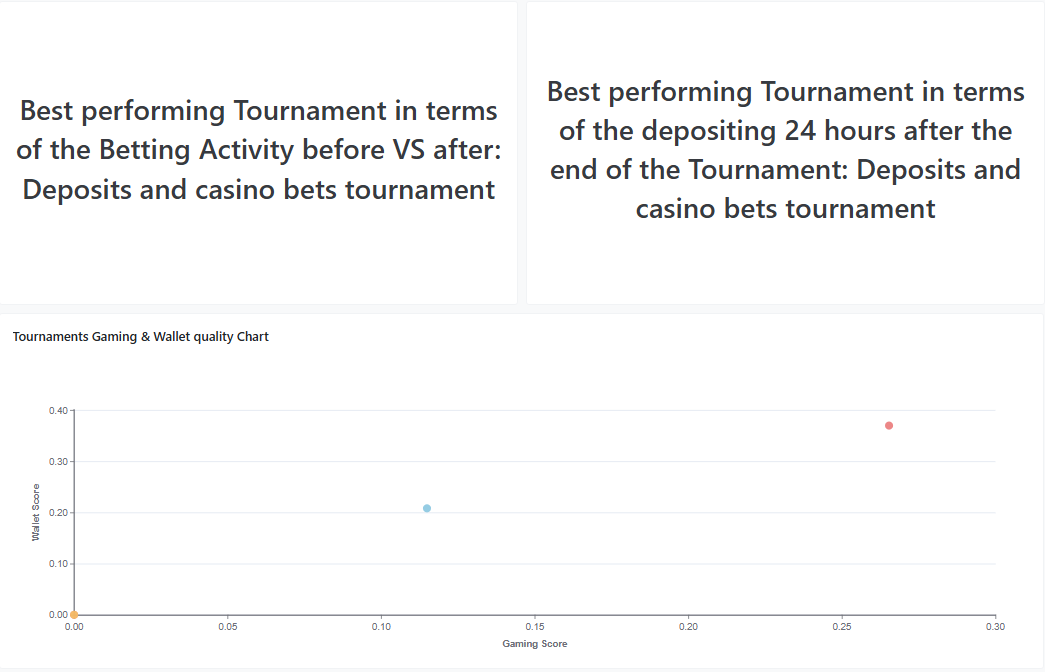
We’ve introduced a scatter chart, illustrating which Tournaments performed best for boosting the business Betting and Wallet Activity.
**Key Concept:**
The analysis calculates the quality of the Tournaments participants in terms of Gaming Score (considering the Betting amounts and number of bets before VS. after the Tournament) and the Wallet Score (considering the Depositing activity 24 hours after the end of the Tournament) and presents the Tournaments scatter within the range. In addition we indicate which Instances performed the best in terms of Bet Boost or Deposit Boost during the filtered period.
{% hint style="info" %}
**Value to You:**\
This section provides a quantitative framework for measuring tournament success based on the ability to drive sustained user betting activity (Gaming Score) and prompt immediate funding/deposits (Wallet Score). It is essential for identifying top-performing event designs and replicating the features that maximize both betting and wallet activity across future programs.
{% endhint %}
### Section 3: Daily KPIs trends per population
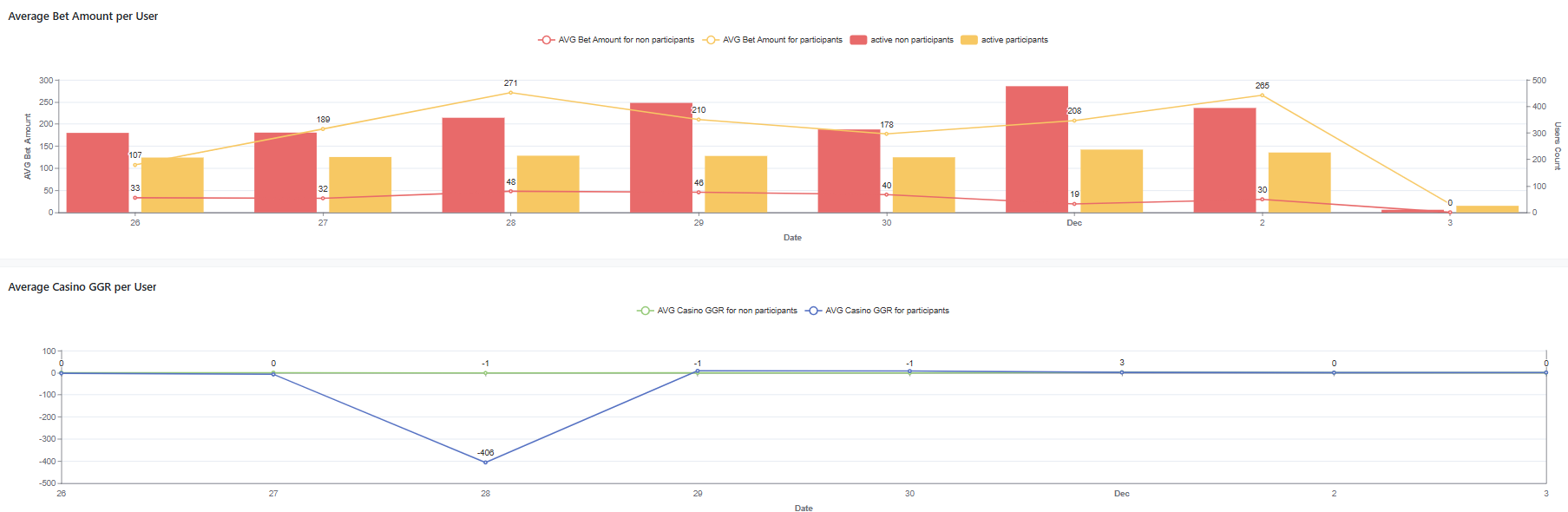
These charts show the daily trends of the average KPIs for the users that engaged in tournaments VS. users that didn't engage in tournaments.
**Key Metrics Included:**
* AVG Bet Amount - average Bet Amount per user per day
* Actives - unique users that had a Turnover or a Deposit during the day.
* AVG Casino GGR - average GGR created on Casino per user per day
*Please note that in case the tournaments are being offered only to a certain segment of the population, especially based on the users' value, the data could be biased.*
## ❓ Frequently Asked Questions (FAQ)
### How often is the Tournaments Dashboard updated compared to the in-game leaderboard?
The in-game player leaderboard updates in real-time as scoring events occur. In contrast, the Tournaments BI Dashboard is an analytical reporting suite powered by scheduled data warehouse pipelines, refreshing on a daily batch cycle to provide verified financial and operational metrics.
### Why do tournament bet amounts differ from our platform's overall casino or sports reports?
The Tournaments Dashboard calculates turnover based strictly on qualifying bets and gameplay events that contributed directly to tournament progress during the active tournament timeframe. It does not count non-qualifying games or activity outside tournament instance hours. Furthermore, the Summary tab applies a baseline activity deduction comparing participants' tournament days against non-tournament days over the previous 90 days.
### Why does Prize Cost or ROI show zero for completed tournaments?
Prize Monetary Cost and ROI calculations rely on populating the monetary cost value on bonus templates in the Back-Office. If a tournament awards prizes without configured bonus costs (such as free spins or points without assigned monetary values), prize cost defaults to zero and ROI cannot be computed.
### Can tournament leaderboards and standings be displayed to players without logging in?
Yes. Operators can expose tournament standings publicly on pre-login pages and promotional landing pages using Vibe Studio widgets or the public API.
### How are the 10 sub-periods in the Tournament Progress charts determined?
The total duration of the tournament instance (from start date/time to end date/time) is divided into 10 equal time intervals (deciles). For example, a 10-day tournament is divided into 1-day sub-periods, while a 20-day tournament is divided into 2-day sub-periods. This enables cohort analysis of when users enter the tournament and how their activity develops over its lifecycle.
### Why does the Unique Winners count exceed the number of prize places configured for the tournament?
When viewing tournament reports across a date range that includes multiple tournament instances (such as recurring daily or weekly tournaments), the report aggregates unique winning players across all completed instances in that timeframe. To inspect winners for a single competition, filter the report by the specific **Tournament Instance ID**.
### What is the difference between Registered Users and Participating Users in the Funnel?
**Registered Users** includes all players who opted in, paid a buy-in, or were automatically registered. **Participating Users** counts only registered players who completed at least one qualifying gameplay action that contributed points to the leaderboard.
{% hint style="info" %}
**Value to You:**\
These charts illustrate the contribution of the Tournament activity for the business.
{% endhint %}
## Daily Data tab
### Section 1: Tournament Participants Daily Total Bet Amount
This table presents the day-by-day gameplay and turnover metrics generated by tournament participants across the duration of active tournaments.
**Key Metrics Included:**
* Date - the activity date within the tournament period.
* Daily Casino & Sports Turnover - the total bet amounts placed by registered, opted-in, or qualified participants.
* Daily GGR - net gaming revenue generated from tournament participants on that date.
## Billing tab
### Section 1: Tournament Credit Consumption Overview
This tab tracks the operational credit costs associated with running tournaments on the platform.
**Key Visualizations:**
* Monthly Credits: Current & Last 3 Months - table summarizing monthly credit utilization for the current and preceding three billing periods.
* Current Month Daily Credits - bar chart displaying the day-by-day consumption of tournament credits during the active calendar month.
### Billing Modules and Consumption Metrics
Tournament credit consumption is driven by three key operational modules:
* **TournEnterServer:** Consumed when incoming gameplay events are processed by the server to evaluate tournament entry eligibility and matching conditions (charged before checking player registration).
* **TournEvaluateConditions:** Consumed periodically as scoring rules and qualification criteria are evaluated against incoming gameplay events.
* **TournActivate:** Consumed upon activating and scheduling tournament instances.
Usage is reported in millions of credits to align with the central Back-Office label billing overview.
---
# Agent Instructions
This documentation is published with GitBook. GitBook is the documentation platform designed so that both humans and AI agents can read, navigate, and reason over technical content effectively. Learn more at gitbook.com.
## Querying This Documentation
If you need additional information that is not directly available in this page, you can query the documentation by asking a question.
Perform an HTTP GET request on the following URL with the `ask` and `goal` query parameters:
```
GET https://help.smartico.ai/welcome/products/bi-and-reporting/tournaments-dashboard.md?ask=&goal=
```
`ask` is the immediate question: it should be specific, self-contained, and written in natural language.
`goal` is what the user is ultimately trying to achieve, the reason they need the answer. Sharing it helps GitBook give you a better, more relevant answer. A goal is most helpful when it describes the outcome the user wants rather than restating the question. For example, with `ask=how do I create an API token`, a goal like `automate deployments from our CI pipeline` lets GitBook tailor the answer to that use case.
The response will contain a direct answer to the question and relevant excerpts and sources from the documentation.
Use this mechanism when the answer is not explicitly present in the current page, you need clarification or additional context, or you want to retrieve related documentation sections.