> For the complete documentation index, see [llms.txt](https://help.smartico.ai/welcome/llms.txt). Markdown versions of documentation pages are available by appending `.md` to page URLs; this page is available as [Markdown](https://help.smartico.ai/welcome/products/crm-automation/activities-of-flows/activity-save-state.md).
# Activity: Save State
Save State is a campaign flow step used to **capture and store dynamic data at a specific moment**. Once saved, this data becomes accessible throughout the rest of the flow and can be reused for personalization and tag replacement inside creatives and communications.
When triggered, Save State stores the current value of one or more selected user state properties (such as First Deposit Date, Registration Date, or Language). These saved values can then be referenced in creatives using tags in the format {{campaign.state.property\_name}} (for example, {{campaign.state.user\_first\_name}}), allowing operators to inject point-in-time values into assets and outgoing communications.
{% hint style="warning" %}
Campaign tags cannot be used in JavaScript functions executed in the frontend widget; only public tags (markers) can.
{% endhint %}
### Configuration
To configure the step, select the **Save State** node in the campaign builder:
1. In the configuration panel, click **Properties to save**.
2. Choose one or more user properties from the dropdown list that you want to snapshot at this point in the flow.
3. Save the step.
If no properties are selected, the node displays **Missing setup** on the canvas and will not capture any values.
Save state is especially useful when you need to preserve a value at a specific point in time and ensure consistency across later stages of the campaign, even if the original source changes.
### How Save State Works
* **Instance-scoped snapshot**: Values saved by this step are stored within the specific user's campaign execution instance. They do not alter or overwrite the user's permanent CRM profile.
* **Persistence across delays**: Snapshotted values remain available across subsequent flow steps, including **Delay**, **Delay Till**, and **Wait for Event** nodes.
* **Fallback values**: You can specify a fallback default value inside the tag syntax using a pipe: `\{{campaign.state.property_name|Default Value\}}`. If no value was saved for the property, the default text is displayed.
### Use case scenario
There are many cases when the campaign starts on some particular action but the communication about it only comes way later. Let’s say the campaign starts on a minigame win, and then you want to use the name of the minigame prize won in the communication to users. But first you need to check for the preferred communication method, unsubscription, etc. So there’s bound to be at least one step between the campaign start and the communication sendout. And to enable the usage of a dynamic property “Minigame: prize name“ - we can use the “save state” step.
\
### Outgoing connections
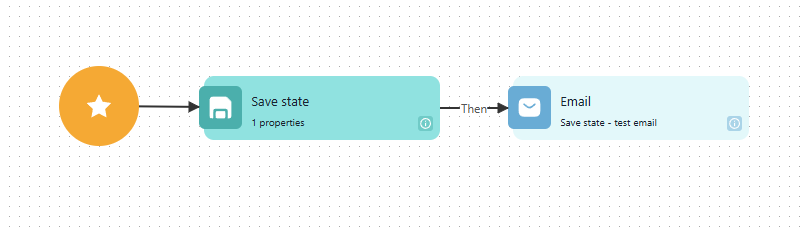
The Save state step has one outgoing connection:
Outgoing connections of Save state in a flow. The numbers match the table below.
| # | Connection | When the player goes this way |
| - | ---------- | ------------------------------------------- |
| 1 | **Then** | After the chosen property values are saved. |
### FAQ
**What is the difference between Save State and Mark User?**
*Save State* captures a point-in-time snapshot of user properties stored exclusively for the current campaign run (accessed via `\{{campaign.state.property_name\}}`) without modifying the user's CRM profile. *Mark user* assigns a permanent marker (core tag) directly to the user's CRM profile, making it globally visible across the Back-Office and usable in segments and other campaign conditions.
**Why is my tag not replacing when I write `\{{campaign.property_name\}}`?**
Properties captured by the Save State activity require the `state.` prefix: `\{{campaign.state.property_name\}}`. Tags formatted as `\{{campaign.property_name\}}` without `state.` only resolve custom tags defined in the campaign's *Campaign tags* tab and, for some trigger events, the event properties that Smartico saves automatically when the campaign starts.
**Can I use Save State values in Check User Profile or branching conditions?**
No. Flow branching nodes like *Check user profile* and *Multiple check* evaluate against live CRM user state or immediate event payloads. Save State values are exclusively available for template tag replacement in outgoing communications and webhooks.
**How do I preserve dynamic event data when there is a delay before sending a message?**
If the trigger event updates a user state property upon arrival, add a *Save State* node immediately after the campaign start to snapshot that property. When subsequent messages are delivered after delays or wait steps, reference `\{{campaign.state.property_name\}}` to ensure the communication uses the initial captured value.
---
# Agent Instructions
This documentation is published with GitBook. GitBook is the documentation platform designed so that both humans and AI agents can read, navigate, and reason over technical content effectively. Learn more at gitbook.com.
## Querying This Documentation
If you need additional information that is not directly available in this page, you can query the documentation by asking a question.
Perform an HTTP GET request on the following URL with the `ask` and `goal` query parameters:
```
GET https://help.smartico.ai/welcome/products/crm-automation/activities-of-flows/activity-save-state.md?ask=&goal=
```
`ask` is the immediate question: it should be specific, self-contained, and written in natural language.
`goal` is what the user is ultimately trying to achieve, the reason they need the answer. Sharing it helps GitBook give you a better, more relevant answer. A goal is most helpful when it describes the outcome the user wants rather than restating the question. For example, with `ask=how do I create an API token`, a goal like `automate deployments from our CI pipeline` lets GitBook tailor the answer to that use case.
The response will contain a direct answer to the question and relevant excerpts and sources from the documentation.
Use this mechanism when the answer is not explicitly present in the current page, you need clarification or additional context, or you want to retrieve related documentation sections.