# User Profile Page

The User Profile Page gives you a full overview of an individual user in the CRM & Gamification system. It brings together account data, communication settings, personal details, and gamification progress. From here, you can check statuses, take quick actions, and manage how the user interacts with both CRM and Gamification features.

<figure><img src="/files/0zI7JGfvIcM6aqmoede1" alt=""><figcaption><p>BO: CRM User profile page</p></figcaption></figure>

***

### Username and Quick Actions

At the top of the page you will find the user’s key identifiers (username, external ID, Smartico ID). Just below are quick action buttons that allow you to immediately engage the user.

* Messaging tools: SMS, Mail, Popup, Push Message, Inbox
* Gamification tools: Give Mission, Give Bonus, Adjust Points, Give Mini-Game, Give Raffle Ticket
* UI tools: UI Widgets, Loyalty UI

These actions are designed for fast interventions, such as sending a reward or assigning a mission or instantly opening the Gamification view to mirror the user's experience.

{% hint style="info" %}
**Note:** Messaging tools must already be integrated with your selected providers. Campaigns for these tools need to be created and managed on your side.
{% endhint %}

<figure><img src="/files/zjqlKRPm4lBxRKwwCKeh" alt=""><figcaption><p>BO: Username and quick action buttons in header</p></figcaption></figure>

***

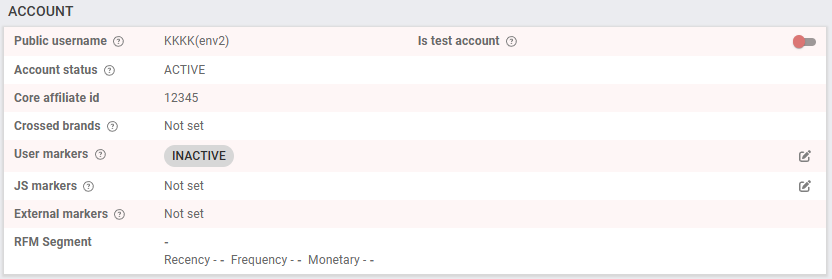
### Account Information

This section provides the system-level status of the user:

* Account Status shows if the profile is currently Active or Inactive.
* Affiliate & Brand Data (Affiliate ID, crossed brands) is available for tracking acquisition sources.
* Markers (User, JS, External) can be applied to tag and classify users for segmentation.
* RFM Segment places the user into a Recency, Frequency, Monetary group for behavioral analysis.

You can use this area to identify the user and understand how they are segmented.

<figure><img src="/files/6Pcz7bQhyst7XQj0Eltu" alt=""><figcaption><p>BO: Account section of User profile page</p></figcaption></figure>

***

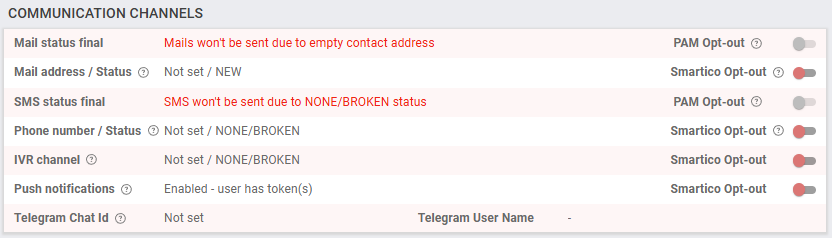
### Communication Channels

The Communication Channels section is not used to send messages but to verify if communications will be sent and why they may not be delivered.

* You can check all statuses in detail here: <https://help.smartico.ai/welcome/products/crm-automation/communication-channels/opt-out-and-communication-statuses>
* Mail, SMS, IVR, Push Notifications, and Telegram are all shown here, each with a status field.
* Opt-in/out toggles allow you to see and control whether the user is opted in or out of each channel.

This section answers two key operator questions:

1. Can the system actually reach this user?
2. Has the user allowed or blocked communication on this channel?

By checking here first, you can avoid wasted sends and troubleshoot delivery problems.

<figure><img src="/files/iTQsLx6ALCCj61FtxPNV" alt=""><figcaption><p>BO: Comm channels section of User profile page</p></figcaption></figure>

***

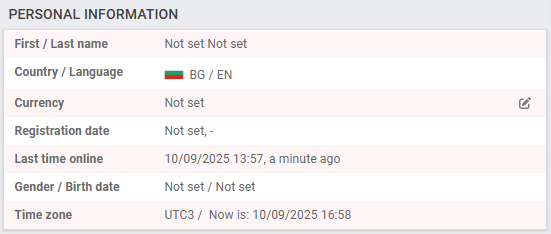
### Personal and Session Information

Two boxes provide additional user context:

* Personal Information: First and last name, country, language, currency, registration date, last time online, gender, date of birth, and current time zone.
* Location & Session Info: First/last known country, last browser and device used, and the last site accessed.

This helps you confirm user identity and understand the environment from which the user is connecting.

<figure><img src="/files/DjvZuIxBegN1cBHIe8DG" alt=""><figcaption><p>BO: Personal information section of User profile page</p></figcaption></figure>

***

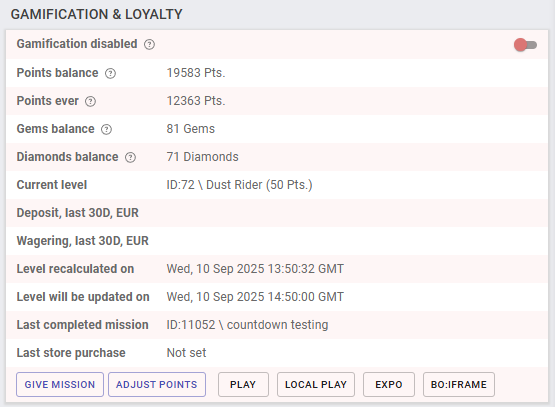
### Gamification & Loyalty

Here, you can track how the user interacts with gamification features:

* Balances: Points, gems, and diamonds.
* Progress: Current level, active missions, last completed mission.
* Monetary activity: Deposits and wagering in the last 30 days.
* System updates: When the user’s level was last recalculated and when the next update is due.

You can also use action buttons at the bottom of this section (Give Mission, Adjust Points, etc...) to directly adjust or test gamification features.

This section is especially useful for rewarding engaged users or re-engaging inactive ones.

<figure><img src="/files/X0Wjc1XXT6PYAJvdOR6c" alt=""><figcaption><p>BO: Gamification &#x26; Loyalty section of User profile page</p></figcaption></figure>

***

### Favorite Product and Churn Risk

* Favorite Product shows what verticals the user prefers (casino, sport, lottery) and can also include favorite categories or games if configured.
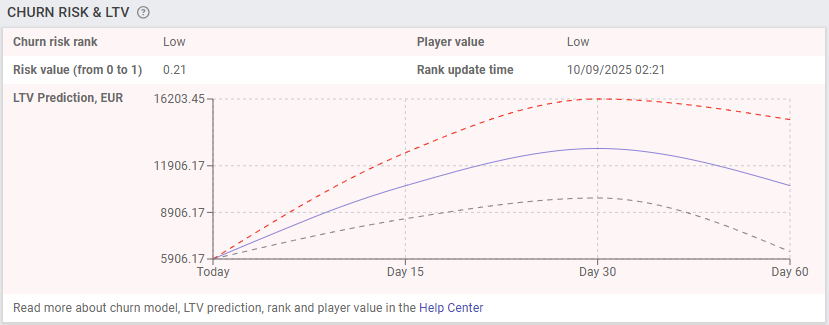
* Churn Risk & LTV (when enabled) gives predictive insights into whether the user may churn and what their potential lifetime value is. If no model is applied, this section simply states that no assessment has been made.

This area helps you personalize offers and prioritize users who may need retention actions.

<figure><img src="/files/26oCyUeZfURqUneSndRJ" alt=""><figcaption><p>BO: Churn risk section of User profile page</p></figcaption></figure>

<figure><img src="/files/2dne18Eu15T2b7olnJCV" alt=""><figcaption><p>BO: Best time section of User profile page</p></figcaption></figure>

***

### Side Navigation Menu

On the right-hand side, the navigation menu lets you open additional sections without leaving the profile.

* Marketing: Profile Overview, User State, Communication history, Campaigns, Segments, UX Sessions, Events.
* Gamification: Progress, Points Log, Active Missions, Tournaments, Mini Games, Unclaimed Prizes, Raffle Winnings, Bonuses.
* Other: Store Purchases, Custom Reports, Audit.
* User Activities: Sport Bets, Casino Bets.

Each link loads data only for the specific user currently being viewed, and is mostly used for identification or troubleshooting purposes.

***

### Operator Best Practices

* Always check Communication Channels before sending campaigns to ensure delivery is possible.
* Use quick actions when fast engagement is required (missions, bonuses, adjustments).
* Review gamification balances and progress to spot high-value or disengaged users.
* Consult Favorite Product and Churn Risk for targeted retention strategies.
* Use the side navigation to quickly dig into campaigns, bets, or rewards tied to the user.\ <br>

***

<br>


---

# Agent Instructions: Querying This Documentation

If you need additional information that is not directly available in this page, you can query the documentation dynamically by asking a question.

Perform an HTTP GET request on the current page URL with the `ask` query parameter:

```
GET https://help.smartico.ai/welcome/products/crm-automation/segmentation/user-profile-page.md?ask=<question>
```

The question should be specific, self-contained, and written in natural language.
The response will contain a direct answer to the question and relevant excerpts and sources from the documentation.

Use this mechanism when the answer is not explicitly present in the current page, you need clarification or additional context, or you want to retrieve related documentation sections.