> For the complete documentation index, see [llms.txt](https://help.smartico.ai/welcome/llms.txt). Markdown versions of documentation pages are available by appending `.md` to page URLs; this page is available as [Markdown](https://help.smartico.ai/welcome/products/mini-games/voyager.md).

# Voyager

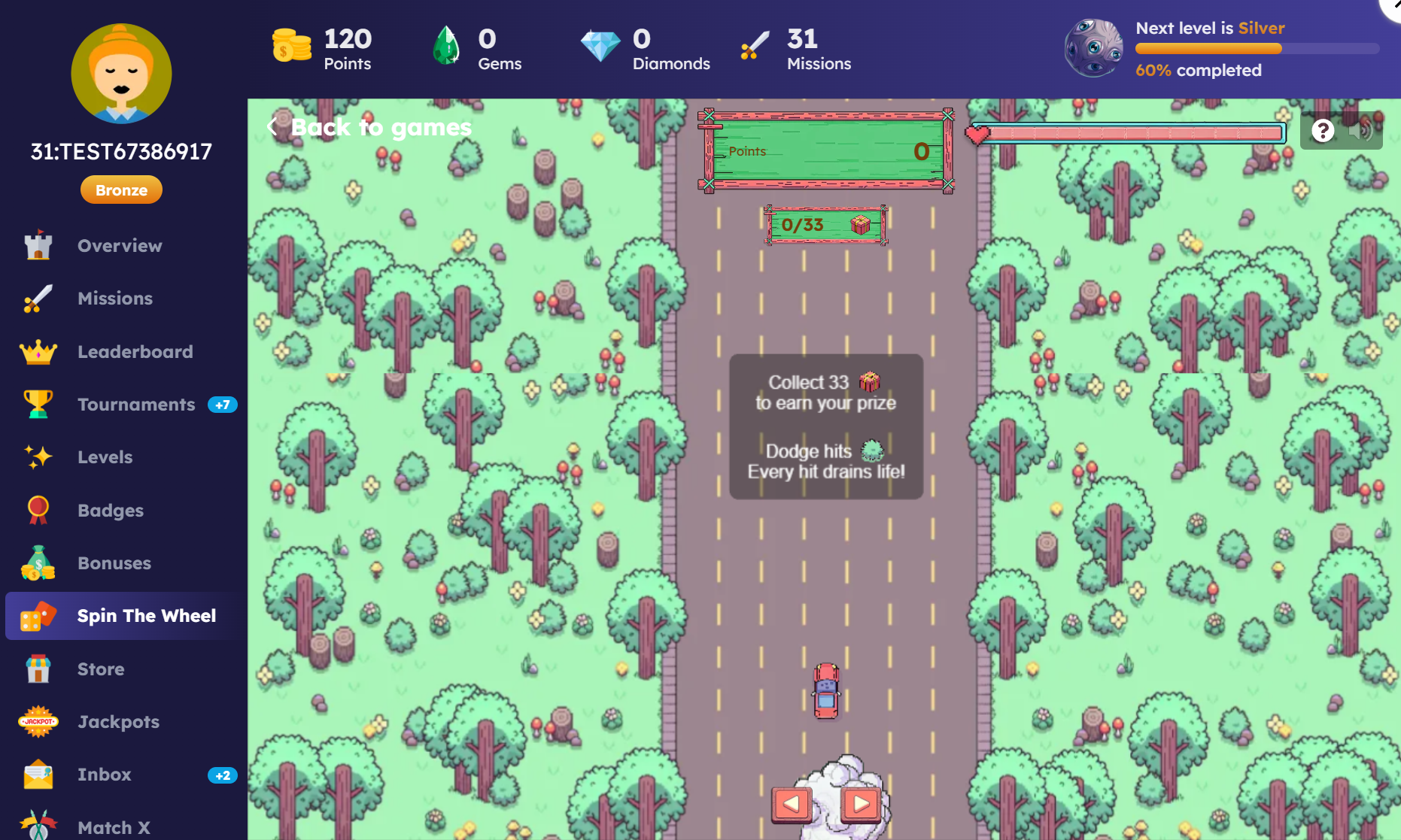
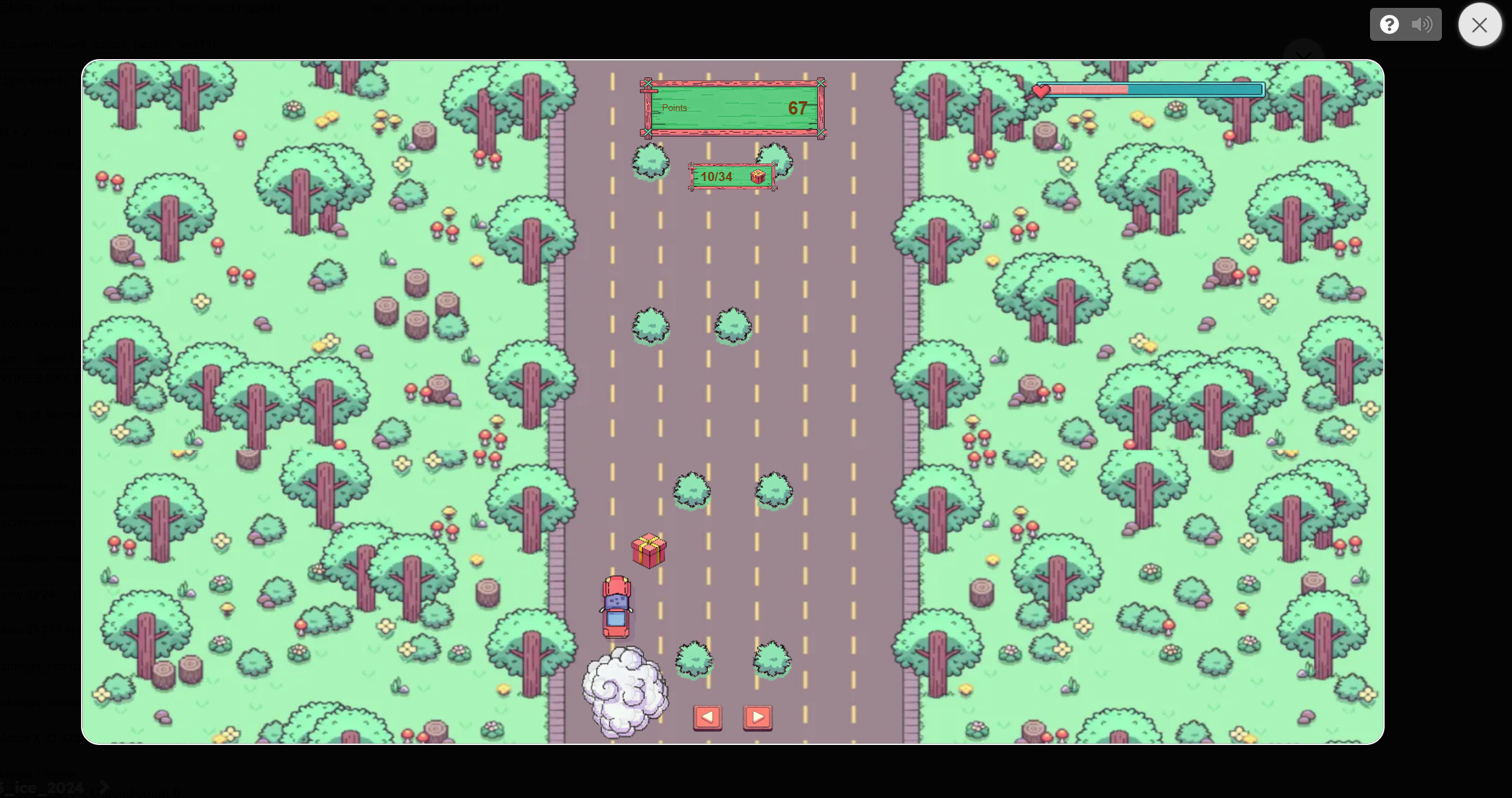
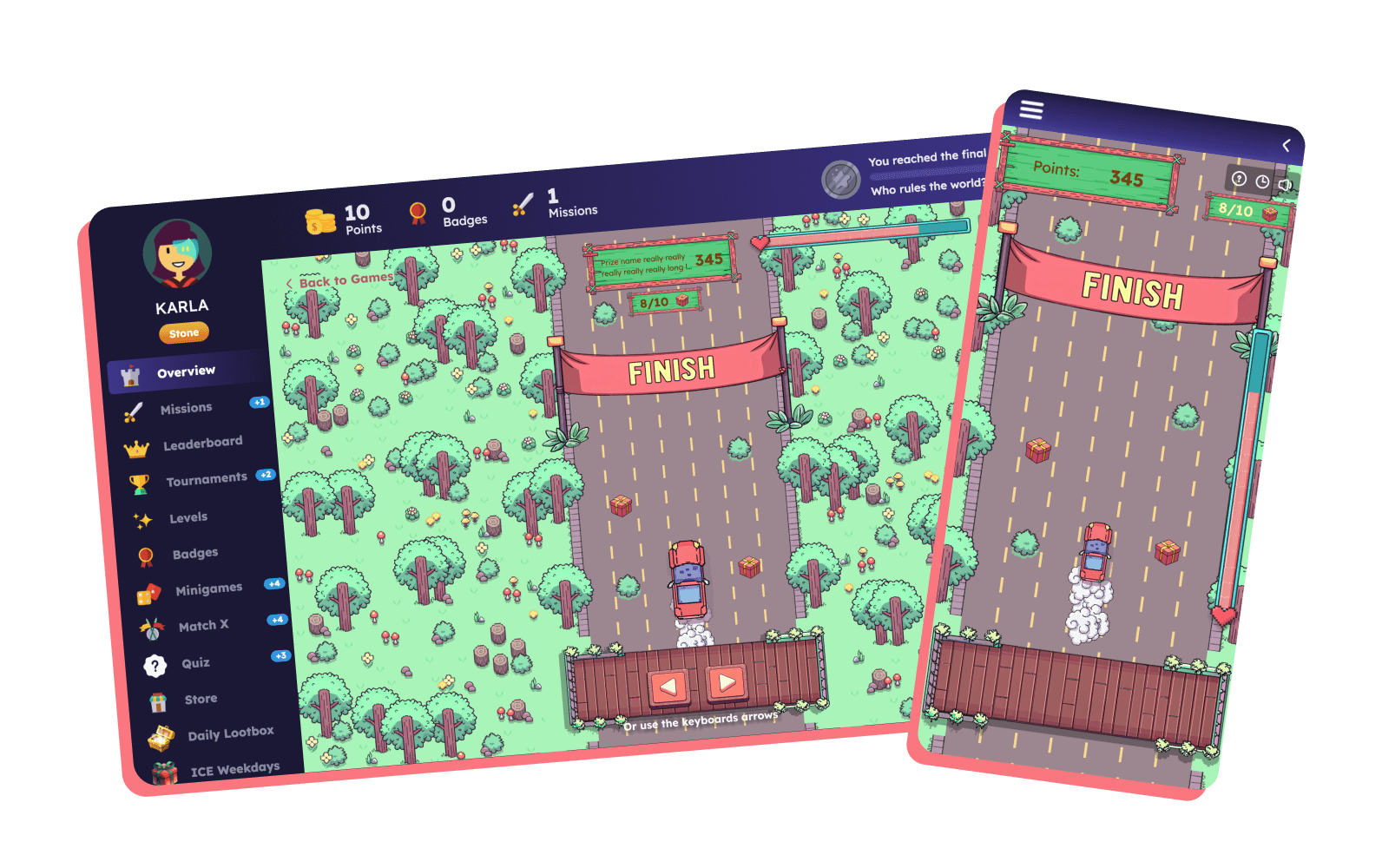
Voyager is a retention-focused mini-game where players accumulate rewards by collecting prizes while avoiding obstacles. The goal is simple: collect all required prizes before the player’s life bar depletes. Players control a moving object (plane, boat, or car), navigating through obstacles. Each hit reduces the life bar, and too many hits lead to game over.

<figure><img src="https://77049817-files.gitbook.io/~/files/v0/b/gitbook-x-prod.appspot.com/o/spaces%2FfS5hl0PiysHtKAKMsQTe%2Fuploads%2Fgit-blob-d846e7afce58747f07ee4bf61a3f34615a8452a1%2Fskin%202.png?alt=media" alt=""><figcaption></figcaption></figure>

### :question: How it works

The ‘Voyager’ mini-game comes with 3 pre-built global skins (ready to use), but it is fully customizable, and it allows you to create your own skin. You can also specify the type and quantity of prizes, determine the cost type for attempts (free, gamification points, or spin attempts), define the user segment eligible to access the game, and much more.

**Gameplay Overview**

1. Starting the game:
   1. Players press Start, then view a short instruction screen.
   2. The character starts moving forward automatically.
   3. Players collect prizes and avoid obstacles.
2. Prize Tracking:
   1. Prize Name (points, free spins, bonuses, etc.) is revealed once gameplay begins.
   2. Each prize contributes to:
      1. Progress Counter → shows progress (e.g., 8/10 collected).
      2. Prize Counter → tracks total accumulated reward.
   3. Modifiers may alter the score:
      1. Multipliers (×2, ×5, ×10)
      2. Dividers (/2, /5, /10)
      3. Reset to 0
      4. Empty (0x)

<div><figure><img src="https://77049817-files.gitbook.io/~/files/v0/b/gitbook-x-prod.appspot.com/o/spaces%2FfS5hl0PiysHtKAKMsQTe%2Fuploads%2Fgit-blob-d9e90e8e3111caa6cd6e4ad9e4e75507e4a274d8%2Fdivide-ten.png?alt=media" alt=""><figcaption></figcaption></figure> <figure><img src="https://77049817-files.gitbook.io/~/files/v0/b/gitbook-x-prod.appspot.com/o/spaces%2FfS5hl0PiysHtKAKMsQTe%2Fuploads%2Fgit-blob-6bb9996675abe549fd6cce4a288bc42bc2a53433%2Fmultiply-ten.png?alt=media" alt=""><figcaption></figcaption></figure> <figure><img src="https://77049817-files.gitbook.io/~/files/v0/b/gitbook-x-prod.appspot.com/o/spaces%2FfS5hl0PiysHtKAKMsQTe%2Fuploads%2Fgit-blob-e3fbed478ab1e3f19e4de416a59863d89797319a%2Freset.png?alt=media" alt=""><figcaption></figcaption></figure> <figure><img src="https://77049817-files.gitbook.io/~/files/v0/b/gitbook-x-prod.appspot.com/o/spaces%2FfS5hl0PiysHtKAKMsQTe%2Fuploads%2Fgit-blob-bb7927093a1a87a479453e44e38e6aadb7343416%2Fzero-modifier.png?alt=media" alt=""><figcaption></figcaption></figure> <figure><img src="https://77049817-files.gitbook.io/~/files/v0/b/gitbook-x-prod.appspot.com/o/spaces%2FfS5hl0PiysHtKAKMsQTe%2Fuploads%2Fgit-blob-b8e9dfed50813481ee904470be2082e0ee65a386%2Fdivide-five.png?alt=media" alt=""><figcaption></figcaption></figure></div>

3. Game progression:
   1. The game can end in a win or a loss.
   2. Max duration: 5 minutes (hardcoded, not visible on the UI).
   3. Players win and receive the prize if:
      1. All prizes are collected within the time limit.
      2. Life bar doesn’t fully deplete.
   4. Players lose and don’t get any prize if:
      1. Time runs out.
      2. Too many hits deplete the life bar.

{% hint style="success" %}
**Note:** Prize amount, score modifiers, and max number of steps in the game are configurable in the BO.
{% endhint %}

4. Game Over & Difficulty

Voyager includes 3 difficulty modes:

* **Easy (default):** High tolerance for hits, life decreases slowly.
* **Medium:** Moderate tolerance, life decreases faster.
* **Hard:** Strict tolerance, life decreases rapidly.

Allowed hits also scale with the number of prizes required.

<table><thead><tr><th width="164">Prizes to collect</th><th width="190">Easy - Allowed hits</th><th>Medium - Allowed hits</th><th>Hard - Allowed hits</th></tr></thead><tbody><tr><td>1 - 5</td><td>25</td><td>17</td><td>11</td></tr><tr><td>6 - 10</td><td>45</td><td>25</td><td>18</td></tr><tr><td>11 - 15</td><td>65</td><td>33</td><td>25</td></tr><tr><td>16 - 20</td><td>85</td><td>40</td><td>32</td></tr><tr><td>21 - 25</td><td>105</td><td>46</td><td>39</td></tr><tr><td>26 - 30</td><td>125</td><td>53</td><td>45</td></tr><tr><td>31 - 36</td><td>145</td><td>60</td><td>50</td></tr></tbody></table>

<figure><img src="https://77049817-files.gitbook.io/~/files/v0/b/gitbook-x-prod.appspot.com/o/spaces%2FfS5hl0PiysHtKAKMsQTe%2Fuploads%2Fgit-blob-45d4d7d95982cb14b96a208efd3c992a35dc8cf0%2FScreenshot_21.png?alt=media" alt=""><figcaption><p>GF Widget: Voyager mini-game</p></figcaption></figure>

### :tools: Configuration

You can set up the Voyager mini-game from the BO under the Mini-Games section in the Gamification tab. The game configuration template is similar to other random mini-games, featuring tabs for General and Advanced Settings, Prizes, Winnings, No Claimed Prizes, BI, and Used In.

However, the Voyager introduces a few unique options in the Advanced settings and in the Prize configuration.

<figure><img src="https://77049817-files.gitbook.io/~/files/v0/b/gitbook-x-prod.appspot.com/o/spaces%2FfS5hl0PiysHtKAKMsQTe%2Fuploads%2FFU3rAKdJOOgwdQFuKhLo%2Fimage%20(54).png?alt=media&amp;token=9c17e9f7-4b82-4696-96f0-676136f04cc5" alt=""><figcaption><p>BO: Voyager game template Advanced settings</p></figcaption></figure>

**Advanced settings:**

* **'Max. number of prizes that can be collected'**. Define the maximum prizes a player can collect in a single session. For example, if you enter 10, the prizes that need to be collected in a single game session will be a random number between 1 and 10, and the number will vary each time the game is played.
* **'Min. number of prizes that can be collected.'** This setting works together with ‘Max. number of prizes that can be collected’ and allows you to define a range for the number of prizes players must collect during a game session. It also helps prevent scenarios where players can finish the game too quickly by receiving a very low target number of prizes to collect (e.g. 2 prizes).
* **Input Limits and Defaults:** The maximum number of prizes can be set from 1 up to 36 (default is 15 in the template form). The minimum number of prizes must be at least 1 and cannot exceed the maximum value. Both settings directly determine the number of collectible reward steps and path length generated for the session.

Example: Random Range

* Min. number of prizes to collect = 5
* Max. number of prizes to collect = 15

In this case, each time a player starts the game, a random target number between 5 and 15 will be generated. Players will always need to collect at least 5 prizes and at most 15 prizes.

By default, the minimum value is 1. This means that if the maximum is set to a higher number, players may receive very low targets such as 1 or 2 prizes. Leaving the field empty results in the same default behavior.

Example: Fixed Number

* Min. number of prizes to collect = 10
* Max. number of prizes to collect = 10

In this setup, players will always need to collect exactly 10 prizes to complete the game.

* **The ‘Game difficulty’** option allows you to choose between 3 modes - Easy (default), Medium, and Hard. For example, in Easy mode, players can hit many obstacles before losing the game, which makes it easy to win.
* **Seed Window (minutes) -** lets you keep the same obstacle layout for all players during a defined period of time. By default the field is empty, meaning the obstacle pattern sequence is shuffled randomly each time a player starts a game session. When a value is set, the obstacle layout - including the sequence of obstacle patterns and the total number of path steps - stays fixed for the full duration of the window. For example, with a Seed Window of 5 minutes, every player who starts a game within those 5 minutes plays on an identical map. Once the window expires, a new layout is generated for the next period. Prizes are still determined individually by the server for each spin.

**The Prize configuration settings** have been updated with the following new options:

* **Prize amount** - The prize amount specifies the final amount the player wins at the end of the game. This amount remains the same even if score modifiers are enabled. If the prize type is points, the option changes to the ‘Points amount’.
* **Prize name (without amount)** - If the prize type is points, bonus, jackpot, or tangible items the prize name should not contain any amount.
* **Hide prize until won** - by default the setting is disabled, but when enabled the prize name remains hidden during gameplay and is only revealed in the winning pop-up once a player wins it.
* **Allow split by decimal** - available for Bonus and Tangible item prize types (disabled for Points and Gems & Diamonds). When enabled, the prize amount can be split into decimal numbers across the collected prize steps.
* **Score modifiers** - You have the option to choose score modifiers for each prize type. These modifiers will appear randomly during gameplay. You can select multiple modifiers, just one, or none. The score modifiers won't change the final prize amount.

{% hint style="warning" %}
If the ‘No prize’ type is set as the winning prize, the game will end as soon as the player collects their first prize.
{% endhint %}

**Standalone mode:**

You can trigger the game in standalone mode directly from a campaign or via a deep link. This allows you to launch the game from any context, such as a mission or another feature.

* **dp:gf\_saw\&id=123** -> will open the game with id 123 in the Gamification widget context
* **dp:gf\_saw\&id=123\&standalone=true** -> will open the game with id 123 in standalone mode

<figure><img src="https://77049817-files.gitbook.io/~/files/v0/b/gitbook-x-prod.appspot.com/o/spaces%2FfS5hl0PiysHtKAKMsQTe%2Fuploads%2Fgit-blob-0bc79c29658e7499855dda5d633507b21ca00a53%2FScreenshot_26.png?alt=media" alt=""><figcaption><p>Standalone mode for Voyager game</p></figcaption></figure>

### :art: Skinning

{% hint style="success" %}
We can provide a Figma template for Mini-games skins upon request.

Please note that any images exported from the template must be compressed before uploading them to the BO. You can use [\[this link\]](https://tinypng.com/) to compress your images.

For further assistance, please contact your Customer Success Manager!
{% endhint %}

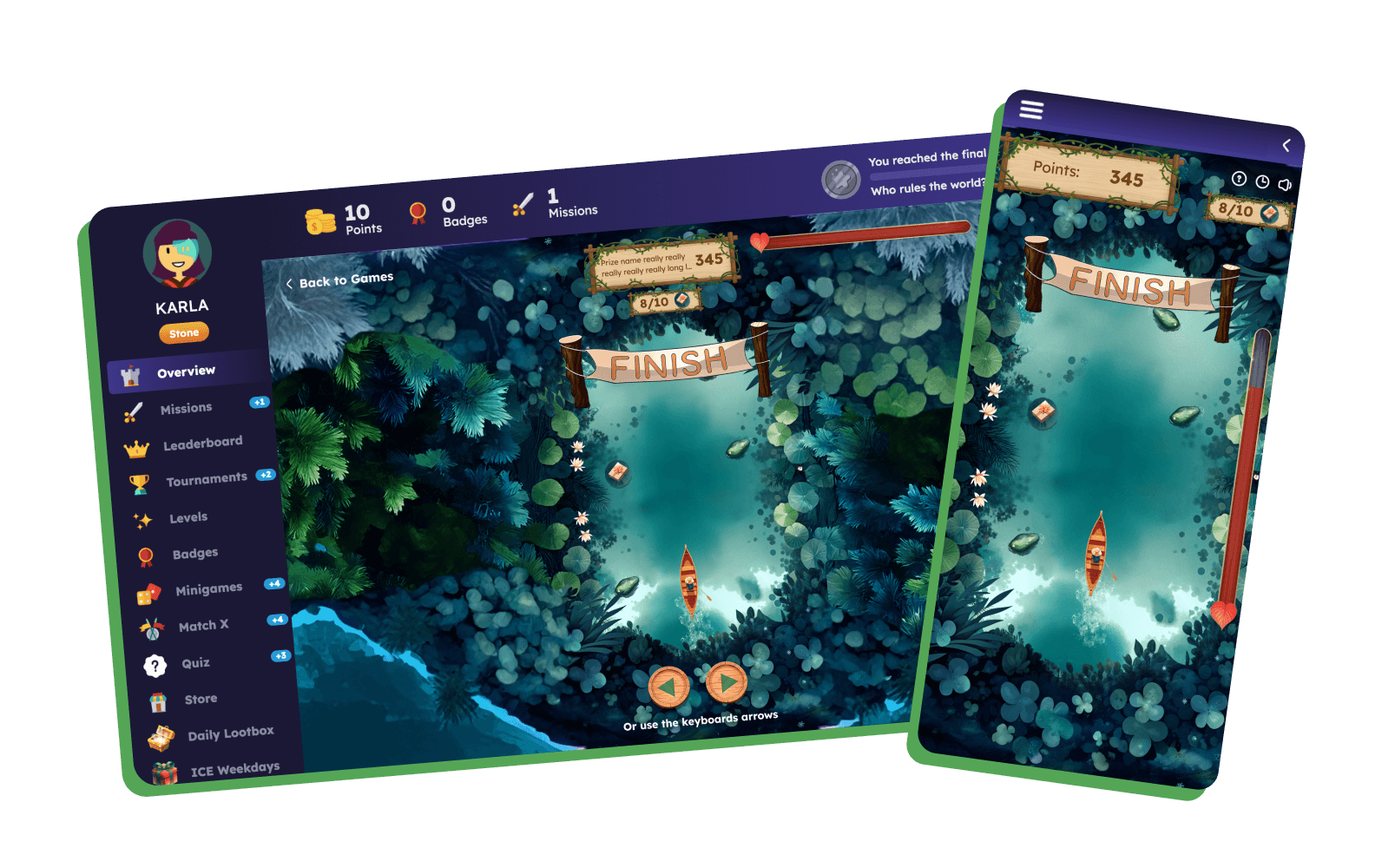
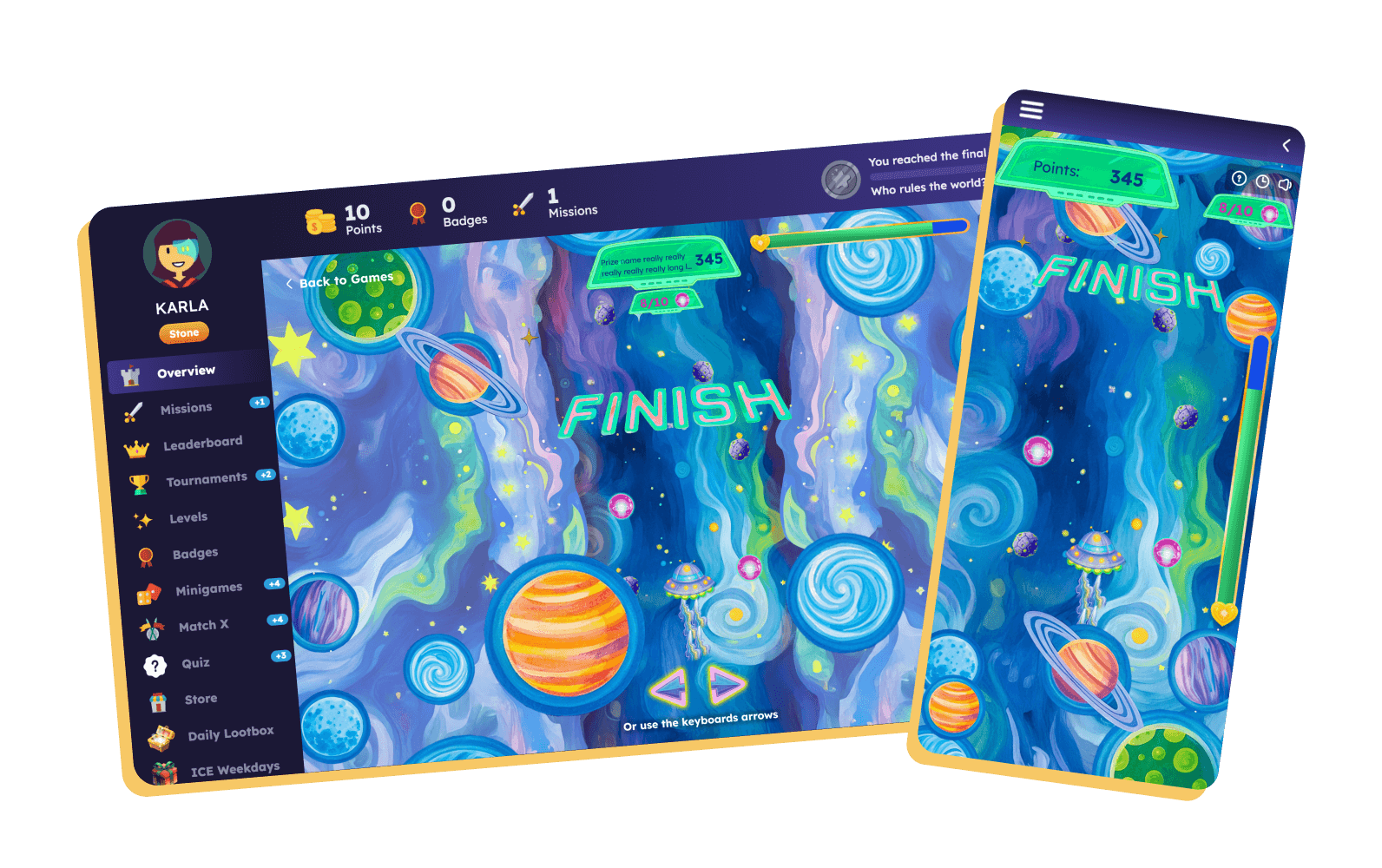
The Voyager comes with 3 pre-built global skins (ready to use):

{% file src="/files/0xjeZPJltgJQxtsbLcKt" %}

<div data-full-width="false"><figure><img src="https://77049817-files.gitbook.io/~/files/v0/b/gitbook-x-prod.appspot.com/o/spaces%2FfS5hl0PiysHtKAKMsQTe%2Fuploads%2Fgit-blob-fdbe03bcd12142491a9d7fa34d07e34f4c304f0a%2Fskin%201.png?alt=media" alt="" width="563"><figcaption></figcaption></figure></div>

{% file src="/files/1hMgqsbJTJp81e4hZiHU" %}

<figure><img src="https://77049817-files.gitbook.io/~/files/v0/b/gitbook-x-prod.appspot.com/o/spaces%2FfS5hl0PiysHtKAKMsQTe%2Fuploads%2Fgit-blob-d846e7afce58747f07ee4bf61a3f34615a8452a1%2Fskin%202.png?alt=media" alt="" width="563"><figcaption></figcaption></figure>

{% file src="/files/xaAL95Qf3MYgrSXO80x8" %}

<figure><img src="https://77049817-files.gitbook.io/~/files/v0/b/gitbook-x-prod.appspot.com/o/spaces%2FfS5hl0PiysHtKAKMsQTe%2Fuploads%2Fgit-blob-0a7ad7623368e56d8ef4edfdd173131403674858%2Fskin%203.png?alt=media" alt="" width="563"><figcaption></figcaption></figure>

<mark style="color:purple;">Find more Voyager skins in:</mark>

{% embed url="<https://help.smartico.ai/welcome/products/mini-games/custom-skins-for-mini-games/voyager>" %}

### :bulb: Tips and Hints

You can adjust the difficulty of the Voyager game by combining the Game Mode (Easy, Medium, Hard) with the Max. number of prizes to collect setting:

* Easier Gameplay (Quick Wins):\
  Use Easy mode with a small number of max. prizes to collect (e.g., 5).\
  → Players will have 25 hits allowed and only 1–5 prizes to collect, making the game very easy to win.
* Balanced Challenge:\
  Use Medium mode with max prizes to collect - 10\
  → Players will need to collect 6–10 prizes with 25 hits allowed, giving a fair challenge.
* Harder Gameplay (Lower Win Rate):\
  Use Hard mode with a bigger number of max. prizes to collect (e.g., 20)\
  → Players will need to collect 16–20 prizes but will only have 32 hits allowed, making the game much more difficult.

### Related Documentation

* For custom skin file specifications, sprite sheet animation (400x400 px frames), and global skin downloads, see [Custom skins for Mini-games](https://help.smartico.ai/welcome/products/mini-games/custom-skins-for-mini-games) and [Voyager Skins](https://help.smartico.ai/welcome/products/mini-games/custom-skins-for-mini-games/voyager-skins).
* For launching mini-games on landing pages, see [Mini-games on the landing pages](https://help.smartico.ai/welcome/products/mini-games/mini-games-on-the-landing-pages).

<br>

### FAQ

**Q: Do score modifiers (multipliers/dividers) increase or change the final payout amount?**

A: No. The actual prize amount is determined server-side when the game starts and is fixed. In-game score modifiers (×2, ×5, /2, Reset) and the running points counter are visual gameplay effects designed to build excitement. If the player completes the run without losing all health, they receive the exact configured prize amount.

**Q: How do I translate the Voyager game name and prize descriptions into other languages?**

A: In the mini-game template's General tab, click the globe translation icon next to the public 'Name' field to enter localized names for each supported language. Similarly, in the Prizes tab, you can provide localized prize names for winning pop-ups.

**Q: What happens if a player loses all lives during the game?**

A: If a player exhausts their life bar from hitting too many obstacles or runs out of time, the game ends in a loss and no prize is awarded. The server voids the spin and returns the drawn item back to the prize pool. Note that if 'No prize' was drawn as the winning prize, the session completes after collecting the first item.


---

# Agent Instructions
This documentation is published with GitBook. GitBook is the documentation platform designed so that both humans and AI agents can read, navigate, and reason over technical content effectively. Learn more at gitbook.com.

## Querying This Documentation
If you need additional information that is not directly available in this page, you can query the documentation by asking a question.

Perform an HTTP GET request on the following URL with the `ask` and `goal` query parameters:

```
GET https://help.smartico.ai/welcome/products/mini-games/voyager.md?ask=<question>&goal=<user_goal>
```

`ask` is the immediate question: it should be specific, self-contained, and written in natural language.
`goal` is what the user is ultimately trying to achieve, the reason they need the answer. Sharing it helps GitBook give you a better, more relevant answer. A goal is most helpful when it describes the outcome the user wants rather than restating the question. For example, with `ask=how do I create an API token`, a goal like `automate deployments from our CI pipeline` lets GitBook tailor the answer to that use case.

The response will contain a direct answer to the question and relevant excerpts and sources from the documentation.

Use this mechanism when the answer is not explicitly present in the current page, you need clarification or additional context, or you want to retrieve related documentation sections.