> For the complete documentation index, see [llms.txt](https://help.smartico.ai/welcome/llms.txt). Markdown versions of documentation pages are available by appending `.md` to page URLs; this page is available as [Markdown](https://help.smartico.ai/welcome/products/ai-models/value-score.md).
# Value Score
**Value Score Segmentation** is a feature designed to help operators analyse and understand player behaviour.
Value Score segmentation clarifies each player's relative contribution to the business. This insight empowers operators to calibrate their engagement strategies, ensuring marketing resources are focused where they yield the highest return.
This segmentation enables operators to optimize marketing efforts by developing targeted campaigns and strategies to maximize the lifetime value of their player base.
The model classifies players into four distinct value tiers:
* **Top** Value Score: The elite population generating the highest value-per-player for the brand.
* **High** Value Score: The second-highest tier, representing high-value contributors with significant potential.
* **Medium** Value Score: The core player base, performing above the general mass average.
* **Low** Value Score: The mass population with the lowest relative value-per-player.
**Where to find it:**
Value score is presented as two properties for each eligible user:
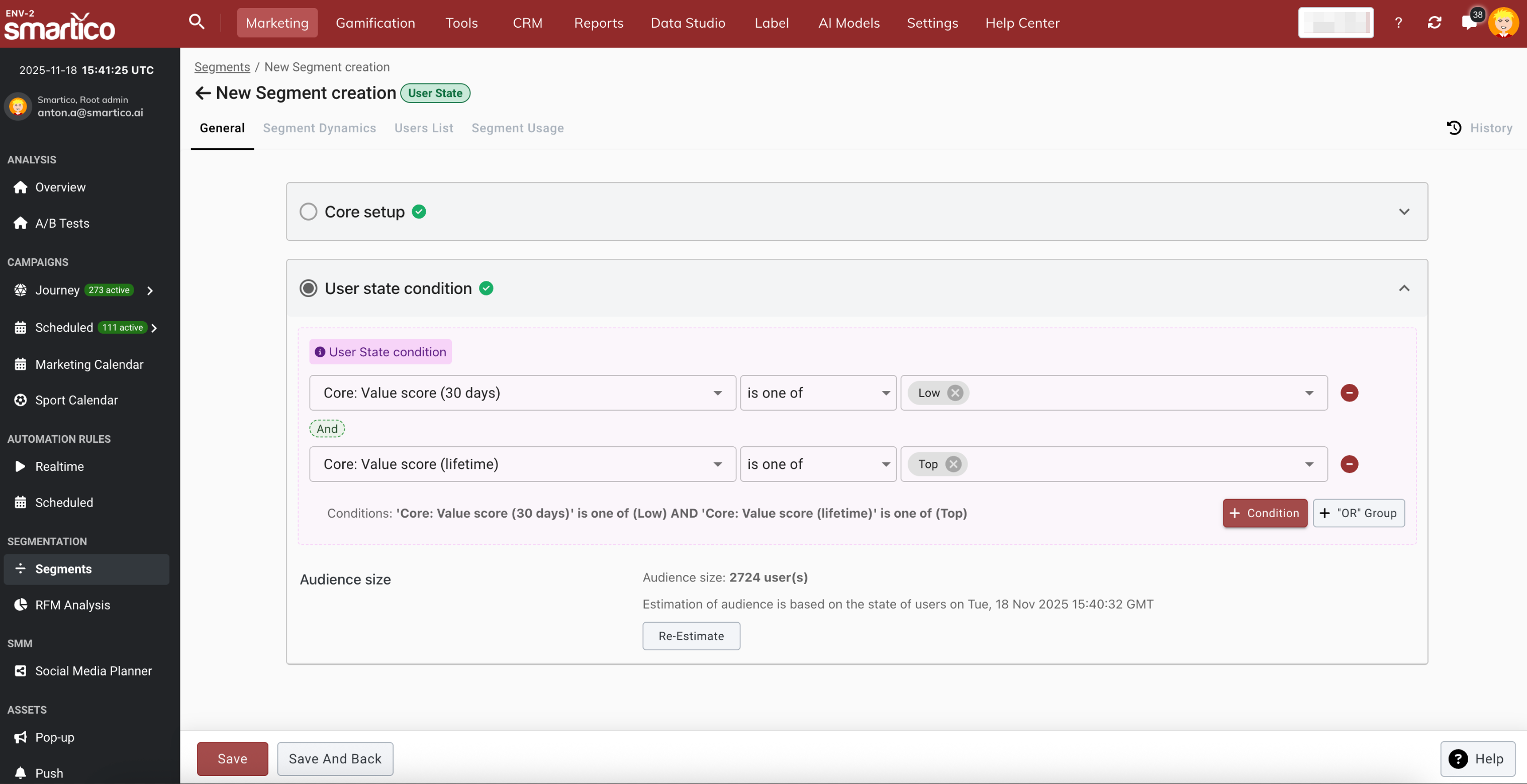
* **"Core: Value score (30 days)"** with technical name **core\_value\_score\_30d**
* **"Core: Value score (lifetime)"** with technical name **core\_value\_score\_lt**
Both properties are available for segmentation and for all real-time activities, such as journeys, automation rules, missions, tournaments, etc.
The **Value Score report** is available in the Segmentation section of the Marketing view. Additionally, this segmentation is integrated across other Dashboards as a global filter and grouping dimension, allowing the Business to monitor all KPIs through the lens of player value.
### **Viewing Value Score in User Profiles and Search**
In addition to the overview report, operators can inspect Value Scores across the Back-Office:
* **User Profile Header:** A dedicated "Value score" chip displays the player's current 30-day tier. Clicking this chip opens the **Value Score History dialog**, showing the player's 30-day and lifetime tiers, exact brand percentile ranks (e.g. "82nd percentile on this brand"), average daily net deposits, and a 90-day percentile trend chart.
* **Advanced Profile:** The Account section displays both **Lifetime** and **Last 30 days** value scores.
* **User Search:** Both **"Core: Value score (30 days)"** and **"Core: Value score (lifetime)"** can be added as columns in the search results table.
### **How the Value Score Model Evaluates Players**
**Eligibility:**
* **30-Day Score:** The population with deposit activity in the last 30 days is evaluated for the rolling 30-day metric.
* **Lifetime Score:** All players who have made at least one deposit since registration are evaluated for the lifetime metric.
* **Non-depositors:** Players who have never deposited remain unranked (displaying as blank or "-").
**Scoring:**
* Players are ranked by their Daily Net Deposits and sorted into four defined groups. Depending on which value band a player falls into, they are assigned a relative score that represents their value to the business.
#### **Tier Percentile Thresholds**
Players on each brand are ranked by Daily Net Deposits (Total Deposits minus Total Withdrawals normalized by active days) and sorted into four defined percentile bands:
* **Top (Score 4):** Top 5% (≥ 95th percentile) — the highest-value tier.
* **High (Score 3):** 80th to 94th percentile (upper 15%).
* **Medium (Score 2):** 55th to 79th percentile (core 25%).
* **Low (Score 1):** Bottom 54% (< 55th percentile) — the mass depositing population.
Because boundaries are relative percentiles within each brand, absolute currency thresholds adjust dynamically based on player turnover.
### **How It Works**
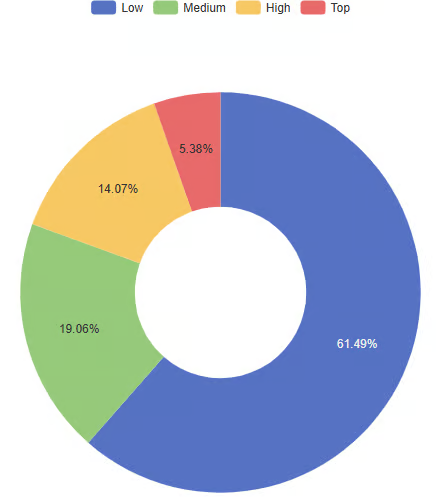
**Visualizing Your Value Score Segments:**
* **Graphical Representation:** The "Value Score Model - Current Population Distribution" chart provides an intuitive visualization of player segments.
* **Segment Details:** Hovering over or selecting a segment provides a detailed breakdown, including the size and percentage of active players it represents.
Each player will have their own Value Score property, which can be used for segmentation and campaigns.
Campaigns can also be triggered by the event of **"Core: Value score updated"** (technical name **core\_value\_score\_updated**), which happens when the value of the user is recalculated.
### **Marketing Suggestions**
| **Segment** | **Primary Goal** | **Best Channel** | **Reward Type** |
| ----------- | -------------------- | -------------------------- | ----------------------------- |
| Top | Retain at all costs | Phone / VIP Host | Physical Gifts, Cash, Custom |
| High | Upsell to VIP | SMS / Email / IM | Tiered Bonuses, Competitions |
| Med | Increase Value | Push / In-App / IM / Email | Gamification (Levels, Badges) |
| Low | Automated Conversion | Push / In-App / IM / Email | Free Spins, Leaderboards |
### **Monitoring the Value Score changes**
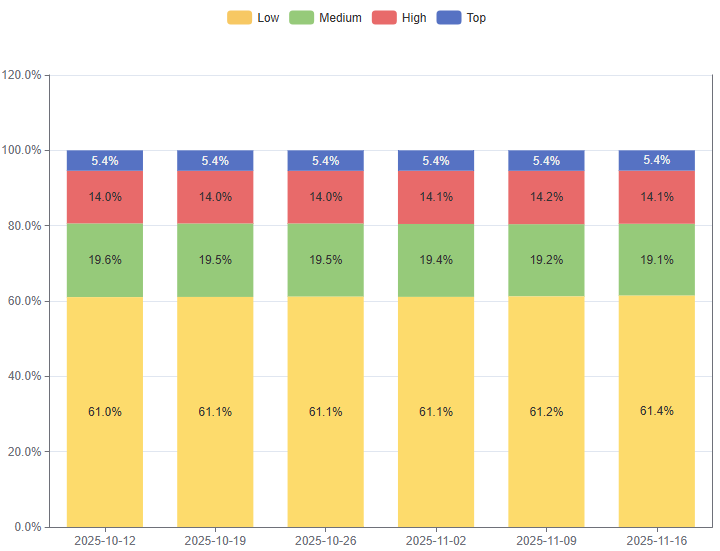
**Weekly Distribution Trends:** Weekly trend with the share of the players for each Segment
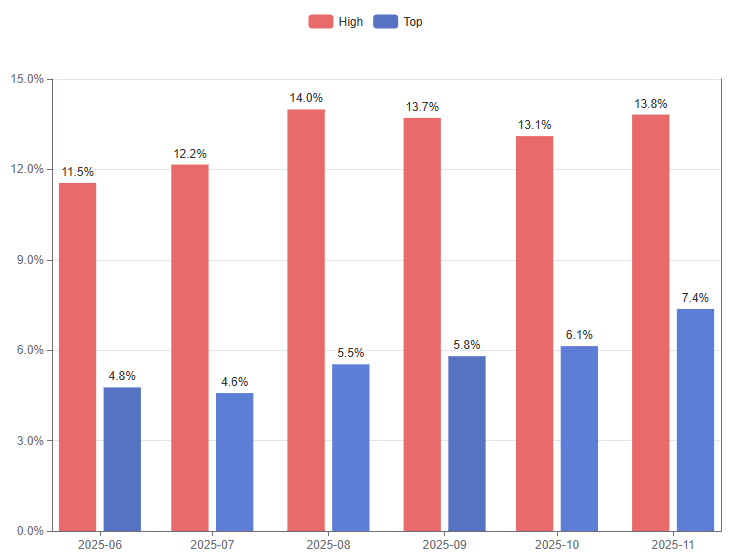
**Monthly Acquisition Quality Indication:**
This chart shows the share of the Top and High Value Score Populations (the 2 highest-value tiers) among all players acquired in each month (players with an FTD Date in that month).
The fluctuations in the share of those two segments out of the total acquired population indicate the quality of the acquired traffic. The higher the share, the better the traffic.
## FAQ
**Q: How often are Value Score categories recalculated?**
They are recalculated daily
**Q: What metrics are taken as the basis for Value Score segmentation?**
The metric, used as the basis for the Value Score Segmentation, is the daily Net Deposit Amount.
**Q: Are the segment boundaries rigid?**
The exact thresholds are constantly changing, based on the player's activity, and the numbers are based on the specific client's data. The measured population is based on a specific Brand.
**Q: What is the difference between the 30-day score and the Lifetime score, and when should each be used?**
The **30-day score** (core\_value\_score\_30d) evaluates net deposit performance over the rolling past 30 days and is ideal for current-state tactical campaigns, journey conditions, and promotional eligibility. The **Lifetime score** (core\_value\_score\_lt) evaluates all deposits since registration and is best suited for long-term player tiering and identifying lapsed VIPs (e.g. players with a Top or High lifetime score who currently sit in the Low 30-day tier and need reactivation).
**Q: Why does a player have an empty or blank ("-") Value Score?**
A blank or NULL score means the player has never made a qualifying deposit on that brand or has not met the minimum activity threshold. Non-depositing users are excluded from the model. Once a player makes their first deposit, their Value Score will be calculated in the next daily recalculation cycle.
**Q: Can the total deposit amount of the "Low" segment exceed that of the "High" or "Top" segments?**
Yes. Because the Low tier encompasses the bottom 54% of all depositing players (the largest share of your user base), the combined deposit sum of this entire group can sometimes exceed the aggregate deposit total of the smaller Top (5%) or High (15%) tiers. The score reflects each individual player's relative rank in the brand distribution, not aggregate group mass.
**Q: How does Value Score differ from Player Value Class in Churn & LTV prediction?**
Value Score segments players into 4 tiers (Low, Medium, High, Top) based on dynamic daily net deposit percentiles across rolling 30-day and lifetime windows. In contrast, Player Value Class (core\_ai\_player\_class\_id) in the Churn & LTV model classifies players into 3 tiers (Low bottom 5%, Medium next 60%, VIP top 35%) using fixed lifetime net deposit percentiles.
---
# Agent Instructions
This documentation is published with GitBook. GitBook is the documentation platform designed so that both humans and AI agents can read, navigate, and reason over technical content effectively. Learn more at gitbook.com.
## Querying This Documentation
If you need additional information that is not directly available in this page, you can query the documentation by asking a question.
Perform an HTTP GET request on the following URL with the `ask` and `goal` query parameters:
```
GET https://help.smartico.ai/welcome/products/ai-models/value-score.md?ask=&goal=
```
`ask` is the immediate question: it should be specific, self-contained, and written in natural language.
`goal` is what the user is ultimately trying to achieve, the reason they need the answer. Sharing it helps GitBook give you a better, more relevant answer. A goal is most helpful when it describes the outcome the user wants rather than restating the question. For example, with `ask=how do I create an API token`, a goal like `automate deployments from our CI pipeline` lets GitBook tailor the answer to that use case.
The response will contain a direct answer to the question and relevant excerpts and sources from the documentation.
Use this mechanism when the answer is not explicitly present in the current page, you need clarification or additional context, or you want to retrieve related documentation sections.