> For the complete documentation index, see [llms.txt](https://help.smartico.ai/welcome/llms.txt). Markdown versions of documentation pages are available by appending `.md` to page URLs; this page is available as [Markdown](https://help.smartico.ai/welcome/products/ai-models/recommended-bet-and-deposit-amounts.md).
# Recommended Bet and Deposit Amounts
Smartico is making a statistical analysis of user activity and bringing the following information in the reporting and as properties available for segmentation:
* **Statistical Model for recommending a Conservative Deposit Amount** - suggests a personalized Deposit Amount, considering the user's Depositing behaviour.
* **Statistical Model for recommending an Upsell Deposit Amount** - suggests an upsell on the Deposit Amount, considering the user's Depositing behaviour.
* **Statistical Model for recommending a Conservative Casino Bet Amount** - suggests a personalized Casino Bet Amount, considering the user's Casino Betting behaviour.
* **Statistical Model for recommending an Upsell Casino Bet Amount** - suggests an upsell on the Casino Bet Amount, considering the user's Casino Betting behaviour.
* **Statistical Model for recommending a Conservative Sport Bet Amount** - suggests a personalized Sport Bet Amount, considering the user's Sport Betting behaviour.
* **Statistical Model for recommending an Upsell Sport Bet Amount** - suggests an upsell on the Sport Bet Amount, considering the user's Sport Betting behaviour.
### Available Calculation Methods
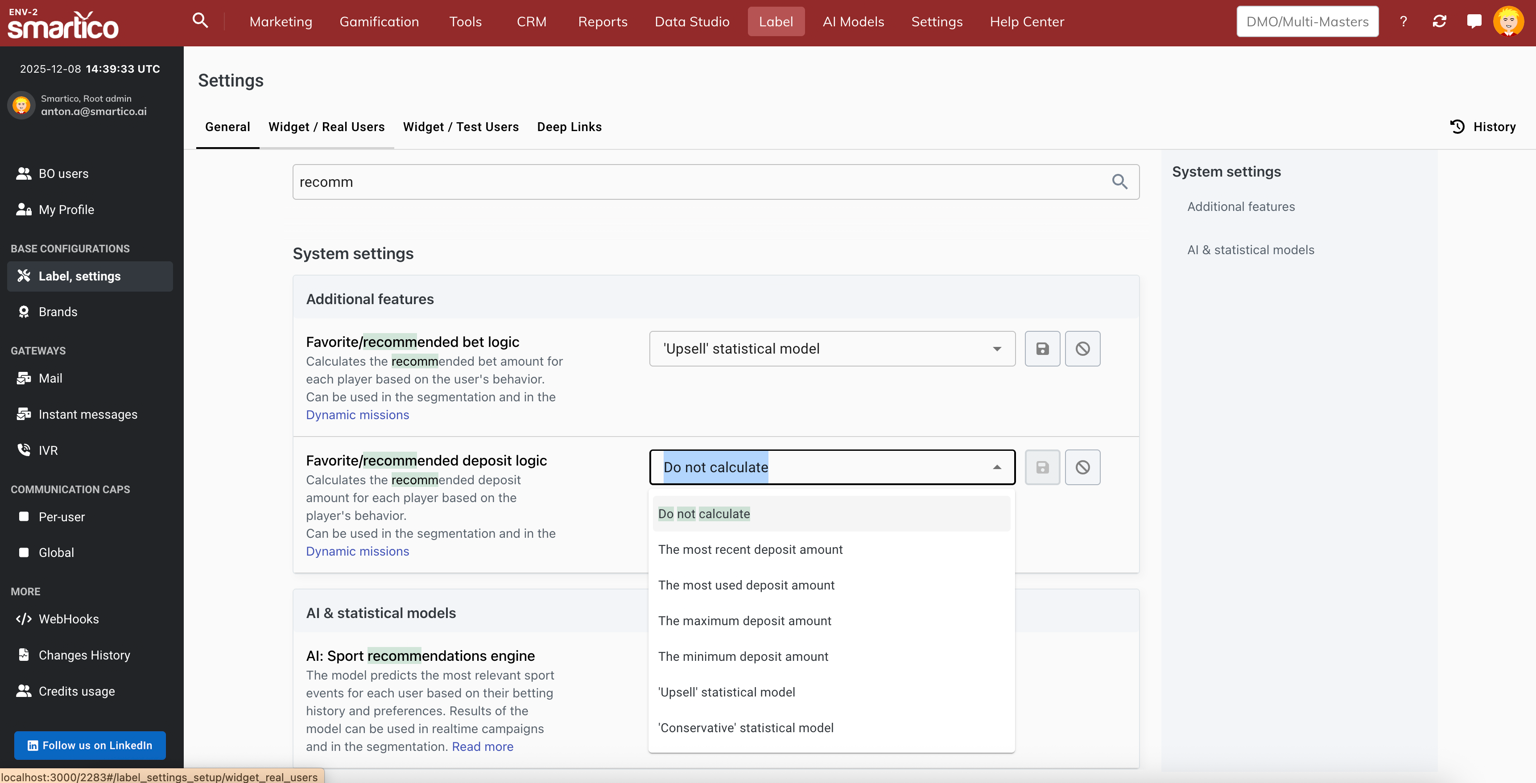
For casino bets, sport bets, and deposits, operators can select one of the following methods in Label Settings:
* **Do not calculate**: Feature is disabled; properties remain empty.
* **The most recent amount**: Uses the user's last recorded bet or deposit amount.
* **The most used amount**: Uses the user's most frequently occurring bet or deposit amount.
* **The maximum amount**: Uses the user's highest historical bet or deposit amount.
* **The minimum amount**: Uses the user's lowest historical bet or deposit amount.
* **'Conservative' statistical model**: Recommends a personalized amount by averaging the highest percentiles of historical activity without upsell pressure.
* **'Upsell' statistical model**: Recommends an increased target by adding standard deviation to the baseline to encourage higher activity.
### Enabling Recommended Amounts
To activate Recommended Bet and Deposit Amounts for your brand:
1. Ensure the product **Favorite Casino Games, Types & Providers** is enabled on your label.
2. In the Back-Office, navigate to **Label Settings > Additional features**.
3. Under **Favorite/recommended casino bet logic**, **Favorite/recommended sport bet logic**, and **Favorite/recommended deposit logic**, select your preferred calculation method for casino bets, sport bets, and deposits respectively.
By default, both settings are set to "Do not calculate". Once a calculation method is chosen, the system calculates values during the nightly processing window and stores the selected amount in the user's state properties.
All of these models are using the user's most recent Depositing or Betting activity for calculating the Recommended Amounts.
The models are calculating a range of user's activity-related KPIs (such as Maximum Amount, Average Amount, Median Amount, Standard Deviation etc.) in order to create an algorithm for the suggested Conservative and Upsell Amounts.
Result of the model calculation is stored in the following user state properties that are available for segmentation:
* **"Core: recommended casino bet amount"** (core\_recommended\_casino\_bet\_amount) - holds the recommended bet amount in the user currency
* "**Core: recommended deposit amount**" (core\_recommended\_deposit\_amount) - holds the recommended deposit amount in the user currency
* **"Core: recommended sport bet amount"** (core\_recommended\_sport\_bet\_amount) - holds the recommended sport bet amount in the user currency
These properties are updated by the event "Core: favorite/recommended metrics update" (core\_fav\_game\_update), which is generated nightly for all users with updated recommended amounts or favorite game preferences. The same event updates preferences in the [Favorite product, game, game type & game provider](/welcome/products/ai-models/favorite-product-game-game-type-and-game-provider.md) model.
For a better UX, the Calculated Amounts are then being rounded by an additional process.
### Recommended Sport Bet Amount
Smartico calculates a personal Recommended Sport Bet Amount for each player alongside the Recommended Casino Bet and Recommended Deposit amounts.
The system analyzes each player's real-money sport betting over a rolling 90-day window (including their most used stake, most recent bets, average stake size, and betting range) and stores the result in the user state property **Core: recommended sport bet amount**.
Key operational characteristics:
* **Calculation logic:** Sport bets have their own dedicated **Favorite/recommended sport bet logic** selector in **Label Settings > Additional features**, allowing independent calculation methods for sport versus casino wagering.
* **Rounding rules:** The per-currency rounding rules defined under **Recommended casino bet rounding rules** are automatically applied to sport bets.
* **Refresh:** Values are recalculated daily during the nightly processing window (02:30–04:30 AM UTC). When the calculation logic is updated in Label Settings, recommended casino and sport bet amounts are recalculated immediately.
* **Public API:** The property is available to front-end integrations in the user profile.
### Custom Rounding Rules
By default, calculated amounts are rounded into standard mathematical tiers. Operators can also define custom rounding breakpoints per currency in **Label Settings > Additional features** via the **Recommended casino bet rounding rules** and **Recommended deposit rounding rules** settings. Note that the casino bet rounding rules are also applied to recommended sport bet amounts.
Rounding rules are configured as a JSON object mapping currency codes to ascending arrays of allowed values (for example: `{"EUR": [1, 2, 5, 10, 25, 50, 100], "USD": [1, 2, 5, 10, 25, 50, 100]}`). When applied, the system rounds the calculated amount up to the nearest configured breakpoint for the player's currency, capped at the maximum specified breakpoint.
### Rounding Rule Execution and Propagation
When custom rounding rules are configured, they are applied dynamically when viewing amounts in the Back-Office user profile dialog. For active user state properties used in segmentation and dynamic missions, updated rounding breakpoints are applied during the scheduled user synchronization cycle or whenever recommendation values are refreshed.
{% hint style="info" %}
"Recommended Amounts" of the player can be used in the Segmentation and the Dynamic Missions, with each player having a dynamically set personal goal. Read more about [dynamic missions](/welcome/products/gamification-basics/missions/dynamic-missions.md).
{% endhint %}
### Using Recommended Amounts in Dynamic Missions
To use recommended amounts as personalized requirements in missions:
1. When creating a mission task (such as a deposit, casino bet, or sport bet task), configure a dynamic condition comparing the event amount (e.g. `casino_last_bet_amount`, `sport_last_bet_amount`, or `acc_last_deposit_amount`) against the user's state property (`core_recommended_casino_bet_amount`, `core_recommended_sport_bet_amount`, or `core_recommended_deposit_amount`).
2. Use the `{{suggested_value}}` placeholder in the mission title, sub-header, or description. The system automatically replaces this tag with the player's personalized amount and currency symbol.
3. Enable the **Lock Recommended Deposit/Bet Amount** toggle on the task if you want to freeze the player's target amount upon first progress, preventing subsequent nightly recalculations from shifting the requirement during the active mission.
## FAQ
**Q: What factors are taken as the basis for the Recommended Amounts calculations?**
The models calculate seven underlying metrics for each user: Most Recent Amount, Most Used Amount (mode), Minimum Amount, Maximum Amount, Average Amount (mean), Median Amount, and Standard Deviation.
**Q: How often are the Recommended Amounts recalculated?**
We aim to recalculate after midnight, within the time window from 2:30 to 4:30 AM UTC.
This time is chosen to have minimal impact on the overall system performance and have fresh betting activities already delivered from the integrated systems to Smartico.
**Q: What time window of user activity is considered during the calculation?**
For deposit recommendations, the calculation evaluates the user's up to 10 most recent deposits. For casino bet recommendations, the calculation evaluates activity exclusively from the user's single most recent active betting day (up to 100,000 bets). For sport bet recommendations, the calculation evaluates real-money betting activity over a rolling 90-day window (up to 100,000 bets). This ensures that bet recommendations reflect the player's latest wagering behavior rather than outdated historical sessions.
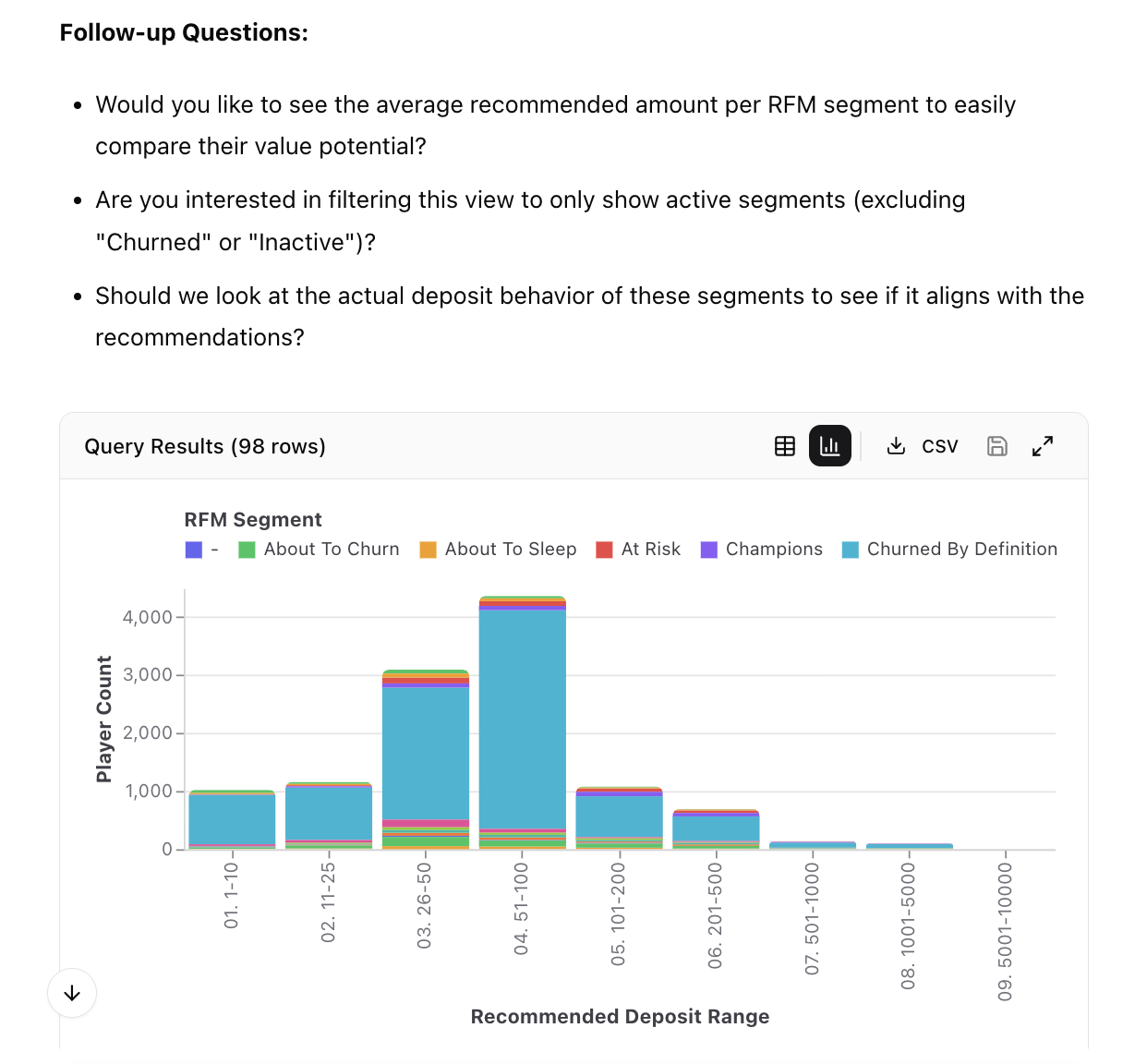
**Q: How can I see the distribution of recommended amounts for all my players?**
You can use Smartico AI Chat, Transactions agent to build custom reports on recommended amounts
Used question - "Show me the distribution of recommended deposit amounts for players, excluding 0 and amounts larger than 10,000, show the distribution for different RFM segments"
**Q: How can I make sure the Recommended Amount is appropriate for the user?**
Upon choosing the preferred recommendation method, you can check the Recommended Amounts in the user profile with the user's Actual KPIs listed beside them, giving you a good indication on the validity of the calculation.
**Q: What happens if a player has no prior deposit or betting activity?**
If a player has not yet placed bets or made deposits, or if the calculation logic is disabled, the corresponding recommended amount property remains empty (null). In the Back-Office user profile, this is indicated as "Didn't bet yet or the feature is not enabled" or "Didn't deposit yet or the feature is not enabled". Once the user makes qualifying transactions, their recommended amounts will be calculated during the next nightly processing window.
**Q: In which currency are recommended bet and deposit amounts calculated?**
All recommended bet and deposit amounts are calculated, rounded, and stored in the player's own registered wallet currency.
**Q: When calculation logic is updated in Label Settings, when does the new value take effect?**
When an operator changes the calculation logic setting in Label Settings, the active recommended amounts are immediately recalculated and updated in the background for all users on the label, without having to wait for the nightly processing window.
**Q: Are there separate rounding rules for sport bet amounts?**
No. Sport bet recommendations automatically reuse the rounding breakpoints configured under **Recommended casino bet rounding rules**.
**Q: Can recommended amounts be used in Realtime Automation Rules?**
Yes. You can configure property-to-property conditions in Realtime Automation Rules comparing incoming transaction event amounts (such as deposit or bet amounts) against the player's personalized recommended amounts (`core_recommended_deposit_amount`, `core_recommended_casino_bet_amount`, or `core_recommended_sport_bet_amount`). This enables automated real-time messaging or promotional triggers when players bet or deposit above or below their recommended levels.
**Q: How do multi-currency values work when creating segments based on recommended amounts?**
Recommended amounts are calculated and stored in each player's registered wallet currency without currency conversion. Proportional calculations (such as multiplying the recommended deposit amount by a percentage) work consistently across all currencies. However, when filtering by fixed numerical thresholds (for example, recommended deposit amount greater than 50), operators should combine the rule with a currency filter to prevent comparing different currencies on identical numeric scales.
---
# Agent Instructions
This documentation is published with GitBook. GitBook is the documentation platform designed so that both humans and AI agents can read, navigate, and reason over technical content effectively. Learn more at gitbook.com.
## Querying This Documentation
If you need additional information that is not directly available in this page, you can query the documentation by asking a question.
Perform an HTTP GET request on the following URL with the `ask` and `goal` query parameters:
```
GET https://help.smartico.ai/welcome/products/ai-models/recommended-bet-and-deposit-amounts.md?ask=&goal=
```
`ask` is the immediate question: it should be specific, self-contained, and written in natural language.
`goal` is what the user is ultimately trying to achieve, the reason they need the answer. Sharing it helps GitBook give you a better, more relevant answer. A goal is most helpful when it describes the outcome the user wants rather than restating the question. For example, with `ask=how do I create an API token`, a goal like `automate deployments from our CI pipeline` lets GitBook tailor the answer to that use case.
The response will contain a direct answer to the question and relevant excerpts and sources from the documentation.
Use this mechanism when the answer is not explicitly present in the current page, you need clarification or additional context, or you want to retrieve related documentation sections.