> For the complete documentation index, see [llms.txt](https://help.smartico.ai/welcome/llms.txt). Markdown versions of documentation pages are available by appending `.md` to page URLs; this page is available as [Markdown](https://help.smartico.ai/welcome/products/general-concepts/game-sessions.md).
# Game Sessions
**Game Sessions** allow you to understand how players actually play - not just what they click or bet.\
By grouping gameplay into meaningful sessions, you can trigger campaigns based on real engagement (session length, intensity, wins or losses), identify high-value and at-risk players, and deliver more timely, relevant CRM actions.
### What it is
A **Game Session** represents a continuous period of user gameplay activity across one or multiple games. A session starts when a user begins playing and ends when they stop interacting with games for a defined period of inactivity. Smartico automatically tracks game sessions and enriches them with aggregated gameplay metrics, including duration, bets, wins, and game count.
### Why it’s important
Game sessions provide a **behavior-level view** of player activity that goes beyond individual events or transactions. By analyzing sessions, operators can:
* Understand real engagement (time spent playing, intensity, betting behavior)
* Identify high-value or at-risk players
* Trigger campaigns based on *actual play behavior*, not just single actions
* Build more accurate segmentation for retention, reactivation, and rewards
In practice, session-based data enables more relevant, timely CRM actions, improving both the player experience and business outcomes.
### How it works
Smartico groups gameplay events into sessions using an **inactivity timeout** (5 minutes by default, configurable on request). Smartico emits a **Game Session: Changed** (`gs_game_session_changed`) event with aggregated metrics when a user switches games within an active session. Once the user becomes inactive beyond the timeout, Smartico finalizes the session and emits a **Game session: Ended** (`gs_game_session_ended`) event.
These session events can then be:
* Used as triggers in campaigns and automations
* Analyzed in reports and dashboards
* Combined with other behavioral or transactional data for advanced segmentation
### Supported Game Types and Integration Prerequisites
Game Sessions tracks **casino gameplay only** (video slots, live casino, table games, and casino demo bets). It does not track sportsbook betting activity, as sports bets are placed and settled asynchronously.
To activate Game Sessions, the operator's platform must already be sending standard casino gameplay events (such as `casino_bet`, `casino_win`, or combined `casino_bet_win`) containing the following required data points:
* Game identifier and Game provider name
* Bet and win amounts (real and bonus balances)
* Action timestamp in milliseconds (`casino_last_bet_date`)
{% hint style="info" %}
"Game Sessions" is an additional paid service that should be requested separately.
Please contact your Customer Success Manager for more details and to activate the service.
{% endhint %}
### Game Session events and payload structure
Smartico tracks gameplay using two session-level events: **Game Session Changed** and **Game Session Ended**. Both events report aggregated gameplay metrics for a single gameplay session. They differ in when they are emitted and in which part of the play they cover.
**Game Session Changed** is emitted **only when a user switches games within an active session**. The event is sent at the moment of the game change. Its metrics cover the play on the game the user just left, but only the last part of it: bets older than the inactivity timeout (5 minutes by default) before the switch are not counted. It also includes identifiers for the previous and newly selected games. For example, if a player moves from Game A to Game B, this event shows their play on Game A in the last 5 minutes (by default) before the switch. If a user switches games several times within a few seconds, Smartico may send one event instead of one per switch.
**Game Session Ended** is emitted **once the session is completed**, after the inactivity timeout. It contains the final session metrics across all games played and should be used for post-session analysis and reporting.
#### Activity Tracking & Data Calculation
To ensure session metrics accurately reflect active player engagement, the following logic is applied to event triggers and data points:
* **Session Prolongation**: Only Bet events are considered active gameplay. This includes standard bet events and "bet-win" events that contain bet data. It is important to note that if a "bet-win" event is configured to report only win data, it will not reset the inactivity timeout or prolong the session.
* **Win Events**: While Win events are essential for calculating payouts, they are not initiated by the user and therefore **do not prolong** the session or prevent an inactivity timeout.
* **Metric Aggregation**: The session statistics are calculated by summing both real and bonus amounts. This means the payload reflects the combined totals for all bets and all wins recorded during the session, regardless of the balance type used.
* **Timestamps**: Session timing is taken from the bet event's `casino_last_bet_date`, which must be a Unix timestamp in milliseconds. Values sent in seconds distort `gs_session_length_seconds`.
{% hint style="info" %}
By default, the `gs_game_session_ended` event is triggered after 5 minutes of inactivity. If you would like to adjust this timeout window to suit your operational needs better, please submit a request to our Customer Support team.
{% endhint %}
**Example: Game Session Changed**
```json
{
"gs_game_session_id": "20260106202442_265428677_20260106202625_Wild Bandito",
"gs_gameplay_session_id": "20260106202442_265428677",
"gs_game_name": "Wild Bandito",
"gs_game_new_id": "MAHJONG WAYS",
"gs_game_old_id": "WILD BANDIT",
"gs_avg_bet_amount": 800,
"gs_max_bet_amount": 800,
"gs_avg_win_amount": 200,
"gs_wins_count": 6,
"gs_max_win_amount": 400,
"gs_total_bet_amount": 3200,
"gs_total_win_amount": 1200,
"gs_bets_count": 4,
"gs_session_start_date": 1767731061000,
"gs_session_end_date": 1767731185000,
"gs_session_length_seconds": 124,
"gs_event_delay_seconds": 48
}
```
**Example: Game Session Ended**
```json
{
"gs_gameplay_session_id": "20260106181914_183005459",
"gs_all_game_ids": [
"MAHJONG WAYS 2",
"GATES OF OLYMPUS 1000",
"STARLIGHT PRINCESS 1000",
"MAHJONG WAYS"
],
"gs_avg_bet_amount": 675.01,
"gs_max_bet_amount": 4000,
"gs_avg_win_amount": 684.53,
"gs_wins_count": 1607,
"gs_max_win_amount": 230050,
"gs_total_bet_amount": 1605850,
"gs_total_win_amount": 1100035,
"gs_bets_count": 2379,
"gs_session_start_date": 1767723553000,
"gs_session_end_date": 1767731126000,
"gs_session_length_seconds": 7573,
"gs_event_delay_seconds": 335
}
```
**Fields reference for Game session ended (gs\_game\_session\_ended):**
* `gs_gameplay_session_id`: Identifier of the gameplay session, shared by every event of that session (present in the payload, not available as a campaign condition).
* `gs_total_bet_amount`: Total value wagered during the entire session.
* `gs_session_length_seconds`: Total duration of the session in seconds.
* `gs_avg_bet_amount`: Average amount wagered per bet.
* `gs_max_bet_amount`: The highest single bet placed.
* `gs_bets_count`: Total number of bets placed.
* `gs_all_game_ids`: A list of all game IDs played during the session.
* `gs_session_start_date` / `gs_session_end_date`: Timestamps for the start and end of the full session.
* `gs_event_delay_seconds`: Delay between the last betting action and event emission.
* `gs_wins_count`: Total number of wins.
* `gs_max_win_amount`: The highest win value in the current session.
* `gs_avg_win_amount`: The average value of win amount.
* `gs_total_win_amount`: Total value of winnings during the entire session.
* `gs_total_ggr`: Total Gross Gaming Revenue for the session, calculated dynamically as `gs_total_bet_amount` minus `gs_total_win_amount`.
* `gs_total_ggr_real`: Total Gross Gaming Revenue for the session, calculated by excluding bonuses and adjusting for rollbacks.
* `gs_bets_rollback_count`: Total number of rolled-back bets during the session.
* `gs_wins_rollback_count`: Total number of rolled-back wins during the session.
* `gs_total_rollback_bet_amount`: Total monetary value of rolled-back bets.
* `gs_total_rollback_win_amount`: Total monetary value of rolled-back wins.
{% hint style="info" %}
`gs_total_ggr_real` is populated only when separate real-money and bonus-money amounts are tracked and mapped in the operator's casino integration. If only total bet and win amounts are provided, this property is omitted from the payload.
{% endhint %}
**Fields reference for Game session changed (gs\_game\_session\_changed):**
* Has the same session metrics as `gs_game_session_ended`, except `gs_all_game_ids`, `gs_total_ggr`, `gs_total_ggr_real` and the rollback counters, plus the following (the metrics are counted for the game the user just left, only within the last inactivity timeout before the switch, not for the whole session):
* `gs_game_session_id`: Identifier of the per-game session that just ended, one game within the gameplay session (payload only, not available as a campaign condition).
* `gs_game_name`: The name of the game the user just stopped playing (payload only, not available as a campaign condition).
* `gs_game_old_id`: The ID of the game the user just stopped playing.
* `gs_game_new_id`: The ID of the new game the user has started.
* `gs_event_delay_seconds`: In this event, the time between the last bet on the previous game and the first bet on the new game.
{% hint style="info" %}
In case of rollbacks `gs` property values are not going to be modified. Instead, the following rollback event properties will be amended:
* `gs_bets_rollback_count`: Total number of rolled-back bets.
* `gs_wins_rollback_count`: Total number of rolled-back wins.
* `gs_total_rollback_bet_amount`: Total value of rolled-back bets.
* `gs_total_rollback_win_amount`: Total value of rolled-back wins.
{% endhint %}
### Use Cases for Campaigns
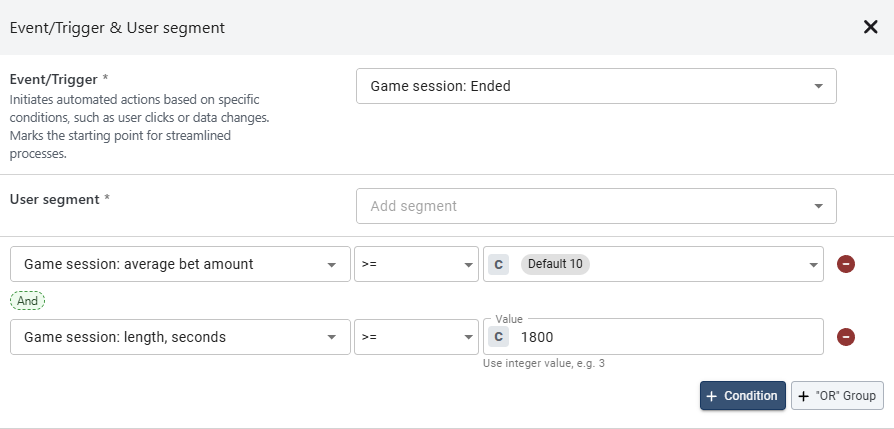
In the campaign conditions, the session properties are shown with names that start with **Game session:**, for example **Game session: average bet amount** for `gs_avg_bet_amount` and **Game session: length, seconds** for `gs_session_length_seconds`.
1\. Reward high-value, long-play users
* Trigger: **gs\_game\_session\_ended**
* Conditions: **gs\_avg\_bet\_amount** ≥ 10, **gs\_session\_length\_seconds** ≥ 1800
* Action: Send a bonus or a push notification to encourage repeat play.
2\. Reactivate after low-engagement sessions
* Trigger: **gs\_game\_session\_ended**
* Conditions: **gs\_session\_length\_seconds** < 120, **gs\_bets\_count** < 10
* Action: Send Free Spins to re-engage the user's interest.
3\. Celebrate game-hopping behavior
* Trigger: **gs\_game\_session\_changed**
* Action: Identify users who switch games frequently and offer a "Multi-game Explorer" badge or a custom mission to encourage continued play.
4\. Promote similar titles
* Trigger: **gs\_game\_session\_changed**
* Conditions: **gs\_game\_old\_id** = \[Adventure Game ID]
* Action: If the user moves to a different genre, send a recommendation for a title similar to the one they just left.
5\. Celebrate high-value sessions
* Trigger: **gs\_game\_session\_ended**
* Conditions: **gs\_total\_bet\_amount** > 1000
* Action: Send a personalized “VIP milestone” message with a loyalty reward.
6\. Offer a retry bonus for short sessions
* Trigger: **gs\_game\_session\_ended**
* Conditions: **gs\_session\_length\_seconds** < 60, **gs\_bets\_count** < 5
* Action: Send a “Quick round? Try again with a boost!” message and offer 5 free spins on the same game.
## Reporting
The Sessions Dashboard (the **Games Sessions** report: open **Reports** in the Back Office and choose it in the **Insights** group) provides a detailed overview of the business performance from the perspective of users’ game interactions, allowing you to track performance, engagement, and general health.
**Chart 1: Daily Trend - Session Length (Sec)**
This chart tracks trends in the number of unique users who engaged in gaming during the day, as well as the total duration of their activity.
**Key Metrics Included:**
* Session Length (Sec) – the average value of all the users’ daily betting activity periods.
* Unique Users with Sessions – unique count of users that had betting activity.
**Value to You:**
* Performance Benchmarking: Provides a baseline to evaluate how product updates or marketing campaigns affect user behavior.
* Early Warning System: Identifies shifts in activity patterns, signaling potential technical issues or changes in user sentiment.
* Volume vs. Quality: Distinguishes between sheer reach (User Count) and actual usage intensity (Session Length).
***
**Chart 2: Daily Trend - Sessions Count and Session Length (Sec) per User**
This chart tracks trends in the average number of sessions per user throughout the day, as well as the average session length per user.
**Key Metrics Included:**
* AVG Sessions Count per User – how many gaming sessions each user had on average per day.
* Session Length (Sec) per user - the average value of all the users’ daily betting activity periods.
**Value to You:**
* Behavioral Patterns: Quantifies the daily "habit" of users by tracking how often they return (Frequency) versus how long they stay per visit (Intensity).
* Engagement Profiling: Distinguishes between "snacking" behavior (many short sessions) and "immersion" (few long sessions) to define user segments.
* Trend Stability: Detects shifts in baseline activity levels to provide an objective health check of daily user interaction.
***
**Chart 3: Daily Trend - AVG Bet Amount and AVG Bet Count per Session**
This chart monitors the Average Bet Amount and Average Bet Count, per user per day.
**Key Metrics Included:**
Bet Amount per Session – the average monetary value of the bets that happened during each gaming session.
Bet Count per Session – the average number of bets that happened during each gaming session.
**Value to You:**
* Session Density: Measures the intensity of activity by tracking how many actions (bets) occur within a single session.
* Monetization Trends: Identifies shifts in spending power or betting appetite across the user base over time.
***
**Chart 4: Daily Trend - AVG of Unique Games Count per Session**
This chart shows the average number of distinct games the user bet on during the session.
**Value to You:**
* Portfolio Breadth: Measures cross-game exploration to determine if users are engaging with multiple titles or sticking to a single game.
* Cross-Sell Effectiveness: Evaluates how successfully the platform surfaces new or different content to users during a single session.
***
**Chart 5: Daily Trend - Acquisition Quality (sessions count and duration for the New Users).**
This chart monitors trends in the average Sessions Count and average Session duration for New Users (based on the RFM Segmentation).
**Key Metrics Included:**
* Session Duration (Sec) - the average value of all the New Users’ daily betting activity periods.
* Number of Sessions per User - how many gaming sessions each New User had on average per day.
**Value to You:**
* First-Impression Benchmarking: Quantifies the immediate engagement level of new users to determine if the initial product experience is successful.
* Retention Predictor: Uses early session frequency and duration as leading indicators for long-term player retention and potential churn.
***
**Charts 6, 7: Sessions per User trend - split per Value Score**
These charts monitor trends in Unique Users and average Session Count for Users, split by Value Score.
**Key Metrics Included:**
* Sessions per User - how many gaming sessions each User had on average per day.
* Users with Sessions – unique count of users that had betting activity.
**Key Presentation:**
* For a clearer view, the data is split into 2 charts: Top Value and High Value Users; Medium Value and Low Value Users.
**Value to You:**
* Segment Health Tracking: Monitors the activity levels of specific cohorts to ensure "Top" and "High" value users maintain their expected usage frequency.
* Growth Optimization: Identifies patterns in "Medium" or "Low" value segments that could indicate potential for promotion to higher value tiers through increased session frequency.
***
**Table 8: Session Length and Retention per Game - top 50 games**
The table lists the 50 most popular games during the filtered period, showing which are the games that the users spend the most time on (Duration per User), and which are the games that the users go back to after a break ("Stickiness").
**Key Metrics Included:**
* Sessions per User - how many gaming sessions each User had on average per day.
* Duration per User (sec) – the average value of all users’ daily betting activity periods on that game.
**Value to You:**
* Portfolio Optimization: Identifies "Hero" games that drive maximum time-on-tool and recurring engagement versus titles that may require removal or updates.
* Investment Prioritization: Directs development or licensing spend toward game mechanics that demonstrate the highest "return-to-play" rates.
### Reporting use cases
Use the **Games Sessions** report to see how your entire user base interacts with your games and monitor behavioral trends as they develop over time. This high-level view helps you understand your players' general habits and provides the data needed to adjust your marketing and segmentation strategies.
* **Game Trends:** Monitor how key metrics, such as average bet amount and total wagering, change across your platform. For example, if you notice a general increase in bet sizes, it might be the right time to introduce higher-tier rewards. Conversely, a downward trend tells you when it’s time for a new retention campaign.
* **Monitoring Session Evolution:** Track whether the average time spent playing is increasing or decreasing for the whole user base. If sessions are getting shorter across the board, it may indicate a shift in player interest.
* **Informing Segmentation Strategies:** Use these global trends to define your player segments. For instance, if the data shows a growing trend of frequent game-switching, you can create a specific segment for these "Explorers" and target them with variety-based offers.
* **Detecting Intense Play Patterns:** Watch for shifts in the number of bets placed per session across your entire base. A sudden spike in the frequency of bets can help you identify high-momentum periods on your platform, allowing you to time your most important offers for maximum impact.
---
# Agent Instructions
This documentation is published with GitBook. GitBook is the documentation platform designed so that both humans and AI agents can read, navigate, and reason over technical content effectively. Learn more at gitbook.com.
## Querying This Documentation
If you need additional information that is not directly available in this page, you can query the documentation by asking a question.
Perform an HTTP GET request on the following URL with the `ask` and `goal` query parameters:
```
GET https://help.smartico.ai/welcome/products/general-concepts/game-sessions.md?ask=&goal=
```
`ask` is the immediate question: it should be specific, self-contained, and written in natural language.
`goal` is what the user is ultimately trying to achieve, the reason they need the answer. Sharing it helps GitBook give you a better, more relevant answer. A goal is most helpful when it describes the outcome the user wants rather than restating the question. For example, with `ask=how do I create an API token`, a goal like `automate deployments from our CI pipeline` lets GitBook tailor the answer to that use case.
The response will contain a direct answer to the question and relevant excerpts and sources from the documentation.
Use this mechanism when the answer is not explicitly present in the current page, you need clarification or additional context, or you want to retrieve related documentation sections.
.png?alt=media)
.png?alt=media)
.png?alt=media)
.png?alt=media)
.png?alt=media)
.png?alt=media&token=9c980471-b28a-40cb-9dae-837625ee6941)
.png?alt=media)