◾Smartico Data Warеhouse
Intro
Smartico provides access to the Data Warehouse (DWH), which contains row-level data related to system operations. The DWH is based on Google BigQuery and exposes fact and dimension tables.
There are mainly three domains of data exposed through the DWH:
CRM - information about campaigns, communication, conversions, automation rules, etc
Gamification - missions, levels, tournaments, mini-games, points, store purchases
Affiliation - registration facts, financial transactions, payments, adjustments, and affiliates information
Transactional tables - these are tables that start with "tr_". They contain most of the data from the integrated system (PAM) and many other Smartico events. Read more about transaction tables in the section below.
Some of these domains have shared information, e.g., bonuses can be given from the CRM and from Gamification.
IMPORTANT: Ignoring the suggestions below may result in high BigQuery read usage and higher charges.
Smartico DWH SHOULD NOT be used to run analytical queries directly, as limitations apply to how much data can be retrieved daily.
Instead, you should perform a batch load of changes to your analytical system and run reports locally.
All fact tables are partitioned by date for your convenience, so you can efficiently load only the data delta for the completed day. We recommend running the import of the previous day a few hours after midnight in UTC to ensure that last-day data is fully delivered to the fact tables.
Don't apply functions on the partition columns when filtering with the 'WHERE' clause. The correct example of taking data for the last day is - 'WHERE fact_date >= TIMESTAMP_TRUNC(TIMESTAMP_SUB(CURRENT_TIMESTAMP(), INTERVAL 1 DAY), DAY)'
Note that the dataset 'dwh_ext_xxx' is provided as an example. The dataset name for your setup is the same as the user name you will have access to the DWH under.
Records in the fact tables are immutable (except when explicitly stated otherwise), meaning they do not change after they are added.
Fact tables are updated in real-time, and dimensional tables are updated once per hour.
Avoid using "select * from table"!. Select only the needed columns. There are two reasons for this:
The cost of the query highly depends on the number of columns you are selecting
Smartico is adding new columns as the product evolves, so your ETL process should be agnostic to the fact that new columns will be adde.d
For the details of the fact & dimensions tables, please usethe following links:
◾Smartico DWH \ Affiliation views◾Smartico DWH \ CRM views◾Smartico DWH \ Gamification viewsSegments export
You can query the DWH to get a near-real-time list of users in specific segments.
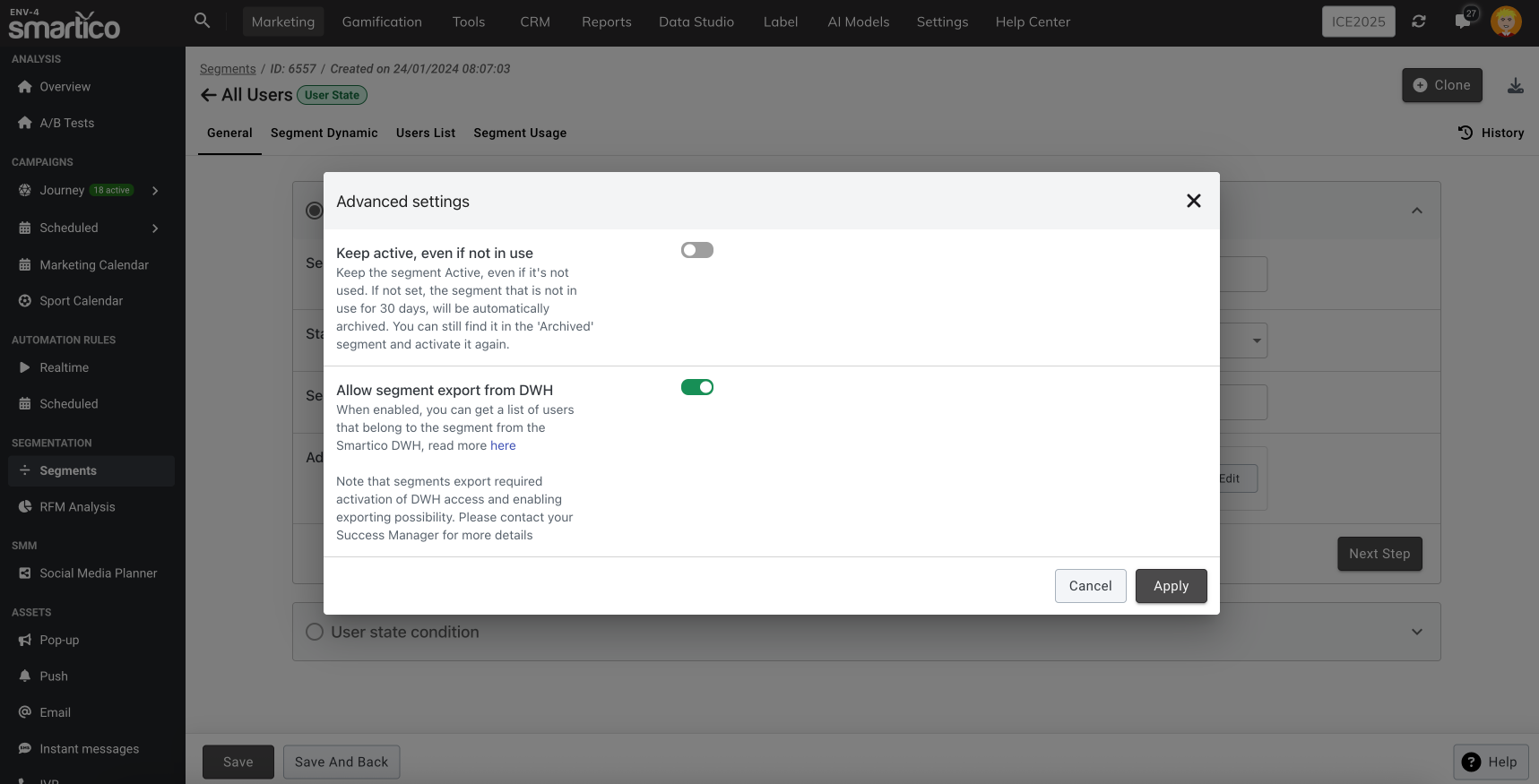
To make a segment available for export, it must first be marked as exportable in the DWH in Smartico BackOffice, as shown in the screen below.

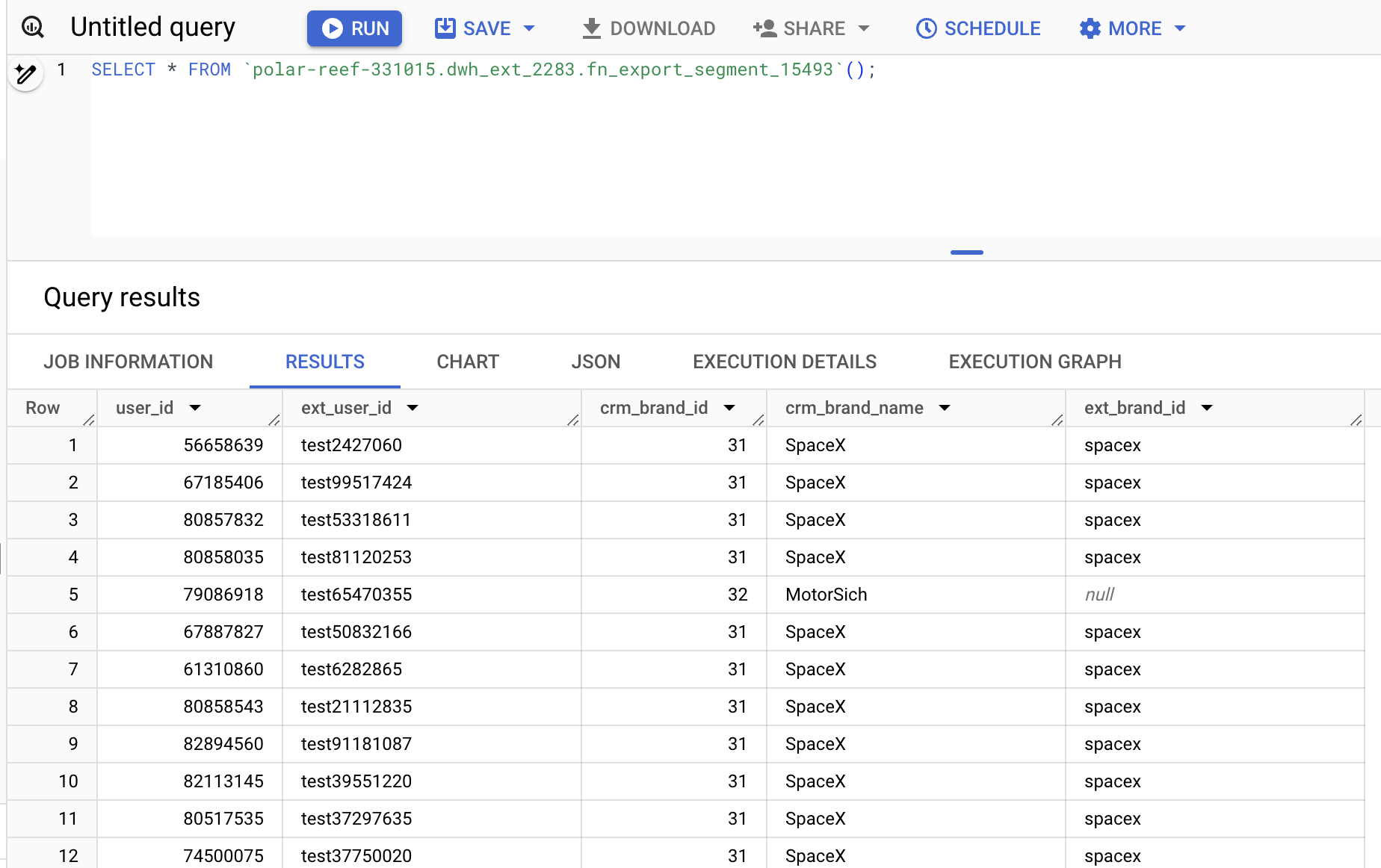
After that, segment content can be queried using the following SQL, where XXX needs to be replaced with the ID of your label and YYY with the ID of the segment.
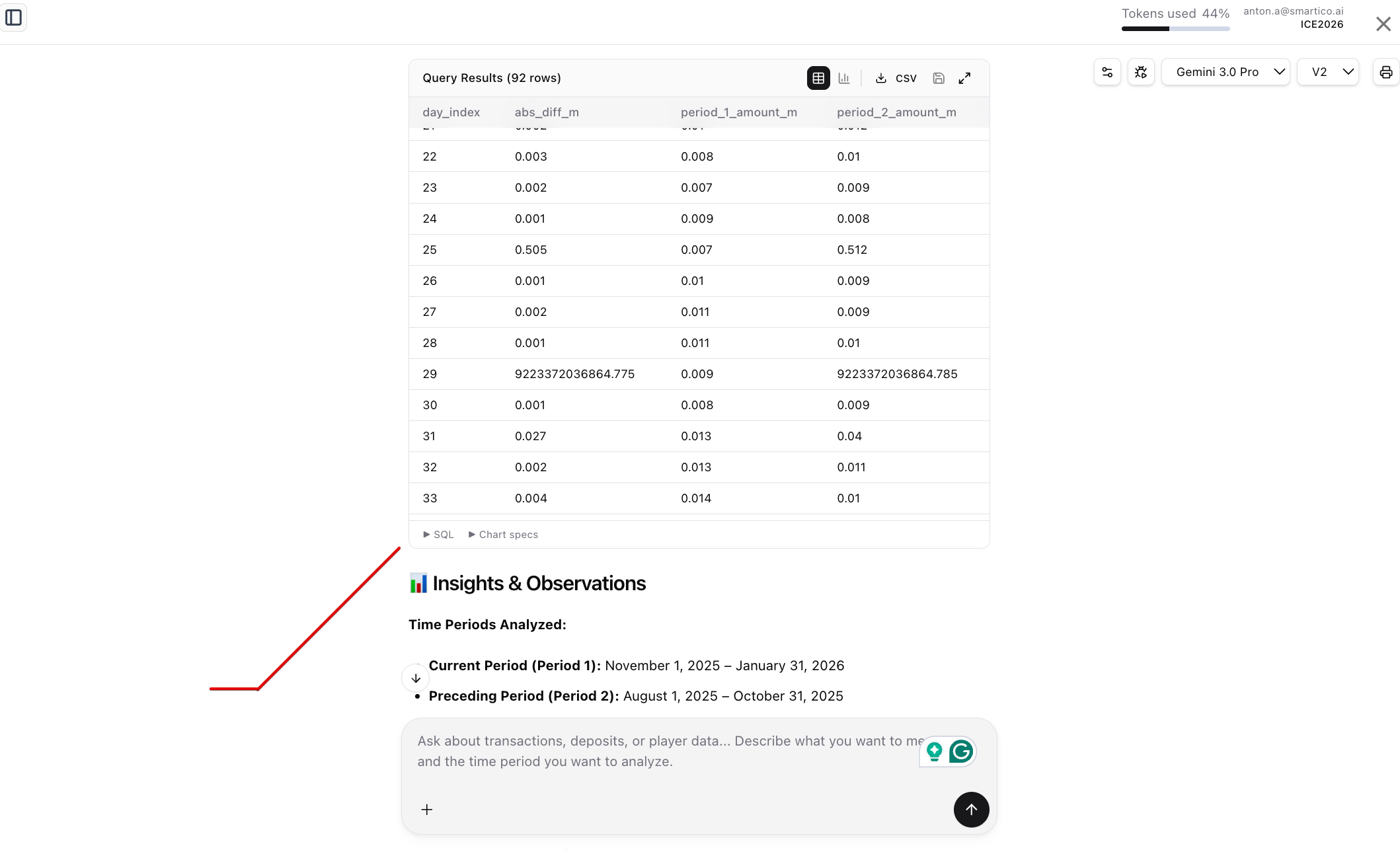
Example of query results

Check for Segment belonging from the JavaScript on the front-end
We have a front-end JavaScript API to verify that the user belongs to a specific segment. You can check for more details here and in the Public API documentation
Query for user profile details
You can query DWH to get detailed information about users stored on the Smartico side.
Note that only a small subset of user profile properties is exposed through the DWH, and only those shared by all clients. If you have a need to expose a specific property, please get in touch with Smartico support.
Currently exposed properties of j_user view
user_id
INT64
ID of the user in Smartico system
user_ext_id
STRING
ID of the user in the integrated platform
core_registration_date
TIMESTAMP
Date/time of registration
core_user_last_time_online
TIMESTAMP
Date/time when user was last time online
ach_level_current_id
INT64
ID of the current gamification level
ach_points_ever
INT64
Amount of points user collected ever
ach_points_balance
INT64
Current points balance of user
user_country
STRING
Country
core_user_language
STRING
Language, ISO code
core_user_last_device_type
STRING
Last used device type (Desktop, Mobile, Native, Wrapper)
core_wallet_currency
STRING
Currency code
core_external_segment
STRING[]
An array of external segment names, populated by the integrated platform. Behaviour is similar to external user markers
core_rfm_segment
INT64
1 - Champions 2 - Loyal 3 - Potential Loyalist 4 - Promising 5 - New Customers 6 - Need Attention 7 - About To Sleep 8 - Hibernating Customers 9 - At Risk 10 - Losing But Engaged 11 - About To Churn 12 - Churned By Definition
core_utm_campaign
STRING
UTM campaign of user as reported from the integrated Platform
core_utm_medium
STRING
UTM medium of user as reported from the integrated Platform
core_utm_source
STRING
UTM source of user as reported from the integrated Platform
core_ai_player_class_id
INT64
Player class value evaluated by LTV model 1 - Low 2 - Medium 3 - VIP
core_ai_churn_rank
INT64
Rank of player for Churn model 1 - Low 2 - Medium 3 - High 4 - Critical 5 - Churned Special value "-1" that has the meaning of "Invalidated", assigned to user in case he was churned or critical on the last evaluation, but did a deposit or bet, so his churn rank is not valid anymore and will be recalculated on the next iteration (by default daily)
core_inbox_unread_count
INT64
Number of unread inbox messages
core_is_test_account
BOOL
Is account indicated as test account
sms_last_clicked_date
TIMESTAMP
Date when user clicked on sms link last time
mail_last_clicked_date
TIMESTAMP
Date when user clicked on mail link last time
push_last_clicked_date
TIMESTAMP
Date when user clicked on push notification last time
last_marketing_popup_sent_date
TIMESTAMP
Date when last marketing popup was sent
last_marketing_push_sent_date
TIMESTAMP
Date when last marketing push was sent
last_marketing_email_sent_date
TIMESTAMP
Date when last marketing email was sent
last_marketing_sms_sent_date
TIMESTAMP
Date when last marketing SMS was sent
core_affiliate_id
INT64
ID of affiliate reported by PAM (in case reported as integer value)
core_affiliate_str
STRING
ID of affiliate reported by PAM (in case reported as string value)
core_account_status
STRING
Primary account status within the Smartico system. It plays a critical role in determining a user's eligibility for marketing activities. If an account's status is not set to ACTIVE, the system will not send any communications (like emails, SMS, or push notifications) to that user and won't issue the bonuses. This behavior can be adjusted in the label settings. The default status for any new account is ACTIVE. Other possible statuses include Blocked, Suspended, Deactivated, etc.
core_external_account_status
STRING
This property stores the account status as defined in your external system or Player Account Management (PAM) platform. It allows you to mirror the account status from your system within Smartico for segmentation and reporting.
core_email_valid_by_pam
BOOL
Email was validated on the PAM side
core_email_confirmed
BOOL
A boolean flag (true/false) that indicates whether a user's email address has been verified or confirmed on your platform (PAM). This status is managed and populated from your system and can be used in Smartico for segmentation
core_phone_confirmed
BOOL
Similar to email confirmation, this is a boolean flag that indicates if a user's phone number has been verified or confirmed on your platform (PAM)
core_is_sms_disabled_by_platform
BOOL
The user has opted out of receiving SMS messages via your platform's flow
core_is_sms_disabled
BOOL
The user has opted out of SMS messages using a Smartico opt-out link
core_is_push_disabled_by_platform
BOOL
The user has opted out of receiving push notifications via your platform's flow
core_is_push_disabled
BOOL
The user has opted out of Push messages using a Smartico opt-out link
core_is_ivr_disabled
BOOL
The user has opted out of receiving IVR (Interactive Voice Response) calls via your platform's flow
core_is_email_disabled_by_platform
BOOL
The user has opted out of receiving emails via your platform's flow
core_is_email_disabled
BOOL
The user has opted out of emails using a Smartico unsubscribe link
core_custom_propX
STRING
Custom string based properties, where X is 1,2,3...
core_custom_prop_dtX
TIMESTAMP
Custom date/time based properties, where X is 1,2,3...
core_custom_prop_numX
NUMERIC
Custom numeric based properties, where X is 1,2,3...
acc_last_deposit_date
TIMESTAMP
Date/time of the user's last approved deposit
core_value_score_30d
INT64
1 - Low 2 - Medium 3 - High 4 - Top
core_value_score_lt
INT64
1 - Low 2 - Medium 3 - High 4 - Top
in_manual_upload_segments
INT64[]
Array of segments IDs for the CSV-based segments and for "Common cases" segments
behaviour_ids
INT64[]
Array of segments IDs for the Behavioural segments
core_user_gender
STRING
User gender
core_is_visitor
BOOL
Indicator if the record represents the visitor
Examples
How to get a list of all users with respective IDs and names of the CSV, Common Cases, and Behavioral segments
Additional views
dwh_ext_xxx.dm_brand
Represents brands defined under your label
crm_brand_id
INT64
PK, ID of brand in Smartico system
crm_brand_name
STRING
Name of brand
ext_brand_id
STRING
ID of brand in external system
You will find more views on this page:
◾Smartico DWH \ CRM views◾Smartico DWH \ Gamification viewsTransactional tables
Smartico DWH exposes many transactional tables that represent events occurring outside Smartico (in the PAM) or events created by Smartico logic.
These tables use the naming convention "tr_some_event_name"; for example, the table "tr_acc_deposit_approved" contains all deposits reported from the integrated platform (PAM).
The transactional tables are updated to near-real-time, with a sub-second delay possible.
Here is an example of the most frequently used tables, the names of tables fully correspond to the original name of the event, e.g., table "tr_acc_deposit_approved" corresponds to the event "acc_deposit_approved". You may also notice that these tables/events are used in the calculation of Dynamic rewards and in the Behavioral segmentation
Payments & Wallet (from PAM)
tr_acc_deposit_approved
tr_acc_deposit_failed
tr_acc_withdrawal_approved
tr_acc_withdrawal_requested
tr_acc_withdrawal_completed
tr_acc_withdrawal_cancelled
Casino Activity (from PAM)
tr_casino_bet
tr_casino_win
tr_casino_bet_win
Sports Betting (from PAM)
tr_sport_bet_open
tr_sport_bet_settled
tr_sport_bet_selection_open
tr_sport_bet_selection_settled
Bonuses (from PAM)
tr_acc_bonus_approved
tr_acc_bonus_cancelled
tr_acc_bonus_failed
tr_acc_bonus_given
Bonuses (by Smartico)
tr_core_bonus_given
tr_core_bonus_failed
Dynamic rewards (by Smartico)
tr_core_dynamic_bonus_issued
tr_core_dynamic_bonus_calculated
Gamification: Points, Gems, Diamonds (by Smartico)
tr_ach_points_added
tr_ach_points_deducted
tr_ach_gems_added
tr_ach_gems_deducted
tr_ach_diamonds_added
tr_ach_diamonds_deducted
Gamification: Levels (by Smartico)
tr_ach_level_changed
Gamification: Missions (by Smartico)
tr_ach_achievement_completed
Gamification: Store (by Smartico)
tr_shop_item_purchase_successed
Gamification: Minigames (by Smartico)
tr_minigame_attempt
tr_minigame_win
tr_minigame_spins_issued
Gamification: Tournaments (by Smartico)
tr_tournament_user_registered
tr_tournament_win
tr_tournament_lose
Gamification: Raffles & Jackpots (by Smartico)
tr_raffle_tickets_given
tr_raffle_draw_won
tr_raffle_draw_run_opt_in
tr_raffle_prize_claimed
tr_jackpot_opt_in
tr_jackpot_user_win
Core System & User Actions (by Smartico)
tr_login
tr_client_action
tr_gs_game_sesssion_changed
tr_gs_game_sesssion_ended
Facts records deduplication
Note that in rare cases, some fact tables may contain duplicate records. This may occur in very exceptional cases and doesn't affect the system's operational layer. For example, if a record for the "mail sent" fact is duplicated, the mail wasn't sent twice; only the "mail sent" fact was duplicated.
You can perform deduplication using the "PK" field in the corresponding table.
How to connect to the Google BigQuery SQL
Smartico leverages Google BigQuery to offer robust and scalable data analytics capabilities. As part of our service, we provide a secure JSON key file that enables programmatic access to our DWH. This section outlines how to use the provided JSON key to connect to BigQuery, depending on the Business Intelligence (BI) tool you choose.
Overview of JSON Key Usage
A JSON key file is used as a credential for authentication. It allows secure access to Google BigQuery without needing user-specific Google credentials. The JSON key file you receive will be associated with a service account created and managed by our company that has been granted access to the required BigQuery resources.
Important Security Note
Please store your JSON key file securely and ensure it is accessible only to those who need it. Please do not share the JSON key publicly or with unauthorized users, as it provides direct access to our Data Warehouse.
Connecting to BigQuery Using Various BI Tools
Different BI tools have varied methods for setting up connections to BigQuery using a JSON key. Below, we offer guidance on connecting some popular BI tools to our DWH. For detailed instructions, refer to the specific documentation for the BI tool you are using.
Note: You shouldn't run analytical queries directly on Smartico DWH, as it may incur high costs. The proper way is to build a pipeline that loads daily data in your internal DWH and build reports on top of it.
Google Data Studio
Connection Type: Direct integration with Google services.
Key Usage: Typically, Data Studio uses OAuth 2.0 for authentication, which does not require a service account JSON key when using a Google account with appropriate permissions.
Tableau
Connection Type: Direct connection using a service account.
Key Usage: Upload your JSON key file during Tableau BigQuery connection setup.
Looker
Connection Type: Direct connection using a service account.
Key Usage: Paste the contents of the JSON key file into the appropriate field when configuring the BigQuery connection in Looker.
Microsoft Power BI
Connection Type: Connect using ODBC drivers.
Key Usage: Use the Simba ODBC Driver for Google BigQuery and specify the path to your JSON key file in the DSN configuration.
Qlik Sense
Connection Type: Connect using ODBC drivers.
Key Usage: Configure a System DSN using the ODBC Data Source Administrator on Windows, including the JSON key file.
FAQ
How to analyze DWH usage
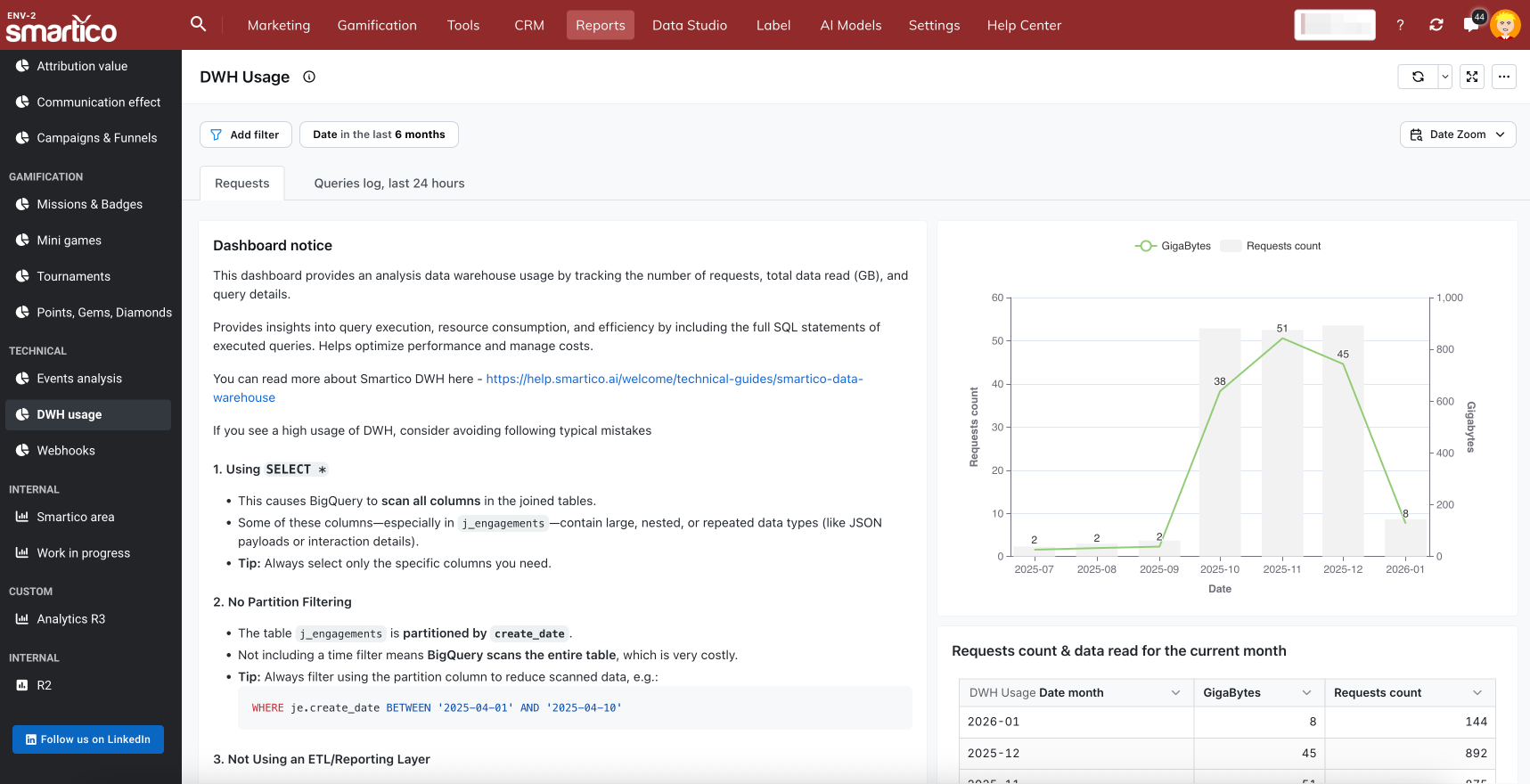
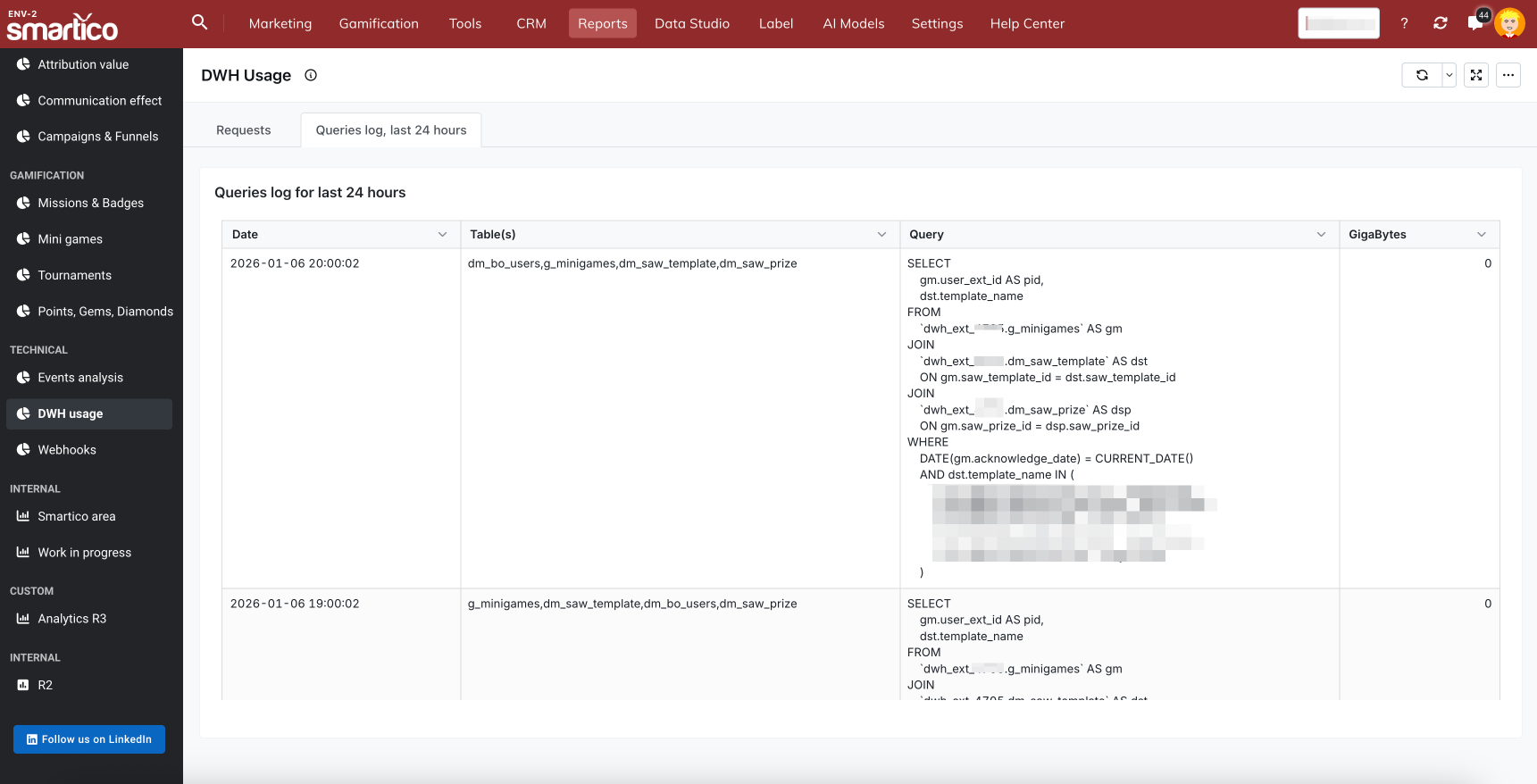
You can find two reports related to DWH usage in the Reports \ DWH usage section of Smartico BackOffice.
They are presented as two tabs.
Usage of DWH over the last 3 months.

Queries log for last 24 hours - will show you exact requests completed in the previous 24 hours and the amount of data read for each.

Why is the usage report showing much higher numbers of GigaBytes compared to the data that we are getting from DWH?
DWH usage is based on "data read," not "data transferred".
You may build a query that returns only one record, but behind the scenes, it may still read much more data. For example, "SELECT count(*) FROM some_table" will return only one record but still needs to scan the entire underlying table.
Can't access the DWH from Power BI: "Unable to authenticate with the Google BigQuery Storage API." Check your account permissions.
You need to disable the Storage API in Power BI settings, following this guide: https://learn.microsoft.com/en-us/power-query/connectors/google-bigquery
"Use Storage API" - A flag that enables using the Storage API of Google BigQuery. This option is true by default. This option can be set to false to not use the Storage API and use REST APIs instead.
How to authenticate in Power BI with the service account
Use the following guide from Microsoft - https://learn.microsoft.com/en-us/power-query/connectors/google-bigquery
Service Account Email: must be in email format
Service Account JSON key file contents: once this JSON key is downloaded, all new lines must be removed from the file so that the contents are in one line. Once the JSON file is in that format, the contents can be pasted into this field.
Pay attention to the content of the JSON file needs to be manually formatted in one line
Can't access table dwh_ext_xxx.j_engagements and any other
You need to replace "xxx" value with the label_id specific for your setup. You can also see the label_id in the name of the BigQuery user that has the format l"dwh_ext_1234"
Can different labels and brands have access using the same DWH account?
Every label requires a separate account to access DWH.
You could have many brands under one label setup. Data related to all these labels will be available from the respective DWH account for this label
The documentation says not to use the DW directly for analytical queries, as it may involve costs. Is the best way to carry out a daily data load to an internal DW?
The best approach is to make a daily incremental load from Smartico DWH to your DWH.
Dimensional tables (prefixed as “dm”) are pretty small, and you can reload them fully every day.
Other tables (fact tables), are partitioned by date/time, so you can run every day at 1 AM UTC, get fresh data for the previous day, and load it to your DWH
When using a BI tool such as Power BI in the import model, can I connect directly to the DWH? Is there any financial or performance impact?
If you use Power BI or any other tool to query data directly from Smartico DWH, this may incur a high load and additional costs depending on how complex reports you are doing. The best way is to load data from Smartico DWH to your DWH and connect Power BI to your DWH.
Regarding the "import" mode in Power BI, per Microsoft documentation, it can operate in two modes: "Full refresh" and "Incremental refresh". Based on the names, the best approach is to use the "Incremental way" method to avoid high resource usage. For the exact setup, please consult an expert in Power BI.
Is there a limit on the number of queries that do not generate this extra cost?
There is a 1 TB monthly limit for scanned data (this reflects how Google is pricing BigQuery usage). There is no limit on the number of queries. Note that if you exceed the 1 TB monthly limit, the service will continue to be provided, and there is no automated blocking; you must manage usage on your side.
Based on the documentation, we have a few questions: Is the data in the DWH always available for a window of the last 1080 days?
Yes, fact tables are limited to the last 1080 days, and you won't be able to query data older than 1080 days from the query start time. If you do incremental/daily load of data finally, you can store unlimited in terms of time, data on your side.
Can we retrieve data from all campaigns in this DWH? Information related to the segmentations we used, results by channel (sms, email, push, etc), value assigned to the active group and control group, CTR, conversion rate, etc?
You can get results from communication channels such as SMS, email, push notifications, etc.
The fact table for communication channels (j_communication) includes all fails, clicks, and impressions, so you can build derived metrics such as CTR, Delivery rate, and Fail rate.
j_engagements fact table represents information about campaigns, you can build a conversion rate for campaigns using it.
Segment exporting is available via the table function fn_export_segment; see the documentation above for details.
If we have multiple labels and want to access data for all of them, should we have multiple access keys or could it be one, shared?
Both options are possible and depend on your needs. We can create a single access key that has access to all labels you manage, or we can create separate keys.
Please note that a specific key can access only labels managed in the same environment. So, if you have one label on environment "3" and five labels on environment "5", you will have at least two access keys.
Can we have two keys/service accounts accessing data for a specific label?
No, we are providing only one service account per label
Can we get access to DWH for a service account managed by our company, and not by Smartico?
No, access to DWH is provided only using service accounts managed by Smartico.
Last updated
Was this helpful?