> For the complete documentation index, see [llms.txt](https://help.smartico.ai/welcome/llms.txt). Markdown versions of documentation pages are available by appending `.md` to page URLs; this page is available as [Markdown](https://help.smartico.ai/welcome/technical-guides/communication-gateways/reverse-integration-messaging.md).
# Reverse integration: messaging
The Smartico platform can notify your system whenever it sends an asset (such as an email, SMS, or push notification) to a user via HTTP call.
\
For example, Smartico can trigger an HTTP request (typically a POST) to your API each time an asset is sent. This enables you to track user communications in real time.\
Possible Parameters Included in the Request
### Supported Triggers & Actions
Webhooks can be configured to trigger on:
* **Communication Channels** – Email, SMS, Push, Inbox, Popups, WhatsApp, Viber, Telegram, and IVR calls.
* **Customer Journey Property Updates** – Triggers whenever specified player properties change, sending the updated property name and its new value.
* **Delivery & Status Events** – Optionally receive updates when messages are delivered, opened, or failed (or filter to send-only events).
* **Time** – Timestamp in epoch milliseconds
* **Campaign Name** – The name of the campaign that triggered the asset
* **Asset Type** – Communication channel (e.g., Email, SMS, Push)
* **External User ID** – The user ID in your system
* **Engagement ID** – Unique identifier of the message interaction
* **Campaign ID** – The numeric ID of the campaign
* **Brand Name** – The name of the brand associated with the user
* **Custom User & Event Tags** – Any user property or event property can be injected using dynamic tags (for example, user properties or custom parameters)
* **Resource Title & Meta** – The title and metadata associated with the message template
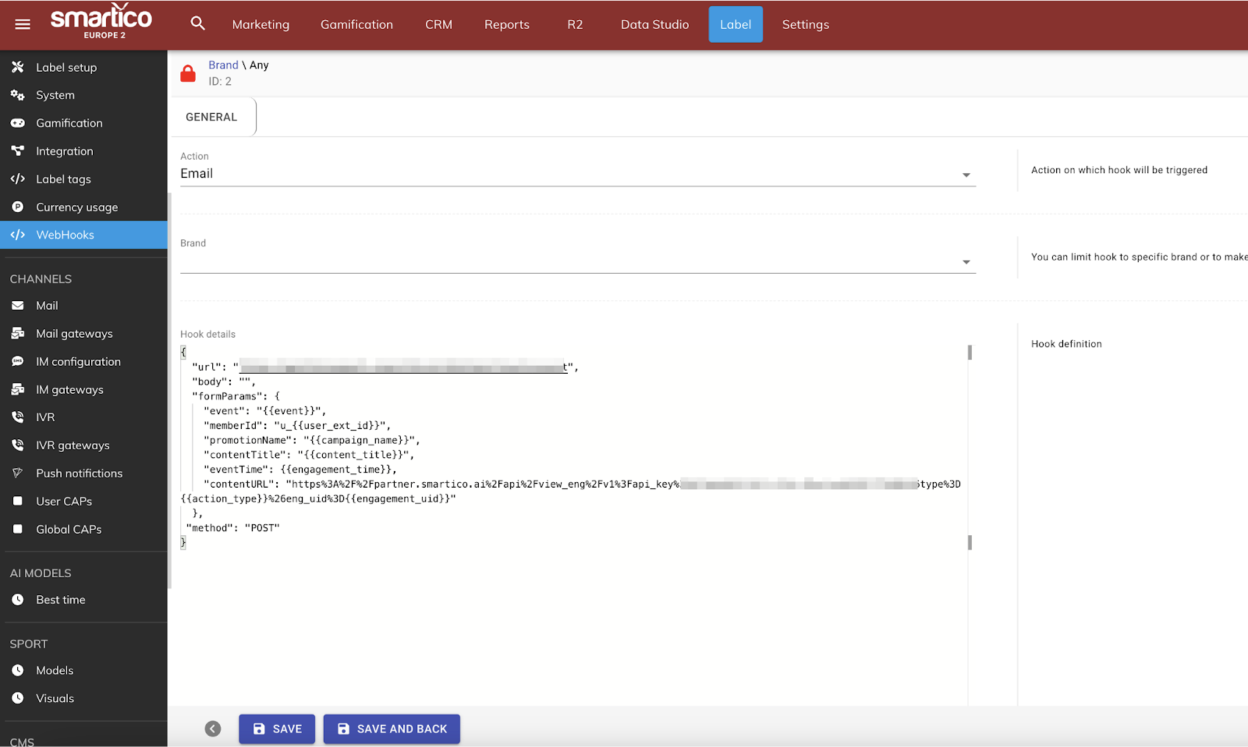
You can configure webhooks directly in the Back-Office under Label > More > WebHooks, or have the Smartico team assist you. When setting up an endpoint, specify:
* **HTTP URL** of your API endpoint
* **Preferred HTTP method** – POST is recommended, but GET is also supported
* **Content type** – "application/json" is suggested
* **Body template** – For POST requests, a JSON payload structure must be defined
* **Headers** – Custom HTTP headers such as Authorization tokens or API keys can be specified in the webhook configuration
**Example of setup**
> Note: The following is a sample request body. It is fully configurable and can be adapted to match your existing API. In 99% of cases, we can integrate with your current structure without requiring changes on your end.
* URL -
* Method POST
* Content-Type: "application/json"
* Body template
```json
{
"login": "123123",
"time": 1664115803000,
"channel": "SMS",
"campaign_name": "RND Flow"
}
```
If you already have an API that handles similar notifications, in most of the cases we can reuse it with minimal to no modification.
### Related Guides
* If you require Smartico to delegate message sending to your own gateway without storing player contact details, see [Secured Messaging Gateways](/welcome/technical-guides/communication-gateways/secured-messaging-gateways-email-sms-im.md).
* To integrate custom push notification dispatchers, see [Custom Push Gateways](/welcome/technical-guides/communication-gateways/custom-push-gateways.md).
* For custom instant message providers, see [Instant Messages Gateway guide](/welcome/technical-guides/communication-gateways/instant-messages-gateway-guide.md).
{% hint style="info" %}
Contact your Success Manager or log a JIRA ticket to set up the reverse integration
{% endhint %}
### FAQ
**Can reverse integration webhooks export historical communication data to our data warehouse?**
No. Reverse integration webhooks fire in real time as individual communication events occur. For historical communication logs and bulk analysis, access the communication tables in your Data Warehouse export or review standard communication reports in the Back-Office.
**How can we pass custom user attributes or event parameters in the webhook body?**
In addition to standard parameters, you can use dynamic tag replacement (such as user profile attributes or custom event parameters) directly in your JSON body template.
**Can we filter webhooks to trigger only on initial message sends rather than delivery callbacks?**
Yes. Webhooks can be configured to trigger exclusively on message send events, ignoring downstream status updates.
---
# Agent Instructions
This documentation is published with GitBook. GitBook is the documentation platform designed so that both humans and AI agents can read, navigate, and reason over technical content effectively. Learn more at gitbook.com.
## Querying This Documentation
If you need additional information that is not directly available in this page, you can query the documentation by asking a question.
Perform an HTTP GET request on the following URL with the `ask` and `goal` query parameters:
```
GET https://help.smartico.ai/welcome/technical-guides/communication-gateways/reverse-integration-messaging.md?ask=&goal=
```
`ask` is the immediate question: it should be specific, self-contained, and written in natural language.
`goal` is what the user is ultimately trying to achieve, the reason they need the answer. Sharing it helps GitBook give you a better, more relevant answer. A goal is most helpful when it describes the outcome the user wants rather than restating the question. For example, with `ask=how do I create an API token`, a goal like `automate deployments from our CI pipeline` lets GitBook tailor the answer to that use case.
The response will contain a direct answer to the question and relevant excerpts and sources from the documentation.
Use this mechanism when the answer is not explicitly present in the current page, you need clarification or additional context, or you want to retrieve related documentation sections.