> For the complete documentation index, see [llms.txt](https://help.smartico.ai/welcome/llms.txt). Markdown versions of documentation pages are available by appending `.md` to page URLs; this page is available as [Markdown](https://help.smartico.ai/welcome/products/tools-and-guides/faqs/faq-gamification.md).
# FAQ: Gamification
### **What is "public user name"?**
Public user name is used to present the user in the gamification widget, for example, in the leaderboards, tournaments, raffles, jackpot winners, etc.
During the integration process, the Smartico technical team can configure the logic to retrieve the "public user name" value from the fields of your choice. The possible scenarios we are usually facing:
* In case your system already has a concept of "username", then it's the best candidate to be used for "public user name".
* If you don't have such, then we recommend using the "First name" of the user.
* Otherwise, you can pick any other user state property. Alternatively, if nothing is selected, you can use the user ID.
* It is also possible to set multiple fields; for example, setting the logic to "core\_username;user\_first\_name;user\_ext\_id" instructs the system to select the first non-empty field.
In the Back-Office, the property priority order is configured under **Label → Label, settings → General → System settings → Integration** (or per brand under **Label → Brands → Brand settings → System → General**) via the **Property for public name of user** setting. A change applies to a player the next time one of these properties changes for that player; to update all players at once, contact your Success Manager. Name masking is enabled under **Label, settings → General → Gamification → General** via **Mask names of other players**, and user nickname editing can be toggled with **Allow username change** under **Label, settings → Widget / Real users → General**.
Notes:
* By default, the "public user name" is masked when visible in the gamification widget (Smartico keeps the first characters, 4 by default, and adds "\*\*\*\*\*": for example, "JohnWeek" is shown as "John\*\*\*\*\*"; the number of characters is set by **Mask username in leaderboards**). You can adjust this logic in Label settings by configuring the **Mask names of other players** option.
* The end user can change their public username from the gamification widget. If it is not desired, turn off **Allow username change** under **Widget / Real users → General**.
### **I see the gamification widget in a language different than my account's core language**
Make sure you check the language settings and verify that the desired language is among the widget's allowed languages:
* **Label → Label, settings → Widget / Real users → General → Allowed languages** (the **Widget / Test users** tab has its own list for test users). A brand with its own widget settings (**Label → Brands → Widget / Real users**) uses the brand list instead. If the player's language is not in the list, the widget is shown in English when English is in the list, otherwise in the first language of the list.
* **Label → Label, settings → General → System settings → Front-end → Languages allowed on the front-end** limits the languages for the widget, popups and inbox. If the player's language is not in this list, English is used when it is in the list, otherwise the first language of the list. Empty means all languages are allowed.
Label, settings → Widget / Real users → General: 1 — Allowed languages of the gamification widget
### How are store items ordered?
The default order is the following:
* 1st priority - items that the user can buy (has enough points and eligible to buy from the conditions settings)
* 2nd priority - items ordered by "priority" value
* 3rd priority - items ordered by price, from high to low
See [Store](/welcome/products/gamification-basics/marketplace.md) for how store items are set up.
{% hint style="info" %}
The default sorting formula can be customized directly in the Back-Office under **Label → Label, settings → Widget / Real users → Store → Store default ordering** (for example, combining eligibility, priority, and price; the default value is `canbuy ASC, priority ASC, price DESC`), or configured with help from your Customer Success Manager.
{% endhint %}
### What are deep links?
Deep links are a way to navigate users to specific screens within the gamification widget or to screens specific to integrated products. They can be used across various channels such as popups, push messages, inbox messages, SMS, mail templates, and more.
### What is the difference between built-in deep links and product-specific deep links?
Built-in deep links usually start with the "gf" prefix and are related to the gamification widget's functionality. Product-specific deep links may have any name and lead users to specific screens in integrated products.
### Why should I use deep links instead of fixed URLs?
Deep links provide a unified way to lead users to specific screens, regardless of the channel used. They simplify operational work, especially when multiple brands use the system, and they can help you migrate to a new domain.
### How can I use deep links?
Deep links can be executed from various places in the Smartico system, including popups, push messages, inbox messages, SMS, mail templates, and more. You can also navigate directly to your site with specific parameters in the URL. Check ["Deep links"](/welcome/products/tools-and-guides/deep-links.md) article for more details.
### When should I use the "standalone" and "hide\_main" parameters?
The "standalone" parameter (for example, \&standalone=true) renders the targeted screen or mini-game without the surrounding gamification widget shell, header, or navigation menus. The "hide\_main" parameter (\&hide\_main=true) hides the main widget background frame so that only a specific modal dialog (such as the avatar selection or username change modal) is displayed over the host page.
### Why are some games not appearing when I try to create missions, tournaments, segments, or other activities?
Certain games may not appear in the system under "game name" for missions, tournaments, segments, and other activities if they have not been played yet by a user on your label. To resolve this issue, follow these steps:
1. **Make Bets**: Ensure that bets are made on the games in question. This action registers the game in the database.
2. **Verify Game Appearance**: After placing the bets, check if the games appear in the system.
3. **Further Action if Necessary**: If the games still do not appear, provide the Smartico profile link of the user who made the bets for further investigation.
**Additional Help:**
If you continue to experience issues, please contact support with:
* The specific games involved
* Confirmation that bets were placed
* The Smartico profile link of the user who made the bets
### **My recurring mission isn't visible. What could be the reasons?**
There are two main reasons why a recurring mission might not be visible:
#### 1. Criteria for Visibility and Progress
Recurring missions have a section called **Who can see and progress in the mission**, where you can specify different criteria the user should meet to see and progress in the mission.
If you don't meet the specified criteria, you won't see the mission.
#### 2. Schedule Configuration
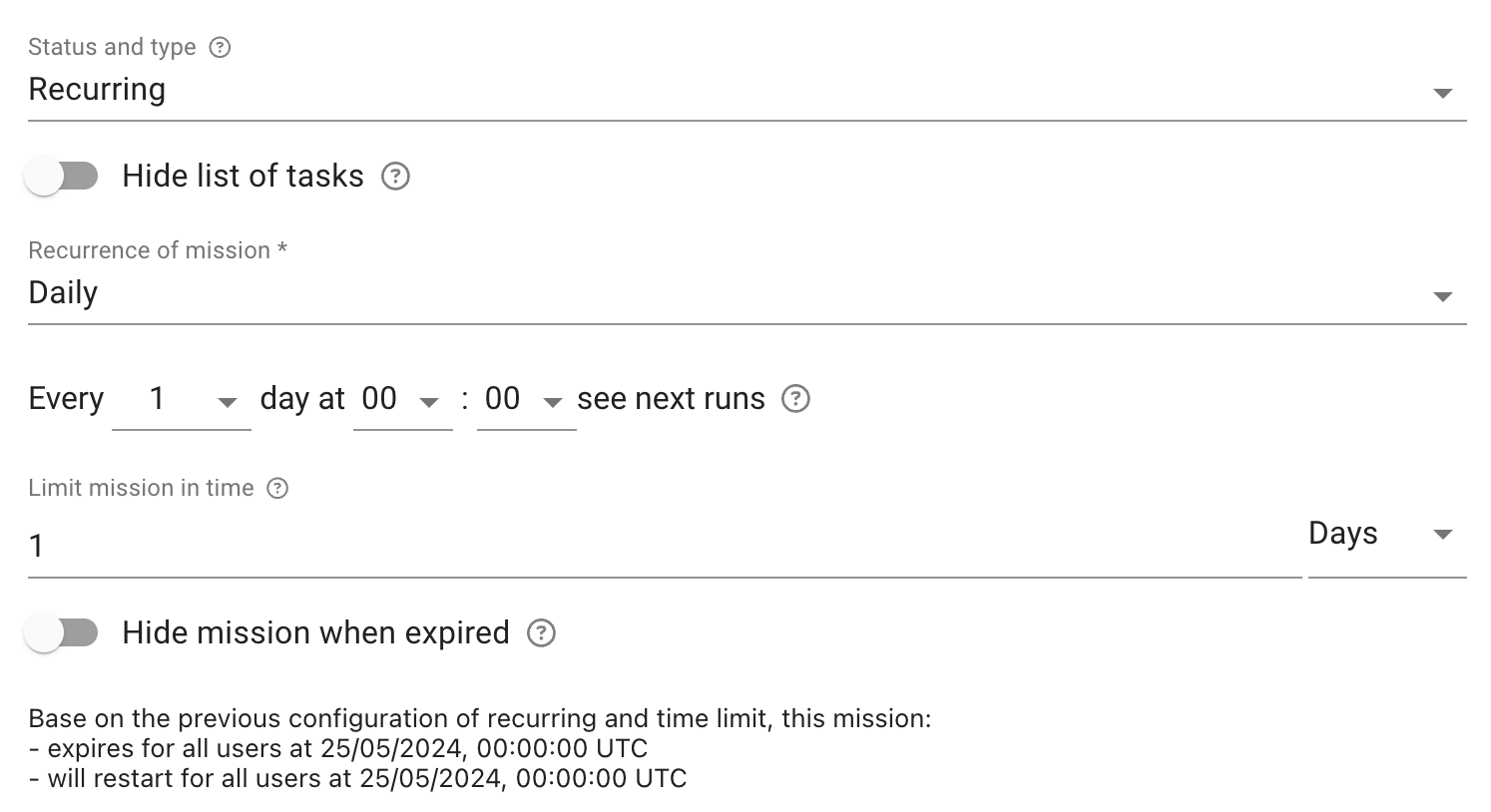
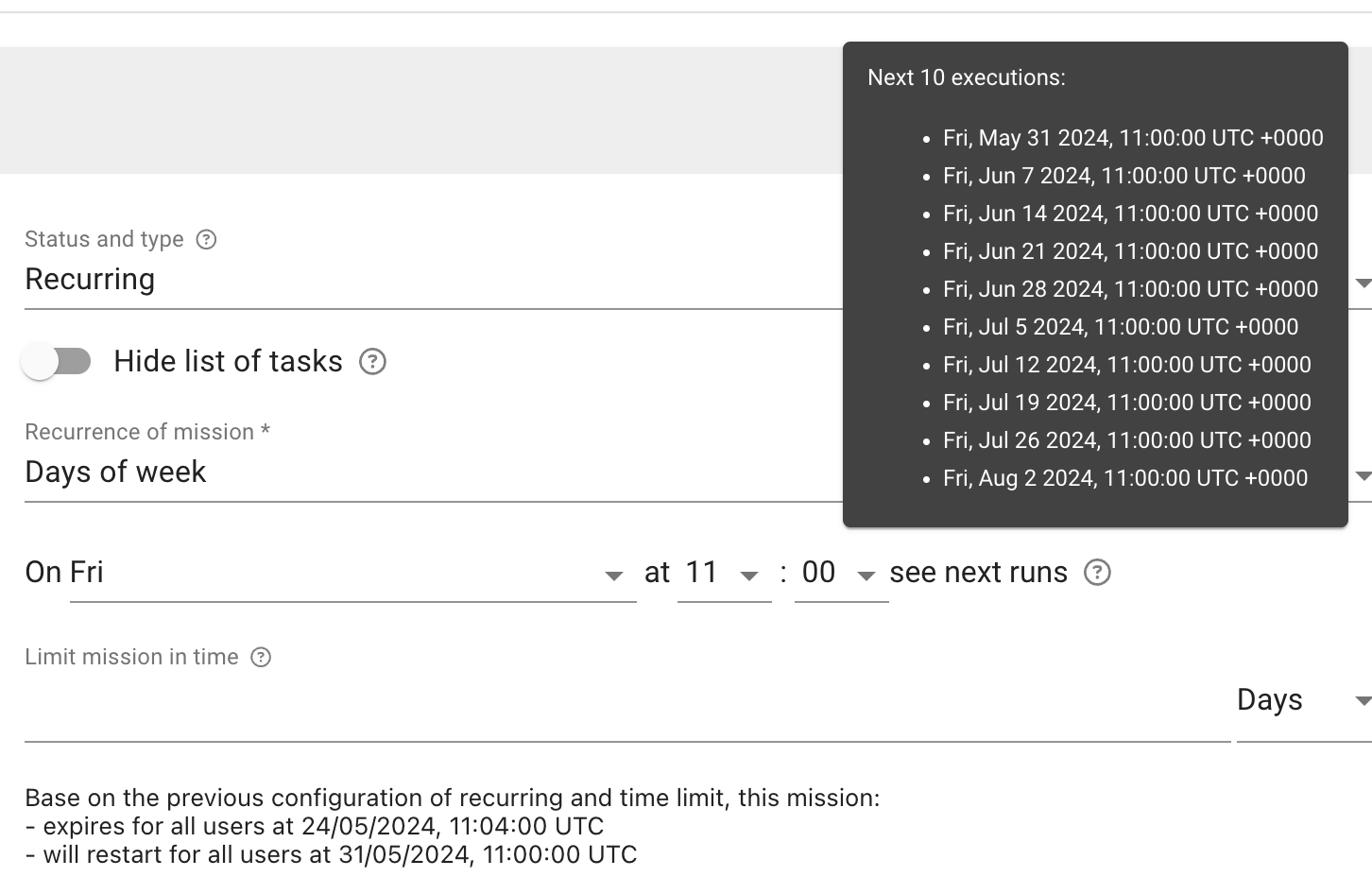
Recurring missions work on a schedule (**Recurrence of mission**). They can run hourly, daily, on certain days of the week, on specific days of the month, or on a few specific dates and times.
{% hint style="info" %}
Please note that the schedule will execute as per the configuration. If the scheduled time for today has already passed, it will exclude the current day and start on the next scheduled time.
{% endhint %}
For example, if a mission is created today at 12:00, May 24th (Friday), and configured to run every Friday at 11:00, the first execution of the mission will be on May 31st at 11:00.
#### Additional Help:
If you continue to experience issues with your recurring mission visibility, please contact support with detailed information, including:
* The specific criteria set for mission visibility
* The schedule configuration of the mission
* Any relevant screenshots or logs
By understanding these factors, you can ensure that your recurring missions are visible and executed as intended. See [Recurring Missions](/welcome/products/gamification-basics/missions/recurring-missions.md) for the full set-up.
### What is the difference between tournament leaderboards and standard gamification leaderboards?
* **Standard Gamification Leaderboards:** Ongoing, periodic rankings (daily, weekly, or monthly) that track accumulated gamification points earned from general gameplay and completed missions. Rankings reset on a fixed calendar schedule, and rewards are distributed exclusively as gamification points.
* **Tournament Leaderboards:** Time-limited competitive events tied to specific tournament schedules. They feature custom score calculation formulas (such as bet counts, win amounts, or multiplier ratios on selected games), distinct entry rules (auto-entry, point/gem buy-in, or qualification), and award diverse prize types including bonuses, points, gems, or physical prizes. See [Tournaments](/welcome/products/gamification-basics/tournaments.md).
### How can I embed gamification elements or mini-games directly on a webpage without opening the full widget?
You can embed individual gamification blocks directly into any container on your website using the JavaScript SDK method for embedding gamification blocks. Additionally, mini-games (such as Spin-a-Wheel or MatchX) can be opened in an isolated modal overlay by triggering deep links with the standalone parameter (for example, dp:gf\_saw\&id=123\&standalone=true).
### Why were points deducted from a player's balance if they did not make a store purchase?
Gamification points can be spent or deducted outside the Store through several mechanics:
* **Mini-Game Spins:** Direct point buy-ins to spin a Wheel of Fortune or play other mini-games.
* **Tournament Buy-Ins:** Entry fees paid in points to participate in gated tournaments.
* **Raffle Tickets:** Points spent purchasing tickets for scheduled raffle draws. Raffle tickets can also be sold for points as store items.
* **Manual or Campaign Adjustments:** Point balance modifications executed via Back-Office manual adjustments, API calls, or automated journey actions.
* **Point Expiration:** Automated expiration rules configured for inactive points balances. Such a rule is usually built as a campaign or automation rule with the **Reset points** or **Deduct points** activity (for example, a scheduled rule that clears the points of inactive players).
To find the reason for a change, open **CRM → Gamification → Points** (or the player's profile): the **Changes source** column shows where every change came from (for example **Play Game**, **Tournament Registration**, **Automation Rule** or **Manual Adjustment**).
---
# Agent Instructions
This documentation is published with GitBook. GitBook is the documentation platform designed so that both humans and AI agents can read, navigate, and reason over technical content effectively. Learn more at gitbook.com.
## Querying This Documentation
If you need additional information that is not directly available in this page, you can query the documentation by asking a question.
Perform an HTTP GET request on the following URL with the `ask` and `goal` query parameters:
```
GET https://help.smartico.ai/welcome/products/tools-and-guides/faqs/faq-gamification.md?ask=&goal=
```
`ask` is the immediate question: it should be specific, self-contained, and written in natural language.
`goal` is what the user is ultimately trying to achieve, the reason they need the answer. Sharing it helps GitBook give you a better, more relevant answer. A goal is most helpful when it describes the outcome the user wants rather than restating the question. For example, with `ask=how do I create an API token`, a goal like `automate deployments from our CI pipeline` lets GitBook tailor the answer to that use case.
The response will contain a direct answer to the question and relevant excerpts and sources from the documentation.
Use this mechanism when the answer is not explicitly present in the current page, you need clarification or additional context, or you want to retrieve related documentation sections.