> For the complete documentation index, see [llms.txt](https://help.smartico.ai/welcome/llms.txt). Markdown versions of documentation pages are available by appending `.md` to page URLs; this page is available as [Markdown](https://help.smartico.ai/welcome/products/release-notes/april-2021.md).

# April 2021

Smartico release notes for April 2021, covering CRM Automation and Gamification improvements done since the previous release.

## CRM Automation

### User profile: revamped UI

<figure><img src="https://lh6.googleusercontent.com/1iExW6Fz-wAhiQ62AVQVpHo3DRAn0G5P78V8TRlQTQ4XGaVTdLaTb3JHF2pIM0fdYht49g-scbO6n9BYMzJ8ybrEMy5j0PyB6__ASIj1whm0KhJFpqSLOPJSbEaYRGNknH6NRHRndHfUjjMgrZKUd1-mPmL97QuKmdcK6xtJmwDu2gHGSmmWQqvHAPg" alt=""><figcaption></figcaption></figure>

* Better UI organization.
* Support of internal user notes
* “Audit” of the profile changes
* Control of user “test” status, channels opt-out, user markers (Former “User Tags”)

### “Attribution Value” KPIs in the scheduled campaigns calendar

AV (Attribution Value) measured by conversion with deposit is presented in the Scheduled campaigns calendar:

<figure><img src="https://lh4.googleusercontent.com/ZJiJzap_YZo1g7EqLPMstT4fSXlbnhwHg4aZHVHCJ6rjUnAg4at6h-AWxUWIPKcCx925EvrarAkLJzh1YMPyB3R5oJHCluZAfVD3BhNwHOoZLKOPY_HH0RX9-u714Kdprf8tXNFYMyayUQo5h3J8PTLLlpIhhSrSWTgq3J1YEvP55PtfTFdMLa2-4iM" alt=""><figcaption></figcaption></figure>

### User profile: personal messages for end users

* Support for personal communication with SMS, Popup, Push, Mails
* Allowed when user opted in, channels are verified and available for sending (user cannot be deactivated)
* Delayed delivery of popups - will be sent on next login
* All communications are branded according to the brand user belongs to

<figure><img src="https://lh4.googleusercontent.com/WUUS5YLOo7PxI2bHCIa4mPFsrFMHiLg5otTEY-7MRi_ROFCPF9BdC4R2AI7U723_FbDVrH1yBUpC-SoP0ABbK360n_kTLoQXtKNSNgAXJeZxBrzyO3-eE6BlwQX9SWgWFgjZdwQU-3V1Tlb17sS-I38JcCAZ1tX6uLYrm0jIfPhoLJYIde9IFGqN1rM" alt=""><figcaption></figcaption></figure>

<figure><img src="https://lh5.googleusercontent.com/5GcPkYL3ID4K5ZXVnxB0zKKG_Wep9U73ijvAlwS5L6FxCEcaEBtmthc6EgASqa_Xm0xDaPkspoP9pN0aL1vq2wpEnwyFfJEyJ5H7i7D0pu8hqVbkSa6wPtaVvFH4_q_PiEI3rTsiJbbyqscrstfjJSKG_l7wZygI5dvHESAg90Us6Pckd7AUiOBfLLQ" alt=""><figcaption></figcaption></figure>

<figure><img src="https://lh5.googleusercontent.com/6I5XJxPGxiMj7qoQyhLKprZcRgkCRzvzUnshjrlRH1YLZvpWpMsNBXtrUNASn6OvgRNnnetFOhu0ZXaXH7TeCpMh_hEWQtn7GyITAGihpRNArqjh0zt4eI2FerEaQ9K0Aro-cbBiDlrePMXSHIPXOBKdNIljDjC1InUsGO6QXXCcLcYuCB7O3Uz2BJI" alt=""><figcaption></figcaption></figure>

### A/B testing status in Flow Builder activities

Mails, Popup, SMS, and Push activities in the flow builder provide the ability to see current A/B testing status, the number of sent messages, conversion rates, and winner selection.

Control A/B distribution and A/B test limits

<figure><img src="https://lh5.googleusercontent.com/WziQB5CQFBzcGs-09lP1IQnaUwlBB795i_4xV--_SpxP_Z6o1h66CVzLPh0eTdf-o28ca01IULr0Bmy57DvrR70oE4BcmxsQLT-FAmkij_6jtXTcN_cKAbG7jepWK5pj3n1y6SEIhmNLsmH3sdx3qfqlBL4f-6Wd2ysoTIGrJo77UUDb6-JREXbyvvA" alt=""><figcaption></figcaption></figure>

### Reworked activities for Marking and Unmarking users

Previously called “Tagging”, now renamed to “Markers”

Now can set or remove multiple markers at once within the campaign flow builder

List of already used markers for operator convenience

<figure><img src="https://lh6.googleusercontent.com/EkJzyN4dImTrJ_y9YoGFfjZ_xt-IVRVqWvC69bjKVd3yIOORM35QbfFlAUgXG4Danr6Kj-f-AUW63KX7VmZDaOtreZWJffwPDv9smBTwcq4rDDjfocOYBrIUngX8nggmKtmvzaZ5vou_0U7YeL0lWUv-Jij0Qxb-gqk5jmzttrRaKF8x9kM99BPzsJU" alt=""><figcaption></figcaption></figure>

### Filter Journeys, Scheduled campaigns and Calendar based on the communication channel used inside campaign

<figure><img src="https://lh6.googleusercontent.com/FF-dmerQND4HyOtEm4UwBojIIajlVrks_5uKwwz-3wedvn2pOGrJE0Uced4iS0cfQPIAhnn38tZsFYg4cWQLPbvfgCs6ftgWaumYPAnI1yTWnaVMXH3fJ-13CZ3bqxaIt-_duweOPP8p0iRNbSCwQ2cmtbrP_39-aRDOPNrY-l70vcMA0sllWAFxTcg" alt=""><figcaption></figcaption></figure>

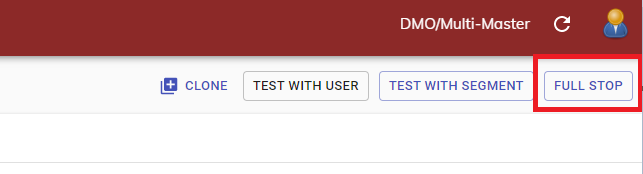
### "Full stop" of campaigns

Ability to stop engagements for all users in the campaign, in case a running campaign should be stopped immediately for whatever reason.

<figure><img src="https://77049817-files.gitbook.io/~/files/v0/b/gitbook-x-prod.appspot.com/o/spaces%2FfS5hl0PiysHtKAKMsQTe%2Fuploads%2Fgit-blob-b9e9f3f870c67e70146a64afd89ee4b181f85148%2Fimage.png?alt=media" alt=""><figcaption></figcaption></figure>

### Active missions in user profile

Current status of all missions available for selected user. Can be used for gamification setup troubleshooting and support personnel

<figure><img src="https://lh5.googleusercontent.com/eM2SxNJuwdi-CXzCsujlVawfHXCyZCTHievrUKz5pkTYGFnaV7d6zzzVcCoKws6XjTQfEVwTSafIwyo5KZg6oBVHNV6LeBzixbWa7zZI8tIjZWQ4GRVOvcrYISD40jMHyOq004b2E1eioD3hKfKF6KmxtDdrufFpbmKAcVaE_JWAY4jS6xjpJ_AeJjw" alt=""><figcaption></figcaption></figure>

### Review of main indicators in campaign BI

<figure><img src="https://lh4.googleusercontent.com/SKWKjAhWBAEp-k1a4THO1zoToSVHTVpZe07bQE0FIrnlMarmDYd7aeKvrcT11jNgtZpgHjknqztHsgILr5IFvz9tLmnRvUprFzhD-MGo-_MTTpGlInIpel5gw3vwwRxlD02dunJ7hZx42im-UpDo3CEerwCTHbQctYyAFLBFzVBV6sYG88cvWc2R8i8" alt=""><figcaption></figcaption></figure>

### Changes in Marketing BI dashboard

<figure><img src="https://lh3.googleusercontent.com/RIdq71LuphpGdtkqQJdKCJy3OsY3e6Nh6iqsii67-BMqCPeyXnyDbPA6hvVUHcn58COXEiJcwAkz8ewoW7C0ERWVKM1hR32qvpUVT4r11rTULFV8qoaaAHMfnu_l0Hj6zKHntyuPxJWvACO6kVW9wusJDSTbM8MCXrsesAViBK8YOZNwh3w97iZ1fUA" alt=""><figcaption></figcaption></figure>

### Inline explanations for indicators in dashboards

<figure><img src="https://lh6.googleusercontent.com/Xuv_NOpwGhdmS6fibOvatVhv3Hydg3ZkZXM7HZidW2lwUQxbF5mIvk5hC4iV8miH66cbrFFdVHj8e23bETPCcBEawvgCJ-i19htJ7YoBUW96kf5XXCuc1Bpcjm-RZg0gbcHss8ijunt1YVEd3QyCdcnd6xcKwmuqBsEYinAc4Das4tokqPA9skgz79A" alt=""><figcaption></figcaption></figure>

<figure><img src="https://lh6.googleusercontent.com/ghrz5PoN4DshafBjf4ibyn-YcpL847jv-P4Rx_eAltttYeGGXESO36Plo3rU-DgTo_0YXfbUGf-kJhneZvYreSyxsPZ3uufa99cy1juAlZVTzrCnaZ6yfEQBkFrpXLjlvrYVCade1IDlKKiMbzfb0sxA2ej6GDkqcDHb0ftn02--yebtHIN5cofjtoM" alt=""><figcaption></figcaption></figure>

### Fail reasons for communication channels

Monitor fails like: Disabled accounts, DnD, Opted-out -> adjust segments and campaigns

External fails: out of credits, wrong configurations -> react operationally

<figure><img src="https://lh4.googleusercontent.com/YdPIJHFf5WrE59H3-y3tvDwWNbrLidrMOEYGHWBoxP8c-4giG5h8lBCV4ZZH7ddmzkHyBWNN6NcQDdDvXUZ7rQ_EuJZNzau9IaJ-Zznk_nza7ACJr_yn4II-p1BxjouDywrDxE8QQ7BWxhWVtaGqngarSWHydaC0te-OqPkLdWkAhWH1AcPfHblXoBA" alt=""><figcaption></figcaption></figure>

### Active users report

Monitor “active” users in terms of actions they did - login, bet, deposit etc. Slice data by user profile dimensions, like Device type, Brand, Country etc.. Note: set of actions is specific per integration and can be extended by request

<figure><img src="https://lh4.googleusercontent.com/NyHAyhCWl6rp0LrBQVYyYIMqQgnyPZs8RwPcYzXoRM_ffecfLXz-r-ERu_1E9msuK2Ie1s5-pTD1h6-0g0ONo_SlOTklAkR4eXEqbFOpoffCMnGWp9o4TbjH5a8-TJHVqVSO6HnnJIt0JklFwnGjEPrOACjuax3LwG6EEo0qOz8FWjoAxEoN7BUPRxw" alt=""><figcaption></figcaption></figure>

### Direct links to custom BI views

After building custom BI view, operator can get a link to this view and share with colleagues

<figure><img src="https://lh5.googleusercontent.com/pS2eNDQ62yrr4Qp0e77Mm_aY3RIJ-5yTwG9Y8G66iA6tnfNz_yWuBFKq-IyhAJOye5ISTMkdMeLolAt8Vq-NN5N2lBSl9h2TVVVklKzZaB5Ec1fO77quO3NeTsZIMUve91I9qJiriESPvVScMhEt8isETXVF7n_kTUTnY9Bf2XOM696ZSpzE2DsVib0" alt=""><figcaption></figcaption></figure>

### Public events - Sport

New type of “mass” campaigns based on operator pre-selected public events (Sports matches, Lottery, etc.). For example, with sports, you select the matches and the send time (e.g., 24 hours before the game) and specify the campaign actions. The campaign will start automatically.

<figure><img src="https://lh5.googleusercontent.com/0uy2PHq4WsAmEJsjKHCBiBirTA-ZEB9QEm6FCnN1cIHbcW0obEcsScTz6FX-uEO_67-o5_HLl2-iWsepSzWoinJEOgy5PEtkZKn_VjjnOfrDfAmrif3LA2b9wphxkUdTCC7YyTyPFIZYOPKI18gs7o5uYLdJoHxIzPxJJu9I6kamX4g3OG7zLEotXXM" alt=""><figcaption></figcaption></figure>

### Public events - Enriched mails

Use tags to put event details in the creative (league name, home and away teams, and other event-related details). Enrichment logic will build a list of similar matches that are happening around the same time and could interest the user.

<figure><img src="https://lh4.googleusercontent.com/g2P3yGO58q6PI7FBRzdZJ0sjuw9BF4ChVBEuEqLIh81yross9Svvel4qm7BZz2Z__7qQf6qjMdu_U7Q5N50ndnUXWs-oRDKhAUqWd_R6BtJVElJJMwloJ3MHQq4AHOZAsnho1WR-DIaM67bAHjwmMAapU_-Xb8sUgMMuh-HJ7WHKUUXdeYZOlJhdnI4" alt=""><figcaption></figcaption></figure>

<figure><img src="https://lh4.googleusercontent.com/BVLh_7poeTwTk8Fr3JUPZPd20HhMkXbDW0MtZkD64GgVzyOBsmTejLICx9AlI8EFbskD4M1IvIDE5ASGtkt9-bYECDn-9z0PEZqA0IWncOHe7Fth8uePdbvYdBUW9Ixh70LHzM0lheW5g7pWu0IoVV_zNENQ2mcwPxUSzZgPOgUT-v6YLO_ftHXuwUk" alt=""><figcaption></figcaption></figure>

### Related documentation

For detailed guides on the core concepts introduced in this release, see the dedicated articles on [Attribution Value](https://help.smartico.ai/welcome/products/general-concepts/attribution-value) and [User Markers and Tags](https://help.smartico.ai/welcome/products/tools-and-guides/user-markers-tags).


---

# Agent Instructions
This documentation is published with GitBook. GitBook is the documentation platform designed so that both humans and AI agents can read, navigate, and reason over technical content effectively. Learn more at gitbook.com.

## Querying This Documentation
If you need additional information that is not directly available in this page, you can query the documentation dynamically by asking a question.

Perform an HTTP GET request on the current page URL with the `ask` query parameter, and the optional `goal` query parameter:

```
GET https://help.smartico.ai/welcome/products/release-notes/april-2021.md?ask=<question>&goal=<endgoal>
```

`ask` is the immediate question: it should be specific, self-contained, and written in natural language.
`goal` is optional and describes the broader end goal you are ultimately trying to accomplish on behalf of the user. GitBook uses it to tailor the answer towards what is most useful for that goal.

The response will contain a direct answer to the question and relevant excerpts and sources from the documentation.

Use this mechanism when the answer is not explicitly present in the current page, you need clarification or additional context, or you want to retrieve related documentation sections.