> For the complete documentation index, see [llms.txt](https://help.smartico.ai/welcome/llms.txt). Markdown versions of documentation pages are available by appending `.md` to page URLs; this page is available as [Markdown](https://help.smartico.ai/welcome/products/gamification-basics/jackpots.md).

# Jackpots

Smartico is providing a progressive Jackpot engine that is independent of the game providers.

In the base scenario, players contribute a small amount from each casino bet to participate. They can opt into the jackpots they prefer and can opt-out at any time. The Jackpot win is triggered randomly using certified RNG, giving every player a chance to win regardless of their bet size or game outcome.

There are 3 modes that jackpot engine supports:

* with player contribution, when jackpot amount is based on additional fee taken from the wallet on every bet
* with marketing budget, when the jackpot is increasing automatically on every player bet and no additional fee is taken from the players' wallet
* with the money taken both from the players' balance and from the marketing budget

In addition to this, jackpots can be:

* **Multi-player** - when many players are contribution to the shared jackpot
* **Personal** - when every player has own pot that is contributed by this player and only this player can win it

<figure><img src="https://77049817-files.gitbook.io/~/files/v0/b/gitbook-x-prod.appspot.com/o/spaces%2FfS5hl0PiysHtKAKMsQTe%2Fuploads%2Fgit-blob-7e362be20f883758326c6a8a6048eb52c07f5bd4%2FJackpots%20scheme%202024-08-12%2016-31-40.png?alt=media&amp;token=85384ec3-a588-4d19-982a-bf53ec3ff27e" alt=""><figcaption></figcaption></figure>

Jackpots engine **requires the following integrations** to be in place:

* [Games catalog API](https://help.smartico.ai/welcome/technical-guides/games-catalog-api.md) - needed to limit jackpots only to selected casino games
* [Bonus API](https://help.smartico.ai/welcome/technical-guides/bonus-api-integration.md) - to issue winning amount to the player. Note that API should allow issuing variable amounts as cash bonuses.
* Wallet API - Smartico can request a deduction from the player's wallet to contribute to the Jackpot.
* Bets submission - the operator needs to submit players' bets to the Smartico.

On the Casino front end, the Operator should use **front-end APIs** to:

* list all available jackpots
* show the current jackpot value on the screen of a specific casino game
* show current participation statutes for the player and provide him the possibility to opt in/out
* handle winning notification

You can find examples of implementation at <https://expo.smartico.ai/jackpots> and in the API Reference - <https://github.com/smarticoai/public-api>

## General capabilities of Jackpot engine

**General Features**

* Operators can set up multiple Jackpots running in parallel, targeting different segments of users and games.
* Games of different providers can participate in one Jackpot
* Support of recurring or one-time jackpots
* Supporting players with different currencies
* The winner(s) is chosen using certified RNG logic.
* Built-in reporting and support interface with the possibility to see historical pots, opted-in users, contributions, etc.
* Jackpot temperature levels and with user event triggers as level changes (explosion nears)
* Can run on players of different brands
* Test mode allowing you to simulate explosions easily

**Contribution logic, bets & games limitations**

* Jackpot can be operator-funded or based on contributions from the Player's wallet.
* Supporting seed amount and minimum and maximum winnings boundaries
* Has control of eligible games and minimum bet amount
* Has control of real & bonus bets participation in the jackpot

**Customization:**

* Integrated with Smartico CRM to announce the winner(s) using Marketing campaigns
* Support of localization and the possibility to customise in multi-brand environments
* Raw data of Jackpot transactions are available in the Smartico Data warehouse and can be exported to the operator's side.
* Fully customizable front-end UI that can be built using API

## How to setup Jackpot

To set the Jackpot configuration, you need to complete 5 steps:

### 1. "**Core**" configuration

These settings are in the **General** section of the jackpot.

* Internal name
* Status. A new jackpot is saved as Draft. A Draft jackpot can be set to Active or Archived, and an Active jackpot to Archived. An Archived jackpot can't be made active again.
* **Type of jackpot** - Multi-player or Personal. The type can't be changed after the jackpot is created.
* Currency
* Segment of eligible users (**Who can participate**)
* Eligible games (available in the "Eligible games" tab after saving jackpot). When **Make all games eligible** is set to Yes, all games take part and the "Eligible games" tab is not shown.
* Auto opt-in. When enabled, all players that are matching to the segment will participate in the jackpot from the first bet matching to the conditions (bet was placed on one of eligible games and minimum bet amount conditions were met)
* Bonus template that will be used to issue the winning via Bonus API
* **Show winners in widget and over API** - when enabled, the history of winners is shown in the Gamification widget and is available in the front-end API.

<figure><img src="https://77049817-files.gitbook.io/~/files/v0/b/gitbook-x-prod.appspot.com/o/spaces%2FfS5hl0PiysHtKAKMsQTe%2Fuploads%2Fgit-blob-2b0ff506c323f9ac47d7260f3ab1ac59ed20f5d9%2Fimage.png?alt=media" alt=""><figcaption><p>BO: General section of the jackpot</p></figcaption></figure>

### 2. Contribution rules

* Type of contribution (percentage from the bet or fixed amount per bet)
* Contribution money type (only real bets or with the addition of bonus ones)
* Contribution money source as:
  * **Taken from player wallet** - when, after each bet, the engine requests from the Wallet an additional contribution amount that should be deducted from the Player's balance.
  * **Funded by operator** - in this case the defined contribution is added to the "pot" without deducting money from the user balance.
  * **Mixed** - when part of the money is taken from the players' balance and the operator contributes another part. You set the player's part in **Percentage of contribution from the player's wallet**. Note that operator contribution will be applied only after a successful contribution from the player wallet is completed.
* Minimum bet amount per currency. It can be left empty if there are no restrictions.
* **Admin fee %** - apply an admin fee to Jackpot participants deducted from the player’s wallet and excluded from the pot. This gives you flexibility to cover costs or apply custom fee logic without impacting the pot. The fee is clearly separated in the UI and reports, with new “Admin fee” columns and updated filters to track totals alongside contributions.
* **Admin fee source** - choose whether the Jackpot fee percentage is calculated "From players bet" or "From contribution amount"

{% hint style="info" %}
You can also customize default contribution percentage by defining specific rules for the exact games or providers. Check the "Custom contribution rules" tab for details. A rule for a game is used before a rule for a provider.
{% endhint %}

{% hint style="danger" %}
When the contribution type is **Percentage of bet**, the contribution from one bet is capped at 10% of the max. amount to explode.

For example, if jackpot is set to explode on 100 EUR, the maximum contribution will be capped to 10 EUR.

This setting can be adjusted to lower or higher value by request from the Operator.
{% endhint %}

<figure><img src="https://77049817-files.gitbook.io/~/files/v0/b/gitbook-x-prod.appspot.com/o/spaces%2FfS5hl0PiysHtKAKMsQTe%2Fuploads%2Fgit-blob-2795e5c2aeca65e8779c074d896c20172354c926%2Fimage.png?alt=media" alt=""><figcaption><p>BO: Setup of contribution rules</p></figcaption></figure>

### 3. Exploding logic & seed amount

You can define:

* **Seed amount** (**Initial amount (seed)**). The seed must be lower than the min. amount, and the min. amount must be lower than the max. amount.
* **Next seed contribution**. You can define if every next seed will be built from the players contribution of the current pot (**Build next seed from the players contributions** and **Next seed contribution, %**).
* Min. amount at which the jackpot can explode
* Max. amount at which the jackpot can explode
* **Explosion window** (Multi-player jackpots only) - limits explosions to a daily time window in UTC. Outside the window the jackpot cannot explode. See [Explosion window for multi-player jackpots](https://850d7d4d-e01b-4775-99b3-56d8f0129083.frame.claudeusercontent.com/_f/1794992084-bfd9/#explosion-window-for-multi-player-jackpots) below.
* **Inactivity reset period** (Personal jackpots only) - resets the player’s pot back to the seed amount if the player hasn’t placed a contributing bet for the defined number of hours or day
* **Recurrence limit**, in case you want the jackpot to restart after it explodes. Leaving it empty will make jackpot running without limit in number of explosions. Set it to 1 for a one-time jackpot
* **Require manual approval of winning** - gives a possibility to approve every prize manually, or to require approval only for winnings above specific amount (**Require approval only for values above**). Note that even with “enable manual approval”, players will be notified about their winnings, but Smartico will not issue the winning amount through the Bonus API until it's approved.
* **Send marketing event** (Multi-player jackpots only) - you can now trigger user events tied to higher temperature levels (hot, burning). These events serve as timely nudges - reminding users to stay in the game and bet while the Jackpot is heating up.

<figure><img src="https://77049817-files.gitbook.io/~/files/v0/b/gitbook-x-prod.appspot.com/o/spaces%2FfS5hl0PiysHtKAKMsQTe%2Fuploads%2Fgit-blob-9df43bb0d437b53369b053dd6d933c6a4b5b1faf%2Fimage.png?alt=media" alt=""><figcaption></figcaption></figure>

{% hint style="info" %}
Leaving "Recurrence limit" empty will make the jackpot recurring for unlimited times.
{% endhint %}

**Inactivity reset for personal jackpots**

For Personal jackpots, you can reset the pot of players who stop playing. When **Inactivity reset period** is enabled, a player’s personal pot goes back to its initial seed amount once the player hasn’t placed a contributing bet for the defined period.

To set it up, open the jackpot, set the type to Personal, go to **Exploding logic & seed amount**, switch **Inactivity reset period** to **Enabled**, and set the period in hours or days. (*min. period is 1 hour.*)

<figure><img src="https://77049817-files.gitbook.io/~/files/v0/b/gitbook-x-prod.appspot.com/o/spaces%2FfS5hl0PiysHtKAKMsQTe%2Fuploads%2Fgit-blob-1fef22d1eb910e2f83ec069ab150a9227ccda316%2Fimage.png?alt=media" alt=""><figcaption><p>BO: Example of Inactivity Reset period set to 7 days</p></figcaption></figure>

How the reset works:

* The period starts from the player’s last bet that contributed to their personal pot. Every new contributing bet starts the period again.
* When the period ends, the pot is reset to the seed amount. Player contributions and any amount collected for the next seed are removed from the pot.
* The reset happens automatically, within about a minute after the period ends.
* If the player bets again after the reset, the pot grows again from the seed amount.

For example, you set the seed to 2 EUR and the inactivity reset period to 7 days. A player builds their personal pot up to 6.50 EUR, and their last bet is on Monday at 10:00. If they don’t place another contributing bet by the next Monday at 10:00, their pot is reset to 2 EUR. If they bet on Sunday instead, the 7 days start again from that bet.

{% hint style="info" %}
**Note:** The Inactivity reset period setting is available only for Personal Jackpots.
{% endhint %}

{% hint style="warning" %}
The setting also applies to pots that are already running. If you enable it on an active jackpot, or shorten the period, the pots of players who have been inactive for longer than the period are reset within about a minute.
{% endhint %}

**Explosion window for multi-player jackpots**

By default, a jackpot can explode at any time once it passes its min. amount. With **Explosion window**, a multi-player jackpot can explode only during a time window that you set for each day, for example from 10:00 to 22:00 UTC. You can use it to run jackpots that pay out when most of your players are online.

To set it up, open a Multi-player jackpot, go to **Exploding logic & Seed amount**, switch **Explosion window** to **Enabled**, and set the **Start time** and **End time**. The setting is placed right after **Max. amount to explode**.

<figure><img src="https://77049817-files.gitbook.io/~/files/v0/b/gitbook-x-prod.appspot.com/o/spaces%2FfS5hl0PiysHtKAKMsQTe%2Fuploads%2FDIXZkMoubqfLfbmUoH7G%2F1.png?alt=media&amp;token=7d4d1bc4-8cf7-4d94-96b1-1d6c2d5b2e4c" alt=""><figcaption><p>BO: Explosion window enabled from 17:45 to 18:15 UTC, with the time converted to the label's timezone below</p></figcaption></figure>

* **Setting the window**
  * The window is the same every day. You can set one window per jackpot.
  * Times are in UTC, in hours and minutes. If your label has a back-office timezone, the line under the field shows the same window in that timezone, for example **UTC +2: 19:45 → 20:15**.
  * The window starts at the **Start time** and ends just before the **End time**. With 10:00 → 22:00 the jackpot can explode from 10:00:00 to 21:59:59.
  * A **Start time** later than the **End time** makes a window that crosses midnight. For example, 22:00 → 06:00 runs from 22:00 until 06:00 the next morning.
  * The start and end must be different times. Otherwise the jackpot can't be saved and the form shows: *The explosion window must start and end at different times.*

<figure><img src="https://77049817-files.gitbook.io/~/files/v0/b/gitbook-x-prod.appspot.com/o/spaces%2FfS5hl0PiysHtKAKMsQTe%2Fuploads%2FAb2n74TOaaVJxE7LGt9F%2F2.png?alt=media&amp;token=78c521c8-4399-417c-8861-9a19e13a5ed1" alt=""><figcaption><p>BO: An explosion window that crosses midnight, 22:00 to 06:00 UTC</p></figcaption></figure>

* **How the jackpot behaves**

| Situation                                            | What happens                                                                                                                      |
| ---------------------------------------------------- | --------------------------------------------------------------------------------------------------------------------------------- |
| Inside the window                                    | The jackpot works as usual: it explodes at a random amount between the min. and max. amount, or at the max. amount at the latest. |
| Outside the window, pot below the max. amount        | Bets contribute as usual and the pot keeps growing, but it cannot explode. The pot stops at exactly the max. amount.              |
| Outside the window, pot at the max. amount           | The jackpot is paused. Bets don't contribute: no contribution is taken from players and nothing is added to the pot.              |
| The window opens and the pot is at the max. amount   | The first contributing bet inside the window wins the jackpot.                                                                    |
| The window ends and the pot is below the max. amount | Nothing is forced. The pot carries over to the next day's window.                                                                 |

For example, a jackpot has a min. amount of 30 EUR, a max. amount of 50 EUR and an explosion window of 10:00 → 22:00 UTC. At 23:30 the pot reaches 50 EUR. It cannot explode, so it waits at 50 EUR, and bets placed during the night don't take a contribution. At 10:00 the next morning, the first contributing bet wins the 50 EUR.

{% hint style="info" %}
The explosion window is not a guaranteed daily drop. The jackpot explodes inside the window only if the RNG picks it, or if the pot has already reached the max. amount. To make a daily payout more likely, keep the gap between the min. and max. amount small compared to what players contribute in a day.
{% endhint %}

{% hint style="warning" %}
Test mode follows the explosion window too: outside the window the jackpot doesn't explode, even for players who match the **Who will win the Jackpot** conditions.
{% endhint %}

**Jackpot temperature**

This is an indication of how close the Jackpot is to potentially triggering. These levels reflect the growing intensity of the Jackpot state and aim to drive engagement through a sense of urgency.

The key temperature states are:

* Hot - The Jackpot has passed its minimum threshold for exploding. At this point, it's officially in the danger zone: each new bet significantly increases the chance of a win, moving from moderate to high probability.
* Burning - The Jackpot has now passed the middle point between its min. and max. amount. At this stage, the chance of it exploding is extremely high—meaning it could drop at any moment.

There are also two lower levels of temperatures:

* Cold - The Jackpot is in it's initial accumulation phase
* Warm - The Jackpot is now approaching the minimum threshold for explosion: it has passed the middle point between the seed and the min. amount

**Building next seed from players contribution**

If you are building recurring jackpot, you may want to define seed to be built from players contribution.

With this approach, your first jackpot will have fixed seed as you define it, but all next pots will have seed collected from the contribution of previous pot.

For example, you set pot contribution to be 1% from bet and contribution to next seed 5%, this means that from 1 EUR bet, system will calculate contribution to the jackpot as 1 cent, from this cent, 0.95 cent will go to the current jackpot and 0.05 cent will be reserved for the next seed.

To continue this example, lets assume that 1st jackpot had 100 EUR seed defined by you, and players did total bets of 75,165 EUR till the point when its exploded, which result 751.65 EUR total contribution. This contribution was split in two parts - 714.0675 (95%) were used for jackpot and 37.5825 EUR were reserved for the next seed.

{% hint style="warning" %}
If you are building a one-time jackpot, it is **necessary for you to define the seed** to be built from players contribution.
{% endhint %}

### **4. UI configurations**

Here, the operator can define the basic parameters for the jackpot visualization.

The first set is used in the Gamification widget and is also available in the [front-end API](https://github.com/smarticoai/public-api/blob/main/docs/api/interfaces/JackpotDetails.md):

* Description (**Description / rules**)
* Image (**Jackpot image**)
* Priority

<figure><img src="https://77049817-files.gitbook.io/~/files/v0/b/gitbook-x-prod.appspot.com/o/spaces%2FfS5hl0PiysHtKAKMsQTe%2Fuploads%2Fgit-blob-b7c1a6af6dcc02f1418d0953d26456b0ba531455%2Fimage.png?alt=media" alt=""><figcaption></figcaption></figure>

<figure><img src="https://77049817-files.gitbook.io/~/files/v0/b/gitbook-x-prod.appspot.com/o/spaces%2FfS5hl0PiysHtKAKMsQTe%2Fuploads%2Fgit-blob-e45bddcffa6f4b3bfaa448a2574dc9cd61d29aff%2FIce%202024%20%40%20Smartico.ai%202024-08-13%2010-13-24.png?alt=media" alt=""><figcaption></figcaption></figure>

The second set of configurations defines who will get notifications about the winner and what the notification UI will look like.

Note that there are two ways to notify players:

* those that are online at the moment of the winning can be addressed with visual animation indicating the winner (**When exploded, notify online users**)
* those that are offline can be addressed from the Marketing campaigns using Events & Properties described below (**When exploded, send event to users**)

<figure><img src="https://77049817-files.gitbook.io/~/files/v0/b/gitbook-x-prod.appspot.com/o/spaces%2FfS5hl0PiysHtKAKMsQTe%2Fuploads%2Fgit-blob-2ccbbd0e0a9e2996360e75be84410ee164def5ea%2Fsmartico.ai%20%40%20EU2%202024-08-13%2010-23-50.png?alt=media" alt=""><figcaption></figcaption></figure>

You can adjust the **Winner HTML Template** and **Not-winner HTML Template** to design your custom winning notification and use Placeholder 1/2 as translatable fields available as {{placeholder1}} and {{placeholder2}} in the HTML.

You can also handle visualization of the winner with fully custom implementation using the callback on the front end:

```javascript
smartico.on('jackpot_win', (winner_info) => console.log(winner_info))
```

Check for the example of custom winning on <https://expo.smartico.ai/jackpots>

### 5. Branding

In case you are operating multiple brands under one setup, you can customize the UI to be different

<figure><img src="https://77049817-files.gitbook.io/~/files/v0/b/gitbook-x-prod.appspot.com/o/spaces%2FfS5hl0PiysHtKAKMsQTe%2Fuploads%2Fgit-blob-b9525f46f2fbfd71c6332899de93208ada3ca0d8%2Fsmartico.ai%20%40%20EU2%202024-08-13%2010-40-33.png?alt=media" alt=""><figcaption></figcaption></figure>

## **Additional details**

### Jackpot approval via campaign activity

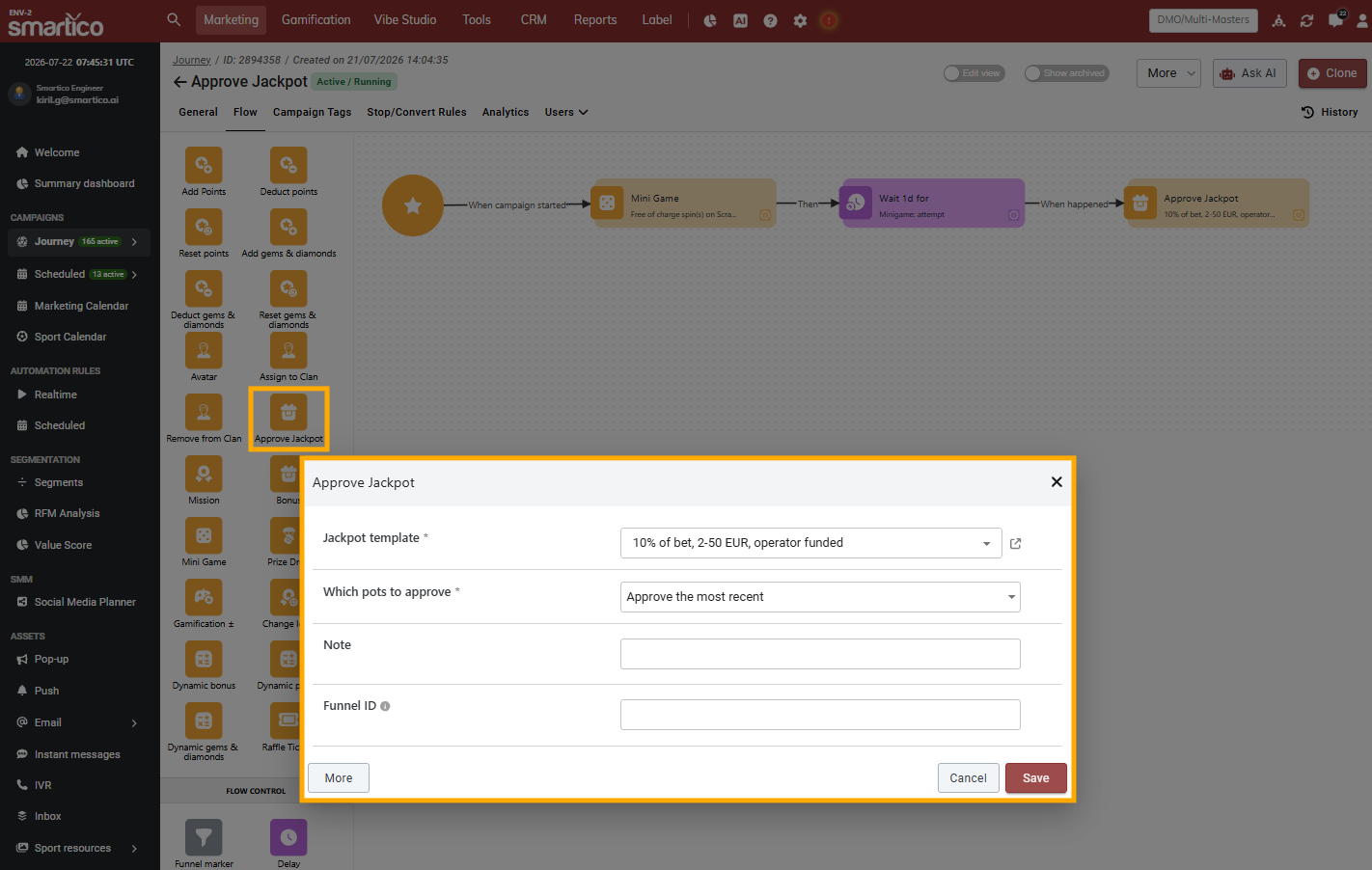
The **Approve Jackpot activity** allows you to trigger the manual approval and crediting of pending jackpot explosions directly inside a Campaign Journey flow.

Instead of instantly paying out a win or requiring manual intervention from an admin, you can delay payout until a player completes a specific action, such as playing a mini-game or engaging with a popup.

<figure><img src="https://77049817-files.gitbook.io/~/files/v0/b/gitbook-x-prod.appspot.com/o/spaces%2FfS5hl0PiysHtKAKMsQTe%2Fuploads%2Fgit-blob-0a7da7a7740c8f0cc7d763897054bd4ce4676753%2Fimage.png?alt=media" alt=""><figcaption><p>BO: Example of Approve Jackpot activity in Campaign</p></figcaption></figure>

{% hint style="info" %}
**Note**: The Approve Jackpot activity will only work with Jackpot Templates that have Manual Approval enabled in their setup.
{% endhint %}

#### How to Set It Up

1. Add the Approve Jackpot Activity to your Campaign flow
2. Configure the Activity:
   * Select a **Jackpot template** that you want to approve pots from. Only jackpots with manual approval enabled are listed.
   * Select **Which pots to approve** (default: Approve all):
     * Approve the most recent: Credits only the player's most recent exploded pot for the selected template.
     * Approve all: Credits all unapproved pot explosions for the selected template.

Example of campaign flow:

* Trigger the journey on a Jackpot Win event.
* Direct the flow to require some user interaction (e.g., Mini Game or Pop-up).
* Connect the completion condition directly to the Approve Jackpot node so the prize is credited immediately after the player finishes the interaction.

### **Jackpot Test mode**

Test Mode is a specialized feature designed to help operators safely simulate jackpot explosions under controlled conditions. **It should be used exclusively for testing and validation purposes.**

To activate Test Mode, use the **Test mode** toggle in the header of the **General** section. This toggle clearly indicates whether you're operating in a standard configuration or in testing mode, helping you stay aware of the current environment.

<figure><img src="https://77049817-files.gitbook.io/~/files/v0/b/gitbook-x-prod.appspot.com/o/spaces%2FfS5hl0PiysHtKAKMsQTe%2Fuploads%2Fgit-blob-bd45fa1f85f31accf356efda8a4bd54c67bde0c5%2FTest%20mode%20gif.gif?alt=media" alt="BO: Test mode and the Who will win the Jackpot field"><figcaption><p>BO: Test mode and the Who will win the Jackpot field</p></figcaption></figure>

Once Test Mode is switched on, an additional configuration field labeled **“Who will win the Jackpot”** becomes available. This field allows you to set up condition rules that for define which users are eligible to trigger a jackpot explosion during the simulation. The system is designed to award the jackpot to the first qualifying bet placed by a user within the defined segment, as long as the jackpot has reached its minimum configured threshold.

Keep in mind that **users must be opted into the Jackpot** feature in order to participate in the test.

{% hint style="danger" %}
If the jackpot reaches its maximum threshold, it will explode on any valid bet - even if the user placing it falls outside the configured segment.
{% endhint %}

### **Eligible games, pots & players list**

You can manage the list of eligible games, review the pots history, including details for all users who contributed to the pots, review the list of players participating in the jackpot, and opt out of players (tabs **Eligible games**, **Pots history** and **Opted-in users**).

<figure><img src="https://77049817-files.gitbook.io/~/files/v0/b/gitbook-x-prod.appspot.com/o/spaces%2FfS5hl0PiysHtKAKMsQTe%2Fuploads%2Fgit-blob-8947cec8c54b1e8909429ea4848a8b1889a495fc%2Fscreencast%202024-08-13%2010-49-06.gif?alt=media" alt="BO: Pots history of a jackpot"><figcaption><p>BO: Pots history of a jackpot</p></figcaption></figure>

### Events & properties to build campaigns & automation rules

There is a set of events and properties that can be used to build a marketing campaign or players in the Automation rules

* jackpot\_opt\_in - sent for the player when he opts into the jackpot.
* jackpot\_opt\_out - sent for the player when he opts out from the jackpot
* jackpot\_user\_nonwin - sent to the participants (non-winners) of the jackpot when the jackpot is exploded
* jackpot\_user\_win - sent to the participants (winners) of the jackpot when the jackpot is exploded
* jackpot\_temperature\_changed - sent to participants of the jackpot when the temperature level has changed (tracks only "hot" and "burning" levels)

Depending on the context, you can use the following properties of events:

* {{state.jackpot\_template}} - name of the jackpot template
* {{state.jackpot\_winner\_name}} - public username of the winner
* {{state.jackpot\_currency}} - currency of the jackpot
* {{state.jackpot\_amount}} - winning amount of the jackpot
* {{state.jackpot\_temperature}} - the temperature level of the jackpot

### Multi-currency usage

In the context of the jackpot we need to keep in mind three currencies:

* The main currency of the player (also called Core Wallet currency). Let's take for example user currency EUR
* The currency of the bet placed by the player. In the setups with multi-wallets, this currency could be different from the main currency of the wallet. For example, user can bet in BGN.
* Currency of the jackpot - used as a base currency for aggregating the contributions of different players. For our example, let's take Jackpot currency as USD.

On the front end, the operator can choose which currency to show the current Jackpot value, which could be either user currency, EUR in our example, or Jackpot currency. (USD). You can find both values in the front-end API documentation - <https://github.com/smarticoai/public-api/blob/main/docs/api/interfaces/JackpotPot.md>

What happens when a player places a bet of 1 BGN

1. Smartico is converting 1 BGN to jackpot currency and calculating the needed contribution, let's assume it is 1% of the bet, so 1 BGN = 0.56 USD, and the player contribution should be 0.0056 USD
2. Smartico is requesting that contributions be deducted from the Casino Wallet. The integration API is flexible, and the request for deduction can be made in the BGN (player bet) or in EUR (player core currency),. In the case of the currency of the bet, it will be 0.01 BGN
3. As soon as the contribution is deducted from the Casino Wallet, the current Jackpot amount is increased by 0.0056 USD
4. Based on the RNG decision, if the player wins the jackpot, the jackpot value is converted from the Jackpot currency to the player currency (EUR) and issued as a bonus using the Bonus API

## Winning protection options

There are few important options that can be used to control the winnings from jackpot

1. **Max amounts** - Multi-user jackpots are limited to 100 EUR of max amount and Personal jackpots are limited to 10 EUR of max amount. This means that operator cannot create jackpots with max amounts above this limits. The multi-user limit is the **Max explode amount for multi-player jackpots, EUR** setting in **Label settings**; for a jackpot in another currency, it is converted at the current rate. The personal limit is the **Max explode amount for personal jackpots, EUR** setting. These configurations can be adjusted by written request from Operator; ask your Success manager to change them.
2. **Manual approval** - we are highly recommending to use "Manual approval" option, that is requiring to issue winnings manually by approval from operator, this way operator can double check winnings before they are attributed to the players via Bonus API
3. **Daily cap** - there is a daily cap limit for the total won jackpots during a day (UTC) for the whole setup. The default configuration is 1000 EUR and can be adjusted by request. Winnings above this limit will be still counted, but will require manual approval.
4. **Hard limit for max winning** - every jackpot has "Max" definition for the winning amount, but there are logical cases when jackpot can go above defined max. There is a "hard limit" that makes sure the jackpot never goes more than 10% above its max amount. For example, with a max amount of 10 EUR the pot never goes above 11 EUR.


---

# Agent Instructions
This documentation is published with GitBook. GitBook is the documentation platform designed so that both humans and AI agents can read, navigate, and reason over technical content effectively. Learn more at gitbook.com.

## Querying This Documentation
If you need additional information that is not directly available in this page, you can query the documentation by asking a question.

Perform an HTTP GET request on the following URL with the `ask` and `goal` query parameters:

```
GET https://help.smartico.ai/welcome/products/gamification-basics/jackpots.md?ask=<question>&goal=<user_goal>
```

`ask` is the immediate question: it should be specific, self-contained, and written in natural language.
`goal` is what the user is ultimately trying to achieve, the reason they need the answer. Sharing it helps GitBook give you a better, more relevant answer. A goal is most helpful when it describes the outcome the user wants rather than restating the question. For example, with `ask=how do I create an API token`, a goal like `automate deployments from our CI pipeline` lets GitBook tailor the answer to that use case.

The response will contain a direct answer to the question and relevant excerpts and sources from the documentation.

Use this mechanism when the answer is not explicitly present in the current page, you need clarification or additional context, or you want to retrieve related documentation sections.