◾Scheduled Campaigns Prioritization
By default when multiple scheduled campaigns are sent around the same time and target overlapping audiences, the campaign that reaches a user first consumes their daily channel cap. As a result, a lower-priority campaign may be delivered while a more important one is blocked.
Priority Groups solve this by allowing you to define campaign priorities. This ensures that higher-priority campaigns are always delivered first, giving businesses full control over which messages reach users when campaigns compete for the same audience.
Where to find it:
Priority Groups are managed under the Label section of the back-office left-hand menu:
Label → Priority Groups

Creating and editing a Priority Group
Click Add Priority Group to open the creation form inline.
Group Name
Required. Must be unique within the label.
Time Window
Required. Enter a number of hours. Maximum 7 days (168 hours). This is the look-ahead window the engine uses to compare overlapping campaigns.
Status
Active / Archived. Defaults to Active.
Description
Optional free-text note.
After saving, the group record gains two additional tabs:
Used in - lists every scheduled campaign currently assigned to this group.
History - full audit trail of all changes to the group.
Assigning a Priority Group to a scheduled campaign
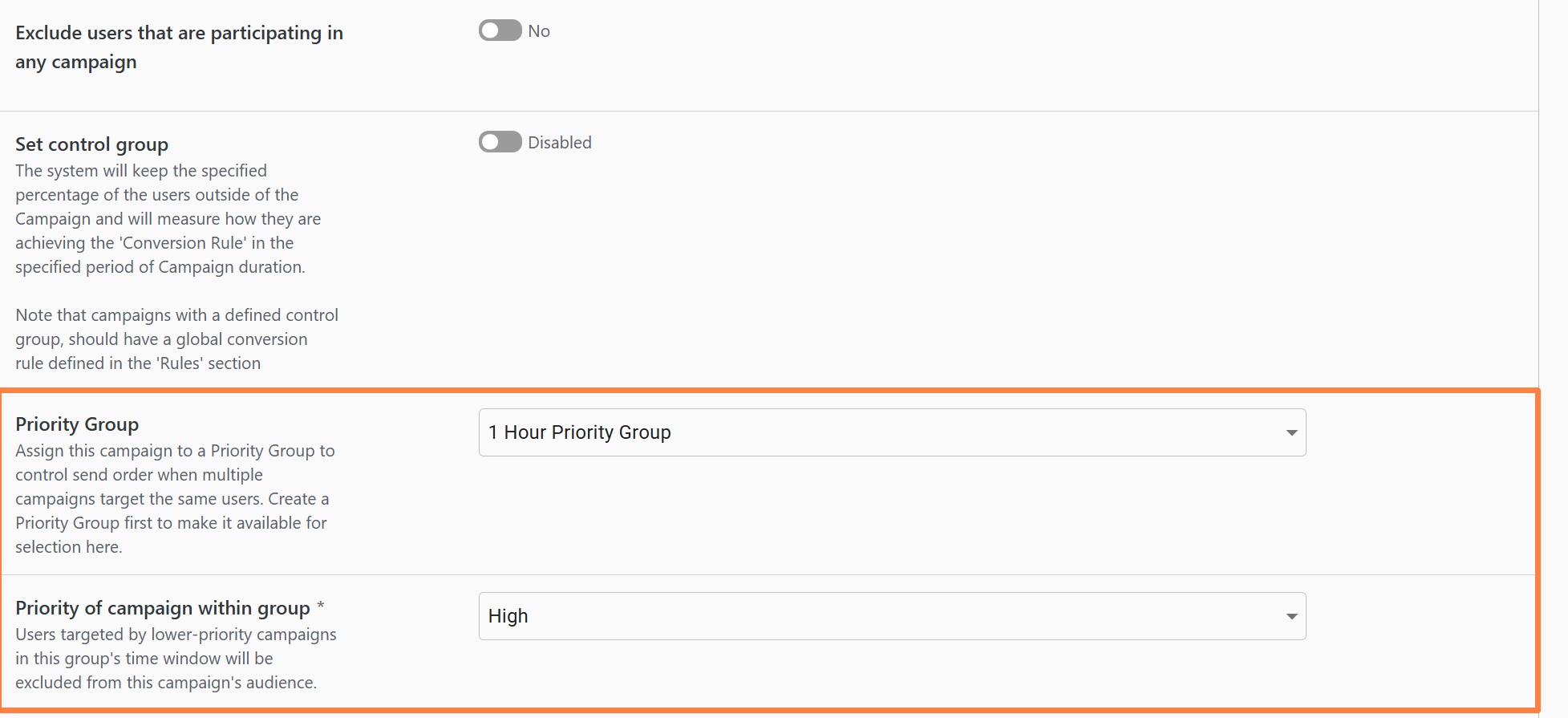
Open any Scheduled campaign → go to the Advanced Settings accordion → scroll below there is a Priority Group drop down:
Priority Group - by default empty, which means that this specific campaign is not assigned to any priority group.
Priority of campaign within group - appears and becomes mandatory only once a Priority Group is selected.
Choose one of: Critical · High · Medium · Low

How to use it:
Go to Label → Campaign Priority Groups and click Add Priority Group.
Name the group, set its Time Window (up to 7 days / 168 hours), and save.
Open any Scheduled campaign → Advanced Settings → assign the Priority Group and choose a Priority level (Critical / High / Medium / Low).
Repeat for all campaigns that should compete within the same group.
At execution time, users who are also targeted by a higher-priority sibling campaign - scheduled within the group's window - are automatically excluded before any engagement is recorded.
How it works at send time
When a scheduled campaign is about to execute, the engine looks ahead over the group's configured ‘Time Window’. Any user who is also targeted by a higher-priority campaign in the same group - scheduled within that window - is silently removed from the current campaign's audience before engagement rows are created.
Key behaviors:
No trace is left. Excluded users do not appear as skips, failures, or any other status in the campaign run log. There is no record of which specific users were removed.
No channel-cap slot is consumed. The user's daily cap is untouched and remains available for the higher-priority campaign.
The full segment size is still shown. The audience size estimate on the campaign edit page always reflects the raw segment count. An additional estimate is displayed below the standard audience estimate, showing the projected audience size after Priority Group rules are applied.
Campaigns without a group are completely unaffected. Only campaigns that share the same Priority Group compete with each other.
Priority levels (highest to lowest)
High
Medium, Low
Medium
Low
Low
-
Things to keep in mind
A Priority Group's Time Window caps at 7 days (168 hours), regardless of whether it is entered in hours or days.
The 'Priority of campaign within group' field is mandatory once a group is selected - the campaign cannot be saved without it.
Changing a group's Time Window or a campaign's priority value takes effect on the next scheduled run (not retroactively).
Deactivating (archiving) a Priority Group does not change campaign assignments - campaigns will simply behave as if they have no group until the group is reactivated or they are reassigned.
Examples
How exclusion actually works
When a lower-priority campaign builds its audience at execution time, the system looks ahead within the group's Time Window and finds any higher-priority sibling campaigns scheduled to run in that window. Users who appear in both are silently dropped from the lower-priority campaign's audience - before a single message is sent, before any channel cap is consumed, and without leaving any skip/failure entry in the run log
The campaign's edit page will show you two audience numbers: the raw segment size and the estimated size after Priority Group rules are applied.

What happens when two campaigns share the same priority?
They don't exclude each other - both run at full audience. The exclusion engine compares campaigns within the same Priority Group and excludes users only from campaigns with a lower priority. If two campaigns have the same priority, neither is considered higher than the other, so no exclusion is applied. As a result, both campaigns build their audiences independently and can be delivered to the same overlapping users.
Avoid assigning the same priority to campaigns that should exclude one another. If you want to ensure your most important campaign is delivered first, assign different priority levels - even if the difference is small (for example, High and Medium). This allows the Priority Group to correctly resolve overlapping audiences.
Scenario A - Three daily campaigns with overlapping audiences
You have three daily campaigns all running at 10:00 UTC, targeting broadly overlapping user segments:
Daily Bonus Email
Critical retention offer
Critical
Weekly Digest
General news & tips
High
Promotional Offer
New game promo
Medium
Setup:
Go to Label → Priority Groups → Create new group
Name:
Daily Email CampaignsTime Window: 24 hours (covers the same-day overlap window - all three fire within the same day)
Status: Active
Open each campaign → Advanced Settings → assign it to
Daily Email Campaignswith the priority above.
What happens at 10:00 UTC:
Daily Bonus Email(Critical) builds its audience from 100,000 users → all 100,000 go through.Weekly Digest(High) builds its audience → the system finds that 40,000 of its users are also inDaily Bonus Email→ those 40,000 are silently dropped → only ~60,000 receive the digest.Promotional Offer(Medium) builds its audience → the system excludes users targeted by both Critical and High campaigns → it reaches the remaining slice only.
No user gets more than one email that day. The most important message always wins.
Scenario B - Four weekly campaigns with overlapping audiences
You have four weekly campaigns, each on a different day of the week, but they all target broadly similar user segments (e.g. "engaged depositors"):
VIP Reactivation
Monday 09:00
High-value lapsed users
Critical
Weekend Promo
Thursday 09:00
Bonus offer for the weekend
High
Game of the Week
Wednesday 09:00
Feature game highlight
Medium
General Newsletter
Friday 09:00
Blog digest
Low
Setup:
Go to Label → Priority Groups → Create new group
Name:
Weekly Engagement CampaignsTime Window: 168 hours (7 days - covers the full weekly spread so every campaign sees all its siblings)
Status: Active
Open each campaign → Advanced Settings → assign to
Weekly Engagement Campaignswith the priorities above.
What happens each week:
When Monday's VIP Reactivation (Critical) fires, no siblings are running yet - it takes the full overlapping audience.
When Wednesday's Game of the Week (Medium) fires, the system looks ahead/back within 168 h and finds VIP Reactivation ran Monday (within the 7-day window). Users who got the Monday campaign are excluded from Wednesday's send.
When Thursday's Weekend Promo (High) fires, the same logic applies - users already reached by Critical campaigns in the window are removed. But because High > Medium, users targeted by Thursday's High campaign are also removed from Friday's Low campaign.
Friday's General Newsletter (Low) gets the remaining users who weren't touched by any higher-priority campaign that week.
The result: your most important communications (VIP Reactivation, Weekend Promo) always reach the full intended audience. The newsletter fills in for everyone else.
Key rules:
Same group only
Campaigns outside the group are completely unaffected - Priority Groups are opt-in
Time Window = look-ahead from now
At the moment a campaign builds its audience, the system looks [now → now + Time Window] for higher-priority competitors. Set the window to at least the gap between your campaigns' fire times
Daily campaigns → Time Window ≥ 24 h
If all campaigns fire the same day, any window from 1 h to 24h covers them. Using 24h is safe
Weekly campaigns → Time Window = 168 h
To ensure a Monday campaign is visible when Friday builds its audience, the window must span the full week
Exclusion is silent
No skip count, no failure - excluded users simply never enter the campaign
Channel caps are preserved
An excluded user's daily email cap is NOT consumed, so the higher-priority campaign can reach them
Archiving a group
Assigned campaigns revert to "no group" behavior - their priority values are preserved for when you re-activate
Changes take effect next run
Changing a campaign's priority or the group's Time Window only applies to the next scheduled execution
Last updated
Was this helpful?