> For the complete documentation index, see [llms.txt](https://help.smartico.ai/welcome/llms.txt). Markdown versions of documentation pages are available by appending `.md` to page URLs; this page is available as [Markdown](https://help.smartico.ai/welcome/products/crm-automation/crm-automation/usage-in-marketing-campaigns.md).

# Mini-games usage in marketing campaigns

### Giving "Game attempts" and triggering standalone Game <a href="#elwct41cprne" id="elwct41cprne"></a>

One of the common use cases for mini games is to give one attempt to play a specific game template, show this template in standalone mode, and after the user wins a prize navigate him to the deposit page.

In such a case, the operator needs to configure the mini-game with the cost type "Spin attempts" and assign a deposit deep link (such as "dp:deposit") to the prize Claim button action.

#### Create the Journey

When the game template is configured, you can create any event driven user journey to trigger the activity of giving a "game attempt" and show the game to the user.

<div data-with-frame="true"><figure><img src="https://77049817-files.gitbook.io/~/files/v0/b/gitbook-x-prod.appspot.com/o/spaces%2FfS5hl0PiysHtKAKMsQTe%2Fuploads%2Fgit-blob-f138e8740fcd1424356a0e8c599c8880fc31a10e%2F2022-10-17_11-29-48%20(1).gif?alt=media" alt=""><figcaption><p><em>Campaign Flow that is triggering a spin attempt in a standalone game for user on start</em></p></figcaption></figure></div>

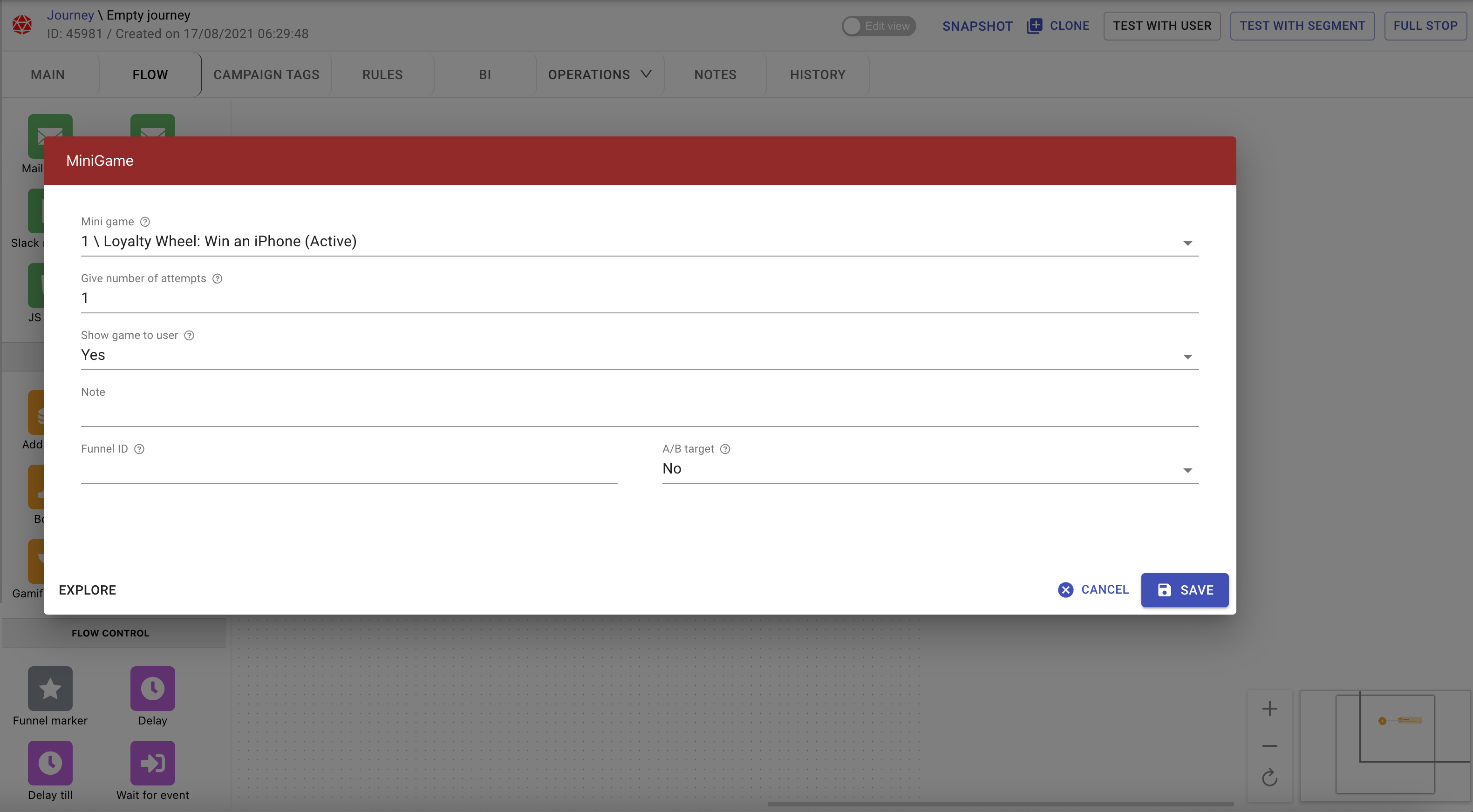
<div data-with-frame="true"><figure><img src="https://77049817-files.gitbook.io/~/files/v0/b/gitbook-x-prod.appspot.com/o/spaces%2FfS5hl0PiysHtKAKMsQTe%2Fuploads%2Fgit-blob-71a81ea870142a513be8744a3f72ec745318a94a%2Fimage.png?alt=media" alt=""><figcaption><p><em>Giving 1 attempt and showing the game to the user</em></p></figcaption></figure></div>

### "Give mini game" Action Settings

When adding a "Give mini game" action block to a campaign journey, configure the following parameters:

* **Mini game**: Select any active mini-game template. If the template's cost type is points, gems or diamonds, the Back-Office warns you that the player pays this cost from their balance when they play. When the same action is used as a reward (in missions, badges, tournaments, raffles, store items or mini-game prizes), only templates with the cost type "Spin attempts" can be selected.
* **Give number of attempts**: Specify how many spin attempts to grant the player in this step (default 1). This field is shown only for templates with the cost type "Spin attempts".
* **Show game to user**: Set to **Yes** to trigger the mini-game in standalone overlay mode immediately on the player's screen (requires the player to be online). Set to **No** to award spins silently to the player's balance without a screen takeover, allowing them to play later from the Gamification Widget.
* **Delivery timeout**: Sets how long (default 20 seconds) the standalone popup message waits for an active player connection before expiring.
* **Failed branch**: An automatic connection path that triggers if the spin grant fails (for example, if the player does not meet the mini-game's segment restrictions or the template is inactive).

{% hint style="info" %}
When building a campaign that is showing a Mini game in standalone mode, you should make sure that the user is online right now. In most of the cases you should start such campaign on "Login" trigger or by waiting for "login" event inside the flow.

If the user is offline at this moment - the flow will give the defined game attempt but will fail to show the game to the user.
{% endhint %}

### Campaign-Only Mini-Games

If a mini-game is intended exclusively for campaign delivery (such as a welcome bonus spin or VIP deposit reward) and should not be browseable in the general Gamification Widget lobby:

1. Open the mini-game template in the Back-Office.
2. Navigate to the **Advanced** tab.
3. Enable **"Available only from campaign (won't be visible in the widget)"**.

This setting keeps the game hidden from player self-navigation in the widget while allowing campaign flows to trigger standalone overlays or issue spin tickets.

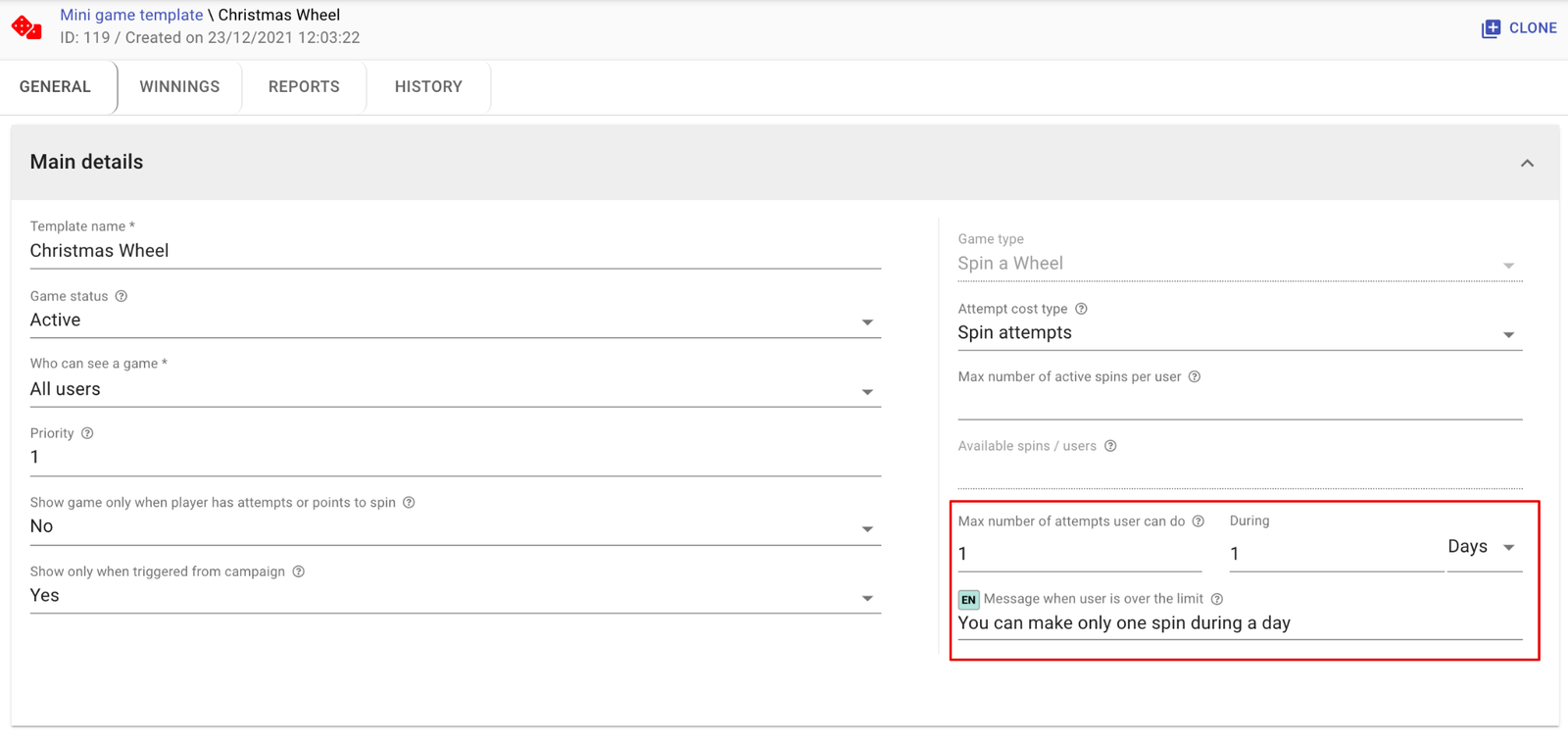
There is a possibility to limit the number of spin attempts that end-users can do during the specified period. E.g. "5 spins during a week or you can make only one spin during the day". Example:

<div data-with-frame="true"><figure><img src="https://77049817-files.gitbook.io/~/files/v0/b/gitbook-x-prod.appspot.com/o/spaces%2FfS5hl0PiysHtKAKMsQTe%2Fuploads%2FuIC2ZN0M43ZgrzhBAkbU%2F72084a6d57-usage-3-3cf020ff-dcb8e5.png?alt=media" alt=""><figcaption><p>Limit number of spins for the period</p></figcaption></figure></div>

### Spin Limits and Expiration Rules

Under **Attempt cost, expiration and limits** in the mini-game configuration, you can control how campaign spins behave:

* **Max active spins per user**: Defines the maximum number of unplayed spins a player can hold simultaneously. Any additional spins awarded by campaigns beyond this cap are discarded.
* **Spin expiration rule**: Set spin attempts to expire after a relative duration (such as 24 hours or 7 days) or at a specific UTC date/time. Expired spins are automatically removed from the player's balance.
* **Max number of attempts user can do**: Restricts how often a player can play the mini-game within a specified time window (for example, at most 1 attempt per calendar day).

#### Notifying players and/or support about winning of specific prizes <a href="#sg434iw7608t" id="sg434iw7608t"></a>

You can use the built-in "Minigame: win" event trigger to start communication campaigns whenever players win a specific prize in a mini-game, filtering by "Minigame: name" and "Minigame: prize name".

<div data-with-frame="true"><figure><img src="https://77049817-files.gitbook.io/~/files/v0/b/gitbook-x-prod.appspot.com/o/spaces%2FfS5hl0PiysHtKAKMsQTe%2Fuploads%2FFVvtMsolS4G2QpzztBYU%2Fb30321a959-usage-4-8e27dbad-3b71bc.png?alt=media" alt=""><figcaption><p>A campaign that starts when a player wins a specific prize</p></figcaption></figure></div>

In this example, the campaign will start when a user wins an iPhone in the "Win an iPhone" game, and the following flow right after the campaign has started will send a communication to the user and notify the support personnel.

<div data-with-frame="true"><figure><img src="https://77049817-files.gitbook.io/~/files/v0/b/gitbook-x-prod.appspot.com/o/spaces%2FfS5hl0PiysHtKAKMsQTe%2Fuploads%2Fgit-blob-a258560f195166c70223a3a2bde740552c962522%2F17?alt=media" alt=""><figcaption></figcaption></figure></div>

### Additional Mini-Game Journey Events

In addition to winning a prize, marketing campaigns can trigger on several other mini-game events:

* **Minigame: spins issued**: Fires when spins are awarded to a player, enabling automatic email, SMS, or inbox notifications alerting them of their new free spins.
* **Minigame: attempt**: Fires whenever a player attempts to play a game, regardless of whether they win or lose.
* **Minigame: lose**: Fires when a player finishes a spin with no prize, allowing you to trigger consolation offers or follow-up communications.
* **Minigame: view**: Fires when a player opens or views a mini-game.


---

# Agent Instructions
This documentation is published with GitBook. GitBook is the documentation platform designed so that both humans and AI agents can read, navigate, and reason over technical content effectively. Learn more at gitbook.com.

## Querying This Documentation
If you need additional information that is not directly available in this page, you can query the documentation by asking a question.

Perform an HTTP GET request on the following URL with the `ask` and `goal` query parameters:

```
GET https://help.smartico.ai/welcome/products/crm-automation/crm-automation/usage-in-marketing-campaigns.md?ask=<question>&goal=<user_goal>
```

`ask` is the immediate question: it should be specific, self-contained, and written in natural language.
`goal` is what the user is ultimately trying to achieve, the reason they need the answer. Sharing it helps GitBook give you a better, more relevant answer. A goal is most helpful when it describes the outcome the user wants rather than restating the question. For example, with `ask=how do I create an API token`, a goal like `automate deployments from our CI pipeline` lets GitBook tailor the answer to that use case.

The response will contain a direct answer to the question and relevant excerpts and sources from the documentation.

Use this mechanism when the answer is not explicitly present in the current page, you need clarification or additional context, or you want to retrieve related documentation sections.