> For the complete documentation index, see [llms.txt](https://help.smartico.ai/welcome/llms.txt). Markdown versions of documentation pages are available by appending `.md` to page URLs; this page is available as [Markdown](https://help.smartico.ai/welcome/products/crm-automation/communication-channels/communication-caps.md).
# Communication caps
Communication caps limit how many messages Smartico sends on a channel, or on all offline channels together, in a period of time. A cap can protect each player from too many messages (per-user caps) or limit the total number of messages your whole label sends (global caps). When a cap is reached, Smartico does not send the message. Each cap counts its limits either over a sliding window (for example, the last 24 hours) or over calendar periods (for example, today from 00:00).
## Where to find it
Go to **Label → Communication caps**. There are two pages:
* **Per-user**: limits for each player.
* **Global**: limits for all players of the label together.
Each page is a list of caps, one row per channel (or **Offline (Combined)**) and campaign category. You can add, edit and delete rows. The **Change history** tab shows who changed the caps and when.
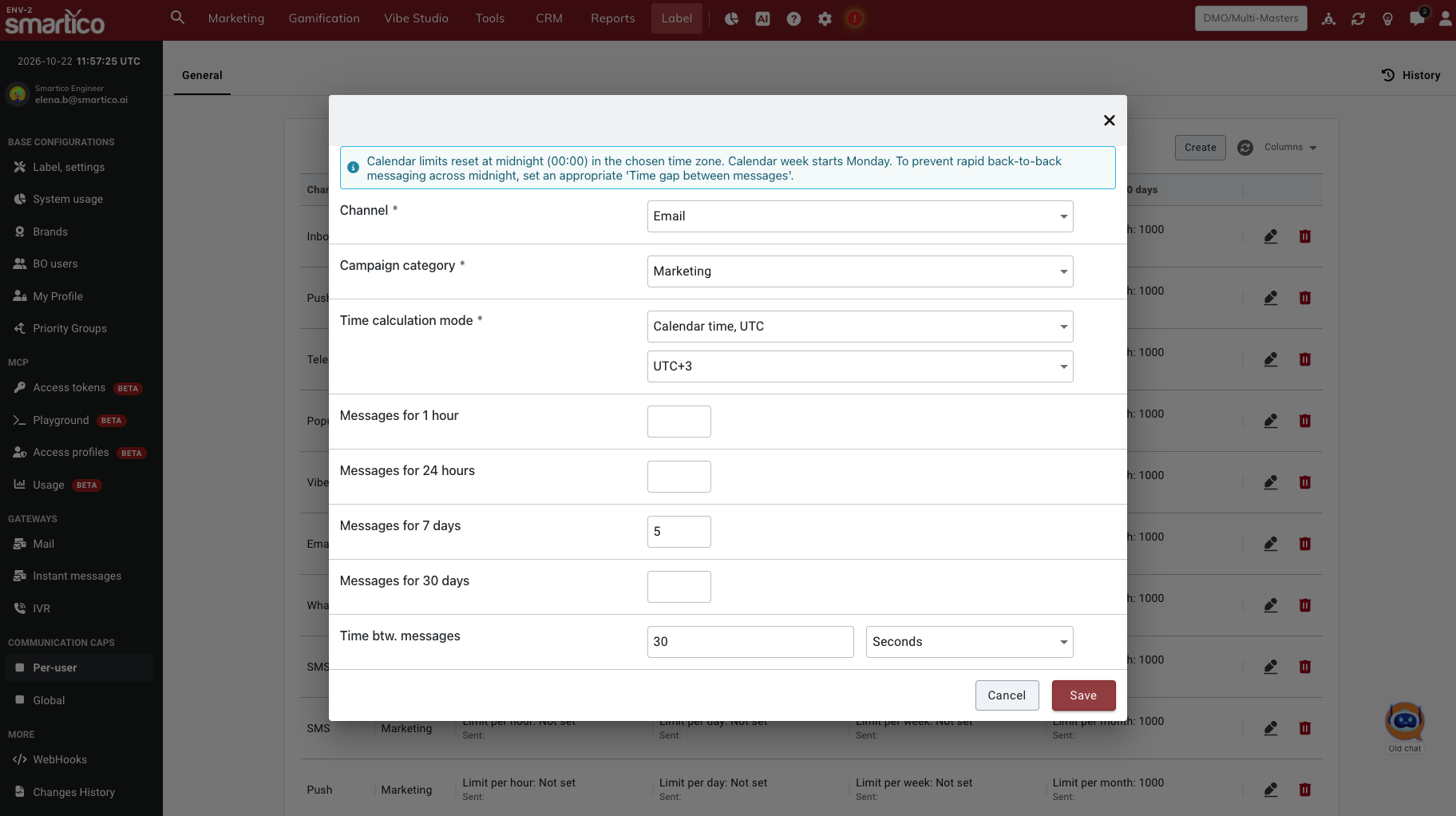
BO: Communication CAPs per user
## Settings
| Setting | What it does |
| ------------------------- | ------------------------------------------------------------------------------------------------------------------------------------------------------------------------------------------------------------------------------------------------------------------------------------------------------------------------------------------------------------------------------------------------------------------------------------------------------------------------------------------------------------------------------------------------------------------------------------------------------------------------------------------------------------------------------------------------------------------------------------------------------------------------------------------------------------------------------------------------------------------------------------------------------------------------------------------------------------------------------------- |
| **Channel** | The channel the cap limits: [**Email**](/welcome/products/crm-automation/communication-channels/email.md), [**Popup**](/welcome/products/crm-automation/communication-channels/pop-up.md), [**SMS**](/welcome/products/crm-automation/communication-channels/sms-viber-and-whatsapp.md), [**Push**](/welcome/products/crm-automation/communication-channels/how-to-create-a-push-resource.md), [**Inbox**](/welcome/products/crm-automation/communication-channels/inbox.md), **IVR**, [**WhatsApp**](/welcome/products/crm-automation/communication-channels/sms-viber-and-whatsapp.md), [**Viber**](/welcome/products/crm-automation/communication-channels/sms-viber-and-whatsapp.md) or [**Telegram**](/welcome/products/crm-automation/communication-channels/telegram.md), or **Offline communication CAP** for all offline channels together (see [Offline communication CAP](#offline-communication-cap)). Each cap covers one channel, except the Offline communication CAP. |
| **Campaign category** | Which messages the cap counts: **Marketing**, **Operational** or **Any** (both). You cannot change it after you save the cap. |
| **Time calculation mode** |
How the cap counts its day, week and month limits: • Sliding window: the last 24 hours, 7 days and 30 days. Default. • Calendar time, UTC: the current calendar day, week (Monday to Sunday) and month, in the time zone you choose. • User time zone: the current calendar day, week and month, in each player's time zone.
|
| **Time zone** | Only with *Calendar time, UTC*. The time zone in which the calendar day starts at 00:00, from UTC-12 to UTC+14. A new cap starts with UTC. |
| **Messages for 1 hour** | The most messages in 1 hour. The same in every time calculation mode. |
| **Messages for 24 hours** | The most messages in 24 hours, or in the current calendar day. |
| **Messages for 7 days** | The most messages in 7 days, or in the current calendar week. |
| **Messages for 30 days** | The most messages in 30 days, or in the current calendar month. |
| **Time btw. messages** | Only on the **Per-user** page. The shortest time between two messages to the same player, in seconds, minutes, hours or days. A new per-user cap starts with 30 seconds. The list shows it as **Time gap between messages**. |
* Leave a limit empty if you do not need it. The list shows it as **Not set**.
* A cap needs at least one value. Otherwise the Back Office shows **At least one value should be defined**.
* Each page can have only one cap for the same channel and campaign category. A second one shows **There is already defined CAP limit for specified type of channel & category**.
* On the **Global** page, each limit also shows **Sent:**, the number of messages the label sent in the last hour, 24 hours, 7 days and 30 days. These numbers can be up to one hour old. For the Offline communication CAP, **Sent:** adds up all offline channels.
## Offline communication CAP
The **Offline communication CAP** limits the total number of messages a player (on the **Per-user** page) or the label (on the **Global** page) gets on all offline channels together. For example: at most 5 marketing messages in 24 hours, on any mix of Email, SMS and Push.
* In the **Channel** list, choose **Offline communication CAP (Email, IVR, Push, SMS, Telegram, Viber, WhatsApp, RCS)**. In the list of caps, it shows as **Offline (Combined)**.
* It counts messages on **Email**, **IVR**, **Push**, **SMS**, **WhatsApp**, **Viber**, **Telegram**, **RCS** and **Custom IM**.
* It does not count **Popup** and **Inbox** messages, or other messages shown inside your site (forms and webhooks).
* It has the same settings as other caps: **Campaign category**, the four limits and, on the **Per-user** page, **Time btw. messages**.
* It works together with your channel caps. You can have, for example, an Email cap and an Offline communication CAP at the same time. A message is not sent if it reaches either of them.
* Each page can have one Offline communication CAP per campaign category.
The campaign category of a message comes from the campaign that sends it: set **Campaign category** (**Marketing** or **Operational**) in the campaign settings. New campaigns are **Marketing**.
## Sliding window or calendar periods
With Sliding window, Smartico looks back from the moment it sends a message: the last 24 hours, 7 days or 30 days. A player who got a message at 18:00 today has it counted until 18:00 tomorrow. With a calendar mode, Smartico counts the messages of the current period:
Limit
Counts messages sent
Messages for 24 hours
Today, from 00:00 to 23:59
Messages for 7 days
This week, from Monday 00:00 to Sunday 23:59
Messages for 30 days
This month, from the 1st at 00:00 to the last day at 23:59
When the period ends, the count starts again from zero. Which midnight is used depends on the mode:
* **Calendar time, UTC:** midnight in the time zone you set on the cap. For example, with UTC+2, the day starts at 22:00 UTC.
* **User time zone:** midnight in each player's time zone, taken from the player's last session. Players with no known time zone are counted in UTC. On the Global page, a User time zone cap counts in UTC, because a global cap covers all players together.
Time zones are fixed offsets from UTC. They do not change for daylight saving time. Messages for 1 hour and Time btw. messages work the same in every mode.
**Messages around midnight**. Calendar limits reset at 00:00. With a limit of 3 messages per day, a player can get 3 messages at 23:50 and 3 more at 00:05. To prevent this, set a longer Time btw. messages on the per-user cap, for example 1 or 2 hours. The Back Office shows a reminder when you choose Calendar time, UTC.
Existing caps use Sliding window. They change only if you change them.
## How caps are counted
* **Per-user caps** count the messages that one player got on the channel.
* **Global caps** count the messages that all players of the label got on the channel.
* Each channel is counted on its own. For example, WhatsApp messages do not count toward an SMS cap.
* The Offline communication CAP is the exception: it counts the messages of all offline channels together. For example, 2 emails and 3 SMS count as 5 messages.
* Only messages that were sent count. Messages that were blocked or failed before sending do not count.
* A **Marketing** cap counts only messages from marketing campaigns, and an **Operational** cap only messages from operational campaigns. An **Any** cap counts both.
* Before Smartico sends a message, it checks the caps of the message's category and the **Any** cap of the same channel. For a message on an offline channel, it also checks the Offline communication CAP of the message's category and the **Any** Offline communication CAP. If any of them is reached, the message is not sent.
Per-user and global caps measure time in different ways:
| Limit | Per-user, Sliding window | Global, Sliding window | Calendar modes (per-user and global) |
| --------------------- | ----------------------------------------------------------------------------------------------------------------------------- | -------------------------------------------------- | -------------------------------------- |
| Messages for 1 hour | The last 60 minutes | The current clock hour (14:00 to 15:00, and so on) | Same as Sliding window |
| Messages for 24 hours | The last 24 hours | The current day, from 00:00 UTC | The current calendar day |
| Messages for 7 days | The last 7 days | About the last 7 days, in whole days (UTC) | The current calendar week, from Monday |
| Messages for 30 days | The last 30 days | About the last 30 days, in whole days (UTC) | The current calendar month |
| Time btw. messages | Time since the last message on this channel. For the Offline communication CAP: since the last message on any offline channel | Not available | Same as Sliding window (per-user only) |
{% hint style="info" %}
After you add or change a cap, it can take up to one hour before Smartico uses the new values.
{% endhint %}
## In the activities
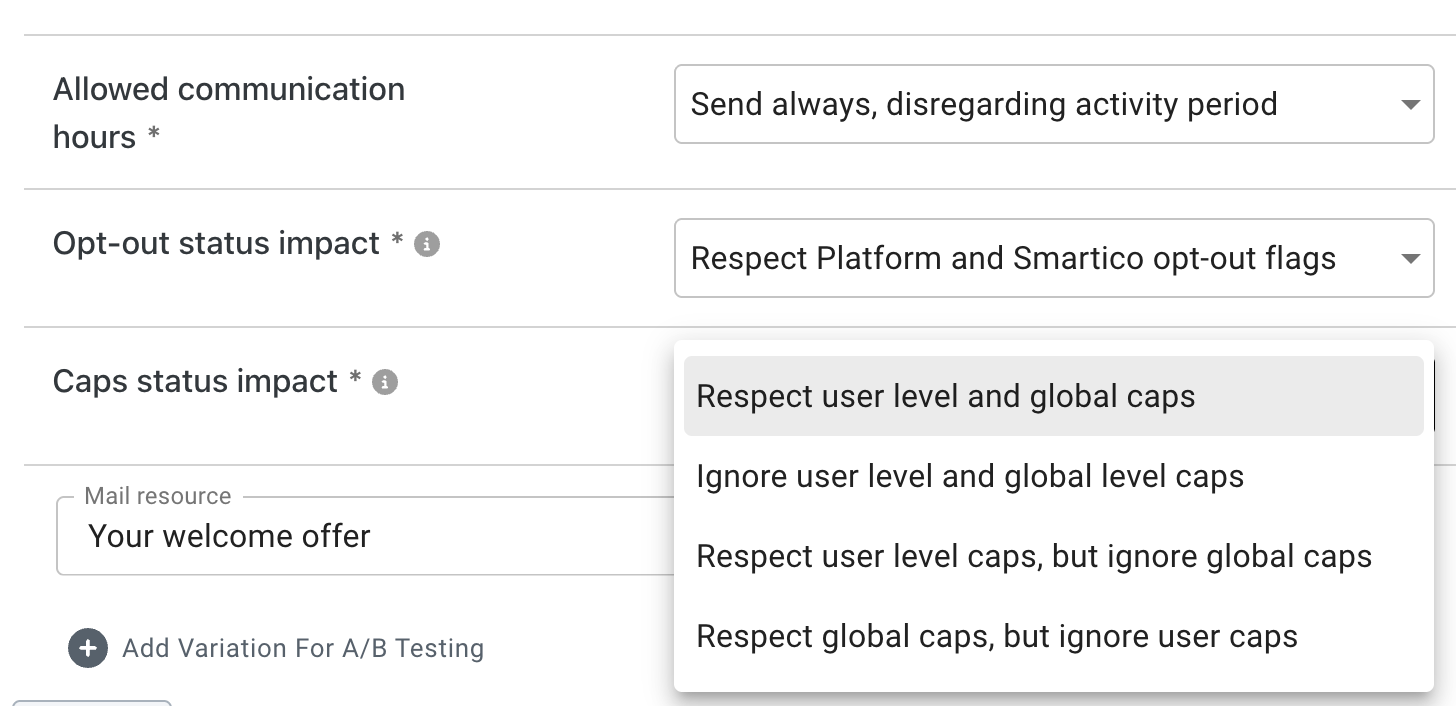
The [Email](/welcome/products/crm-automation/activities-of-flows/activity-email.md), [SMS, RCS, Viber and WhatsApp](/welcome/products/crm-automation/activities-of-flows/activity-sms-viber-and-whatsapp.md), [Telegram Bot](/welcome/products/crm-automation/activities-of-flows/activity-telegram-bot.md), Push, Popup, Inbox and IVR activities have the setting **Caps status impact**. It decides which caps the activity follows:
| Option | What happens |
| --------------------------------------------------- | ---------------------------------------------------------------------- |
| **Respect user level and global caps** | Default. The message follows both per-user and global caps. |
| **Ignore user level and global level caps** | No cap stops the message. Use it for messages that must always go out. |
| **Respect user level caps, but ignore global caps** | Only per-user caps can stop the message. |
| **Respect global caps, but ignore user caps** | Only global caps can stop the message. |
A message that ignores a cap is still counted. It can make the cap reach its limit for the next messages.
**Caps status impact** applies to the Offline communication CAP in the same way as to channel caps.
The [Custom IM](/welcome/products/crm-automation/activities-of-flows/activity-custom-im.md) activity does not have this setting. Custom IM and RCS cannot have caps of their own, because they are not in the **Channel** list. They do count toward the Offline communication CAP, and it can stop them. A Custom IM message always follows both per-user and global Offline communication CAPs.
The [Best Channel](/welcome/products/crm-automation/activities-of-flows/activity-best-channel.md) activity checks the caps of each channel, including the Offline communication CAP. It does not choose a channel whose cap is reached. When the Offline communication CAP is reached, it cannot choose any offline channel.
Caps status impact on an Email activity: which caps this email follows
## What happens when a cap is reached
* Smartico does not send the message. The message is not delayed and not sent later: it is marked as failed.
* The fail reason is **User/Global CAPs**. You can find these messages in **CRM → Marketing → Communications** with the **Fail reason** filter.
* In the flow, the message leaves the activity through the **Failed, CAP** branch (and the **Failed** branch). The Email, SMS, WhatsApp, Viber, Telegram, RCS, Push, Popup and IVR activities have the **Failed, CAP** branch. The Inbox activity has only **Failed**. Use the **Failed, CAP** branch, for example, to try another channel.
* A message that waits for its send time (for example, until the player's active hours) is checked again when it is about to go out. If a cap is reached by then, it fails at that moment.
* This works the same way for channel caps and the Offline communication CAP.
* Caps do not stop messages to test players. Smartico sends them anyway.
## FAQ
**Is a capped message sent later, when the cap allows it again?**\
No. The message fails with the reason **User/Global CAPs** and is not sent again. To reach the player another way, use the **Failed, CAP** branch of the activity.
**The Global page shows fewer messages under Sent: than the limit, but messages are blocked. Why?**\
**The *****Sent:*** numbers always count the last hour, 24 hours, 7 days and 30 days, and can be up to one hour old. The global cap itself counts the current clock hour and, depending on its time calculation mode, the current day from 00:00 UTC or the current calendar day, week and month. Also, an *Any* cap counts marketing and operational messages together.
**Do marketing caps stop operational messages?**\
A **Marketing** cap counts and stops messages from marketing campaigns. To limit both kinds with one cap, choose **Any**. One exception: a push message that waits for its send time is checked against the **Marketing** push caps and the **Marketing** Offline communication CAP when it goes out, also when it comes from an operational campaign.
**Can one cap cover several channels?**\
Yes, with the Offline communication CAP. It covers all offline channels together: Email, IVR, Push, SMS, WhatsApp, Viber, Telegram, RCS and Custom IM. All other caps cover one channel each.
**Can I use a channel cap and the Offline communication CAP at the same time?**\
Yes. Both are checked, and a message is not sent if it reaches either of them. For example, with an Email cap of 3 in 24 hours and an Offline communication CAP of 5 in 24 hours, a player who got 3 emails gets no more emails that day, but can still get 2 messages on other offline channels.
**Does the Offline communication CAP count popups and Inbox messages?**\
No. It counts only offline channels. Popup and Inbox messages are not counted and are not stopped by it.
**I changed a cap. Why do messages still follow the old values?**\
Smartico can keep the old values for up to one hour.
**Do caps apply to test players?**\
No. Messages to test players are sent even when a cap is reached.
**Should I use Sliding window or a calendar mode?**\
Use a calendar mode when you plan communication per day, week or month and want every player to get a new allowance at the start of the period. Use Sliding window to keep messages evenly spread, without a reset at midnight.
**Why did a player get several messages just before and just after midnight?**\
With a calendar mode, the day limit starts again at 00:00. Set a longer *Time btw. messages* on the per-user cap to keep messages apart.
**Which time zone does User time zone use?**\
The time zone of the player's last session. If Smartico does not know it, it uses UTC. Global caps with User time zone always use UTC.
## Related
* [Opt-out & Communication Statuses](/welcome/products/crm-automation/communication-channels/opt-out-and-communication-statuses.md)
* [Activity: Best Channel](/welcome/products/crm-automation/activities-of-flows/activity-best-channel.md)
* [Activity: Email](/welcome/products/crm-automation/activities-of-flows/activity-email.md)
* [Activity: SMS, RCS, Viber and WhatsApp](/welcome/products/crm-automation/activities-of-flows/activity-sms-viber-and-whatsapp.md)
* [Campaigns](/welcome/products/crm-automation/create-journey-flow.md)
---
# Agent Instructions
This documentation is published with GitBook. GitBook is the documentation platform designed so that both humans and AI agents can read, navigate, and reason over technical content effectively. Learn more at gitbook.com.
## Querying This Documentation
If you need additional information that is not directly available in this page, you can query the documentation by asking a question.
Perform an HTTP GET request on the following URL with the `ask` and `goal` query parameters:
```
GET https://help.smartico.ai/welcome/products/crm-automation/communication-channels/communication-caps.md?ask=&goal=
```
`ask` is the immediate question: it should be specific, self-contained, and written in natural language.
`goal` is what the user is ultimately trying to achieve, the reason they need the answer. Sharing it helps GitBook give you a better, more relevant answer. A goal is most helpful when it describes the outcome the user wants rather than restating the question. For example, with `ask=how do I create an API token`, a goal like `automate deployments from our CI pipeline` lets GitBook tailor the answer to that use case.
The response will contain a direct answer to the question and relevant excerpts and sources from the documentation.
Use this mechanism when the answer is not explicitly present in the current page, you need clarification or additional context, or you want to retrieve related documentation sections.