> For the complete documentation index, see [llms.txt](https://help.smartico.ai/welcome/llms.txt). Markdown versions of documentation pages are available by appending `.md` to page URLs; this page is available as [Markdown](https://help.smartico.ai/welcome/products/crm-automation/activities-of-flows/activity-gamification-on-off.md).
# Activity: Gamification On/Off
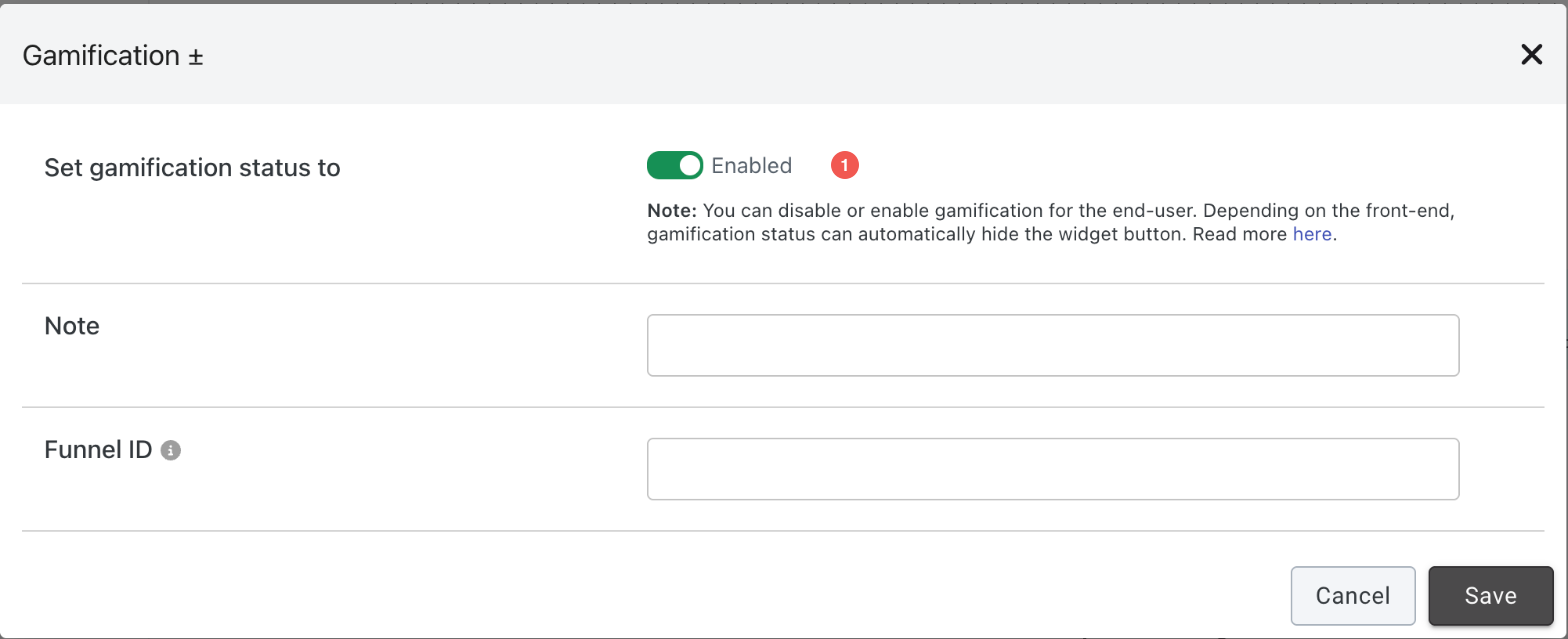
The **Gamification ±** activity turns gamification on or off for one player. A player with gamification off is in the gamification control group: Smartico does not open the gamification widget for this player and stops gamification rewards and progress. Use it to give gamification to a chosen group of players, or to take it away.
The **Gamification ±** activity is in the **Loyalty & Gamification** group of the flow builder palette. It appears when the Gamification product is on for your label. You can also use it in [automation rules](/welcome/products/crm-automation/automation-rules.md), where it is called **Gamification On/Off**. It is not available in missions or tournaments.
## Settings
* **Set gamification status to** — a switch: **Enabled** (default) or **Disabled**.
* **Enabled** takes the player out of the gamification control group.
* **Disabled** puts the player into the gamification control group.
* **Note** and **Funnel ID** (flow builder only) — the same common fields as in every activity.
The status is stored in the player property **Gamification: user in control group**: Yes when gamification is off, No when it is on. Use this property in [segments](/welcome/products/crm-automation/segmentation/user-state-segments.md) and in [Check user profile](/welcome/products/crm-automation/activities-of-flows/activity-check-user-profile.md).
Gamification ±: 1 — the status to set
## Outgoing connections
Gamification ± has one outgoing connection:
Outgoing connections of Gamification ± in a flow. The numbers match the table below.
| # | Connection | When the player goes this way |
| - | ---------- | ------------------------------------------------------------------------ |
| 1 | **Then** | After the gamification status is changed, and only if the change worked. |
## How it works
### In Smartico
While a player is in the gamification control group, Smartico:
* does not count progress in missions and badges;
* does not give or take points, and does not give level changes, avatars, mini-game attempts or Prize Drops (changes you make by hand in the Back Office still work);
* does not let the player spin mini-games, see or buy store items, take part in jackpots or get raffle tickets;
* skips the [Form](/welcome/products/crm-automation/forms.md) activity for the player.
Other activities, such as bonuses and messages, are not changed.
### On your website or app
The status is sent to the Smartico script on the player's page as `ach_gamification_in_control_group`, both when the player logs in and when the status changes. While it is `true`, the Smartico script:
* does not open the gamification widget and does not open mini-games;
* does not follow gamification [deep links](/welcome/products/tools-and-guides/deep-links.md);
* reports the event `core_cannot_open_gamification` instead.
The script does not hide your own button that opens the widget. Your front end decides this. Hide the button in your `props_change` callback:
```javascript
_smartico.on('props_change', function (props) {
if (props.ach_gamification_in_control_group !== undefined) {
var btn = document.getElementById('missions_button');
btn.style.display = props.ach_gamification_in_control_group ? 'none' : 'block';
}
});
```
Read more in [Extended integration](/welcome/technical-guides/front-end-integration/extended-integration/player-profile-and-gamification-ui.md#hiding-gamification-for-the-control-group).
### The control group setting
The **Gamification control group, %** setting in **Label settings** puts a share of **new** players into the control group when they are created. Players who already exist are not changed. With **Gamification ±** you can change the status of any player at any time, for example to move a segment out of the control group.
## Example
You keep 20% of new players out of gamification to measure its effect. After three months, you want to give gamification to the VIP players of that group.
1. Create a segment: **Gamification: user in control group** is Yes, and the player is a VIP.
2. Create a scheduled campaign for this segment.
3. Add **Gamification ±** with **Set gamification status to** = **Enabled**.
4. On its **Then** branch, add a **Push** or an **Email** that tells the players about missions.
## FAQ
**Q: I disabled gamification, but the player still sees the widget button. Why?**
A: The Smartico script stops the widget from opening, but it does not hide your button. Hide it in your front end, as shown above.
**Q: Does Gamification ± stop all campaigns for the player?**
A: No. Campaigns, bonuses and messages work as before. Only gamification features stop, and the **Form** activity is skipped.
**Q: The player was disabled a minute ago, but still got points. Why?**
A: On a label that never used the gamification control group before (the **Gamification control group, %** setting is 0 and no player was put in the group), Smartico can need up to about an hour to start applying the control group to rewards and progress. The Smartico script on the player's page reacts as soon as the new status reaches it.
## Related
* [Activities of Flows](/welcome/products/crm-automation/activities-of-flows.md)
* [Extended integration: Hiding gamification for the control group](/welcome/technical-guides/front-end-integration/extended-integration/player-profile-and-gamification-ui.md#hiding-gamification-for-the-control-group)
* [Missions](/welcome/products/gamification-basics/missions.md)
* [Automation Rules](/welcome/products/crm-automation/automation-rules.md)
* [A/B Testing](/welcome/products/crm-automation/a-b-testing.md)
---
# Agent Instructions
This documentation is published with GitBook. GitBook is the documentation platform designed so that both humans and AI agents can read, navigate, and reason over technical content effectively. Learn more at gitbook.com.
## Querying This Documentation
If you need additional information that is not directly available in this page, you can query the documentation by asking a question.
Perform an HTTP GET request on the following URL with the `ask` and `goal` query parameters:
```
GET https://help.smartico.ai/welcome/products/crm-automation/activities-of-flows/activity-gamification-on-off.md?ask=&goal=
```
`ask` is the immediate question: it should be specific, self-contained, and written in natural language.
`goal` is what the user is ultimately trying to achieve, the reason they need the answer. Sharing it helps GitBook give you a better, more relevant answer. A goal is most helpful when it describes the outcome the user wants rather than restating the question. For example, with `ask=how do I create an API token`, a goal like `automate deployments from our CI pipeline` lets GitBook tailor the answer to that use case.
The response will contain a direct answer to the question and relevant excerpts and sources from the documentation.
Use this mechanism when the answer is not explicitly present in the current page, you need clarification or additional context, or you want to retrieve related documentation sections.