> For the complete documentation index, see [llms.txt](https://help.smartico.ai/welcome/llms.txt). Markdown versions of documentation pages are available by appending `.md` to page URLs; this page is available as [Markdown](https://help.smartico.ai/welcome/products/bi-and-reporting/raffles-1.md).
# Clans
## Overview
The **Clans Dashboard** provides a statistical and analytical overview of your Clans-related KPIs. It is designed to help you monitor clan membership activity, track ranking progression, understand member movement patterns, and measure the impact of Clans on your tournament performance.
The dashboard is divided into three tabs: **Clans Info and Ranks**, **Clans Movements**, and **Clans – Tournaments**.
To access the Clans Dashboard, navigate to **Reports › Gamification › "Clans"**.
You can also open the dashboard directly from the Clans management list (**Gamification › Clans**) by clicking the **Clans Analytics** button in the top toolbar.
You can select filters including **Period**, **Clan Name / ID**, and **Brand**.
The dashboard includes pre-configured filters for **Event Date** (filtering clan joins and exits), **Rank Date** (filtering clan ranking snapshots), and **User ID**, with support for adding custom filters on any clan or player dimension.
***
## Summary
### Clans Info and Ranks Tab
A detailed table listing every active clan in your label. Each row represents one clan and includes:
* **Clan ID / Clan Name** — identifier and display name of the clan
* **Status** — Active, Draft, or Archived
* **Capacity Limit** — maximum number of members the clan can hold
* **Entry Fee** — the cost (in Points, Gems, or Diamonds) a player must pay to join; displayed as Free when there is no fee
* **Entry Segment / Visibility Segment** — the player segments that control who can see and join the clan; blank means unrestricted
* **Rank Points** — cumulative F1-style global rating points (lower = better global standing)
* **Create Date / Update Date** — when the clan was created and last modified
#### Clans Ranking Daily Trend (scatter chart)
A scatter chart plotting each clan's **global rank (Clan Place)** on the Y-axis against the **date** on the X-axis, with one data point per clan per day. Each clan is represented by a distinct colour. Y-axis labels highlight the podium positions: 1st place, 2nd place, 3rd place. This chart lets you track how each clan's competitive standing has shifted day-by-day over the selected period — a flat dotted line indicates a clan holding a steady rank, while a jump or drop signals a change driven by tournament results or inactivity.
**How to read this chart:** Lower Y values = better rank. A clan consistently plotted at Y=1 is the current global leader. Use this view to detect whether the ranking order is static (dominated by the same clans) or dynamic (clans swapping positions frequently), and to correlate rank changes with tournament end dates.
#### Top Rank Each Clan Reached Lifetime (table)
A summary table showing the **best global rank ever achieved** by each clan, regardless of the selected date filter. One row per clan, with two columns:
* **Clan Name** — the clan's display name
* **Best Global Rank** — the lowest (best) rank position the clan has ever held since its creation
This is a lifetime metric and is not affected by the Period filter. It provides a permanent record of each clan's peak competitive performance and is useful for recognising long-standing high achievers even if they have since dropped in rank.
> **How to use this tab:** This is your starting point for reviewing the current state of your clans programme. Use the Clans Data table to audit configuration (entry fees, capacity, segment restrictions) and ensure clans are set up as intended. The ranking charts help you identify which clans are growing in prestige and whether membership size correlates with competitive strength. If a clan has a high member count but poor rank points, it may indicate low tournament participation by its members.
***
### Clans Movements Tab
The Clans Movements tab tracks how players flow into, out of, and between clans over time. It uses a combination of flow diagrams and trend charts to surface the dynamics of your clan membership ecosystem.
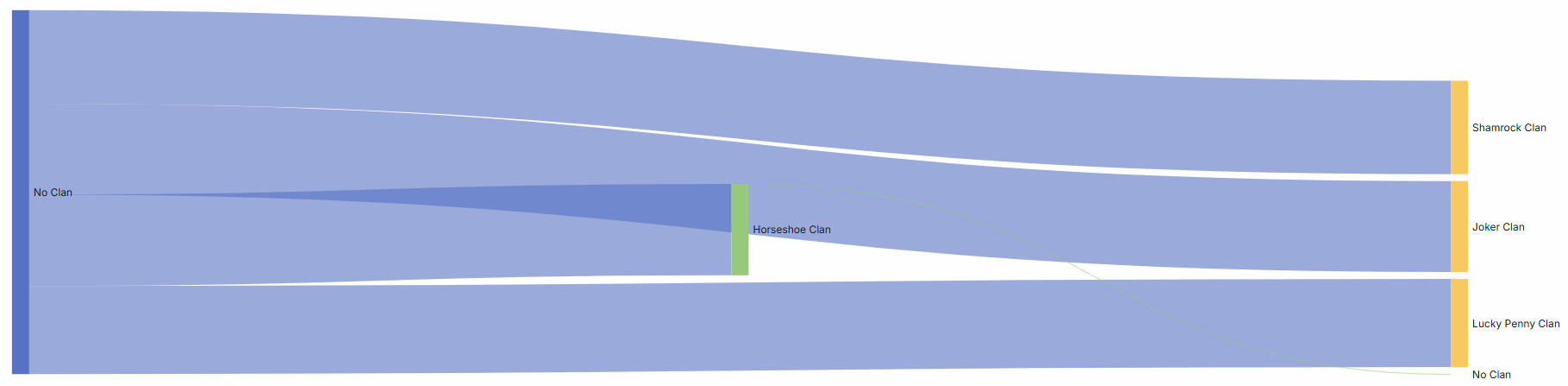
#### Clan Membership Flow (Sankey diagram)
A Sankey flow chart visualising how users have moved between clans during the selected period. Each node represents either a specific clan or **"No Clan"** (for players joining a clan for the first time). Each flow link shows the volume of users who transitioned from one state to another. A player joining a clan for the first time will appear as a flow from **No Clan → \[Clan Name]**. A player switching clans will appear as a flow from the old clan to the new one.
#### Daily Clan Joiners (bar chart)
A daily trend chart showing the number of users who joined a clan on each day within the selected period. Bars are split by clan, allowing you to see which clans were most active in attracting new members on a given day.
Breaks down clan joins by **join source**:
* **Clan (self-join)** — player joined via the Gamification Widget
* **Manual** — operator added the player via the Back Office
* **API** — player assigned via the Public API or Campaign Journey automation
This chart helps you understand whether clan growth is organic (player-driven) or operator-managed.
#### Users Joining Clans – Value Score Distribution (donut chart)
A donut chart showing the **User Value Score** breakdown of all players who joined a clan during the selected period. The four segments are:
* **Low** — players with a low value score (typically the largest segment)
* **Medium** — mid-tier value players
* **High** — high-value players
* **Top** — the highest-value player tier
This chart answers the question: *what quality of player is being attracted to your clans?* A programme dominated by Low-value joiners may benefit from entry fee adjustments or targeted visibility segments to attract higher-value cohorts.
#### Users Joining Clans – Split by Clan and Value Score (100% stacked bar chart)
A 100% stacked bar chart with one bar per clan, each bar subdivided by Value Score tier (Low / Medium / High / Top). The total number of joining users is displayed above each bar.
This view lets you compare the **value profile of joiners across clans side-by-side**. If one clan is attracting a disproportionately high share of Top/High-value players compared to others, it may be due to its entry fee, visibility segment, or organic reputation. Use this to benchmark clans against each other and identify which ones are most effective at engaging your most valuable players.
#### Users Joining Clans – RFM Distribution (donut chart)
A donut chart showing the **RFM (Recency, Frequency, Monetary) segment** breakdown of players who joined a clan during the selected period. Segments include:
* **Churned By Definition** — players who have not been active for an extended period
* **Potential Loyalist** — recently active players with growing engagement
* **At Risk** — previously active players showing declining engagement
* **Champions** — the most active and high-spending players
* **Hibernating Customers** — long-inactive players
* **Need Attention, About To Sleep, About To Churn, Loyal, Losing But Engaged, Promising, New Customers** — additional lifecycle stages
This chart helps you understand **where in the lifecycle players are when they decide to join a clan**. A high proportion of Churned or At Risk players joining may indicate clans are being used as a re-engagement tool; a high proportion of Champions and Potential Loyalists signals the feature is resonating with your active core.
#### Users Joining Clans – Product Preference Distribution (donut chart)
A donut chart showing the **product preference** of clan joiners, classified by their betting history:
* **Casino Only** — players who exclusively play casino products
* **More Casino, Less Sport** — players who predominantly play casino but have some sports activity
* **Sport Only** — players who exclusively bet on sports
* **More Sport, Less Casino** — players who predominantly bet on sports but have some casino activity
* **Casino and Sport** — balanced cross-product players
This chart reveals the **product profile of your clan membership base**. If your clans are intended to target sports bettors but the joiner base is dominated by Casino Only players, it may be worth revisiting visibility segment rules or promoting clans more prominently within the sports product.
> **How to use this tab:** This tab is your primary tool for understanding both the volume and quality of clan membership growth. Start with the Sankey and Daily Joiners charts to understand the pace and direction of player movement. Then use the four profiling charts (Value Score, RFM, Value Score by Clan, Product Preference) together to build a clear picture of *who* is joining. If the profile diverges from your intended target audience, adjust clan entry fees, segment restrictions, or Back Office assignment strategies accordingly.
***
### Clans – Tournaments Tab
The Clans – Tournaments tab focuses specifically on how Clans intersect with Tournament participation. It separates clan-based tournament activity from individual-tournament activity and surfaces which clans are winning.
#### Tournament Registrations — Daily Trend (bar chart)
A daily trend chart showing the number of **unique users registered to tournaments**, split by:
* Users registered to **Clan-based Tournaments** (further broken down by clan)
* Users registered to **Non-Clan Tournaments**
This chart makes it immediately visible on which days clan tournaments drove registration activity, and which clans had the most participants.
> **Note on data accuracy:** The `clan_id` column in the underlying tournament analytics events is populated sparsely (only at registration, not on every scoring event). The clan attribution in this chart is derived from registration records, which is the authoritative source for a player's clan at the time they entered the tournament.
#### Clan Tournament Registrations (table)
An aggregated table showing unique player registration counts across clan-based tournament instances, including:
* **Tournament Name / ID** — the clan-based tournament the player registered for
* **Tournament Instance ID** — the specific run of the tournament
* **Unique Users** — total number of unique players registered for the tournament instance representing the clan
* **Clan Name / Clan ID** — the clan the player was representing at registration
* **Scores / Finished Place** — the player's final score and individual place
* **Clan Place** — the finishing rank of the player's clan in this instance
* **Player Rank in Clan** — the player's rank among their clanmates
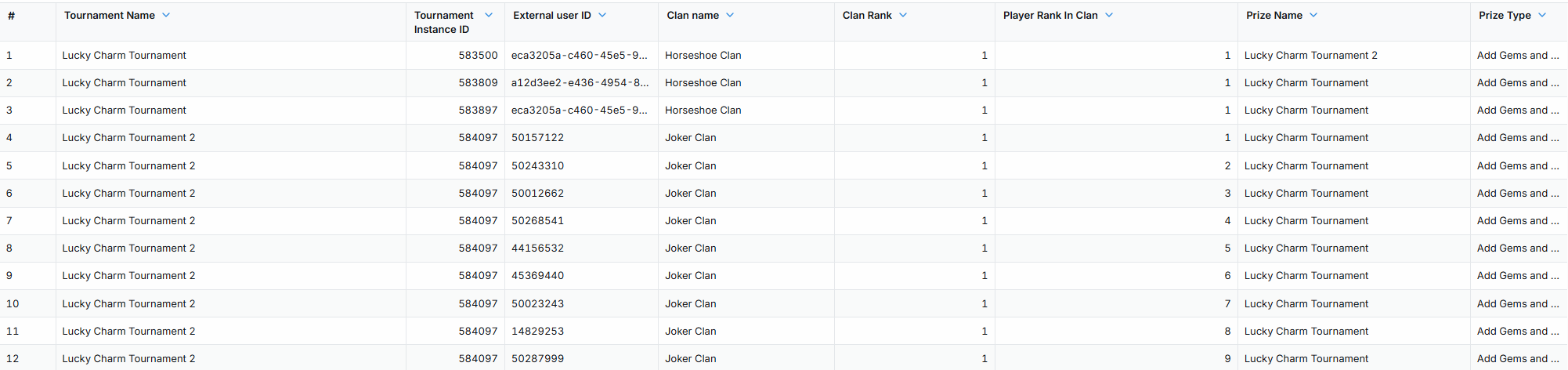
#### Tournament Winning Clans (table)
A summary table of finalized clan-based tournament results. One row per player per tournament instance that reached a podium position. Key columns include:
* **Tournament Name** — the clan-based tournament
* **Clan Name / Clan ID** — the winning clan
* **Clan Place** — the clan's final rank (1 = winner)
* **Prize Name / Type** — the reward awarded to the player
* **Clan Member Count** — number of members who contributed scores
* **Player Rank in Clan** — individual player's position within the winning clan
* **Prize Value** — the prize awarded to the player
> **How to use this tab:** Use this tab to evaluate the ROI and engagement quality of your clan-based tournaments. Compare daily registration volumes between clan and non-clan tournaments to assess whether the clan mechanic is driving incremental participation. The winning clans table lets you identify whether the same clans dominate repeatedly — a signal that prize distribution or clan balance may need adjustment. If one clan consistently wins, consider whether its membership advantages (higher capacity, no entry fee, favourable segment) are creating an uneven playing field.
### Frequently Asked Questions
#### What is the difference between Clan Points and Rank Points?
**Rank Points** represent a clan's global competitive rating calculated from tournament placements within the rolling rating window (default 30 days), where lower point totals indicate better competitive standing. **Clan Points** are real-time, additive points earned by individual players for clan activities to power live in-clan member leaderboards; they accumulate continuously and can be scheduled for periodic resets via the clan points reset setting without impacting tournament rank points.
#### How many clans can a player belong to simultaneously?
A player can only belong to **one clan** at any given time. Players cannot voluntarily leave a clan to become clanless; they can only switch to another eligible clan (subject to the clan switch cooldown) or be removed by an operator.
#### How are clans selected for a clan-based tournament?
When creating a tournament in the Back-Office with the Clan Tournament option enabled, all active clans automatically participate. Any registered player represents their active clan, and their tournament activity contributes to the clan's overall score.
#### What is the maximum number of clans allowed per label?
A label can create up to **50 clans** (combining active, draft, and archived statuses).
#### How frequently is the Clans Dashboard data refreshed?
Clan configuration and catalog data updates approximately every 30 minutes from operational databases, membership movement events stream to analytics in near real time, ranking snapshots are recorded after tournament finalizations and scheduled recalculations, and tournament winner data updates as soon as tournament instances conclude.
---
# Agent Instructions
This documentation is published with GitBook. GitBook is the documentation platform designed so that both humans and AI agents can read, navigate, and reason over technical content effectively. Learn more at gitbook.com.
## Querying This Documentation
If you need additional information that is not directly available in this page, you can query the documentation by asking a question.
Perform an HTTP GET request on the following URL with the `ask` and `goal` query parameters:
```
GET https://help.smartico.ai/welcome/products/bi-and-reporting/raffles-1.md?ask=&goal=
```
`ask` is the immediate question: it should be specific, self-contained, and written in natural language.
`goal` is what the user is ultimately trying to achieve, the reason they need the answer. Sharing it helps GitBook give you a better, more relevant answer. A goal is most helpful when it describes the outcome the user wants rather than restating the question. For example, with `ask=how do I create an API token`, a goal like `automate deployments from our CI pipeline` lets GitBook tailor the answer to that use case.
The response will contain a direct answer to the question and relevant excerpts and sources from the documentation.
Use this mechanism when the answer is not explicitly present in the current page, you need clarification or additional context, or you want to retrieve related documentation sections.