> For the complete documentation index, see [llms.txt](https://help.smartico.ai/welcome/llms.txt). Markdown versions of documentation pages are available by appending `.md` to page URLs; this page is available as [Markdown](https://help.smartico.ai/welcome/products/bi-and-reporting/favorite-product.md).
# Favorite Product
## 📘 Overview
The Favorite Product Dashboard provides an overview of the [Favorite Product Segmentation](https://help.smartico.ai/welcome/products/ai-models/favorite-product-game-game-type-and-game-provider#favorite-product), allowing you to monitor the activity distribution as well as the quality of the segments and the health of the business.
### Product Preference Categories
The dashboard categorizes users based on their 30-day betting activity across gaming verticals, applying an exponential time-decay model where recent wagers have greater weight:
* **Casino Only**: 100% of turnover generated in Casino games.
* **Sport Only**: 100% of turnover generated in Sports betting.
* **Lottery Only**: 100% of turnover generated in Lottery products.
* **More Casino, Less Sport**: Player wagers on both verticals, with Casino turnover strictly higher than Sports.
* **More Sport, Less Casino**: Player wagers on both verticals, with Sports turnover strictly higher than Casino.
* **Casino and Sport**: Equal turnover split between Casino and Sports.
* **Mixed Preferences**: Activity split across multiple verticals or involving Lottery combinations.
**🔍 How to Access the Favorite Product Report**
1. Navigate to Reports → Insights → Favorite product
2. Select: Period
3. Explore the Dashboard for detailed insights.
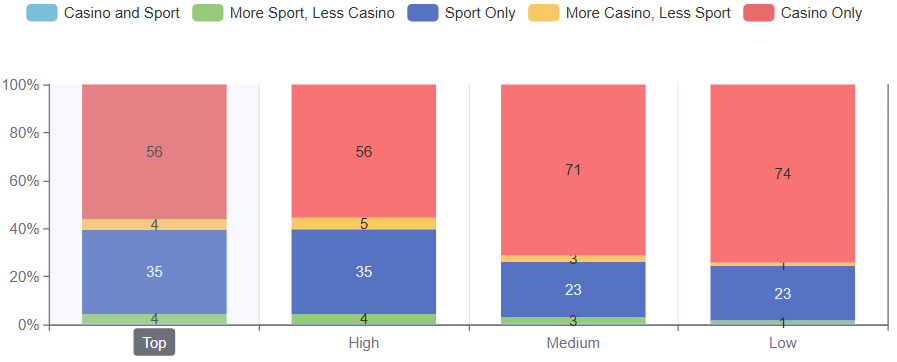
### Section 1: Value Scores split by Product Preference (%)
Use this chart to understand what differs between your Top, High, Medium and Low Value Score users in terms of the Product Preferences.
This chart displays a 100% stacked bar breakdown of each 30-day Value Score tier (Top, High, Medium, Low) across the seven product preferences. It helps identify which verticals drive the highest player lifetime value and where low-value players concentrate.
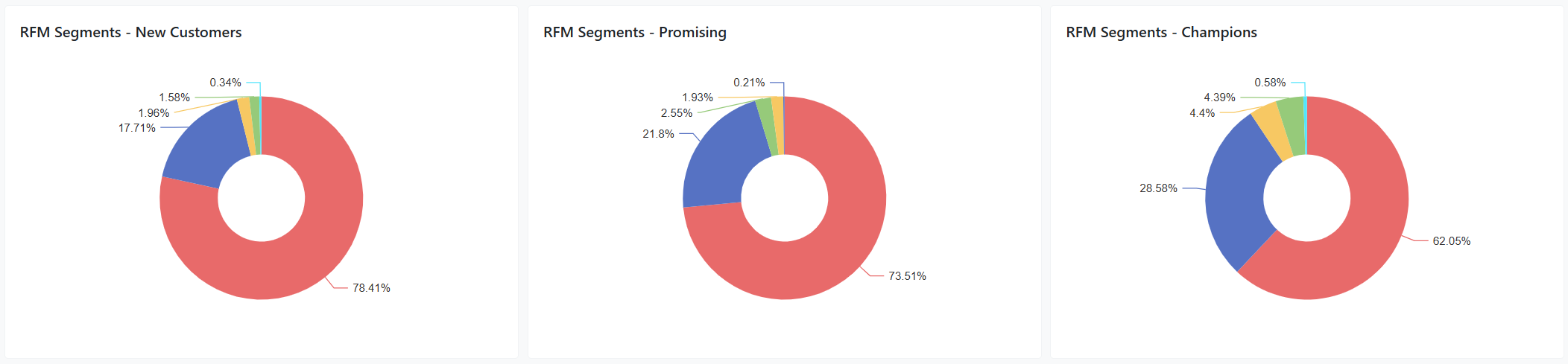
### Section 2: Product Segmentation split by RFM Models
Use these 3 charts to further understand the distribution of the Product Segmentations, referring to them as a business funnel from New Customers, moving to Promising, moving to Champions.
The three donut charts display the product preference distribution within each core RFM lifecycle stage:
* **New Customers**: Preferred products of newly onboarded players, revealing acquisition channel tendencies.
* **Promising**: Product preferences of players showing increasing engagement and frequency.
* **Champions**: The vertical mix of your most loyal, high-monetary players.
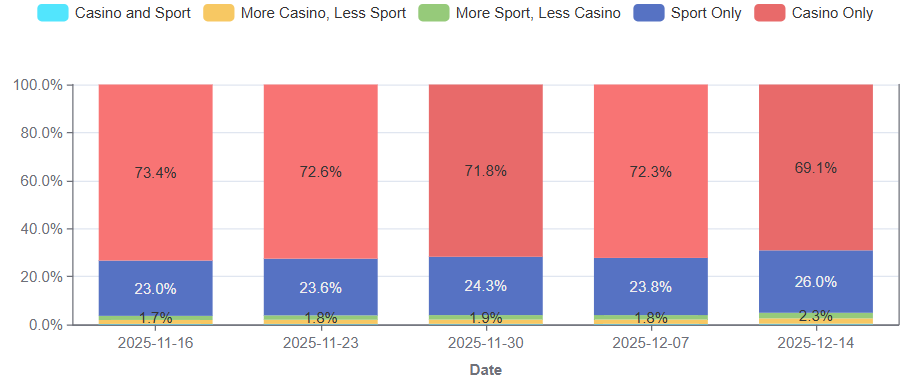
### Section 3: Weekly Distribution by Product Preference
Once you have an understanding on which distribution is healthiest for the business, based on the charts in sections 1 and 2, use this chart in order to understand whether the business moves in the right direction to increasing the value of the user base.
## 💡 Actionable Insights & Next Steps
* **Targeted Promotional Campaigns**: Build segments using Favorite Product Type to deliver vertical-specific offers (such as sports free bets to Sport Only players or free spins to Casino Only players).
* **Cross-Vertical Upselling**: Identify Casino Only Champions or High-Value players and introduce them to Sportsbook via tailored onboarding promotions.
* **Gamification Personalization**: Align dynamic mission tasks, tournaments, and mini-games to match the dominant product preference of your player segments.
### Frequently Asked Questions
**Q: How is a player's Favorite Product determined?**
A: Smartico analyzes 30 days of betting turnover across Casino, Sports, and Lottery using an exponential time-decay calculation where recent bets carry greater weight than older activity.
**Q: How often is the Favorite Product report updated?**
A: The underlying models recalculate nightly between 02:30 and 04:30 AM UTC. Dashboard visualizations and user profile properties reflect these updated classifications daily.
**Q: What happens if a player has not placed any bets in the last 30 days?**
A: For inactive users with no recent bets, the system preserves their last known favorite product classification rather than resetting it.
**Q: What is the difference between Favorite Product and Favorite Games?**
A: Favorite Product identifies the macro vertical preference (Casino, Sport, Lottery), whereas Favorite Games identifies the specific game titles, game categories, and game providers a player interacts with most.
**Q: Can I filter campaigns and journeys using Favorite Product?**
A: Yes. In the Segment Builder, use the condition Favorite Product Type to target specific preference groups, or filter by percentage share properties (such as Favorite Product Casino % or Favorite Product Sport %).
---
# Agent Instructions
This documentation is published with GitBook. GitBook is the documentation platform designed so that both humans and AI agents can read, navigate, and reason over technical content effectively. Learn more at gitbook.com.
## Querying This Documentation
If you need additional information that is not directly available in this page, you can query the documentation by asking a question.
Perform an HTTP GET request on the following URL with the `ask` and `goal` query parameters:
```
GET https://help.smartico.ai/welcome/products/bi-and-reporting/favorite-product.md?ask=&goal=
```
`ask` is the immediate question: it should be specific, self-contained, and written in natural language.
`goal` is what the user is ultimately trying to achieve, the reason they need the answer. Sharing it helps GitBook give you a better, more relevant answer. A goal is most helpful when it describes the outcome the user wants rather than restating the question. For example, with `ask=how do I create an API token`, a goal like `automate deployments from our CI pipeline` lets GitBook tailor the answer to that use case.
The response will contain a direct answer to the question and relevant excerpts and sources from the documentation.
Use this mechanism when the answer is not explicitly present in the current page, you need clarification or additional context, or you want to retrieve related documentation sections.