> For the complete documentation index, see [llms.txt](https://help.smartico.ai/welcome/llms.txt). Markdown versions of documentation pages are available by appending `.md` to page URLs; this page is available as [Markdown](https://help.smartico.ai/welcome/products/ai-agents/ai-agent-product-expert.md).
# AI Agent: Product Expert
The **Product Expert Agent** is your expert guide to understanding and using the Smartico platform. It retrieves information from the comprehensive knowledge base to answer questions about features, configurations, best practices, and troubleshooting.
### Accessing the Agent
You can launch the Product Expert Agent from several places in the Back-Office:
* **Global Search Bar:** Enter any question or feature name in the top search bar and click the AI assistant search result to open the chat with your query pre-filled.
* **AI Assistant Button:** Click the floating AI Assistant icon in the navigation bar to open the chat drawer, then select Product Expert from the agent selector dropdown.
* **Inline Assistance:** Click "Ask AI" buttons within configuration screens to ask questions about that specific section.
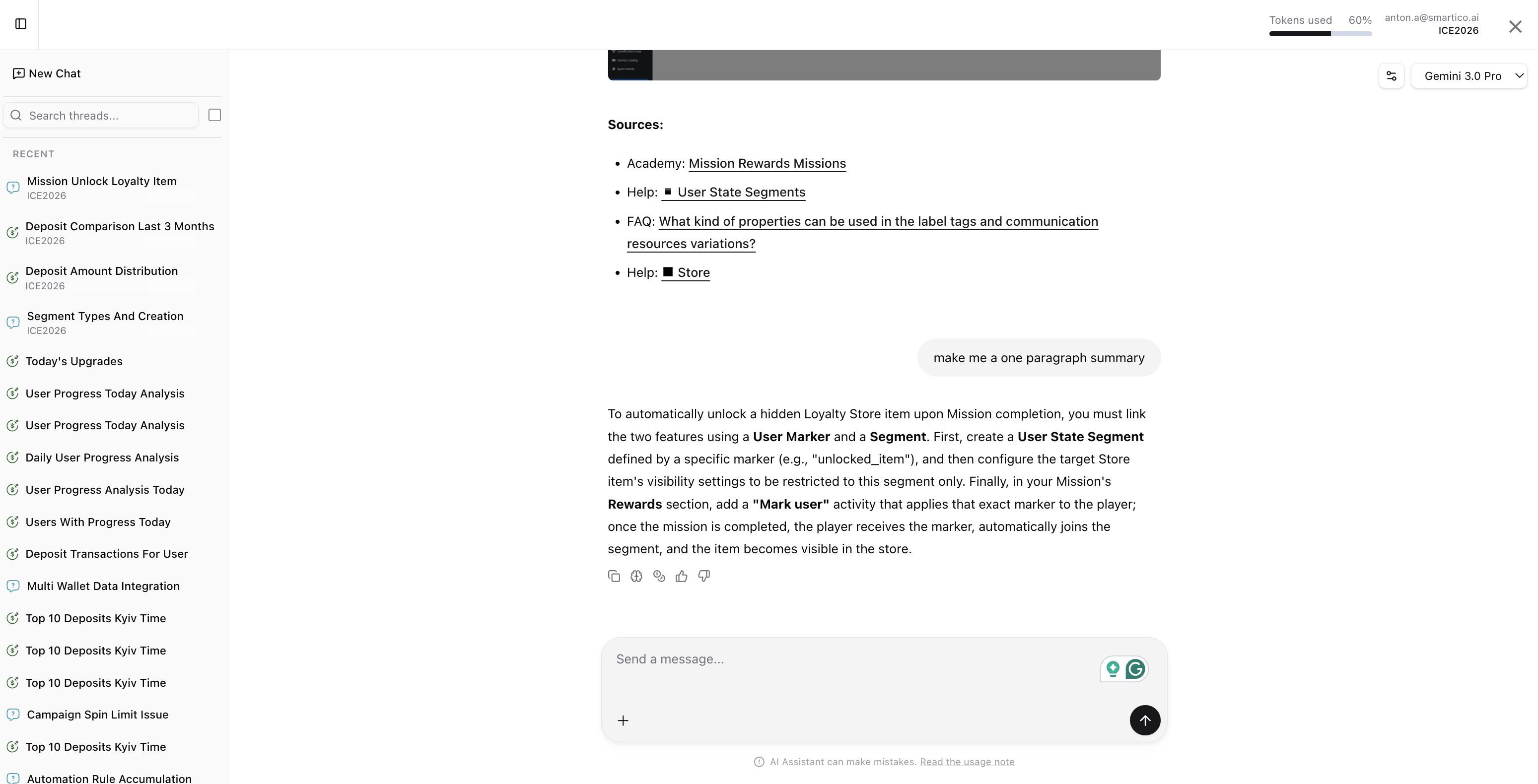
In every chat session, you are able to see:
* Referenced help articles, Academy videos, or FAQ sections that were used to build the answer
* You can give positive or negative feedback for the provided answer; it will be analyzed by our AI Engineers in order to improve the quality of the Agent
* Token consumption details (via the coin icon) and the agent's live reasoning steps to understand how it processes the information and forms a conclusion.
Note that the agent **doesn't have access to your live setup or player data**, so it cannot answer why a specific user did not enter a campaign or inspect custom configurations. However, it knows everything available in the Help section, Video Academy, Smartico FAQ, DWH documentation, and API documentation, and will provide a direct link to the Data Analyst Agent when account data is needed.
### Data Analyst Handoff
When your question involves operational metrics, live player lookups, or account configuration details, the Product Expert Agent automatically explains the underlying concept and generates an interactive **Ask Data Analyst** button. Clicking this button opens the Data Analyst Agent with your question pre-filled, allowing you to transition smoothly from platform documentation to live data analysis.
#### Best Practices
* **Be Specific** - Instead of "Tell me about tournaments", ask "How do I configure prize distribution in tournaments?"
* **One Topic at a Time** - For best results, ask about one feature or concept per question. You can always ask follow-up questions.
* **Use follow-ups -** if you need clarification or more details, ask follow-up questions to refine the answer.
### Permissions and Languages
* **Role Access:** The Product Expert Agent is available to all Back-Office user roles by default, including CRM Support users.
* **Multi-Language Support:** You can ask questions in any supported language (such as English, Portuguese, Spanish, Ukrainian, or Russian). The agent automatically queries the knowledge base and responds in your preferred language.
#### Example Use Cases
* **Feature Discovery -** "What are the different types of mini-games available?"
* **Configuration Help -** "How do I set up multi-currency support for bonuses?"
* **Best Practices -** "What's the recommended way to structure automation rules for VIP players?"
* **Troubleshooting -** "Why might a user not see their available tournament?"
* **Integration Guidance -** "How do I integrate Smartico widgets into my website?"
* **API usage** - "How to get a list of active missions over the API?"
* **DWH usage** - "How to build a SQL query to get communication performance per campaign?"
### FAQ
**Q: Can the Product Expert Agent check why a specific player did not receive a bonus or enter a journey?**
A: No. The Product Expert Agent only accesses platform documentation and best practice guides. To inspect specific user event histories, bonus deliveries, or campaign logs, use the Data Analyst Agent via the generated "Ask Data Analyst" link.
**Q: Can I ask questions in languages other than English?**
A: Yes. You can submit questions in Portuguese, Spanish, Russian, Ukrainian, and other languages. The agent will retrieve the relevant documentation and reply in the same language.
**Q: Where can I see how many AI tokens my query consumed?**
A: Hover over or click the coin icon at the bottom of any assistant message to view the token breakdown, including input, thinking, and output tokens.
**Q: How do I switch to a different AI agent?**
A: Use the agent selector dropdown at the top of the AI Assistant window to switch between Product Expert, Data Analyst, Popup Builder, Image Generation, and other specialized assistants.
### Related Articles
* For an overview of all available AI assistants, see [AI Agents](/welcome/products/ai-agents.md).
* To analyze live operational data and generate SQL reports, see [AI Agent: Data Analyst](/welcome/products/ai-agents/ai-agent-data-analyst.md).
---
# Agent Instructions
This documentation is published with GitBook. GitBook is the documentation platform designed so that both humans and AI agents can read, navigate, and reason over technical content effectively. Learn more at gitbook.com.
## Querying This Documentation
If you need additional information that is not directly available in this page, you can query the documentation by asking a question.
Perform an HTTP GET request on the following URL with the `ask` and `goal` query parameters:
```
GET https://help.smartico.ai/welcome/products/ai-agents/ai-agent-product-expert.md?ask=&goal=
```
`ask` is the immediate question: it should be specific, self-contained, and written in natural language.
`goal` is what the user is ultimately trying to achieve, the reason they need the answer. Sharing it helps GitBook give you a better, more relevant answer. A goal is most helpful when it describes the outcome the user wants rather than restating the question. For example, with `ask=how do I create an API token`, a goal like `automate deployments from our CI pipeline` lets GitBook tailor the answer to that use case.
The response will contain a direct answer to the question and relevant excerpts and sources from the documentation.
Use this mechanism when the answer is not explicitly present in the current page, you need clarification or additional context, or you want to retrieve related documentation sections.