> For the complete documentation index, see [llms.txt](https://help.smartico.ai/welcome/llms.txt). Markdown versions of documentation pages are available by appending `.md` to page URLs; this page is available as [Markdown](https://help.smartico.ai/welcome/products/ai-agents/ai-agent-popups-builder.md).
# AI Agent: Popups Builder
{% hint style="warning" %}
**This agent is retired.** Create popups in **Vibe Studio** instead: open the Pop-up list, click **Create** and choose **Popup with Vibe Studio**. Vibe Studio has 43 ready popup designs, changes them from your words in the chat, and lets your team save popups as templates. See [Create a popup with Vibe Studio](https://help.smartico.ai/welcome/products/crm-automation/communication-channels/pop-up#create-a-popup-with-vibe-studio). For games inside a popup, see [Doodles](https://help.smartico.ai/welcome/products/crm-automation/communication-channels/doodles). Popups you made with this agent keep working.
{% endhint %}
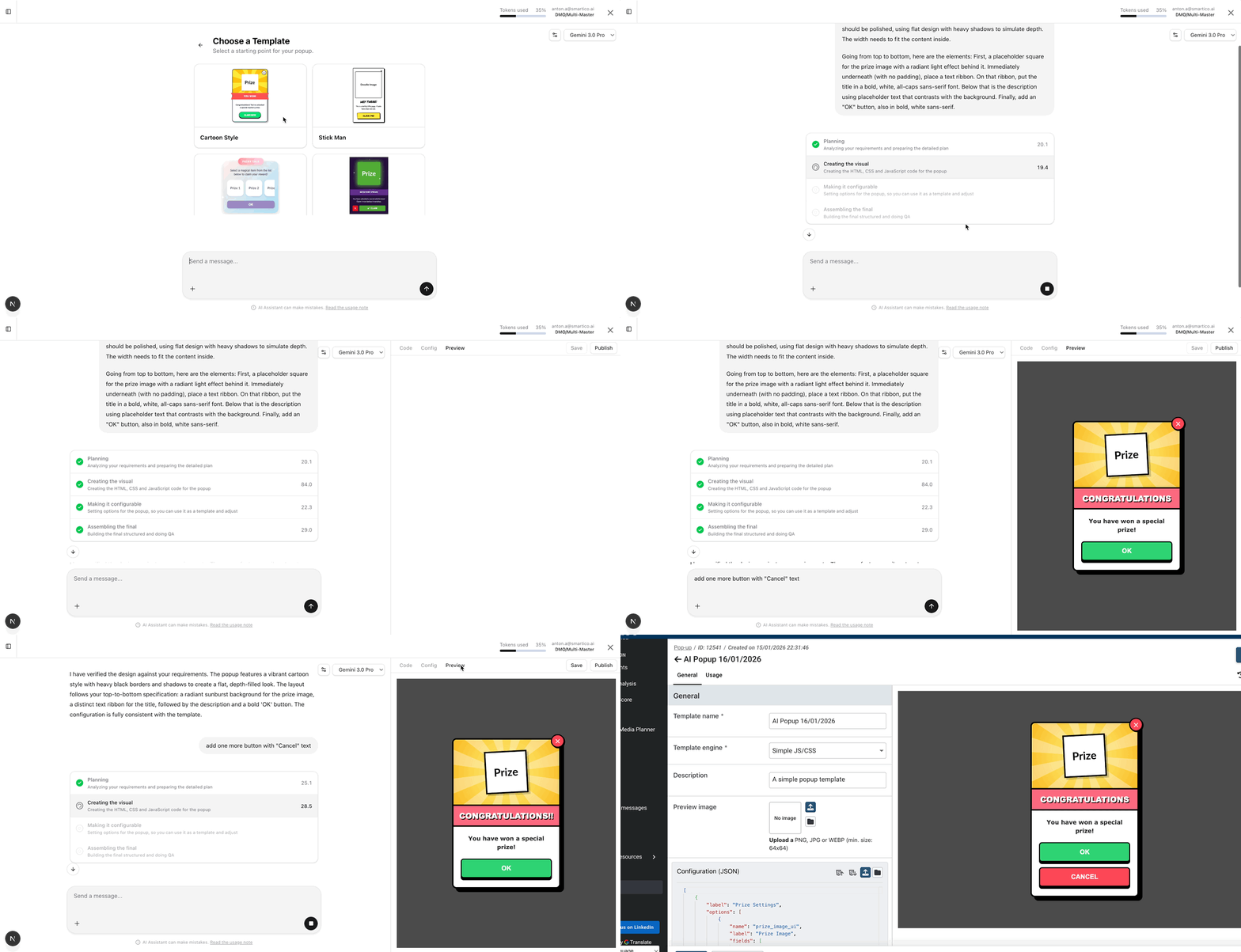
The **Popups Builder Agent** can help you build a pop-up template by describing the required layout, elements, styles, and animations.
The agent is creating a fully configurable template that you can adjust after that by replacing text, images, and links.
**How to use it:**
* Pick one of the existing templates and adjust the prompt for your needs
* Access the agent by navigating to Marketing → Templates → Popup Templates and clicking "Create with AI" (brain icon), or select the Popup Builder directly from the AI Assistant menu.
* Wait for the agent to complete the work; depending on the complexity of the requirements, it can take up to 2-3 minutes.
* Check the visual result, explore HTML/CSS/JavaScript code and Configuration tabs, if you do custom changes there, don't forget to "save" them
* The side panel includes three tabs: "Code" (view and edit raw HTML, CSS, and JavaScript), "Config" (view and edit form controls in structured UI or JSON mode), and "Preview" (interactive rendering with a Restart button to replay animations).
* The agent can generate AI images (such as hero graphics and backgrounds) and accepts uploaded image attachments, while inserting placeholders for secondary elements that you can replace later.
* You can also ask the agent to make adjustments if you don't like something in the first version.
* When you are ready, click "Publish." This saves the pop-up template, which you can use to build final pop-ups.
* To use your published template, navigate to Marketing → Assets → Popups, create a new popup asset, select your template, configure content variations (texts, images, and button deep links), and assign the popup to a real-time Campaign or Journey.
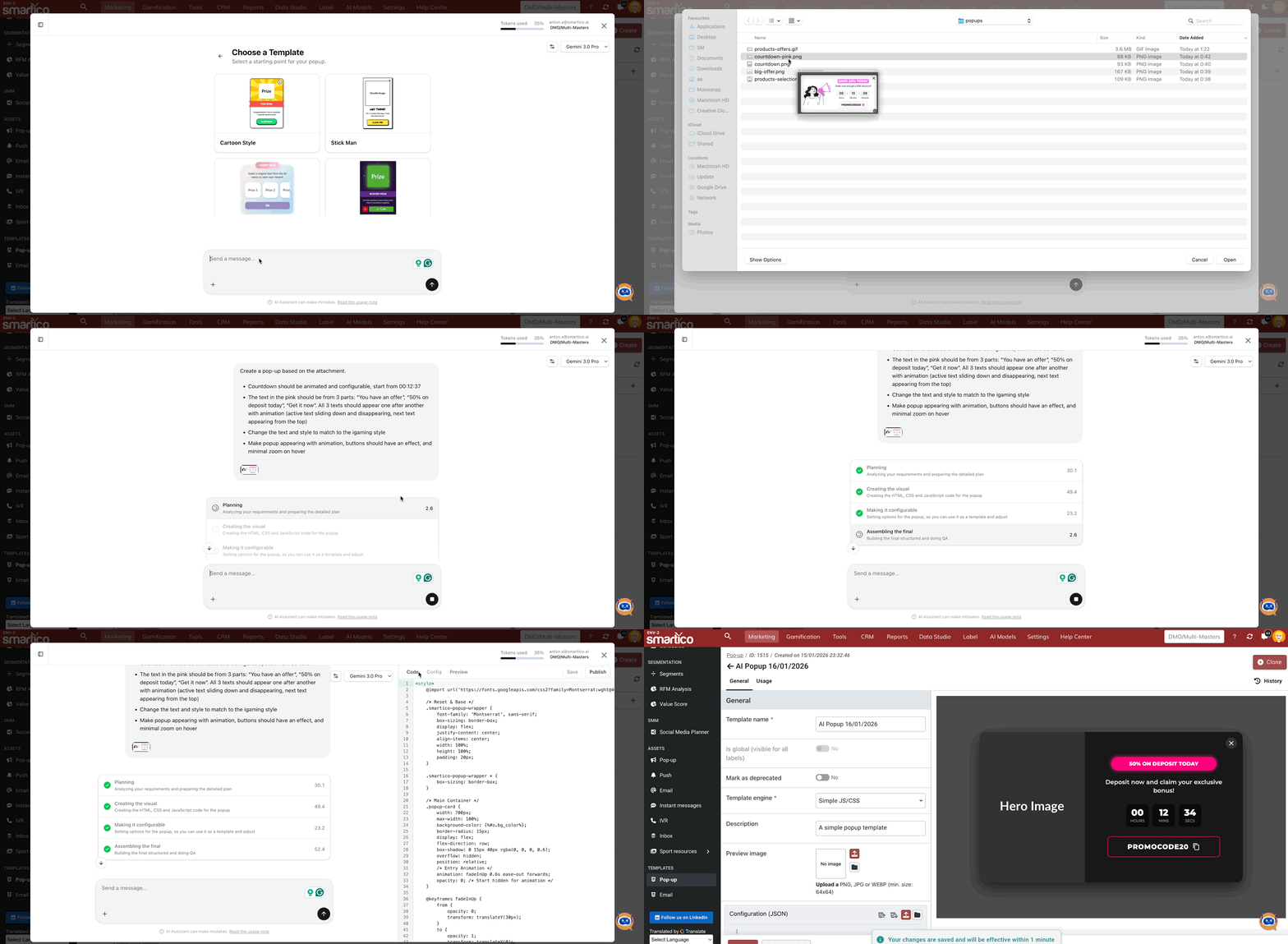
**Countdown pop-up based on the screenshot**
**Carousel with offers**
**Hints and tricks:**
* Structure your request as:
* Explain layout & elements
* Give style guideline
* Explain animations
* You can make a screenshot from your site or from some pop-up that you have seen on another site, and ask the agent to recreate it according to your vision
To generate standalone graphic assets or mini-game skins, see [AI Agent: Create an image](https://help.smartico.ai/welcome/products/ai-agents/ai-agent-create-an-image) and [AI Agent: Doodle Game Creator](https://help.smartico.ai/welcome/products/ai-agents/ai-agent-doodle-game-creator).
### Frequently Asked Questions
**How do I configure button actions and deep links in the popup?**
Buttons can use Smartico deep links (such as `dp:ok`, `dp:close`, `dp:cancel`, or custom navigation deeplinks to the cashier or gamification sections). You can ask the agent to configure specific deep links during creation or customize them in the Configuration tab.
**Are popup templates automatically optimized for mobile devices?**
Yes. Popup templates are built with responsive container styles and standardized widths (default 300px modal card) to render cleanly across both mobile and desktop screens.
**Can I manually edit the HTML, CSS, or configuration after AI generation?**
Yes. Use the "Code" tab in the right panel to edit the HTML, CSS, and JavaScript directly, or use the "Config" tab to modify the structured input fields. Click "Save" to preserve your manual changes before publishing.
---
# Agent Instructions
This documentation is published with GitBook. GitBook is the documentation platform designed so that both humans and AI agents can read, navigate, and reason over technical content effectively. Learn more at gitbook.com.
## Querying This Documentation
If you need additional information that is not directly available in this page, you can query the documentation by asking a question.
Perform an HTTP GET request on the following URL with the `ask` and `goal` query parameters:
```
GET https://help.smartico.ai/welcome/products/ai-agents/ai-agent-popups-builder.md?ask=&goal=
```
`ask` is the immediate question: it should be specific, self-contained, and written in natural language.
`goal` is what the user is ultimately trying to achieve, the reason they need the answer. Sharing it helps GitBook give you a better, more relevant answer. A goal is most helpful when it describes the outcome the user wants rather than restating the question. For example, with `ask=how do I create an API token`, a goal like `automate deployments from our CI pipeline` lets GitBook tailor the answer to that use case.
The response will contain a direct answer to the question and relevant excerpts and sources from the documentation.
Use this mechanism when the answer is not explicitly present in the current page, you need clarification or additional context, or you want to retrieve related documentation sections.