> For the complete documentation index, see [llms.txt](https://help.smartico.ai/welcome/llms.txt). Markdown versions of documentation pages are available by appending `.md` to page URLs; this page is available as [Markdown](https://help.smartico.ai/welcome/products/ai-agents/ai-agent-create-an-image.md).
# AI Agent: Create an image
The ‘**Create an image**’ AI Agent allows you to generate images directly within the Smartico Backoffice. It’s available directly in the ‘AI Assistant’ and anywhere you can upload an image - including missions, badges, levels, tournaments, mini-games, lootboxes, store items, raffles, and more. Generate stylish, custom visuals instantly and use them wherever you need.
#### How to use it?
1. **Inside a mission, mini-game, tournament, etc.**
* Open the mission, mini-game, tournament, or any other item you want to generate an image for.
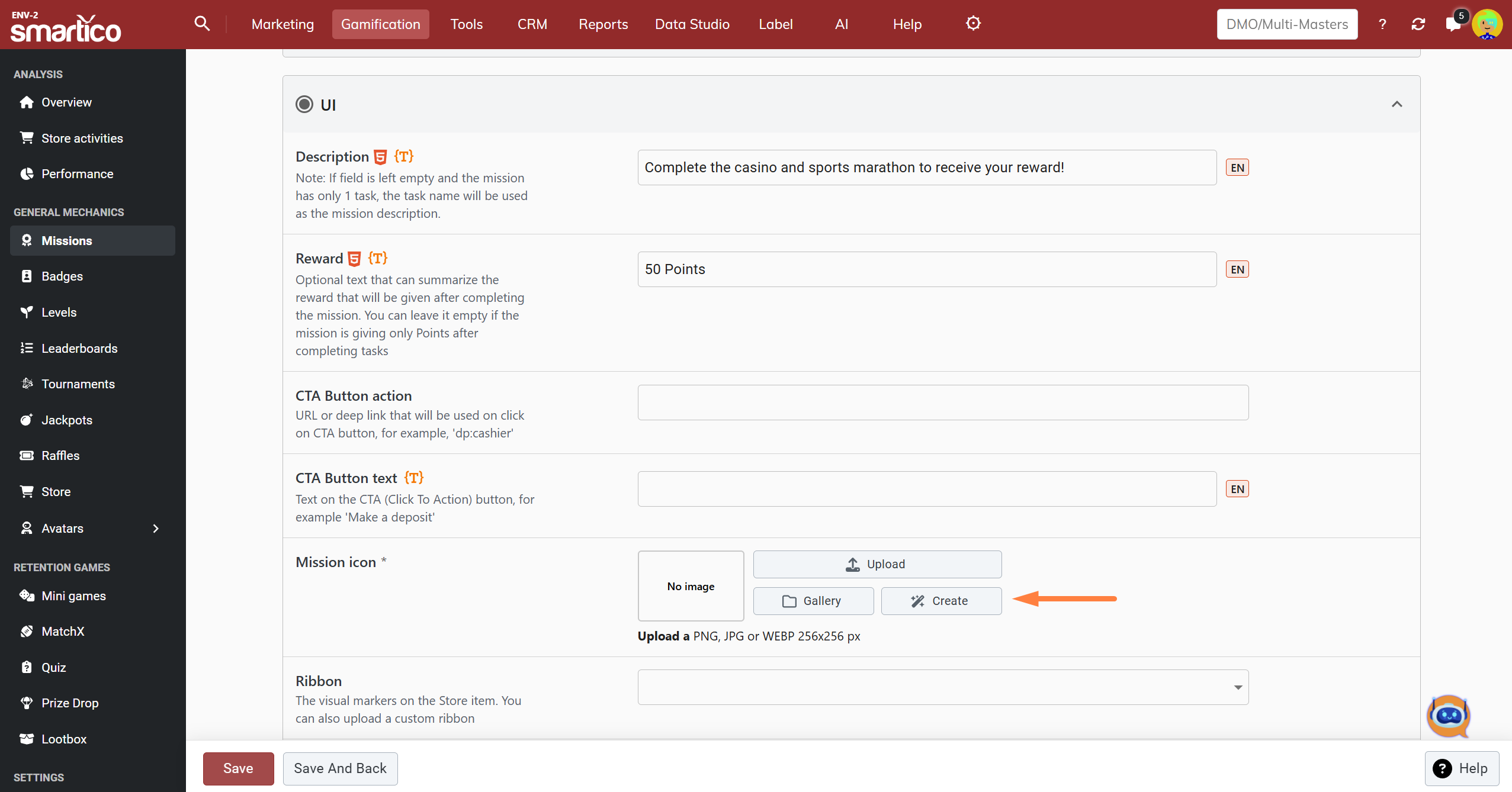
* Go to the Image section and click the "Create" button (featuring a magic wand icon and "Generate with AI" tooltip).
BO: Generate an image for a Mission
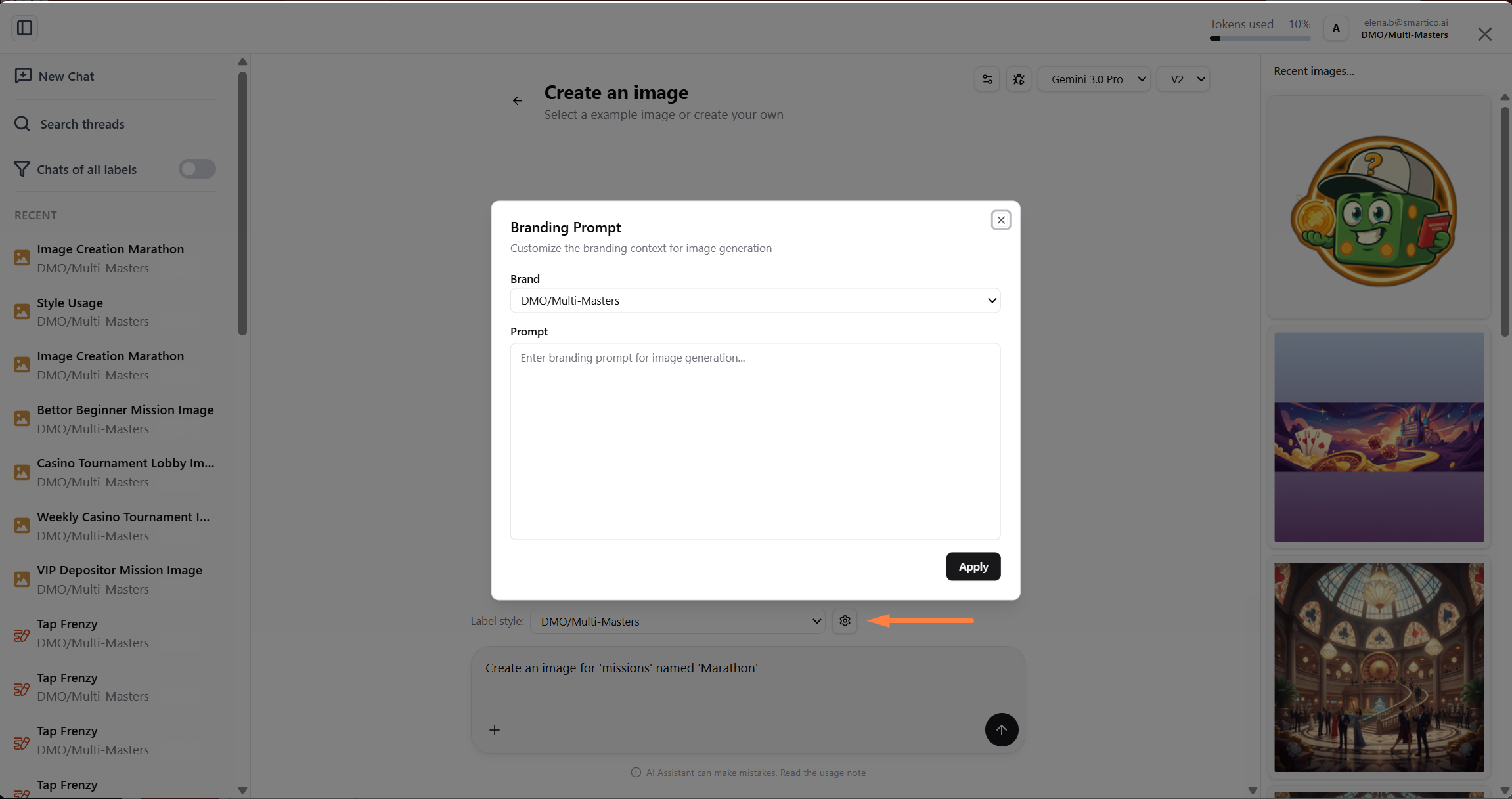
* (Optional) Set up a style for your label or brand. When you select that brand in the future, images will automatically be generated in the defined style.
BO: Brand styling in 'Create an image' AI Agent
* Write a new prompt to describe the image or adjust the one that is already populated
When triggered from an entity (such as a mission, badge, or tournament), the prompt is pre-filled with the entity name and the generation is automatically configured with required target dimensions (e.g., 256x256 px for icons, 920x200 px for lobby banners). You can also specify custom dimensions (like "800x400") or aspect ratios (such as "16:9" or "1:1") directly in your prompt.
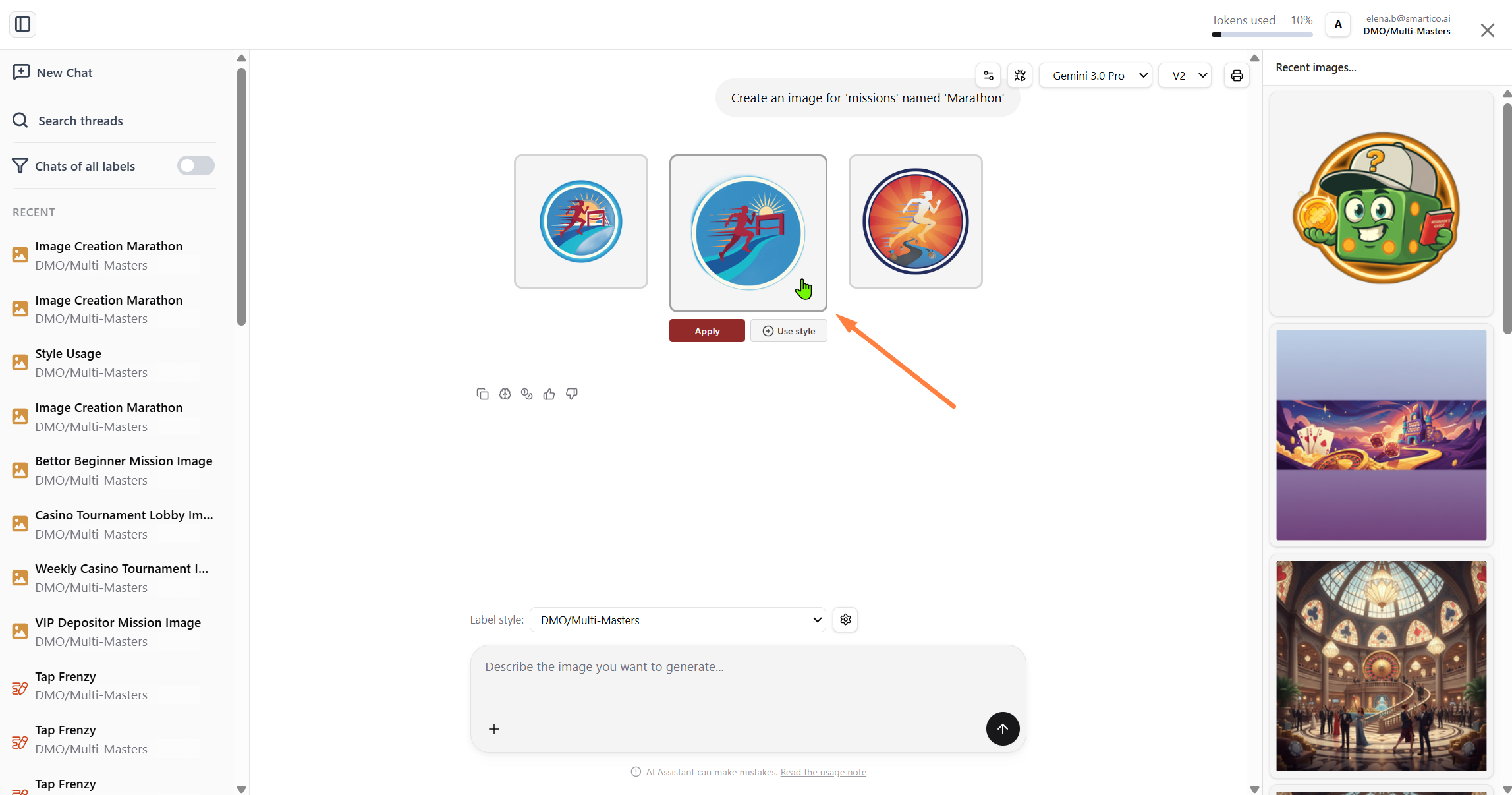
* Once the images are generated, you can either apply one instantly or make adjustments while keeping the same style.
The agent produces 3 image variations for each prompt. On each variation, you can click "Apply" (in entity forms) or "Save" (in the standalone AI Assistant) to store the image in your Resource Manager, or click "Use style" to lock in that specific visual style for subsequent generation prompts.
BO: Generated image for a mission
* You can also upload a reference image to guide the generation.
* When you're happy with the result, click Apply. The image will also be automatically saved in your Resource Manager so you can reuse it anytime.
* You can browse recently generated visuals in the "Recent images..." sidebar panel. Clicking "Use this style" on any previous generation adds it directly to your prompt context as a visual reference.
2. **Directly from the ‘AI Assistant’**
* Open the AI Assistant and select ‘Create an image’
* Set up a style for your label or brand. When you select that brand in the future, images will automatically be generated in the defined style.
* Write your prompt to describe the image you want to generate
* Once the images are generated, you can either save it or make adjustments while keeping the same style.
* If you choose to save it, the image will be saved in your resource manager, and you can use it later whenever it is needed.
### Icon vs Banner Formatting
* **Icons and Badges:** When creating icons (e.g. for missions, badges, levels, avatars, or store items), the AI automatically performs background removal post-processing to output a clean, transparent PNG.
* **Banners and Illustrations:** For wide headers and background scenes (e.g. tournament lobby banners, inbox headers), the AI generates a unified, continuous scene without transparency.
* You can also upload a reference image to guide the generation.
{% hint style="info" %}
For the best results, attach a reference image. This could be a screenshot from your site or any marketing material. While it can be difficult to describe a style in words, providing a reference image makes it much easier for the AI to capture the exact look and feel you want.
{% endhint %}
### Prerequisites & Access
* Access to the Create an image AI Agent is available to Back-Office users across roles (excluding CRM Support unless extended access is granted).
* Visual generation is subject to your organization's monthly AI token allowance.
{% embed url="" %}
### FAQ
**Q: How do I generate a consistent visual set across multiple tiers or levels?**
Generate your first image (e.g. a Bronze badge), then click "Use style" on your favorite variation or select it from the "Recent images..." sidebar panel. Subsequent generation prompts will maintain the same artistic style, shading, and visual elements.
**Q: Can I edit or modify an existing image directly?**
No. Reference images serve as visual style guides for generating brand new assets. The AI does not modify, crop, or in-paint existing files.
**Q: Does changing an image on an active mission or tournament update immediately for players?**
Yes. Applying the new image and saving the mission or tournament updates the graphic immediately in the player widget and Back-Office.
**Q: Where are my generated images saved?**
All applied or saved images are automatically stored in the Resource Manager (Gallery) under their respective entity category (such as missions, badges, tournaments), where they can be selected anytime.
### Related AI Agents
* For an overview of all AI Assistant capabilities, see [AI Agents](/welcome/products/ai-agents.md).
* To generate custom visual skins for the Spin the Wheel minigame, see [AI Agent: Wheel Design Creator](/welcome/products/ai-agents/ai-agent-wheel-design-creator.md).
* To generate interactive popup templates, see [AI Agent: Popups Builder](/welcome/products/ai-agents/ai-agent-popups-builder.md).
---
# Agent Instructions
This documentation is published with GitBook. GitBook is the documentation platform designed so that both humans and AI agents can read, navigate, and reason over technical content effectively. Learn more at gitbook.com.
## Querying This Documentation
If you need additional information that is not directly available in this page, you can query the documentation by asking a question.
Perform an HTTP GET request on the following URL with the `ask` and `goal` query parameters:
```
GET https://help.smartico.ai/welcome/products/ai-agents/ai-agent-create-an-image.md?ask=&goal=
```
`ask` is the immediate question: it should be specific, self-contained, and written in natural language.
`goal` is what the user is ultimately trying to achieve, the reason they need the answer. Sharing it helps GitBook give you a better, more relevant answer. A goal is most helpful when it describes the outcome the user wants rather than restating the question. For example, with `ask=how do I create an API token`, a goal like `automate deployments from our CI pipeline` lets GitBook tailor the answer to that use case.
The response will contain a direct answer to the question and relevant excerpts and sources from the documentation.
Use this mechanism when the answer is not explicitly present in the current page, you need clarification or additional context, or you want to retrieve related documentation sections.