# December 2025

### <i class="fa-telegram">:telegram:</i> Telegram Bot proxy mode

We have introduced **Bot proxy mode** for Telegram bots in the Instant Messages Gateway. This mode enables operators who already host their own Telegram bot logic to run Smartico in parallel without replacing their existing webhook configuration.

By design, **Telegram supports only one active webhook per bot**, preventing the registration of multiple webhook endpoints for the same Telegram bot. With *Bot proxy mode*, Telegram updates continue to be delivered to your existing webhook, and you simply forward those requests to Smartico using the **Bot Proxy URL** provided after saving the configuration. As long as the forwarded request preserves the original Telegram webhook payload format, Smartico can process the events in parallel with your internal bot logic. This allows you to extend Smartico messaging capabilities without disrupting your current bot integration.

Read more about the Telegram bot and the new Proxy mode in [#configure-the-bot-in-smartico](https://help.smartico.ai/welcome/products/crm-automation/activities-of-flows/activity-telegram-bot#configure-the-bot-in-smartico "mention")

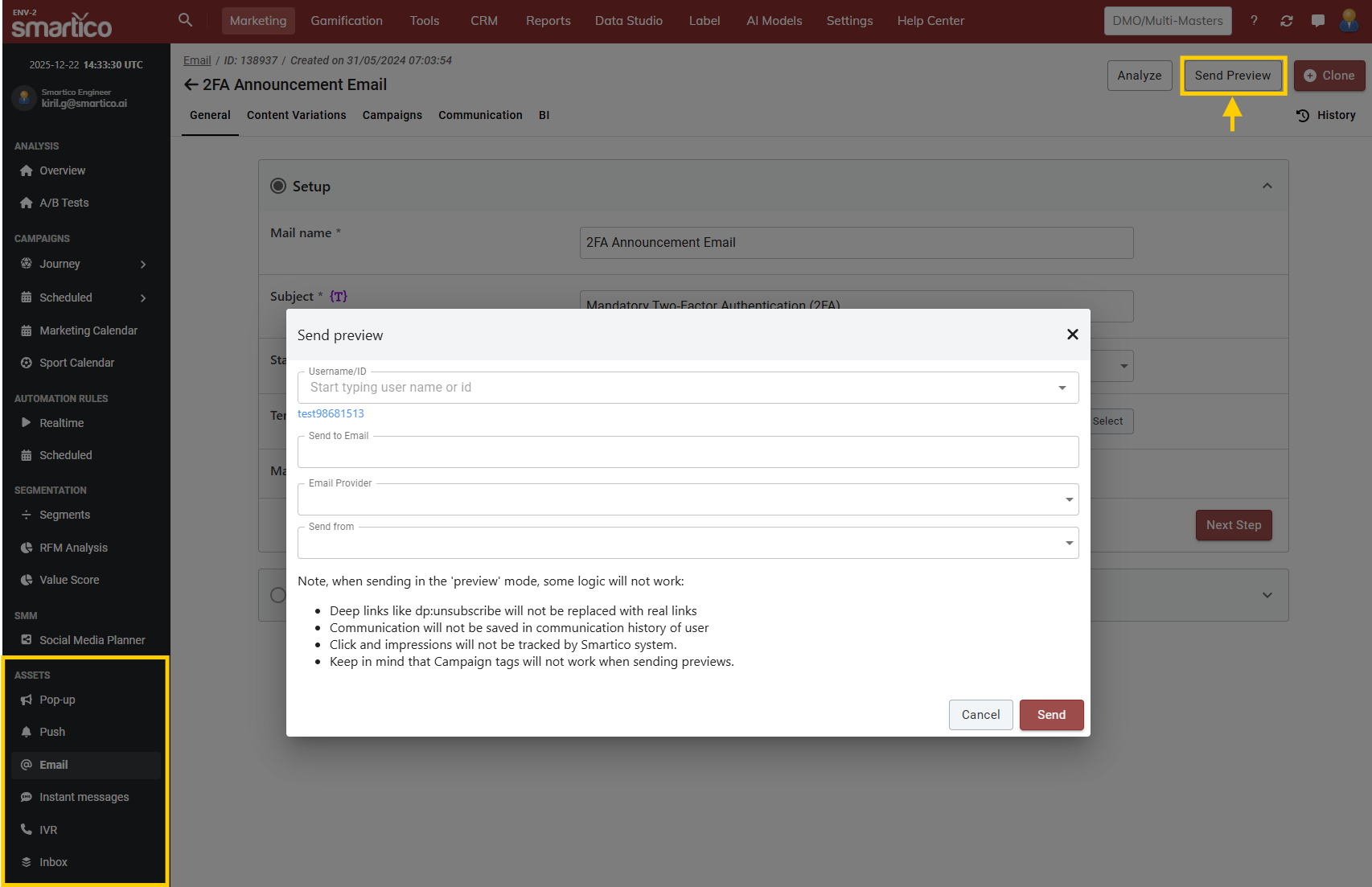
### <i class="fa-envelope-open-text">:envelope-open-text:</i> Support for variations in the preview of communications

We have added support for variation previews across all communications, allowing you to navigate to any specific variation and initiate a preview for an applicable user.\
You can also trigger a preview directly from the default content, where the system automatically selects and sends the variation based on the user's criteria.

{% hint style="info" %}
If a user does not meet the criteria for a specific variation, the system will display the default preview instead.
{% endhint %}

<div data-with-frame="true"><figure><img src="https://77049817-files.gitbook.io/~/files/v0/b/gitbook-x-prod.appspot.com/o/spaces%2FfS5hl0PiysHtKAKMsQTe%2Fuploads%2Fgit-blob-ffb22c528b1ccec17516a418ab73acc530cf3df5%2Fimage.png?alt=media" alt=""><figcaption><p>BO: Initiate a preview in communication assets</p></figcaption></figure></div>

<mark style="color:purple;">Read more about the preview capabilities of communications:</mark>

{% embed url="<https://help.smartico.ai/welcome/products/crm-automation/communication-channels#general-capabilities>" %}

### <i class="fa-chart-column">:chart-column:</i> New Campaigns Dashboard

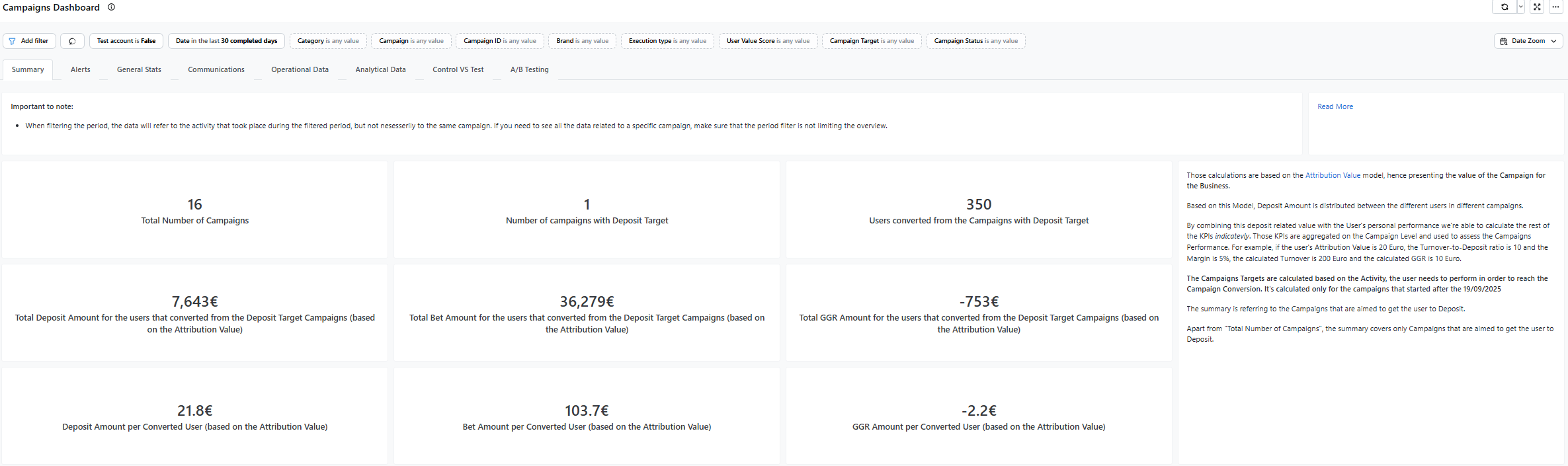
We have launched a comprehensive Campaigns Dashboard that provides a 360-degree view of your campaign performance, costs, and player engagement. Spanning eight dedicated tabs, this new tool allows you to:

* Track Financials: Monitor key metrics like Total Deposits, GGR, and Attribution Value in the Summary view.
* Mitigate Risk: Use the Alerts tab to instantly spot negative GGR, low conversion rates, and potential player churn.
* Optimize Strategy: Leverage advanced analytics for A/B Testing, Control vs. Test uplift, and granular Communication Funnel tracking to ensure your marketing efforts drive maximum ROI.

<div data-with-frame="true"><figure><img src="https://77049817-files.gitbook.io/~/files/v0/b/gitbook-x-prod.appspot.com/o/spaces%2FfS5hl0PiysHtKAKMsQTe%2Fuploads%2Fgit-blob-a7d06599e15cf0d87e0c5235116340252e538bac%2Fimage.png?alt=media" alt=""><figcaption></figcaption></figure></div>

Read more in the [campaigns-dashboard](https://help.smartico.ai/welcome/reporting/campaigns-dashboard "mention")

### <i class="fa-chart-column">:chart-column:</i> Favorite Product Report Revamp

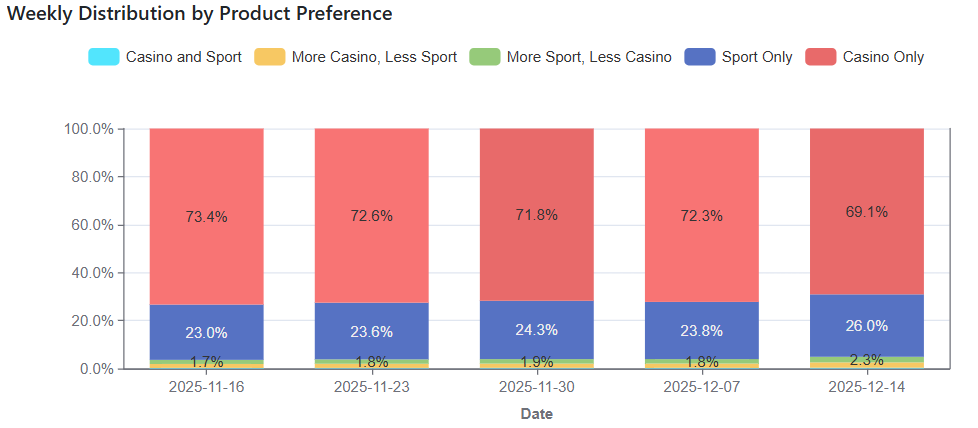
We've optimized the Favorite Product Report. The new version of the Favorite Product Report provides an overview of Favorite Product Segmentation, allowing you to monitor activity distribution, segment quality, and business health.

<div data-with-frame="true"><figure><img src="https://77049817-files.gitbook.io/~/files/v0/b/gitbook-x-prod.appspot.com/o/spaces%2FfS5hl0PiysHtKAKMsQTe%2Fuploads%2Fgit-blob-a1240c38af5088f7df7717384e5f1f37b808fdda%2Fimage.png?alt=media" alt=""><figcaption></figcaption></figure></div>

### <i class="fa-gamepad-modern">:gamepad-modern:</i> Show ‘External User ID’ in Minigames

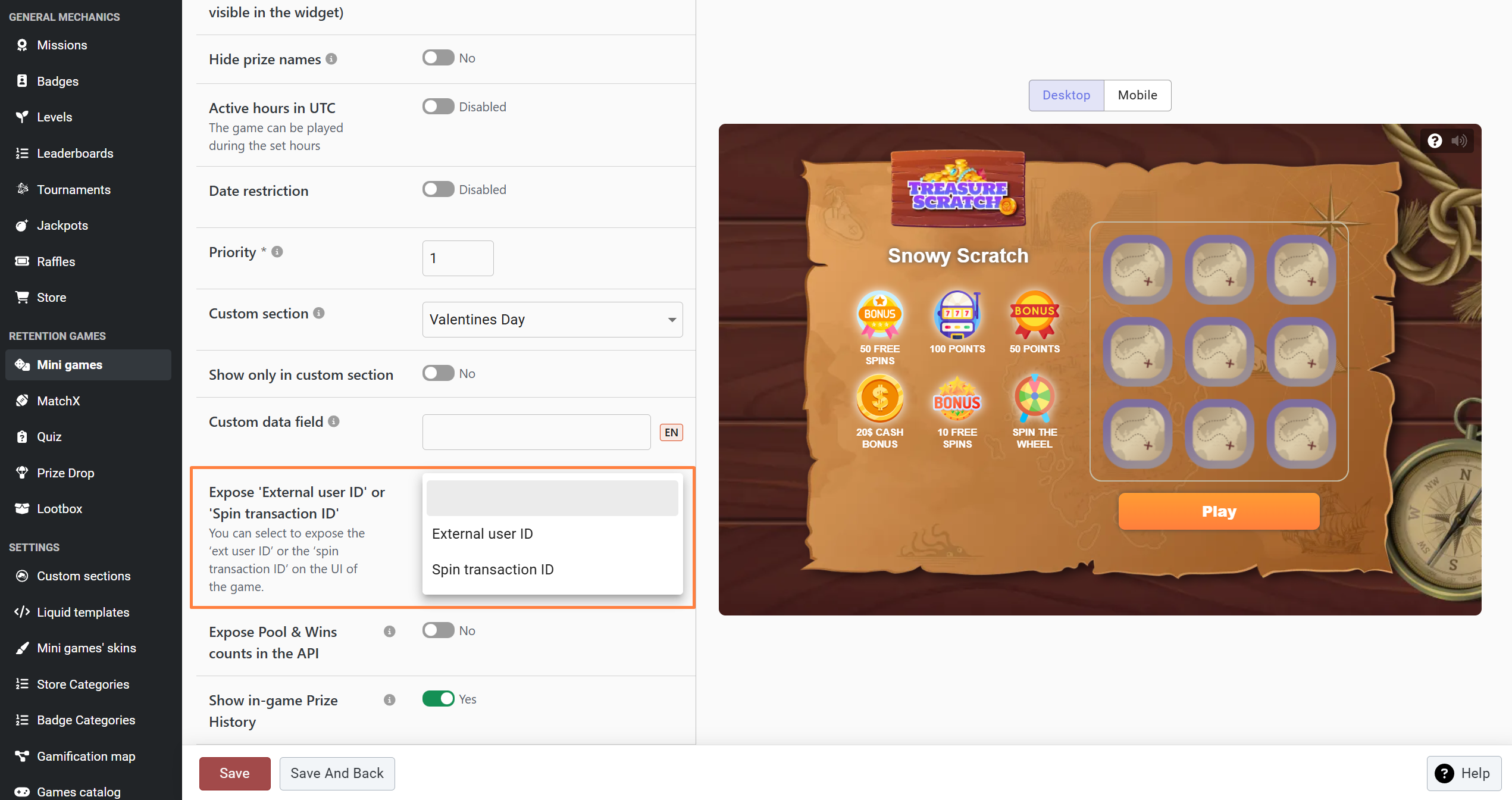
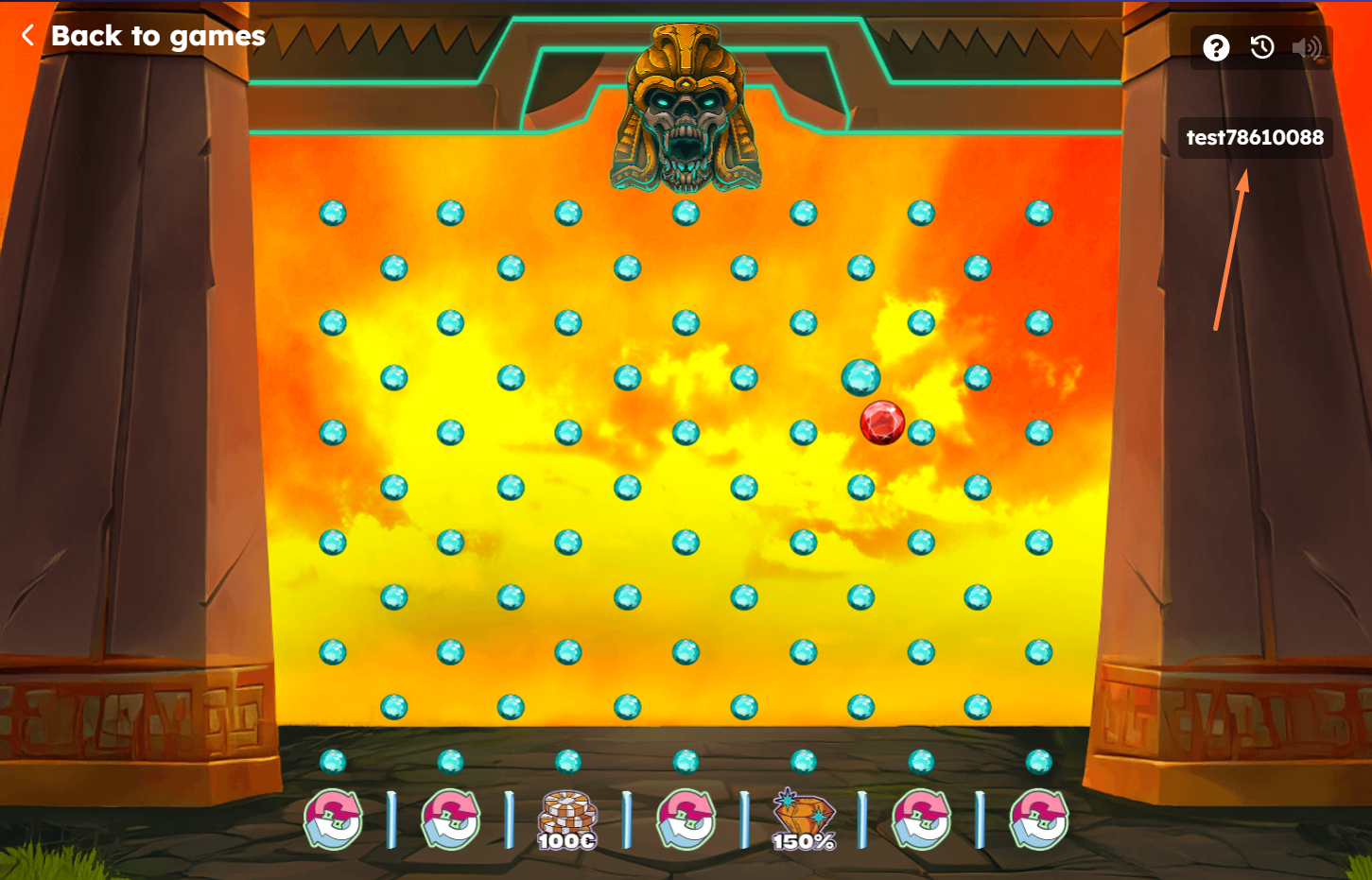
We’ve added a new option to the mini-games template that allows you to display either the **External User ID** or the **Spin Transaction ID** in the game UI. When enabled, the selected ID is displayed on the main game screen after the player clicks Play/Spin and also appears in the winning pop-up at the end of the game. This option is disabled by default, meaning no ID is displayed in the game UI unless explicitly enabled.

<div data-full-width="false"><figure><img src="https://77049817-files.gitbook.io/~/files/v0/b/gitbook-x-prod.appspot.com/o/spaces%2FfS5hl0PiysHtKAKMsQTe%2Fuploads%2Fgit-blob-24f0ba442ecd0ceab3132d252f8d0cd364850296%2FScreenshot_17.png?alt=media" alt=""><figcaption></figcaption></figure> <figure><img src="https://77049817-files.gitbook.io/~/files/v0/b/gitbook-x-prod.appspot.com/o/spaces%2FfS5hl0PiysHtKAKMsQTe%2Fuploads%2Fgit-blob-417a4a8e17d637a4be01aef2058ba0f774659582%2FScreenshot_18.png?alt=media" alt=""><figcaption></figcaption></figure></div>

<mark style="color:purple;">Read more about mini-games:</mark>

{% embed url="<https://help.smartico.ai/welcome/products/mini-games/game-template-setup>" %}

### <i class="fa-gears">:gears:</i> Minimum amount of Points for Dynamic Rewards

We have added a "Minimum allowed amount" field within the Dynamic Formulas configuration when the reward type is set to Points, Gems, or Diamonds.

This setting allows you to define a threshold. If the dynamic formula's calculated result falls below the set minimum, the reward will be considered invalid and not issued to the user. This functionality is designed to help you avoid issuing small, unproductive amounts.

<div data-with-frame="true"><figure><img src="https://77049817-files.gitbook.io/~/files/v0/b/gitbook-x-prod.appspot.com/o/spaces%2FfS5hl0PiysHtKAKMsQTe%2Fuploads%2Fgit-blob-150eb7d6f485c0b1e33635aa29e31bd0283cd6ca%2Fimage.png?alt=media" alt=""><figcaption><p>BO: Setup of "Min allowed Points amount" in Dynamic formula</p></figcaption></figure></div>

<mark style="color:purple;">Read more Dynamic Points, Gems or Diamonds:</mark>

{% embed url="<https://help.smartico.ai/welcome/products/general-concepts/dynamic-rewards?q=rfm#dynamic-points>" %}

### <i class="fa-gamepad-modern">:gamepad-modern:</i> Missions sub-header

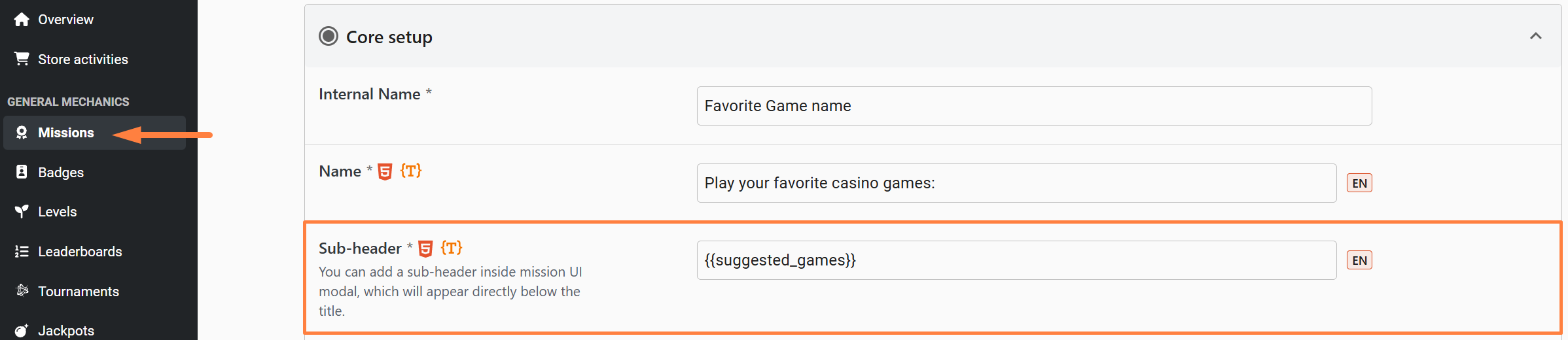
We’ve added a new ‘Sub-header’ field to the mission template. This field lets you display additional information below the mission title and supports both HTML and dynamic tags.

<div data-with-frame="true"><figure><img src="https://77049817-files.gitbook.io/~/files/v0/b/gitbook-x-prod.appspot.com/o/spaces%2FfS5hl0PiysHtKAKMsQTe%2Fuploads%2Fgit-blob-2c61f8282abc9f0e970bc88b8c3581ac6f877e68%2FScreenshot_12.png?alt=media" alt=""><figcaption><p>BO: Sub-header field in Missions</p></figcaption></figure></div>

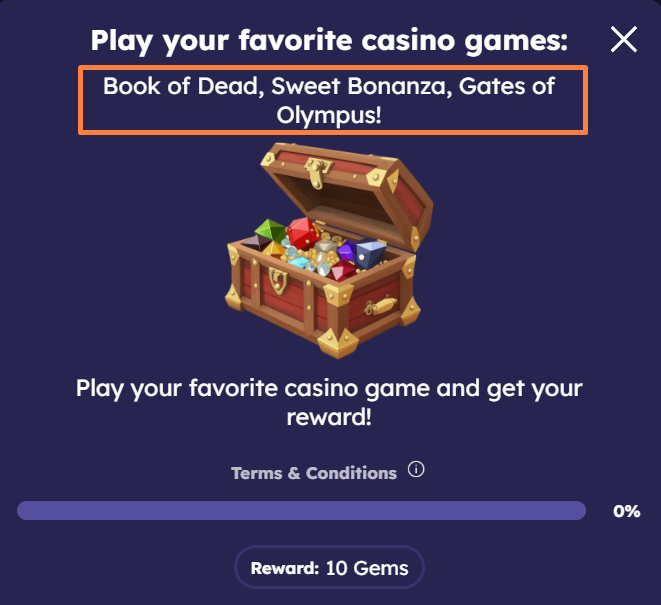
For dynamic missions, you can use the Sub-header to show dynamic values - such as a player’s favorite game or provider instead of placing those tags in the mission title. On the UI, the sub-header appears directly below the mission title inside the mission modal.

<div data-with-frame="true"><figure><img src="https://77049817-files.gitbook.io/~/files/v0/b/gitbook-x-prod.appspot.com/o/spaces%2FfS5hl0PiysHtKAKMsQTe%2Fuploads%2Fgit-blob-98d5f9b96188ab626cdfe63b65cfd2bae46a60f6%2FScreenshot_11.png?alt=media" alt=""><figcaption><p>GF: Mission modal with sub-header</p></figcaption></figure></div>

<mark style="color:purple;">Read more about missions:</mark>

{% embed url="<https://help.smartico.ai/welcome/products/gamification-basics/missions>" %}

### <i class="fa-store">:store:</i> Active Hours in Store items

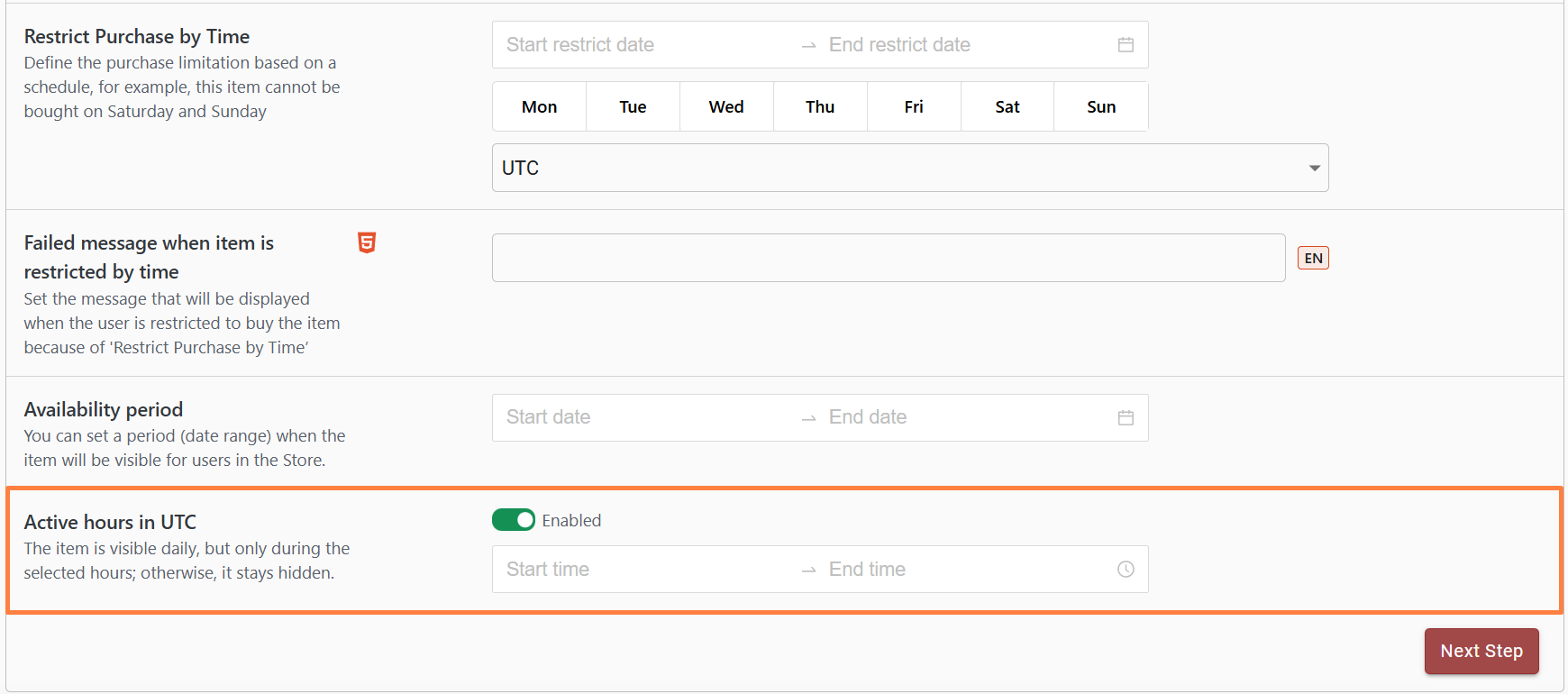
We’ve introduced a new Active Hours option for Store items. When a time range is configured, the item will only be visible during those hours. Outside that window, it will remain hidden. The option is disabled by default, meaning the item will be visible all day.

{% hint style="success" %}
**Note:** 'Active Hours' can work independently or in combination with 'Availability Period' and 'Restrict Purchase by Time', depending on your configuration.
{% endhint %}

<div data-with-frame="true"><figure><img src="https://77049817-files.gitbook.io/~/files/v0/b/gitbook-x-prod.appspot.com/o/spaces%2FfS5hl0PiysHtKAKMsQTe%2Fuploads%2Fgit-blob-7f1001b83d1b25a8cb54bac92df18b22fc5b07f4%2FScreenshot_10.png?alt=media" alt=""><figcaption><p>BO: Active hours in Store items</p></figcaption></figure></div>

<mark style="color:purple;">Read more about Store items:</mark>

{% embed url="<https://help.smartico.ai/welcome/products/gamification-basics/marketplace>" %}

### <i class="fa-messages">:messages:</i> **Improved Popup Behavior Across Multiple Browser Tabs**

We have improved the pop-up display logic to ensure a smoother user experience when a customer has your site open in multiple tabs.

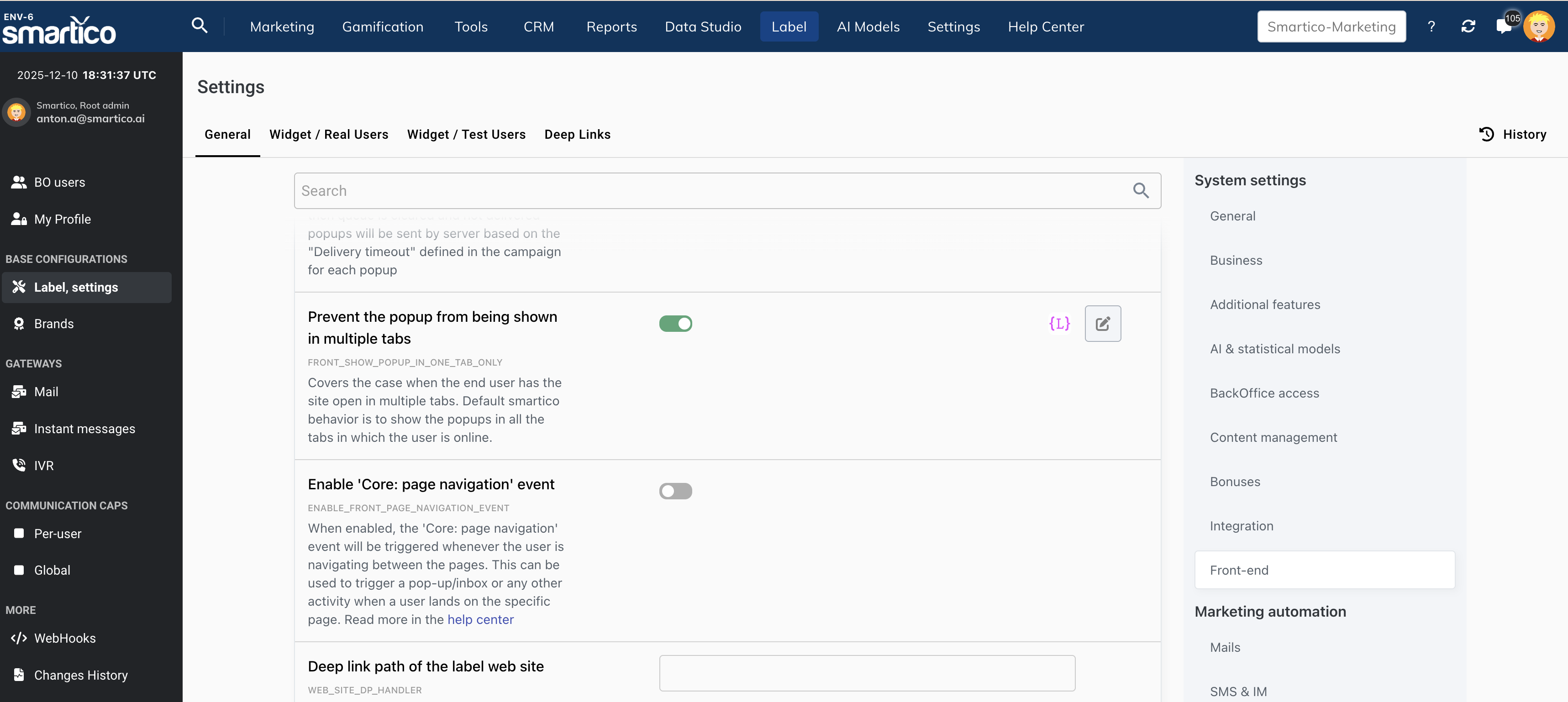
By default, Smartico displays the same pop-up in all active tabs. With the new configuration, pop-ups are restricted to a single tab, preventing duplicate displays and reducing user distraction.

<div data-with-frame="true"><figure><img src="https://77049817-files.gitbook.io/~/files/v0/b/gitbook-x-prod.appspot.com/o/spaces%2FfS5hl0PiysHtKAKMsQTe%2Fuploads%2Fgit-blob-c8a912d18a34f8bb291bb502d6a655eb1aa0f608%2Fimage.png?alt=media" alt=""><figcaption></figcaption></figure></div>

The configuration is availabe in the Label settings, under the front-end section

### <i class="fa-upload">:upload:</i> Upload ‘User Markers’ via CSV

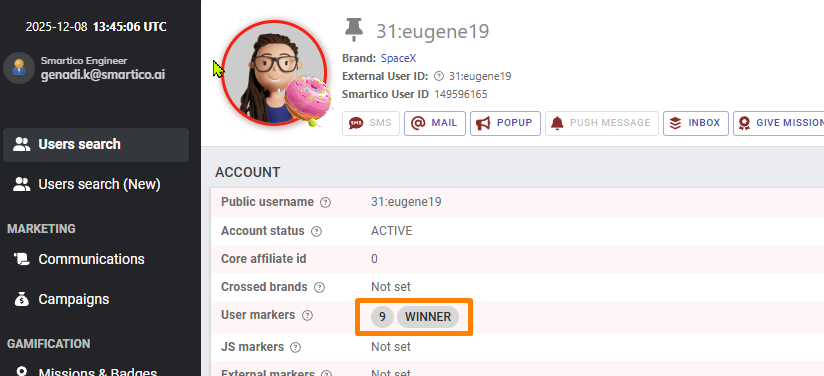
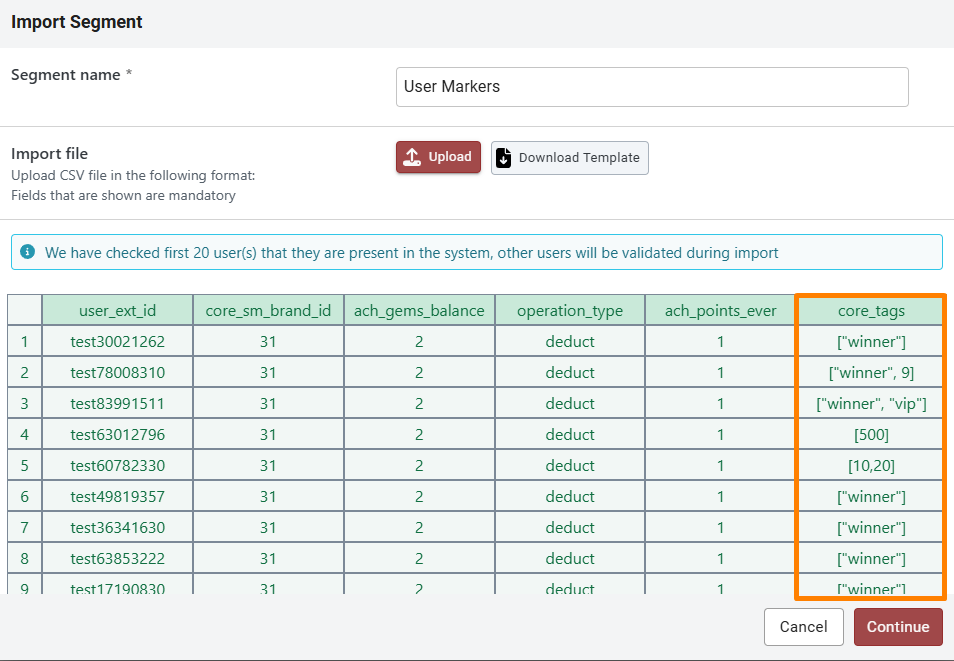
We’ve added the ability to **set** User Markers using a CSV import in Segments. This update also allows you to modify properties that accept array values.

{% hint style="warning" %}
**Important:** Uploading tags via CSV will completely overwrite any existing tags for a user. It is not possible to append new tags or remove specific ones using this method. If you need granular control over tags, please use the REST API.
{% endhint %}

<div data-with-frame="true"><figure><img src="https://77049817-files.gitbook.io/~/files/v0/b/gitbook-x-prod.appspot.com/o/spaces%2FfS5hl0PiysHtKAKMsQTe%2Fuploads%2Fgit-blob-d8e64f220632f861f6380c80593f4fed9fe1335f%2FScreenshot_9.png?alt=media" alt=""><figcaption><p>BO: User markers in User profile page</p></figcaption></figure></div>

**Required CSV Column -** `core_tags`

**Accepted Formats:**

* <mark style="color:green;">**\[ ]**</mark> - Sets empty value
* <mark style="color:green;">**\["text"]**</mark> - Sets a single user marker containing text.
* <mark style="color:green;">**\["text", "text1"]**</mark> - Sets multiple text-based user markers.
* <mark style="color:green;">**\["text", 10]**</mark> - Sets multiple user markers containing both text and numeric values.
* <mark style="color:green;">**\[10]**</mark> - Sets a numeric user marker.
* <mark style="color:green;">**\[10, 20]**</mark> - Sets multiple numeric user markers.

<div data-with-frame="true"><figure><img src="https://77049817-files.gitbook.io/~/files/v0/b/gitbook-x-prod.appspot.com/o/spaces%2FfS5hl0PiysHtKAKMsQTe%2Fuploads%2Fgit-blob-84fae43fb88e39c4437e7146a2009178408123a5%2FScreenshot_7.png?alt=media" alt=""><figcaption><p>BO: Importing CSV segment with User markers</p></figcaption></figure></div>

<mark style="color:purple;">Read more about CSV Imported Segments:</mark>

{% embed url="<https://help.smartico.ai/welcome/products/crm-automation/segmentation/imported-segments>" %}

### <i class="fa-chart-column">:chart-column:</i> Recommended Bet and Deposit amounts

We've added two statistical properties available for the segmentation:

* "**Core: recommended casino bet amount**" (core\_recommended\_casino\_bet\_amount) - holds the recommended bet amount in the user currency
* "**Core: recommended deposit amount**" (core\_recommended\_deposit\_amount) - holds the recommended deposit amount in the user currency

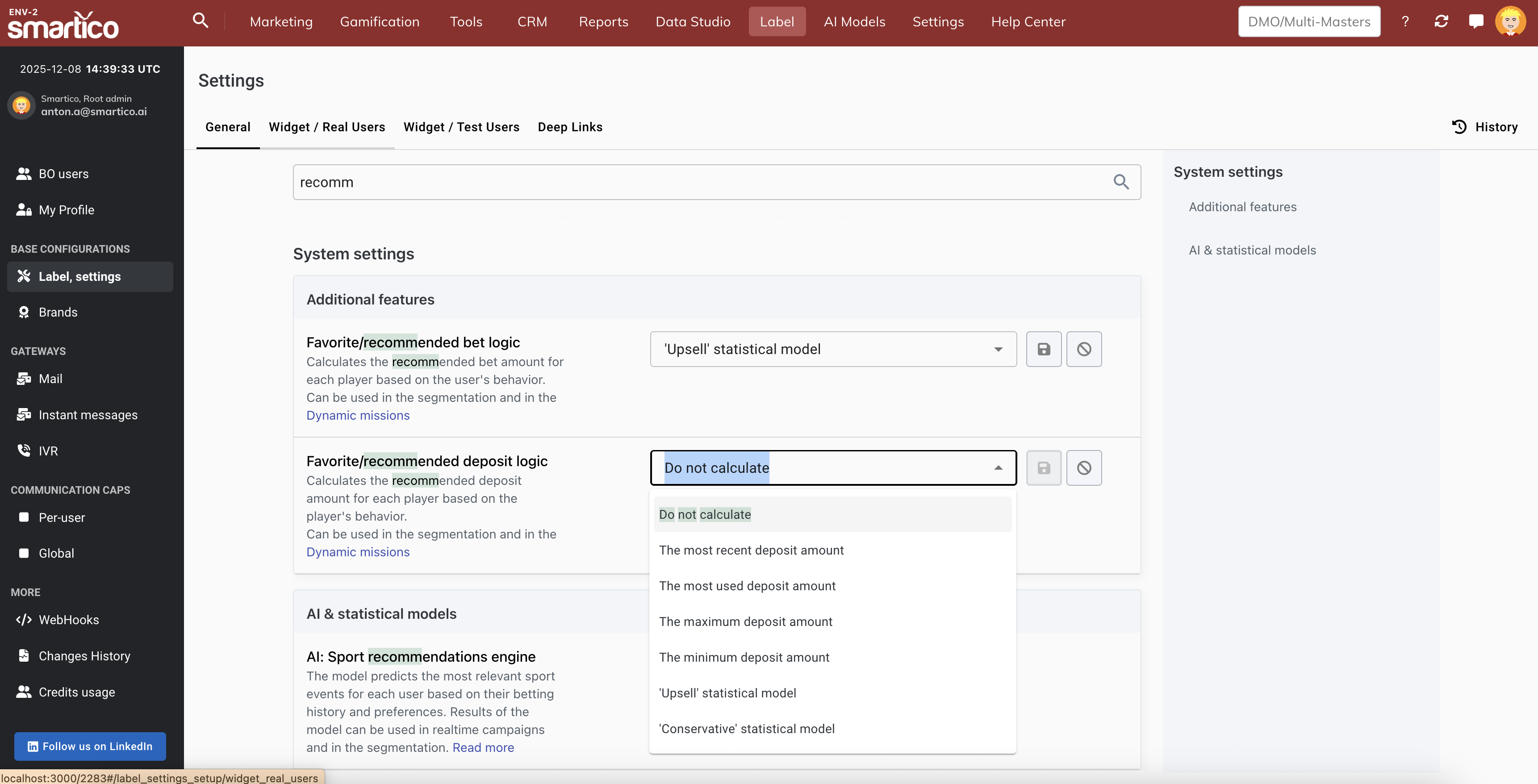
The recommendation logic can be configured according to the operator's needs in the Label settings.

<div data-with-frame="true"><figure><img src="https://77049817-files.gitbook.io/~/files/v0/b/gitbook-x-prod.appspot.com/o/spaces%2FfS5hl0PiysHtKAKMsQTe%2Fuploads%2Fgit-blob-da255a2773f60a042789e6a1d4e026eb33ac2484%2Fimage.png?alt=media" alt=""><figcaption><p>Rrecommended bet / deposit amount model configuration</p></figcaption></figure></div>

Possible options are:

* The most recent bet / deposit amount
* The most used bet / deposit amount
* The maximum bet / deposit amount
* The minimum bet / deposit amount
* 'Upsell' statistical model
* 'Conservative' statistical model

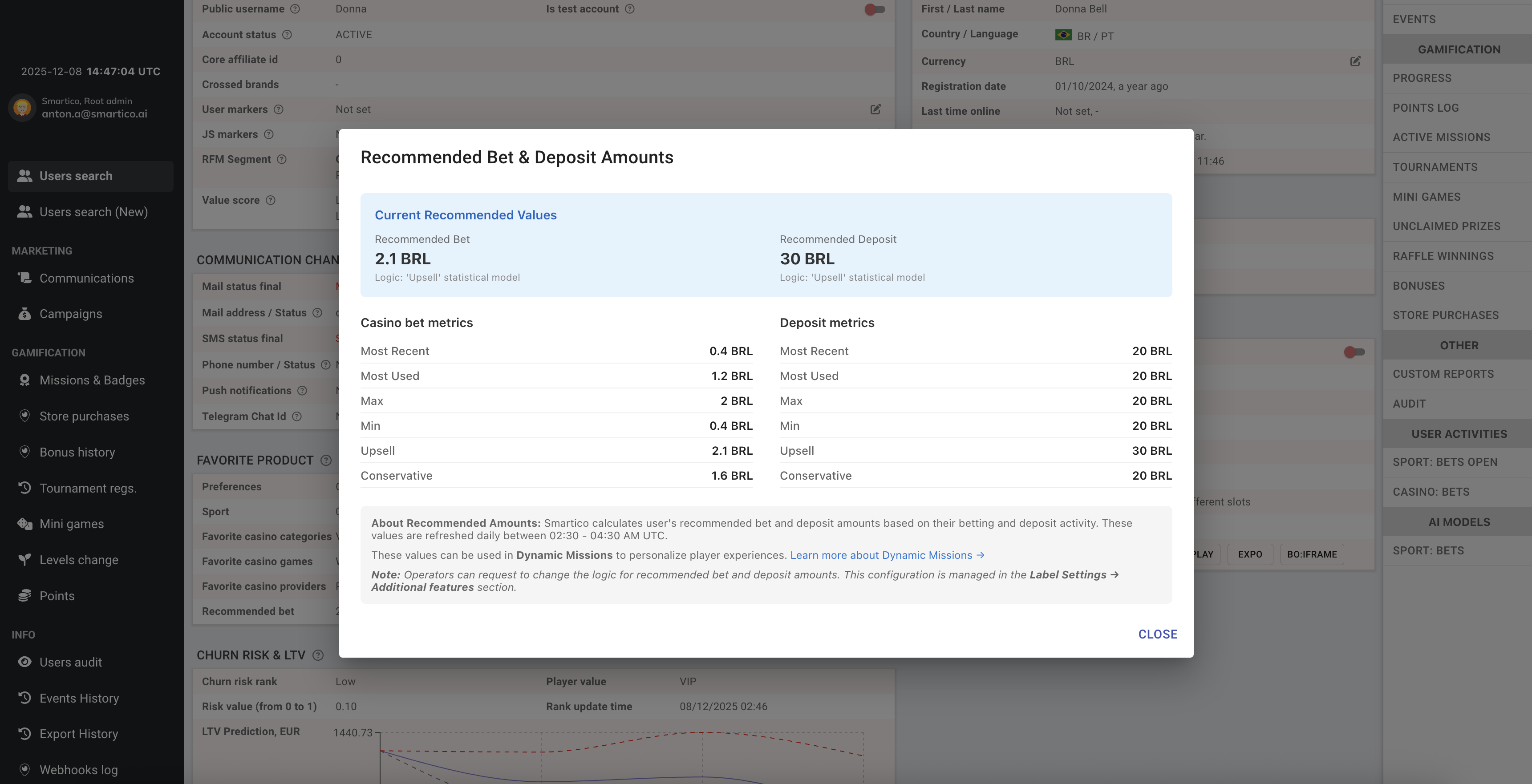
The "**Upsell**" model challenges users to increase their upsell amounts while accounting for their typical behavior and the standard deviation around it. The "**Conservative**" model follows the current user behaviour without upsell intention.

<div data-with-frame="true"><figure><img src="https://77049817-files.gitbook.io/~/files/v0/b/gitbook-x-prod.appspot.com/o/spaces%2FfS5hl0PiysHtKAKMsQTe%2Fuploads%2Fgit-blob-19d4b2cbfb24762a0087442a9f7ddb2bccd62e9d%2Fimage.png?alt=media" alt=""><figcaption><p>Models metrics on the user profile</p></figcaption></figure></div>

Recalculation of models is happening every day in the period from 2:30 till 4:30 UTC.

To change the logic, please get in touch with your Success Manager.

Read more in the [recommended-bet-and-deposit-amounts](https://help.smartico.ai/welcome/products/ai-models/recommended-bet-and-deposit-amounts "mention")

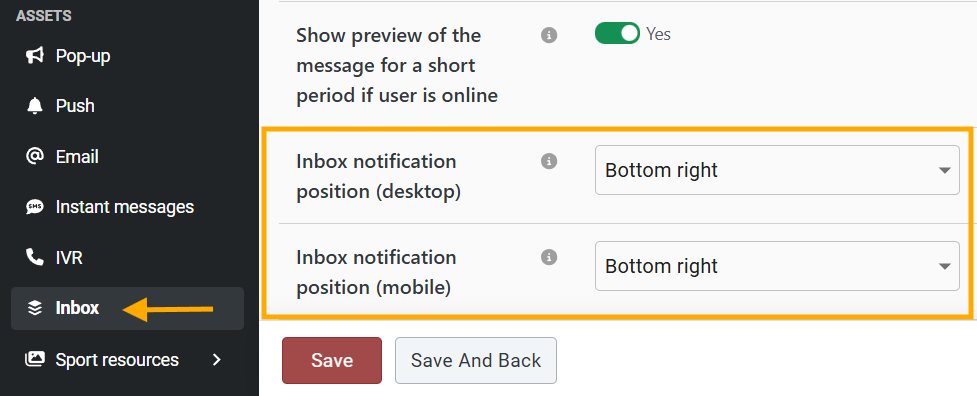
### <i class="fa-gears">:gears:</i> Inbox notification preview position

We've introduced an inbox notification preview position setting during template creation. Now you have the flexibility to define the position individually for each template on both mobile and desktop devices.

{% hint style="info" %}
If the position is not defined during template creation, it will use the default value set in label settings.
{% endhint %}

<div data-with-frame="true"><figure><img src="https://77049817-files.gitbook.io/~/files/v0/b/gitbook-x-prod.appspot.com/o/spaces%2FfS5hl0PiysHtKAKMsQTe%2Fuploads%2Fgit-blob-9fd967e1c880b8f7f4107815347e9e70e37fc6b5%2Fimage.png?alt=media" alt=""><figcaption><p>BO: Setup of Inbox notification position in Inbox assets</p></figcaption></figure></div>

<mark style="color:purple;">Read more about Inbox template setup:</mark>

{% embed url="<https://help.smartico.ai/welcome/products/crm-automation/communication-channels/inbox#inbox-template>" %}

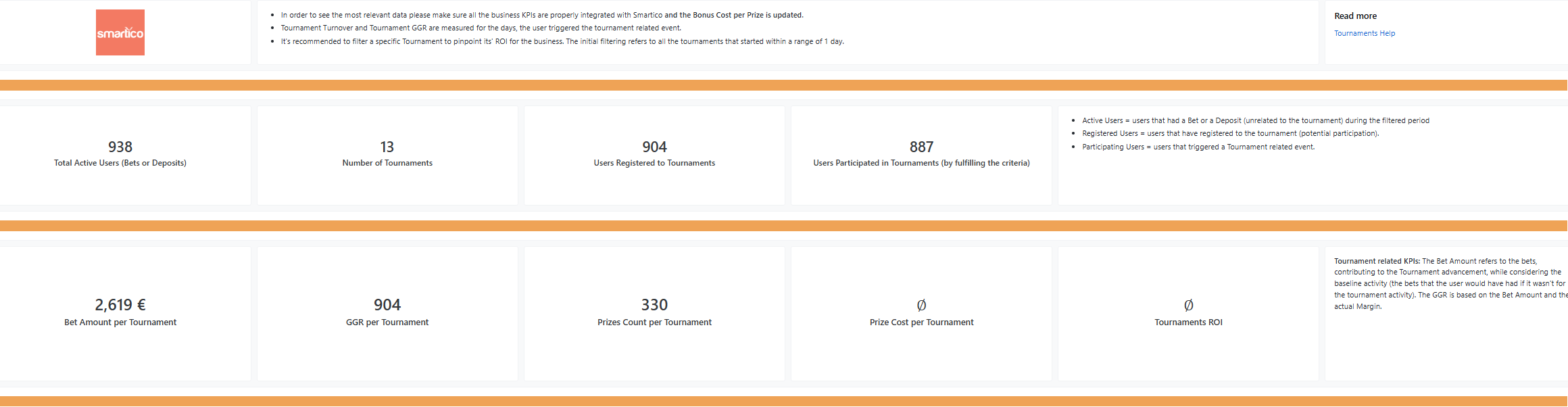
### <i class="fa-chart-column">:chart-column:</i> Tournaments Dashboard Revamp

We've optimized the Tournaments Dashboard. The new version provides a detailed analysis of your tournament usage, allowing you to track performance, costs, and product effectiveness. It’s designed to help you monitor product performance over time, across segments and regions, identify trends, and make data-driven decisions to optimize your tournament usage strategy.

<div data-with-frame="true"><figure><img src="https://77049817-files.gitbook.io/~/files/v0/b/gitbook-x-prod.appspot.com/o/spaces%2FfS5hl0PiysHtKAKMsQTe%2Fuploads%2Fgit-blob-aa3278f009b8827c98c49860b1156e670a8fd163%2Fimage.png?alt=media" alt=""><figcaption></figcaption></figure></div>

{% embed url="<https://help.smartico.ai/welcome/reporting/tournaments-dashboard>" %}

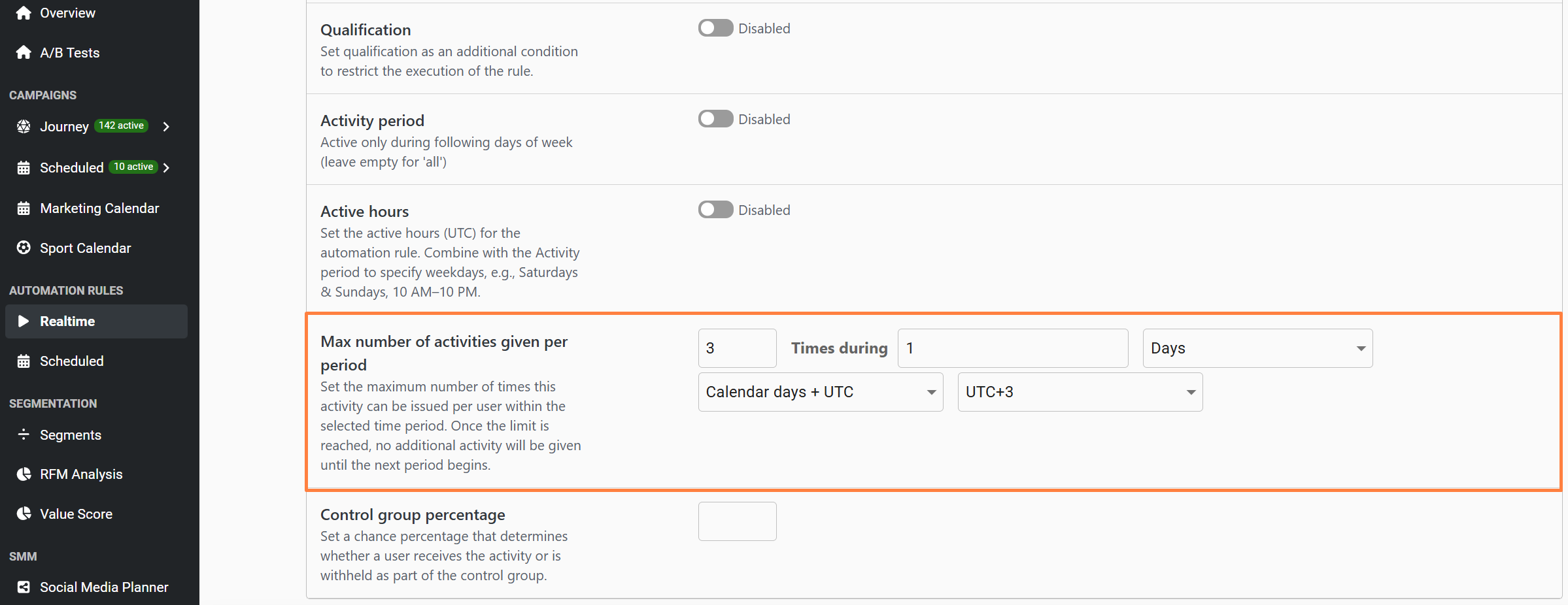
### <i class="fa-gear-complex">:gear-complex:</i> Limit the activities given by the Automation Rule.

We’ve added a new option to Automation Rules that lets you control how many times an activity can be granted to a user within a specific period. Once the limit is reached, no further activity will be issued until the next period begins. This new setting, “**Max number of activities given per period**”, is available for both Scheduled and Real-time Automation rules. For example, you can configure a bonus-granting rule to limit it to 3 per user per day, ensuring each user receives the bonus only 3 times per day.

{% hint style="warning" %}
When “**Once in a lifetime**” is enabled, the “**Max number of activities given per period**” option is not available.
{% endhint %}

<div data-with-frame="true"><figure><img src="https://77049817-files.gitbook.io/~/files/v0/b/gitbook-x-prod.appspot.com/o/spaces%2FfS5hl0PiysHtKAKMsQTe%2Fuploads%2Fgit-blob-b7bc60d9a6575abc968b039ba291aa48c2beb394%2FScreenshot_14.png?alt=media" alt=""><figcaption><p>BO: Max number of activities given per period in Automation Rules</p></figcaption></figure></div>

<mark style="color:purple;">Read more about Automation rules:</mark>

{% embed url="<https://help.smartico.ai/welcome/products/crm-automation/automation-rules>" %}

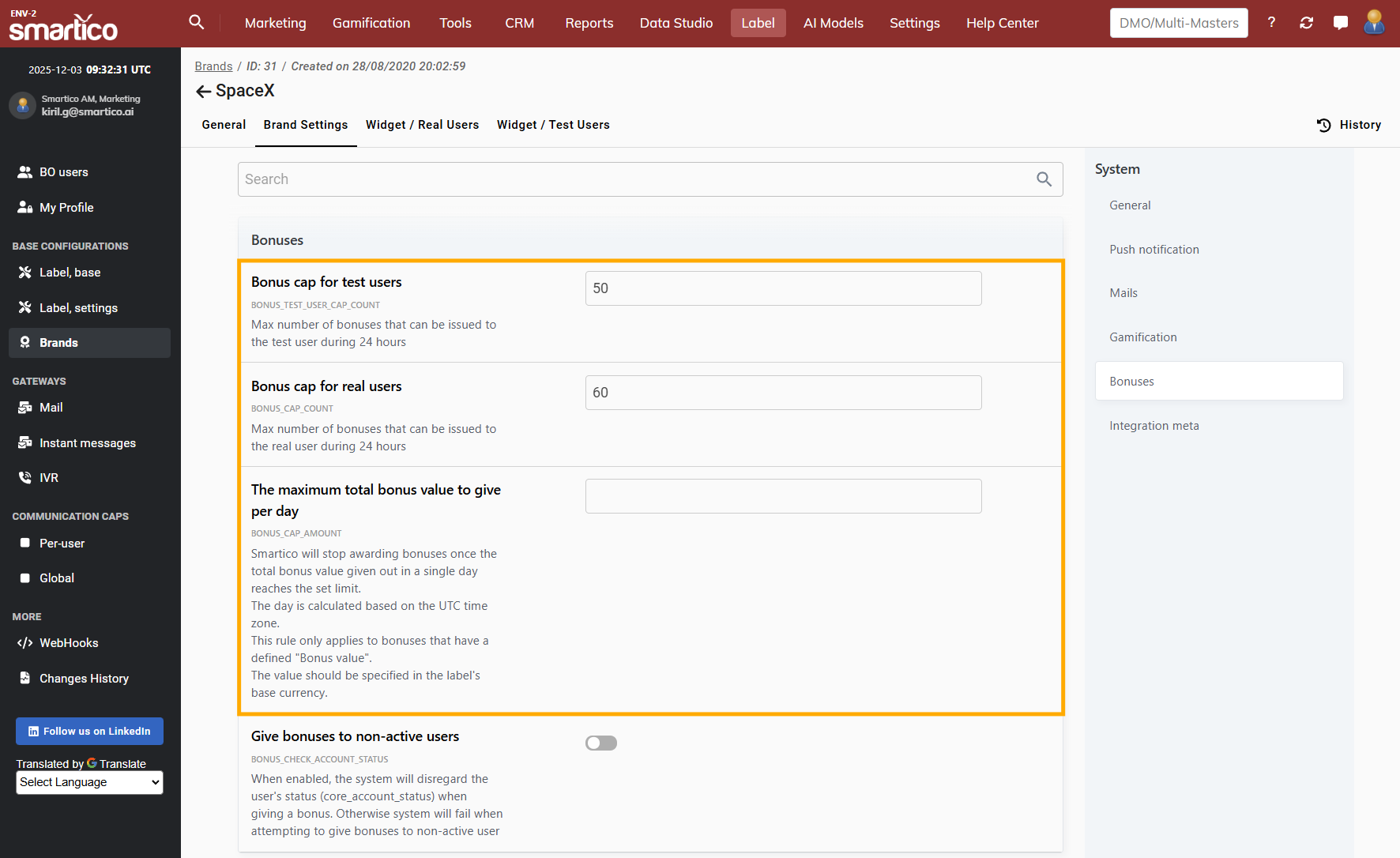
### <i class="fa-gears">:gears:</i> Bonus Caps per Brand

We have introduced the Bonus cap configurations at the Brand level. This provides you with greater flexibility to set up different caps across your brands, in addition to the existing Label-level configuration.

{% hint style="info" %}
Note: The Bonus Cap configuration remains in the Label settings. However, if you configure a custom Bonus Cap at the Brand level, it will override the Label-level cap for that Brand.
{% endhint %}

<div data-with-frame="true"><figure><img src="https://77049817-files.gitbook.io/~/files/v0/b/gitbook-x-prod.appspot.com/o/spaces%2FfS5hl0PiysHtKAKMsQTe%2Fuploads%2Fgit-blob-e2880ae26b0f92baf83b436eedb968dd9a140b41%2Fimage.png?alt=media" alt=""><figcaption><p>BO: Bonus cap configurations in Brand settings</p></figcaption></figure></div>

<mark style="color:purple;">Read more about Bonus Caps:</mark>

{% embed url="<https://help.smartico.ai/welcome/products/general-concepts/bonuses#daily-bonus-amount-cap>" %}